
Introduction
Thank you for purchasing the Miady LDL04 Clip-on Rechargeable LED Reading Lamp. This manual provides essential information for the safe and efficient operation of your new lamp. Please read these instructions thoroughly before use and retain them for future reference.

Image: Two Miady LDL04 clip-on lamps, white, featuring flexible goosenecks and circular LED heads, designed for portable illumination.
Package Contents
Ensure all items are present in the package:
- Miady LDL04 Clip-on Rechargeable LED Reading Lamp (2 units)
- USB Charging Cable (2 units)
- Built-in Lithium Ion Battery (2 units)
Product Features
- Adjustable Brightness: Features 18 LED bulbs providing natural, non-flickering light with 3 brightness levels.
- Rechargeable Battery: Equipped with a 1200mAh built-in battery, offering up to 3 hours of high-brightness illumination on a full charge.
- Portable Design: Compact size and sturdy clip allow for easy portability and attachment to various surfaces.
- Flexible Gooseneck: A 360-degree flexible gooseneck enables precise light positioning.
- Eye-Caring Technology: Designed to reduce glare and multiple shadows, minimizing eye strain during extended use.

Image: A graphic highlighting the 'Eye-Protect' feature of the Miady lamp, emphasizing its circular design for natural light simulation and glare reduction.
Setup
1. Initial Charging
Before first use, fully charge the lamp. Connect the provided USB charging cable to the lamp's USB port and to a standard USB power adapter (not included) or a computer USB port.
- The charging indicator light will be red while charging.
- The indicator light will turn yellow when the battery is fully charged.

Image: A detailed view of the lamp's base, indicating the USB charging port and the charging indicator light, which shows red when charging and yellow when fully charged.
2. Placement
Utilize the integrated clip to attach the lamp to various surfaces such as desks, shelves, or headboards. The flexible gooseneck allows for precise adjustment of the light direction.
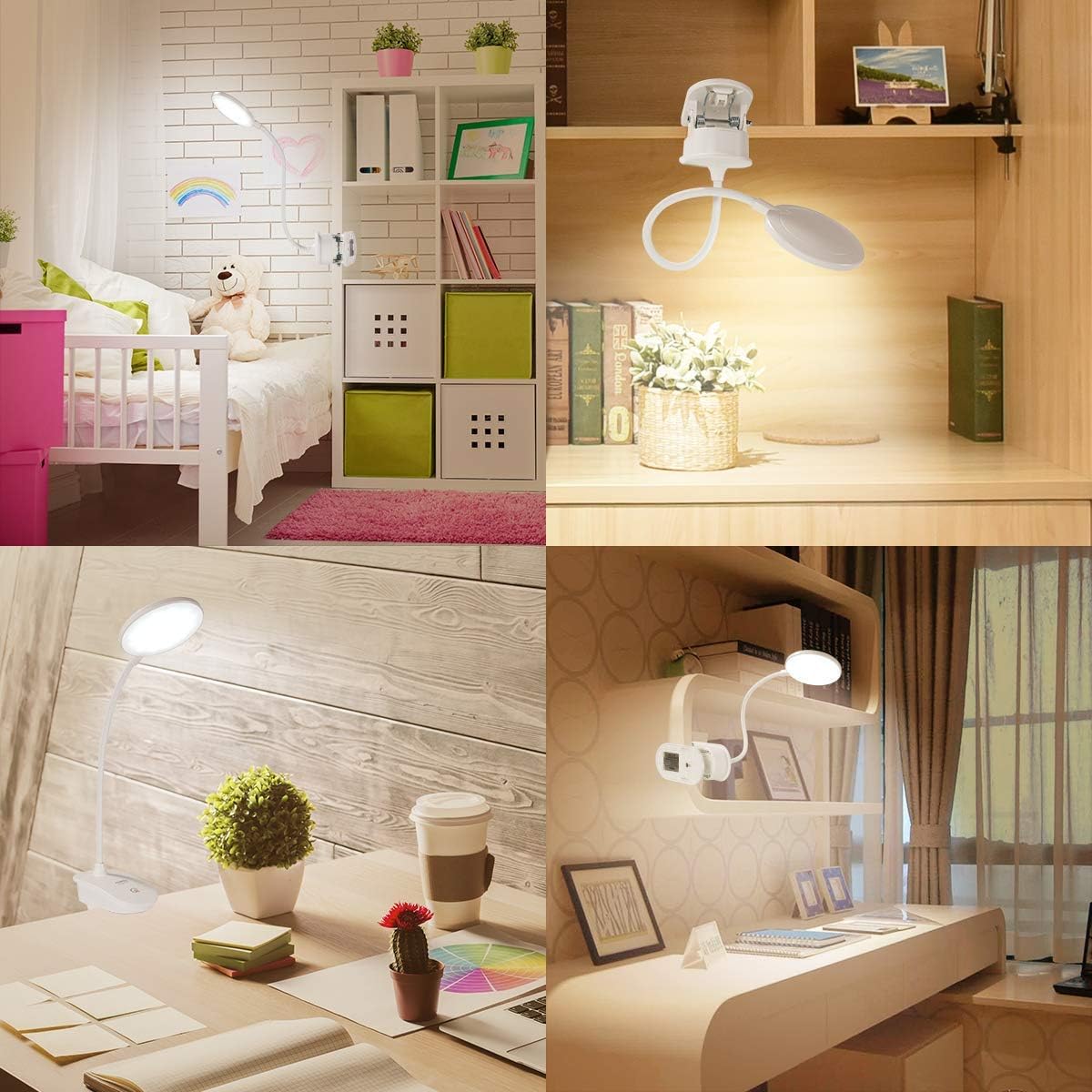
Image: A collage demonstrating the versatility of the Miady clip-on lamp, shown attached to a bed frame, a desk shelf, and positioned on a desk for different lighting needs.
Operating Instructions
Power On/Off and Brightness Adjustment
The lamp features a touch-sensitive switch for control.
- To Power On: Lightly touch the power symbol on the lamp base.
- To Adjust Brightness: Continue touching the power symbol to cycle through the 3 available brightness levels (low, medium, high).
- To Power Off: After cycling through all brightness levels, touch the power symbol one more time to turn the lamp off.

Image: A visual guide demonstrating the three brightness levels (10%, 40%, 100%) of the Miady lamp and how to adjust them using the touch-sensitive power button.
Maintenance
To ensure the longevity and optimal performance of your Miady LDL04 lamp:
- Cleaning: Use a soft, dry cloth to wipe the lamp. Avoid abrasive cleaners or solvents.
- Storage: When not in use for extended periods, store the lamp in a cool, dry place.
- Battery Care: Recharge the battery regularly, even if the lamp is not frequently used, to maintain battery health. Avoid fully depleting the battery before recharging.
Troubleshooting
- Lamp does not turn on: Ensure the battery is charged. Connect the lamp to a power source using the USB cable and check the charging indicator.
- Light is dim or flickers: The battery may be low. Recharge the lamp fully.
- Charging indicator does not light up: Check the USB cable connection and the power source. Try a different USB port or adapter.
- Lamp does not hold a charge: If the lamp has been used for an extended period (e.g., 3 years as per customer feedback), the battery may have reached its end-of-life. While the internal battery is not user-replaceable, the lamp can still function when continuously plugged into a power source.
Specifications
| Feature | Specification |
|---|---|
| Model Number | LDL04 |
| Light Source Type | LED |
| Number of Light Sources | 18 |
| Brightness | 18 Lumen |
| Wattage | 2.5 watts |
| Power Source | Battery Powered (Cordless) |
| Battery Type | Lithium Ion (included) |
| Battery Capacity | 1200mAh |
| Voltage | 3.7 Volts (DC) |
| Control Method | Touch |
| Installation Type | Clip On |
| Material | Acrylonitrile Butadiene Styrene |
| Product Dimensions | 5"D x 3"W x 6.5"H |
| Item Weight | 1.17 pounds |
| Finish Type | Polished |
| Special Feature | Dimmable |
Warranty
Miady provides a 12-month warranty for this product. Please retain your proof of purchase for warranty claims. For any issues or inquiries, refer to the support section.
Support
For product support, technical assistance, or warranty claims, please contact Miady customer service through the retailer's platform where the product was purchased or visit the official Miady website for contact information.