
1. Introduction
Thank you for choosing the Noaton DF 4214 HEPA Dehumidifier and Air Purifier. This appliance is designed to improve your indoor air quality by effectively removing excess moisture and filtering airborne particles. It is suitable for rooms up to 25 m² and offers multiple functions including dehumidification, air purification, and clothes drying. Please read this manual thoroughly before use to ensure safe and optimal operation.

Figure 1: Front view of the Noaton DF 4214 HEPA Dehumidifier and Air Purifier. This image shows the compact design of the unit, highlighting its modern aesthetic and portability.
2. Important Safety Instructions
- Read all instructions before using the appliance.
- Do not operate the appliance with a damaged cord or plug. If the cord or plug is damaged, contact customer support for assistance.
- Ensure the appliance is placed on a stable, level surface to prevent tipping.
- Do not block air inlets or outlets. Maintain at least 20 cm clearance from walls and furniture.
- Do not insert objects into the air outlets or inlets.
- Keep the appliance away from heat sources, direct sunlight, and flammable materials.
- Do not use the appliance in bathrooms, laundry areas, or other excessively humid environments where it may come into contact with water.
- Always unplug the appliance before cleaning, maintenance, or when not in use.
- This appliance is not intended for use by persons (including children) with reduced physical, sensory, or mental capabilities, or lack of experience and knowledge, unless they have been given supervision or instruction concerning use of the appliance by a person responsible for their safety.
- Children should be supervised to ensure that they do not play with the appliance.
- Only use accessories and spare parts recommended by the manufacturer.
3. Product Overview
3.1 Components
- Air Inlet Grille
- Control Panel with Display
- Air Outlet
- Water Tank (2.3 L capacity)
- HEPA Filter
- Continuous Drainage Port
- Transport Handle
- Wheels
3.2 Control Panel
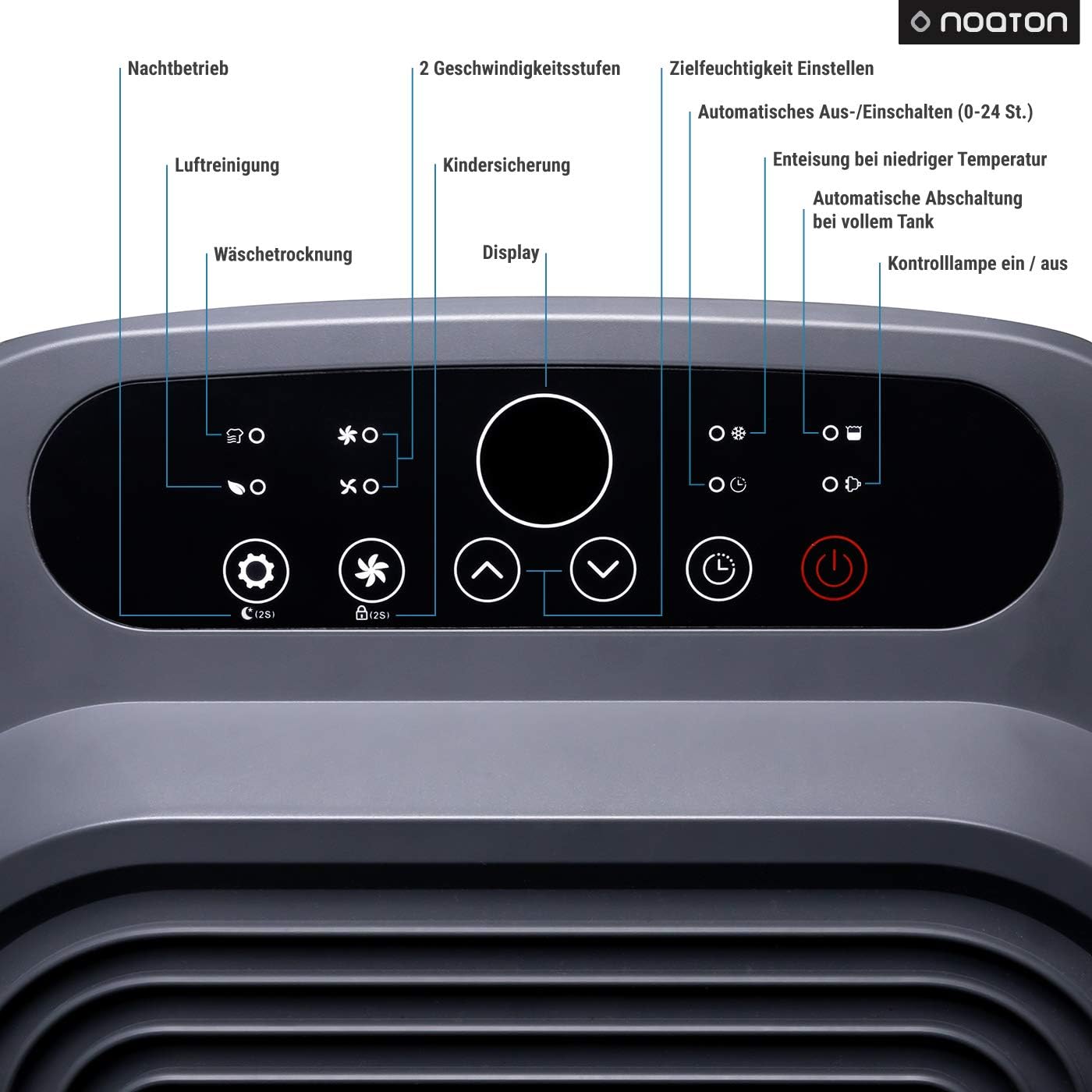
Figure 2: Detailed view of the Noaton DF 4214 control panel. This image indicates the functions of each button and display area, including night mode, fan speeds, humidity settings, timer, child lock, defrost, and water tank alerts.
- Power Button: Turns the unit on or off.
- Mode Button: Cycles through Dehumidification, Air Purification, and Combined modes.
- Fan Speed Button: Adjusts fan speed (Low/High).
- Humidity Setting Buttons (Up/Down): Adjusts target humidity level.
- Timer Button: Sets the auto-on/off timer (0-24 hours).
- Child Lock Button: Activates/deactivates child lock.
- Display: Shows current humidity, timer settings, and other indicators.
- Night Mode Indicator: Lights up when night mode is active.
- Full Water Tank Indicator: Lights up when the water tank is full.
- Defrost Indicator: Lights up when automatic defrost is active.
3.3 HEPA Filter
The Noaton DF 4214 is equipped with a HEPA filter, which is highly effective in capturing airborne particles. This filter can remove up to 99.97% of bacteria, viruses, fine dust, and other allergens from the air, making the appliance ideal for individuals with allergies or asthma.

Figure 3: Close-up view of the HEPA filter. This image highlights the pleated structure of the filter material, designed for efficient particle capture.
4. Setup
4.1 Unpacking and Placement
- Carefully remove the appliance from its packaging.
- Place the dehumidifier on a firm, level surface in the desired room.
- Ensure there is at least 20 cm of clear space around the air inlets and outlets for proper airflow.
- The integrated transport handle and wheels allow for easy relocation of the unit.
4.2 Water Tank Installation
- Ensure the water tank is correctly inserted into the appliance. The unit will not operate if the tank is not properly seated or is full.
4.3 Continuous Drainage (Optional)
For continuous operation without needing to empty the water tank, you can connect a drainage hose (not included) to the continuous drainage port.
- Locate the continuous drainage port at the back of the unit.
- Connect a suitable hose (inner diameter 13 mm, outer diameter 17 mm) to the port.
- Ensure the hose is sloped downwards to allow water to drain by gravity into a floor drain or larger container.
- Verify that the connection is secure to prevent leaks.

Figure 4: Rear view of the unit showing the continuous drainage port. This image illustrates where to connect a hose for continuous water removal, eliminating the need to manually empty the water tank.
5. Operation
5.1 Power On/Off
- Plug the power cord into a suitable electrical outlet.
- Press the Power Button to turn the appliance on. The display will light up, showing the current room humidity.
- Press the Power Button again to turn the appliance off.
5.2 Operating Modes
The Noaton DF 4214 offers three operating modes:
- Dehumidification Mode: Removes excess moisture from the air.
- Air Purification Mode: Filters airborne particles using the HEPA filter.
- Combined Mode: Operates as both a dehumidifier and an air purifier simultaneously.
Press the Mode Button repeatedly to cycle through these options. The corresponding indicator on the display will illuminate.
5.3 Setting Target Humidity
- In Dehumidification or Combined mode, use the Up/Down Humidity Setting Buttons to set your desired humidity level (e.g., 40%, 50%, 60% RH).
- The appliance will operate until the room humidity reaches the set target, then it will pause and restart if humidity rises again.
5.4 Fan Speed Adjustment
- Press the Fan Speed Button to switch between low and high fan speeds.
- The unit operates quietly, with a maximum noise level of 42 dB, making it suitable for night use.
5.5 Timer Function
- Press the Timer Button to set an auto-on or auto-off time (0-24 hours).
- Each press increases the time by one hour. The display will show the set time.
- The appliance will automatically turn on or off after the set duration.
5.6 Clothes Drying Function
The appliance can assist in drying clothes by circulating warm air and removing moisture. To use this function:
- Place the dehumidifier in the room with the wet laundry.
- Select the Dehumidification mode and set a low target humidity (e.g., 30-40% RH) for faster drying.
- Ensure good air circulation around the clothes.
5.7 Child Lock
- Press and hold the Child Lock Button for a few seconds to activate or deactivate the child lock.
- When active, the control panel buttons will be unresponsive to prevent accidental changes to settings.
5.8 Automatic Defrost
The appliance features an automatic defrost function. If frost builds up on the evaporator coils during operation in low temperatures, the unit will automatically enter defrost mode. The defrost indicator will light up, and the dehumidification function will temporarily pause until the frost is cleared. This ensures efficient operation and protects the unit.
6. Maintenance
Regular maintenance ensures optimal performance and extends the lifespan of your Noaton DF 4214.
6.1 Emptying the Water Tank
- When the water tank is full, the Full Water Tank Indicator will light up, and the appliance will automatically stop operating.
- Carefully pull out the water tank from the unit.
- Empty the collected water.
- Reinsert the water tank firmly into its position. The appliance will resume operation.
6.2 Cleaning the HEPA Filter
The HEPA filter should be cleaned regularly (e.g., every 2-4 weeks, depending on usage and air quality) to maintain purification efficiency.
- Turn off and unplug the appliance.
- Locate the filter cover on the side of the unit.
- Open the filter cover and carefully pull out the HEPA filter.

Figure 5: View of the filter compartment with the HEPA filter removed. This image demonstrates how to access and remove the filter for cleaning or replacement.
- Use a soft brush or a vacuum cleaner with a brush attachment to gently remove dust and debris from the filter surface.
- Do not wash the HEPA filter with water, as this can damage its filtration capabilities.
- Once cleaned, carefully reinsert the HEPA filter into its compartment, ensuring it is properly seated.

Figure 6: View of the filter compartment with the HEPA filter correctly installed. This image shows the filter properly seated within its compartment, ready for operation.
- Close the filter cover.
- Plug in the appliance and resume operation.
6.3 Cleaning the Exterior
- Wipe the exterior of the appliance with a soft, damp cloth.
- Do not use abrasive cleaners, solvents, or harsh chemicals, as these can damage the surface.
7. Troubleshooting
| Problem | Possible Cause | Solution |
|---|---|---|
| Appliance does not turn on. | No power supply. Water tank full or incorrectly inserted. | Check power cord connection. Empty and correctly reinsert water tank. |
| No dehumidification. | Room temperature too low. Air filter blocked. Target humidity set too high. | Ensure room temperature is above 5°C. Clean the air filter. Lower the target humidity setting. |
| Unit is noisy. | Appliance not on a level surface. Air filter blocked. | Place on a flat, stable surface. Clean the air filter. |
| Water leaks from the unit. | Water tank incorrectly inserted. Continuous drainage hose loose or blocked. | Reinsert water tank correctly. Check continuous drainage hose for secure connection and blockages. |
| Child lock is active. | Child lock engaged. | Press and hold the Child Lock Button for a few seconds to deactivate. |
If the problem persists after attempting these solutions, please contact customer support.
8. Specifications

Figure 7: Technical parameters of the Noaton DF 4214 HEPA Dehumidifier. This image provides a comprehensive overview of the unit's performance and physical characteristics.
| Feature | Specification |
|---|---|
| Model Name | DF 4214 |
| Dehumidification Capacity | 14 Liters/day |
| Airflow | 95 m³/hour |
| Recommended Room Size | Up to 25 m² |
| Max Power Consumption | 210 Watts (155 W at 27°C, 60% RH) |
| Noise Level | Max. 42 dB |
| Water Tank Volume | 2.3 Liters |
| Dimensions (H x W x D) | 47.8 x 30.9 x 22.9 cm |
| Weight | 11.5 Kilograms |
| Filter Type | HEPA Filter |
| Operating Modes | Dehumidification, Air Purification, Combined |
| Special Features | Timer, Auto Defrost, Adjustable Hygrostat, Child Lock, Clothes Drying Function, Continuous Drainage Option |
9. Warranty and Customer Support
Noaton products are manufactured to high-quality standards. For information regarding warranty coverage, please refer to the warranty card included with your purchase or visit the official Noaton website. If you encounter any issues or have questions about your DF 4214 HEPA Dehumidifier and Air Purifier, please contact Noaton customer support for assistance.
Please retain your proof of purchase for warranty claims.


