
Sky-Watcher S21150
Sky-Watcher AZ-GTe with StarTravel 80 Refractor User Manual
Model: S21150
Introduction
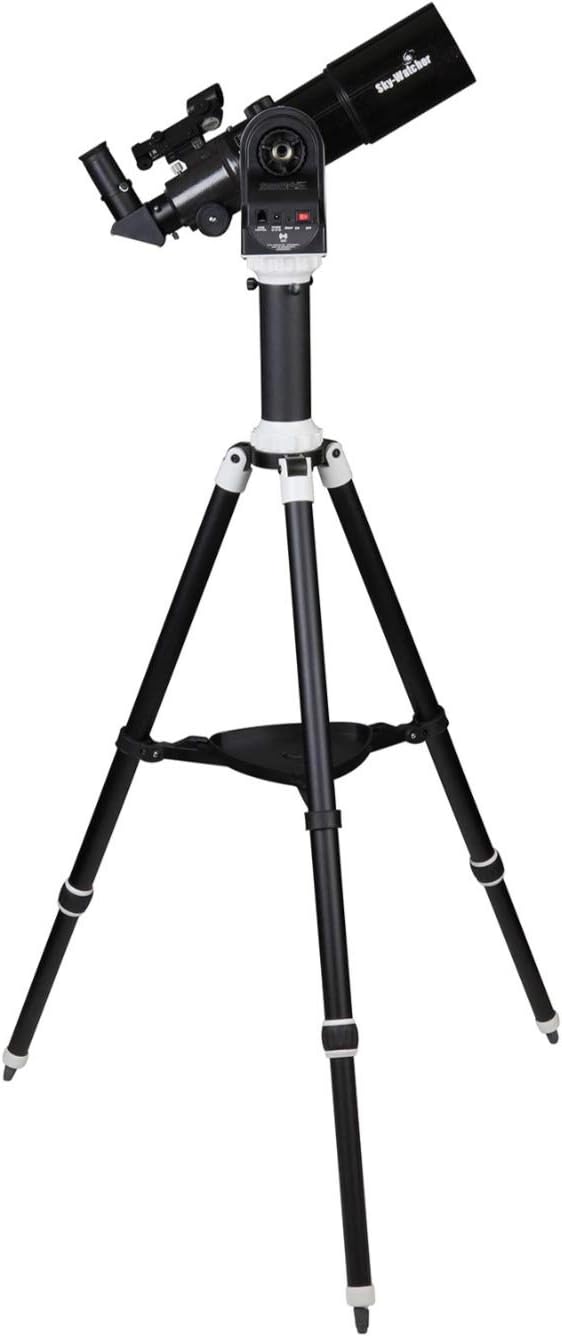
The Sky-Watcher AZ-GTe with StarTravel 80 Refractor is a versatile and portable Go-To Alt-Az tracking mount system designed for both astronomical observation and time-lapse photography. This manual provides essential information for setting up, operating, and maintaining your Sky-Watcher AZ-GTe system, ensuring optimal performance and longevity.
What's in the Box
Please verify that all components are present before proceeding with assembly:
- Tripod
- Pier Extension
- AZ-GTe Mount
- StarTravel 80 Refractor Optical Tube Assembly (OTA)
- Red Dot Finder
- Diagonal
- 10mm Eyepiece
- 25mm Eyepiece
Setup
Follow these steps to assemble your Sky-Watcher AZ-GTe telescope system:
- Tripod Assembly: Extend the legs of the adjustable aluminum tripod to a stable position. Secure the pier extension onto the tripod if desired for additional height.
- Mount Attachment: Attach the AZ-GTe mount head securely to the tripod. The mount can also be attached to any photographic tripod using a standard 3/8"-16 thread.
- Optical Tube Assembly (OTA) Installation: Carefully attach the StarTravel 80 Refractor OTA to the AZ-GTe mount. Ensure it is balanced and securely fastened.
- Accessory Installation: Install the Red Dot Finder, Diagonal, and desired eyepiece (10mm or 25mm) into the OTA.


Operating Instructions
The AZ-GTe mount is controlled via a dedicated app on your smart device.
Wifi Connectivity and App Control
The AZ-GTe generates its own Wi-Fi signal. To connect, enable Wi-Fi on your iOS or Android device and select the AZ-GTe network. Once connected, use one of the following Sky-Watcher applications:
- SynScan Pro App: For celestial tracking and Go-To alignment. This app allows you to navigate the night sky with precision.
- SynScan PTZ App: For time-lapse photography and panoramas.
Go-To Alignment
Using the SynScan Pro app, follow the on-screen instructions to perform a Go-To alignment. This process typically involves pointing the telescope at a few bright stars to calibrate its position, enabling accurate tracking and object location.
Time-Lapse and Panorama Photography
The AZ-GTe is equipped for advanced photography features:
- Integrated SNAP Port: Connect your DSLR camera to the mount's SNAP port using an auxiliary shutter release cable.
- Automated Shooting: With a 60-second preset exposure setting, the AZ-GTe can trigger your DSLR to continually shoot 60-second exposures. This automation continues until the cable is disconnected.
Maintenance
Proper maintenance ensures the longevity and performance of your Sky-Watcher AZ-GTe system.
- Optical Care: Keep lenses and mirrors clean. Use a soft, lint-free cloth and specialized optical cleaning solution. Avoid touching optical surfaces with bare hands.
- Mechanical Components: The mount features rugged brass and aluminum gears designed for durability. Periodically check for any loose screws or connections and tighten them as necessary. Avoid over-tightening.
- Storage: When not in use, store the telescope and mount in a dry, dust-free environment. Use dust caps for the optical tube and eyepieces.
- Battery Care: If using external power or internal batteries, ensure they are properly maintained and charged according to their specifications.
Troubleshooting
If you encounter issues with your Sky-Watcher AZ-GTe, consider the following common solutions:
- No Power: Ensure all power connections are secure and batteries are fully charged or correctly installed. Check the power source (AA/12V).
- Wi-Fi Connection Issues: Verify that the AZ-GTe is powered on and generating its Wi-Fi signal. Try restarting both the mount and your smart device. Ensure no other Wi-Fi networks are interfering.
- Go-To Alignment Failure: Ensure the mount is level and the initial alignment stars are correctly identified and centered in the eyepiece. Perform the alignment process in an open area with clear views of the sky.
- Tracking Inaccuracy: Re-check your alignment. Ensure the mount is stable and not subject to vibrations.
- App Not Responding: Close and reopen the SynScan Pro or SynScan PTZ app. If the issue persists, try reinstalling the app.
For persistent issues, refer to the Sky-Watcher support website or contact customer service.
Specifications
| Feature | Detail |
|---|---|
| Product Dimensions | 25 x 25 x 25 inches |
| Item Weight | 12.8 pounds |
| ASIN | B082BD8Z7F |
| Item Model Number | S21150 |
| Batteries | 1 Lithium Metal battery required (included) |
| Date First Available | December 4, 2019 |
| Manufacturer | Sky-Watcher |
| Brand | Sky-Watcher |
| Model Name | S21150 |
| Eyepiece Lens Description | Kellner |
| Objective Lens Diameter | 80 Millimeters |
| Telescope Mount Description | Altazimuth Mount |
| Focus Type | Auto Focus |
| Power Source | AA/12V |
| Finderscope | Reflex |
| Compatible Devices | Smartphone |
Warranty and Support
For information regarding product warranty, technical support, or service, please contact Sky-Watcher directly through their official website or authorized distributors. Keep your purchase receipt as proof of purchase for warranty claims.
Ask a question about this manual
Ask about setup, troubleshooting, compatibility, parts, safety, or missing instructions. Manuals+ will review the question and use this page’s manual context to help answer it.