
Introduction
Thank you for purchasing the NGS SKYCHARM 50W Bluetooth Tower Speaker. This elegant tower speaker system delivers crisp and powerful sound, offering multiple connectivity options including Bluetooth, USB, FM Radio, AUX, and Optical input. This manual provides detailed instructions for setup, operation, maintenance, and troubleshooting to ensure you get the best experience from your device.
What's in the Box
Please check the contents of your package. If any items are missing or damaged, contact your retailer.
- 1 x NGS SKYCHARM Tower Speaker
- 1 x 3.5 mm audio jack cable
- 1 x Power adapter
- 1 x Remote control
- 1 x User manual (11 languages)
- 1 x 2-year warranty card
Product Overview
Familiarize yourself with the components and controls of your NGS SKYCHARM tower speaker.

Figure 1: Front view of the NGS SKYCHARM Tower Speaker, highlighting its sleek design and dimensions (83 cm height, 13 cm width, 11 cm depth). It features multiple speaker drivers and an LED display.
Top Panel Controls and Ports

Figure 2: Close-up of the top control panel, showing the power button, mode selection, DSP, volume controls, and track navigation buttons. Also visible are the USB port and AUX input.
- Power Button: Turns the speaker on or off.
- Mode Button: Switches between input sources (Bluetooth, FM, USB, AUX, Optical).
- DSP Button: Digital Sound Processing for audio enhancement.
- Volume +/-: Adjusts the master volume.
- Previous/Next Track: Navigates tracks in Bluetooth or USB mode.
- Play/Pause: Controls playback in Bluetooth or USB mode.
- USB Port: For MP3 playback from a USB drive or charging a device.
- AUX Input: 3.5mm jack for connecting external audio devices.
- Phone Slot: Integrated slot for holding a smartphone or tablet.
Rear Panel Ports

Figure 3: Rear view of the speaker's connection panel, showing the Optical input, Audio IN, and Audio OUT ports for stereo pairing.
- Optical Input: For connecting to TVs or other devices with optical audio output.
- Audio IN (L/R): For connecting a secondary tower speaker for stereo sound.
- Audio OUT (L/R): For connecting to a secondary tower speaker for stereo sound.
Remote Control

Figure 4: The included remote control, providing convenient access to power, DSP, volume, track navigation, and direct input selection buttons (AUX, FM, OP, BT, USB).
The remote control allows for convenient operation of all speaker functions from a distance.
Setup
- Placement: Place the tower speaker on a stable, flat surface. Ensure there is adequate space around the speaker for optimal sound dispersion and ventilation.
- Power Connection: Connect the power adapter to the DC IN port on the back of the speaker, then plug the adapter into a wall outlet.
- Power On: Press the Power button on the top panel or the remote control to turn on the speaker. The LED display will illuminate.
- Initial Mode Selection: The speaker will typically start in the last used mode. Press the 'Mode' button on the top panel or the remote to cycle through available input sources (Bluetooth, FM, USB, AUX, Optical).
Operating Instructions
Bluetooth Mode
- Press the 'Mode' button until 'BT' appears on the LED display, or press the 'BT' button on the remote. The speaker will enter pairing mode, indicated by a flashing 'BT' on the display.
- Enable Bluetooth on your smartphone, tablet, or other device.
- Search for 'NGS SKYCHARM' in your device's Bluetooth list and select it to pair.
- Once paired, the 'BT' indicator will stop flashing, and you can play audio from your device through the speaker.
FM Radio Mode
- Press the 'Mode' button until 'FM' appears on the LED display, or press the 'FM' button on the remote.
- To auto-scan and save stations, press and hold the 'Play/Pause' button. The speaker will scan for available stations and store them.
- Use the 'Previous/Next Track' buttons to navigate through saved FM stations.
USB Playback Mode
- Insert a USB flash drive containing MP3 audio files into the USB port on the top panel.
- The speaker will automatically switch to USB mode, or you can select it using the 'Mode' button or 'USB' button on the remote.
- Use the 'Play/Pause' and 'Previous/Next Track' buttons to control playback.
- The USB port can also be used to charge compatible devices.
AUX Input Mode
- Connect one end of the 3.5mm audio jack cable to the AUX IN port on the top panel of the speaker.
- Connect the other end of the cable to the headphone jack or audio output of your external device (e.g., laptop, MP3 player).
- Press the 'Mode' button until 'AUX' appears on the LED display, or press the 'AUX' button on the remote.
- Control playback from your connected external device.
Optical Input Mode
- Connect an optical audio cable (not included) from the optical output of your TV or other audio source to the OPTICAL input port on the rear of the speaker.
- Press the 'Mode' button until 'OP' appears on the LED display, or press the 'OP' button on the remote.
- Ensure your TV's audio output settings are configured for optical output.
Stereo Pairing (Connecting Two Towers)
The NGS SKYCHARM speaker supports connecting two towers for a true stereo experience.
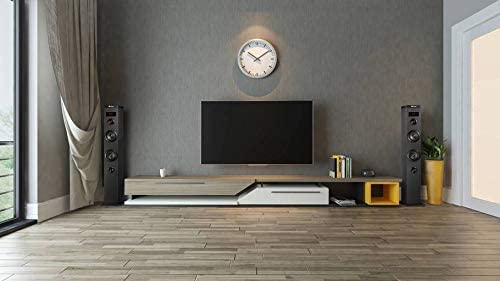
Figure 5: An example setup showing two NGS SKYCHARM tower speakers positioned for stereo audio, typically flanking a television or entertainment center.
- Ensure both NGS SKYCHARM tower speakers are powered off.
- Using an audio cable (e.g., RCA to RCA or 3.5mm to RCA, depending on the cable type for Audio IN/OUT), connect the 'Audio OUT' ports of the main tower to the 'Audio IN' ports of the secondary tower.
- Power on both speakers. The secondary tower will only respond to controls from the main tower.
- Select your desired input mode on the main tower. Audio will now play in stereo through both speakers.
Maintenance
- Cleaning: Use a soft, dry cloth to clean the exterior of the speaker. Do not use abrasive cleaners, waxes, or solvents.
- Ventilation: Ensure the speaker's ventilation openings are not blocked to prevent overheating.
- Storage: When not in use for extended periods, store the speaker in a cool, dry place away from direct sunlight and extreme temperatures.
- Handling: Avoid dropping or subjecting the speaker to strong impacts.
Troubleshooting
| Problem | Possible Cause | Solution |
|---|---|---|
| No power | Power adapter not connected or faulty outlet. | Ensure the power adapter is securely connected to the speaker and a working power outlet. Try a different outlet. |
| No sound | Volume too low; incorrect input mode; device not connected properly. | Increase volume on both the speaker and the connected device. Select the correct input mode. Check all cable connections. |
| Bluetooth pairing fails | Speaker not in pairing mode; device too far; interference. | Ensure the speaker is in Bluetooth pairing mode. Move your device closer to the speaker. Turn off other Bluetooth devices to reduce interference. |
| Remote control not working | Batteries depleted; obstruction; remote out of range. | Replace the remote control batteries. Ensure there is no obstruction between the remote and the speaker's sensor. Use the remote within its effective range. |
| FM radio poor reception | Weak signal; antenna position. | Adjust the position of the speaker or its antenna (if external). Try auto-scanning again in a different location. |
Specifications
- Model Name: SKYCHARM
- Speaker Type: Multimedia Tower Speaker
- RMS Power Output: 50 Watts
- Connectivity Technology: Bluetooth, USB, Auxiliary (3.5mm), Optical
- Wireless Communication: Bluetooth
- Audio Output Mode: Stereo (2.0 channel)
- Control Method: Remote, On-device buttons
- Product Dimensions: 11D x 13W x 83H Centimeters
- Item Weight: 2.39 Kilograms
- Power Source: Corded Electric
- Recommended Uses: Home Audio, TV, Smartphone, Tablet, Laptop
- Included Components: Speaker, 3.5mm audio cable, power adapter, remote control, user manual, warranty card
Warranty and Support
Your NGS SKYCHARM Tower Speaker comes with a 2-year warranty from the date of purchase. Please retain your proof of purchase and the warranty card for any claims.
For technical support, troubleshooting assistance, or warranty inquiries, please refer to the contact information provided in your included user manual or visit the official NGS website.
Manufacturer: NGS


