
1. Product Overview
The Shark Pet Pro Cordless Stick Vacuum Cleaner, model IZ340H, is designed for powerful and versatile cleaning across various floor types. It features a self-cleaning brushroll with PowerFins to prevent hair wrap, and MultiFLEX technology for easy cleaning under furniture and compact storage. This lightweight vacuum offers up to 40 minutes of runtime and includes HEPA filtration with Anti-Allergen Complete Seal technology to capture dust and allergens.

Figure 1.1: The Shark Pet Pro Cordless Stick Vacuum shown in its full upright configuration and folded for compact storage. This illustrates the MultiFLEX technology allowing the wand to bend.
2. Important Safety Instructions
Please read all instructions carefully before using your Shark Pet Pro Cordless Stick Vacuum. Failure to follow these instructions may result in electric shock, fire, or serious injury.
- Household Use Only: This appliance is intended for household use only.
- Power Source: Use only as described in this manual. Do not use with any non-Shark charger.
- Electrical Safety: Do not handle plug or appliance with wet hands. Do not use outdoors or on wet surfaces.
- Keep Area Clear: Keep hair, loose clothing, fingers, and all parts of body away from openings and moving parts.
- Filter Maintenance: Ensure all filters are completely dry before placing them back into the vacuum.
- Battery Safety: Do not incinerate appliance even if it is severely damaged. Batteries can explode in a fire.
- Supervision: Close supervision is necessary when any appliance is used by or near children.
3. Assembly and Setup
3.1 What's in the Box
- Handheld Vacuum
- MultiFLEX Wand
- PowerFins Floor Nozzle
- Lithium-Ion Battery (pre-installed or separate)
- Charger
- Dusting Brush
- Crevice Tool

Figure 3.1: The standard accessories included with your Shark Pet Pro Cordless Stick Vacuum, featuring the dusting brush and crevice tool for specialized cleaning tasks.
3.2 Assembly Steps
- Insert the MultiFLEX Wand into the PowerFins Floor Nozzle until it clicks securely into place.
- Insert the Handheld Vacuum into the top of the MultiFLEX Wand until it clicks securely into place.
- Ensure the battery is fully charged before first use. Connect the charger to the charging port on the handheld vacuum or directly to the battery if removable.
3.3 Charging the Battery
The Lithium-Ion battery provides up to 40 minutes of runtime in standard mode. To charge, plug the charger into a wall outlet and connect it to the charging port on the handheld vacuum. The battery indicator lights will illuminate to show charging status. A full charge typically takes approximately 3.5 hours.
4. Operating Instructions
4.1 Powering On/Off and Suction Modes
Press the Power button on the handheld vacuum to turn the unit on or off. The vacuum features two power levels for different cleaning needs:
- Standard Mode: Ideal for everyday cleaning on bare floors and light carpet cleaning.
- Boost Mode: Provides increased suction for deep cleaning carpets or tackling stubborn debris. Press the Boost button to activate.
4.2 Cleaning Different Surfaces

Figure 4.1: The Shark Pet Pro Cordless Stick Vacuum effectively cleans both carpeted and hard floor surfaces, demonstrating its versatility for whole-home cleaning.
The PowerFins brushroll provides continuous cleaning contact, digging deep into carpets and directly engaging hard floors for thorough cleaning without needing to switch brushrolls.
4.3 Using MultiFLEX Technology

Figure 4.2: The MultiFLEX wand bends at a joint, allowing the vacuum to easily reach and clean under low-lying furniture without requiring the user to bend down.
Press the MultiFLEX release button on the wand to bend it, allowing you to easily clean under furniture and other hard-to-reach areas. This feature also enables compact, freestanding storage.

Figure 4.3: The MultiFLEX technology allows the vacuum to fold down into a compact, freestanding position, making storage convenient and space-saving.
4.4 Using as a Handheld Vacuum and Accessories
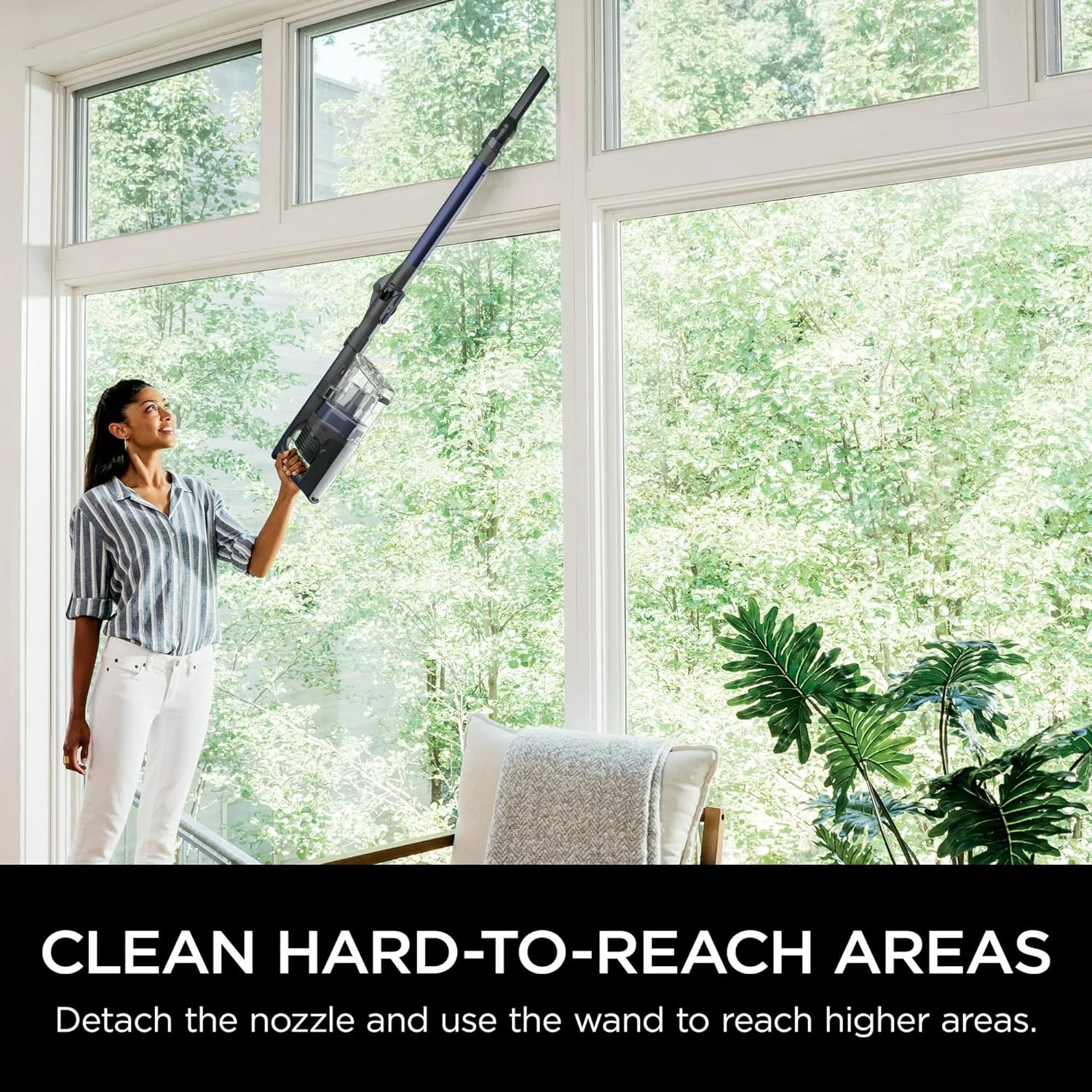
Figure 4.4: The handheld vacuum can be detached from the wand and used with or without accessories to clean elevated surfaces, curtains, or tight spaces.
Detach the handheld vacuum from the wand for lightweight above-floor cleaning. Attach the dusting brush or crevice tool directly to the handheld vacuum or to the end of the wand for extended reach.
5. Maintenance
5.1 Emptying the Dust Cup

Figure 5.1: The XL dust cup features a CleanTouch Dirt Ejector, allowing for quick and hygienic emptying of debris directly into a trash bin without needing to touch the contents.
Empty the XL dust cup after each use or when debris reaches the MAX fill line. To empty, hold the dust cup over a trash bin and press the CleanTouch Dirt Ejector button to release the bottom flap.
5.2 Cleaning the Brushroll

Figure 5.2: The self-cleaning PowerFins brushroll actively removes pet hair and long hair during operation, minimizing tangles and maintaining optimal cleaning performance.
The PowerFins brushroll is self-cleaning, designed to prevent hair wrap. Periodically inspect the brushroll for any remaining debris or blockages. If necessary, use scissors to carefully cut away any tangled hair.
5.3 Cleaning Filters
Regularly clean the foam and felt filters to maintain optimal suction. Rinse filters with cold water only. Allow filters to air-dry completely for at least 24 hours before reinstalling them. Do not use a hairdryer or other heating methods.
- Pre-Motor Filters (Foam & Felt): Located inside the dust cup assembly. Rinse every month.
- Post-Motor HEPA Filter: Located at the base of the handheld vacuum. Rinse once a year.
6. Troubleshooting
If your Shark Pet Pro Cordless Stick Vacuum is not performing as expected, consult the following common issues and solutions:
| Problem | Possible Cause | Solution |
|---|---|---|
| Vacuum not picking up debris or no suction. | Dust cup is full. Filters need cleaning. Blockage in nozzle, wand, or hose. | Empty dust cup. Clean and dry filters thoroughly. Check for and remove any blockages. |
| Brushroll not spinning. | Hair wrap or debris caught in brushroll. Nozzle blockage. | Inspect and clear brushroll. Check for and remove any blockages in the nozzle. |
| Vacuum turns off on its own. | Overheating (due to full dust cup, clogged filter, or blockage). Low battery. | Empty dust cup, clean filters, clear blockages, and allow vacuum to cool for 45 minutes. Recharge the battery. |
| Battery not charging. | Charger not properly connected. Faulty charger or battery. | Ensure charger is securely plugged into outlet and vacuum. Contact Shark customer support if issue persists. |
7. Product Specifications
| Feature | Detail |
|---|---|
| Brand | Shark |
| Model Number | IZ340H |
| Special Feature | Bagless, MultiFLEX Technology, Self-Cleaning Brushroll |
| Filter Type | Foam, HEPA |
| Included Components | Brush, Crevice Tool |
| Cordless | Yes |
| Recommended Uses | Carpet, Hard Floors |
| Battery Type | Lithium-Ion |
| Battery Life | Up to 40 minutes (in standard mode) |
| Control Method | Push Button, Touch |
| Number of Power Levels | 2 |
| Item Weight | 13.17 pounds |
| Product Dimensions | 14.96 x 10.24 x 46.06 inches |
| UPC | 622356565240 |
8. Warranty and Support
For information regarding your product's warranty, please refer to the warranty card included in your product packaging or visit the official Shark website. For technical support, replacement parts, or service inquiries, please contact Shark Customer Service through their official website or by phone.
Online Support: www.sharkclean.com/support


