
1. Introduction
The VirtuFit MB300 Mini Exercise Bike (Model VF20604) is a compact and versatile pedal exerciser designed for both arm and leg training. It is suitable for improving fitness, muscle activation, and supporting rehabilitation efforts. Its portable design allows for convenient use at home, in the office, or during recovery periods.
This manual provides essential information for the safe and effective use of your VirtuFit MB300. Please read it thoroughly before assembly and operation, and retain it for future reference.
2. Safety Instructions
- Consult a physician before starting any exercise program, especially if you have pre-existing health conditions.
- Use the exercise bike on a flat, stable surface. Ensure adequate space around the unit.
- Keep children and pets away from the equipment during use.
- Wear appropriate athletic footwear and clothing. Avoid loose clothing that could get caught in moving parts.
- Do not stand on the pedals. This device is designed for seated use only.
- Stop exercising immediately if you feel faint, dizzy, or experience pain.
- Regularly inspect the unit for wear and tear, especially pedals, straps, and adjustment knobs. Do not use if damaged.
- The maximum user weight capacity is 110 kg. Do not exceed this limit.
- This product is for personal, non-commercial use only.
3. Package Contents
Upon unpacking, please ensure all components are present and undamaged:
- Main Unit (with integrated display and resistance knob)
- Left Pedal
- Right Pedal
- User Manual
Note: Small assembly tools may be included or required. Please check the packaging for specific tool requirements.
4. Assembly and Setup
Follow these steps to assemble your VirtuFit MB300 Mini Exercise Bike:
- Unpack: Carefully remove all components from the packaging.
- Identify Pedals: The pedals are marked 'L' for left and 'R' for right. Note that the left pedal has a reverse thread.
- Attach Right Pedal: Screw the right pedal (R) clockwise into the crank arm on the right side of the main unit until secure.
- Attach Left Pedal: Screw the left pedal (L) counter-clockwise into the crank arm on the left side of the main unit until secure.
- Check Stability: Place the assembled unit on a flat surface. The anti-slip rubber feet should provide stability.
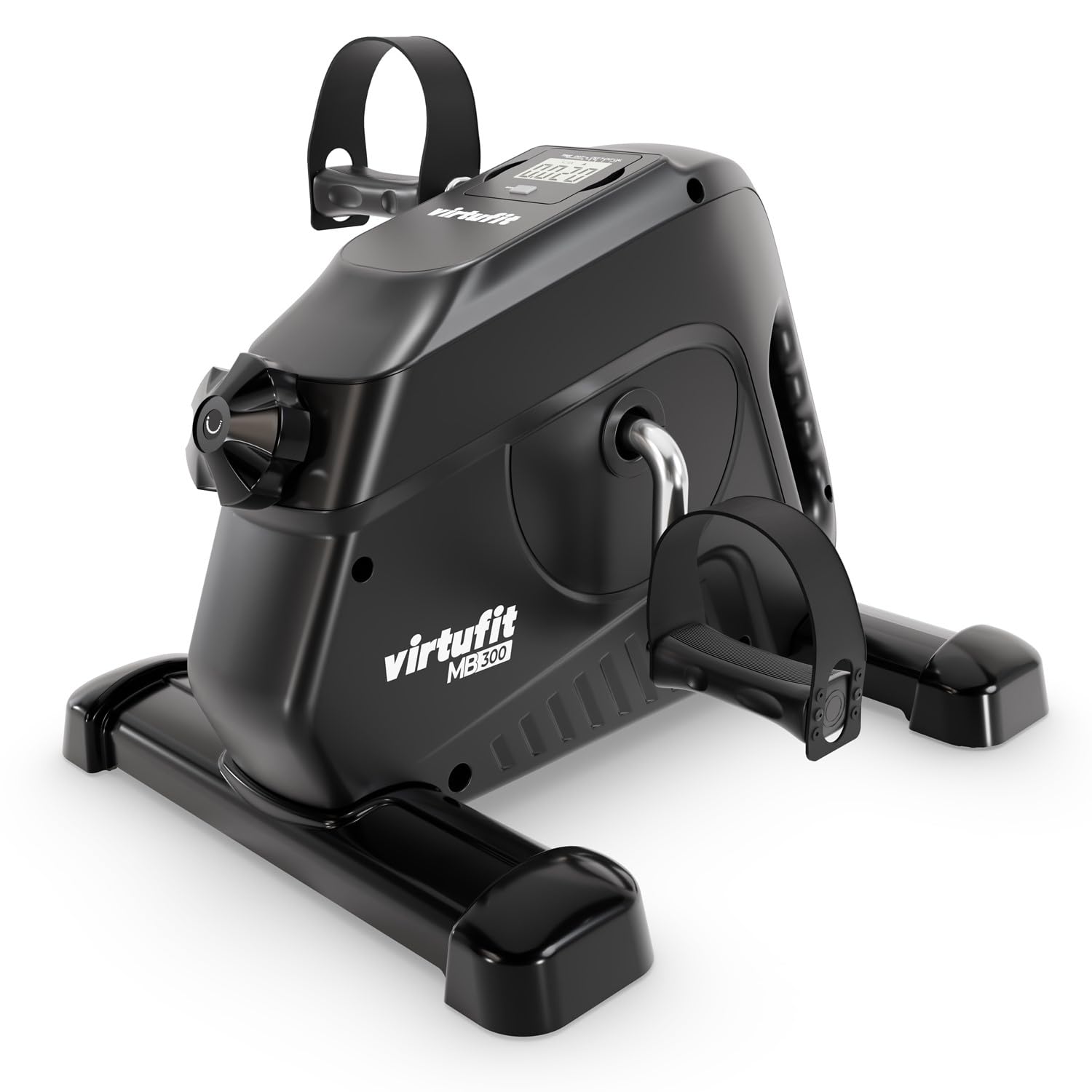
Foot Straps: The adjustable foot straps are pre-installed on the pedals. Ensure they are adjusted to comfortably and securely hold your feet or hands during exercise.

5. Operating Instructions
5.1 Adjusting Resistance
The VirtuFit MB300 features individually adjustable resistance. Locate the resistance knob on the front of the main unit. Turn the knob clockwise to increase the resistance for a more challenging workout, and counter-clockwise to decrease it for lighter movement. Adjust the intensity to match your personal training level and comfort.
5.2 Using the Training Computer Display
The integrated LED display provides real-time feedback on your workout. It typically shows the following metrics:
- TIME: Duration of your current workout session.
- DISTANCE: Estimated distance covered.
- REVOLUTIONS (COUNT): Total number of pedal rotations.
- REVOLUTIONS PER MINUTE (RPM): Current pedaling speed.
- CALORIES: Estimated calories burned.
The display operates automatically when pedaling begins. Use the button below the display to cycle through different metrics or to reset the values (refer to the specific display instructions on the unit if available).
6. Training Guidelines
The VirtuFit MB300 is designed for both lower and upper body exercise while seated.
6.1 Leg Training
Place the mini exercise bike on a stable surface in front of your chair or sofa. Sit comfortably and place your feet into the pedal straps, adjusting them for a secure fit. Begin pedaling at a comfortable pace. Adjust the resistance as needed. This helps improve leg circulation, muscle activation, and endurance.

6.2 Arm Training
Place the mini exercise bike on a sturdy table at a comfortable height. Sit in front of the table and place your hands into the pedal straps, adjusting them for a secure fit. Begin rotating the pedals with your arms. Adjust the resistance as needed. This exercise targets arm and shoulder muscles and improves upper body circulation.

7. Maintenance
- Cleaning: Wipe down the unit with a damp cloth after each use to remove sweat and dust. Do not use abrasive cleaners or solvents.
- Inspection: Periodically check all bolts, nuts, and moving parts for tightness and wear. Tighten any loose fasteners.
- Storage: Store the exercise bike in a cool, dry place away from direct sunlight and extreme temperatures. Its compact size allows for easy storage under a desk or in a closet.
8. Troubleshooting
| Problem | Possible Cause | Solution |
|---|---|---|
| Unit slips or moves during use. | Unstable surface; insufficient grip from anti-slip feet; high resistance setting. | Ensure the unit is on a flat, non-slippery surface. Place a non-slip mat underneath. Reduce resistance if slipping persists. |
| Pedals are loose or difficult to turn. | Pedals not securely tightened; resistance set too high. | Ensure pedals are tightened correctly (left pedal is reverse-threaded). Adjust resistance knob to a lower setting. |
| Display is not working or showing incorrect readings. | Batteries are low or incorrectly installed; sensor issue. | Check and replace batteries if necessary (batteries not included). Ensure the sensor cable (if visible) is securely connected. |
| Unusual noises during operation. | Loose components; internal friction. | Check all visible bolts and connections for tightness. If noise persists, discontinue use and contact customer support. |
9. Specifications
| Feature | Specification |
|---|---|
| Model Number | VF20604 |
| Brand | VirtuFit |
| Product Dimensions (L x W x H) | 40 x 28 x 34 cm |
| Item Weight | 4.5 kg |
| Maximum Weight Capacity | 110 kg |
| Material Type | Plastic |
| Resistance Levels | 8 (Adjustable) |
| Display Type | LED |
| Control Type | Button (for display) |
| Power Source (for display) | Battery (not included) |
| Department | Unisex-Adult |
10. Warranty and Support
For warranty information, product support, or to purchase replacement parts, please refer to the documentation included with your purchase or visit the official VirtuFit website. Keep your proof of purchase for warranty claims.
If you encounter any issues not covered in this manual, please contact VirtuFit customer service for assistance.


