
Introduction
This manual provides detailed instructions for the assembly, transformation, and operation of your Transformers Cyberverse Ultimate Class Optimus Prime Action Figure (Model E7112ES1). Please read these instructions carefully to ensure proper use and enjoyment of your product.
Safety Information
WARNING: CHOKING HAZARD - Small parts may be generated. Not for children under 3 years.
Recommended for ages 6 and up.
What's in the Box
- Cyberverse Ultimate Class Optimus Prime figure
- Energon Axe weapon accessory
- Instruction sheet (this document)
Setup and Energon Armour Activation
Your Optimus Prime figure comes ready for action. To activate the Energon Armour feature:
- Ensure the Optimus Prime figure is in robot mode.
- Locate the shoulder mechanisms on the figure.
- Press the figure's shoulders firmly to engage and activate the Energon Armour, converting Optimus Prime into his powered-up mode. This action reveals cool, colored Energon Armour components.

Image: Optimus Prime figure in robot mode, showcasing the activated Energon Armour. The figure is predominantly red and blue, holding an orange Energon Axe.
Operating: Transformation and Attack Feature
Transformation from Truck to Robot Mode
The Optimus Prime figure can convert from a truck to a robot in 6 steps. Follow these general guidelines:
- Begin with the figure in truck mode.
- Carefully manipulate the various parts of the truck, following the transformation sequence. The included instruction sheet provides visual guidance for each step.
- In the final step of conversion, pull out the Energon Axe weapon accessory. This action simultaneously activates the spinning Energon Axe Action Attack feature.
- Ensure all parts are securely locked into place for stable robot mode.
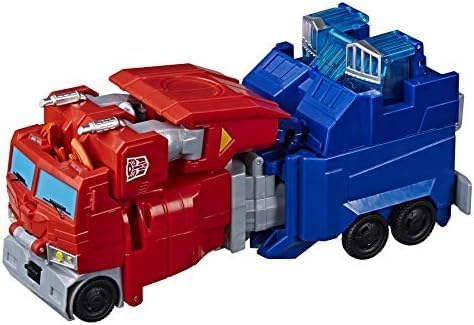
Image: Optimus Prime figure in its alternate truck mode. The truck is primarily red with blue and grey accents, featuring multiple wheels.
Energon Axe Action Attack
The Energon Axe weapon accessory is integral to the transformation and provides an action feature. When converting to robot mode, pulling out the weapon accessory will activate a spinning motion for the axe, simulating an attack.

Image: The back of the product packaging, illustrating the 6-step transformation process from truck to robot mode and the Energon Armour feature. It also shows the Energon Axe weapon accessory.
Maintenance
To keep your Optimus Prime figure in optimal condition:
- Clean the figure with a soft, dry cloth. Avoid using harsh chemicals or abrasive materials.
- Store the figure away from direct sunlight and extreme temperatures to prevent material degradation.
- Handle moving parts gently during transformation to avoid breakage.
Troubleshooting
Difficulty with Transformation
If you encounter difficulty transforming the figure, or if mechanisms seem to stick:
- Refer to the detailed visual instructions provided on the included instruction sheet or the back of the product packaging.
- Ensure all previous steps are completed correctly and parts are aligned before attempting the next step.
- Apply gentle, consistent pressure rather than excessive force. Forcing parts can lead to damage.
- Check for any small obstructions or misaligned tabs that might be preventing smooth movement.
Lost Weapon Accessory
The Energon Axe weapon accessory is crucial for the full transformation sequence and the action attack feature. If the accessory is lost, the figure may not be able to complete its transformation or activate its spinning attack feature as intended.
Specifications
- Brand: Transformers
- Model Number: E7112ES1
- Product Dimensions: 3.55 x 1.16 x 4.73 inches (approximate)
- Item Weight: 10.6 ounces (approximate)
- Recommended Age: 6 years and up
- Manufacturer: Hasbro
Warranty and Support
For any questions, concerns, or support regarding your Transformers Cyberverse Ultimate Class Optimus Prime Action Figure, please contact the manufacturer, Hasbro, directly through their official customer service channels. Specific warranty details may be available on their website or included with your purchase documentation.


