
Important Safety Instructions
Please read all instructions carefully before using this appliance. Retain this manual for future reference.
- Ensure the power supply voltage matches the rating label on the appliance (220-240V~ 50/60Hz).
- Do not immerse the appliance, cord, or plug in water or other liquids.
- Always unplug the appliance from the power outlet before cleaning, filling, or when not in use.
- Keep the appliance out of reach of children and pets.
- Do not operate the appliance with a damaged cord or plug, or after the appliance malfunctions or has been damaged in any manner.
- Place the appliance on a stable, level surface.
- Do not block air inlets or outlets. Maintain at least 20cm clearance from walls or other objects.
- Only use the appliance indoors.
- Do not use the appliance near flammable materials or open flames.
- Avoid direct sunlight exposure for prolonged periods.
Product Overview
The Sona Remote Air Cooler SAC 6303 is a multi-functional appliance designed to provide cooling, humidification, and air purification. It features a 10-liter water tank, three fan speeds, a 7-hour timer, wide-angle oscillation, and an infrared remote control for convenient operation.
Key Features:
- Multi-Function: Fan, Humidifier, Air Purifier
- Air Flow: 410m³/hr
- Fan Speeds: 3 settings
- Timer: 7 hours preset and auto-off timer
- Filter: 40mm thick filter for enhanced cooling
- Water Tank: 10-liter capacity with auto shut-off pump protection when water level is low
- Control: LED light display and infrared remote control
- Mobility: Universal wheels for easy movement
- Energy Eco Function: Auto-off when no new command is input for 12 hours
- Accessories: Includes 2 Ice Packs
Product Components:
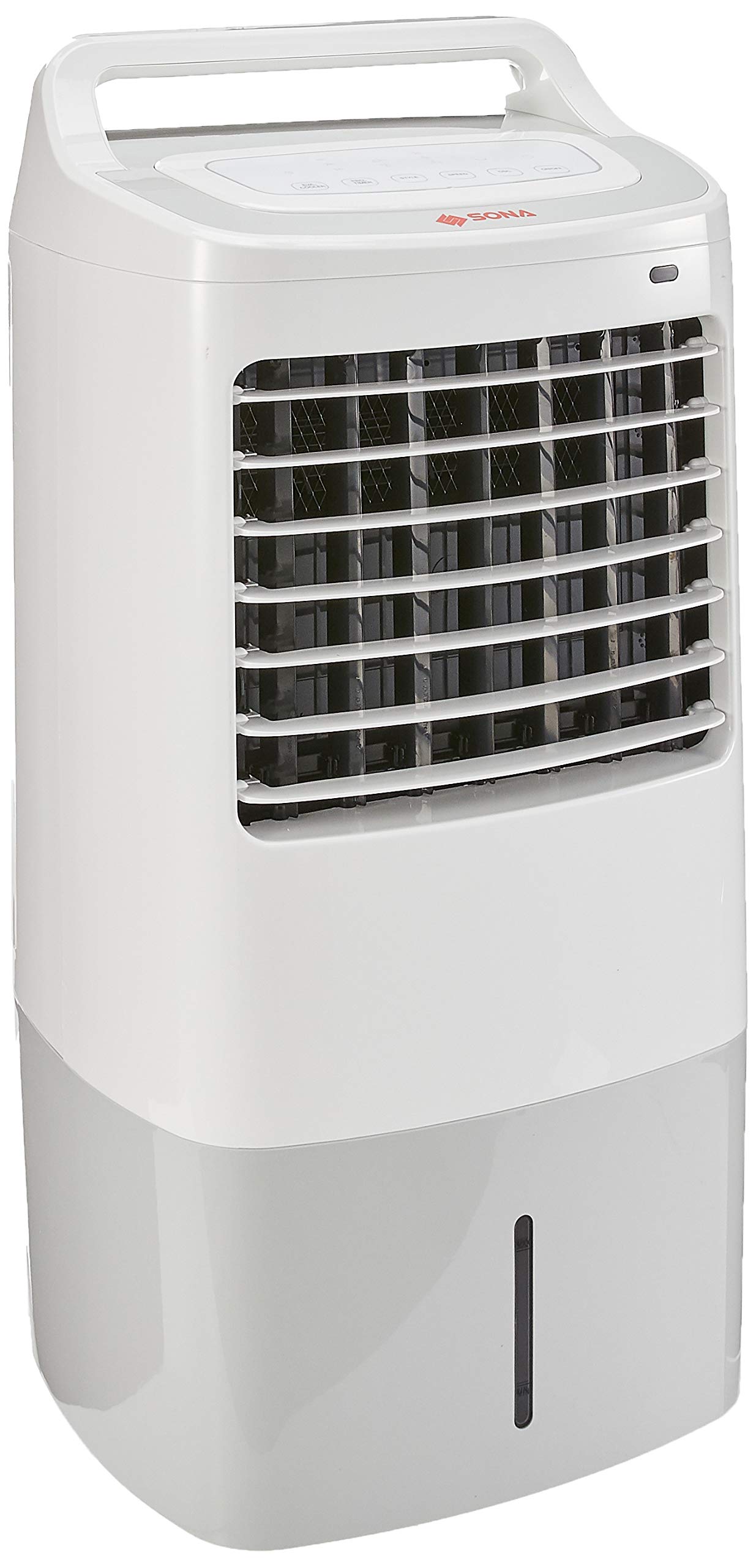


Setup
- Unpacking: Carefully remove the air cooler from its packaging. Retain packaging materials for future storage or transport.
- Wheel Installation: The air cooler comes with universal wheels for easy movement. If not pre-installed, gently tilt the unit and insert the wheels into the designated slots at the bottom of the base until they click into place. Ensure all wheels are securely attached before placing the unit upright.
- Placement: Position the air cooler on a firm, level surface. Ensure there is adequate space around the unit for proper airflow, at least 20cm from walls or furniture.
- Filling the Water Tank:
- Pull out the water tank from the bottom rear of the unit.
- Fill the tank with clean tap water. Do not exceed the 'MAX' fill line indicated on the water level indicator.
- Carefully slide the water tank back into the unit until it is fully seated.
- Using Ice Packs (Optional for enhanced cooling):
- Place the included ice packs in a freezer until they are completely frozen.
- Once frozen, place the ice packs directly into the water tank along with the water. This will help to lower the water temperature and provide cooler air.
- Power Connection: Plug the power cord into a suitable 220-240V~ 50/60Hz electrical outlet.
Operating Instructions
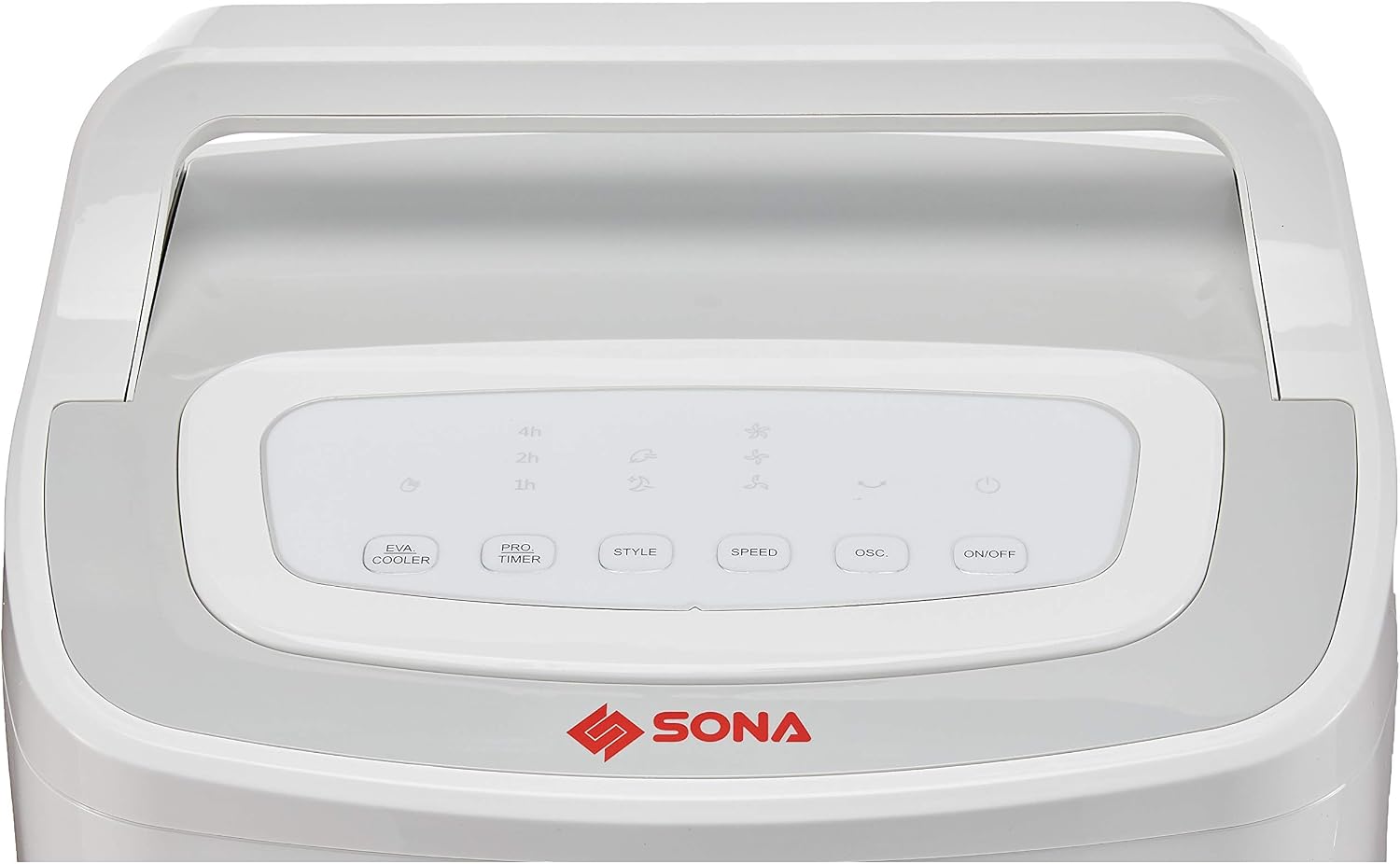
The air cooler can be operated using the control panel on top of the unit or the infrared remote control.
Control Panel & Remote Functions:
- Power On/Off: Press the ON/OFF button to turn the unit on or off. The LED display will illuminate when the unit is on.
- Fan Speed: Press the SPEED button repeatedly to cycle through the three fan speed settings: Low, Medium, and High. The current speed will be indicated on the LED display.
- Mode Selection (Style): Press the STYLE button to select the desired operating mode:
- Normal Fan: Provides a steady airflow.
- Natural Mode: Simulates natural breeze by varying fan speed.
- Sleep Mode: Operates at a lower, quieter speed for comfortable sleep.
- Humidifier Function (EVA. COOLER): Press the EVA. COOLER button to activate the humidification/cooling function. This will engage the water pump to circulate water over the cooling pad, adding moisture to the air and enhancing cooling. Ensure the water tank is filled before activating this function.
- Oscillation: Press the OSC. button to activate the wide-angle oscillation feature. The internal louvers will move from side to side to distribute air more broadly. Press again to stop oscillation.
- Timer: Press the PRO. TIMER button repeatedly to set the auto-off timer. You can set it for 1, 2, 4, or 7 hours. The unit will automatically turn off after the selected time period.
- Energy Eco Function: The unit features an Energy Eco Function. If no new command is input for 12 consecutive hours, the air cooler will automatically turn off to save energy.
Maintenance
Regular cleaning and maintenance will ensure optimal performance and extend the lifespan of your air cooler.
Cleaning the Exterior:
- Before cleaning, always unplug the appliance from the power outlet.
- Wipe the exterior surfaces with a soft, damp cloth. Do not use abrasive cleaners, waxes, or solvents as these may damage the finish.
- Ensure no water enters the control panel or other electrical components.
Cleaning the Water Tank:
- The water tank should be cleaned regularly, especially if the unit is used frequently or if water has been left in it for extended periods.
- Pull out the water tank from the unit.
- Empty any remaining water.
- Wash the tank with mild soap and water, then rinse thoroughly.
- Allow the tank to air dry completely before reinserting it into the unit.
Cleaning the Air Filter:
- The 40mm thick air filter should be cleaned periodically to maintain air quality and cooling efficiency.
- Unplug the unit.
- Remove the rear filter cover (refer to the rear view image for location).
- Carefully remove the filter.
- Rinse the filter under running water to remove dust and debris. For stubborn dirt, use a soft brush and mild detergent.
- Allow the filter to dry completely before reinserting it. Do not operate the unit without the filter.
Storage:
- If the air cooler will not be used for an extended period, empty and clean the water tank and filter.
- Store the unit in a cool, dry place, away from direct sunlight.
Troubleshooting
| Problem | Possible Cause | Solution |
|---|---|---|
| Unit does not power on. | No power supply. | Check if the power cord is securely plugged into a working outlet. |
| Weak airflow. | Air filter is dirty. | Clean the air filter as described in the Maintenance section. |
| No cooling effect. | Water tank is empty or low. Humidifier function not activated. | Fill the water tank. Activate the EVA. COOLER function. Consider using frozen ice packs. |
| Water leakage. | Water tank not properly seated. Water level too high. | Ensure the water tank is fully pushed in. Do not exceed the 'MAX' fill line. |
| Remote control not working. | Batteries are dead or incorrectly inserted. Obstruction between remote and unit. | Replace batteries. Ensure clear line of sight to the unit's receiver. |
| Unit turns off automatically. | Timer function activated. Energy Eco Function activated. Low water level. | Check timer settings. If no commands for 12 hours, this is normal. Refill water tank if low. |
Specifications

| Specification | Detail |
|---|---|
| Brand | Sona |
| Model Number | SAC 6303 |
| Voltage | 220-240V~ |
| Frequency | 50/60Hz |
| Wattage | 60W |
| Air Flow | 410m³/hr |
| Water Tank Capacity | 10 Liters |
| Number of Fan Speeds | 3 |
| Timer | 7 Hours Preset |
| Dimensions (D x W x H) | 33D x 38W x 73.6H cm |
| Material | Plastic |
| Special Features | Auto Shut Off, Timer, Multi Function (Fan, Humidifier, Air Purifier), Wide Angle Oscillation, Auto Shut Off Pump Protection, Energy Eco Function |
| Included Components | 10L Air Cooler, Ice Pack x 2, Remote Control |
Warranty and Support
The Sona Remote Air Cooler SAC 6303 comes with a 2-year warranty on the motor, covering manufacturing defects under normal use conditions.
For technical assistance, warranty claims, or general inquiries, please contact Sona customer support through their official website or the contact information provided with your purchase documentation.
Please have your model number (SAC 6303) and proof of purchase ready when contacting support.