
Introduction
This manual provides essential information for the safe and efficient operation of your new Farberware 1.1 Cu. Ft. Countertop Microwave Oven. Please read all instructions carefully before use and retain this manual for future reference.
Important Safety Instructions
When using electrical appliances, basic safety precautions should be followed, including the following:
- Read all instructions before using the appliance.
- Do not operate the oven if the door is damaged, or if it is not working properly.
- Do not attempt to service or repair the oven yourself. Contact qualified service personnel.
- Do not allow children to use the microwave without supervision.
- Use caution when removing hot items from the microwave to prevent burns.
- Ensure proper ventilation around the microwave.
Setup
- Unpacking: Carefully remove the microwave oven and all packing materials from the carton.
- Placement: Place the microwave on a flat, stable surface that is strong enough to hold the oven and the food you will be placing in it. Ensure there is adequate space for ventilation (at least 3 inches on the sides and back, and 12 inches above).
- Turntable Installation: Place the roller ring in the center of the oven floor. Then, place the glass turntable securely on top of the roller ring. Ensure it rotates freely.
- Power Connection: Plug the microwave oven into a standard 120V AC electrical outlet.

Figure 1: Farberware 1.1 Cu. Ft. Countertop Microwave Oven.

Figure 2: The microwave oven positioned on a kitchen counter.
Operating Instructions
Your Farberware microwave oven features an intuitive control panel designed for ease of use.

Figure 3: Detailed view of the control panel with key features highlighted.
Basic Cooking
- Time Cook: Press the 'Time Cook' button, then enter the desired cooking time using the number pads. Press 'Start/+30Sec' to begin.
- Quick Start (+30Sec): For quick heating, simply press the 'Start/+30Sec' button. Each press adds 30 seconds of cooking time at 100% power.
- Power Level: To adjust power, press 'Power' after setting the cooking time, then select a power level from 1-10 using the number pads.
Auto Cook Settings
The oven includes six one-touch auto cook settings for common food items:
- Popcorn: For microwave popcorn.
- Potato: For baking potatoes.
- Pizza: For reheating pizza slices.
- Beverage: For heating drinks.
- Fresh Vegetable: For cooking fresh vegetables.
- Frozen Vegetable: For cooking frozen vegetables.
- Dinner Plate: For reheating a dinner plate.
- Soup: For heating soup.
To use, simply press the desired auto cook button. The oven will automatically set the appropriate cooking time and power level.
Defrost Settings
- Weight Defrost: Press 'Weight Defrost', enter the food's weight in ounces using the number pads, then press 'Start/+30Sec'.
- Time Defrost: Press 'Time Defrost', enter the desired defrosting time, then press 'Start/+30Sec'.
Clock and Timer
- Setting the Clock: Press 'Timer/Clock' once, enter the current time using the number pads, then press 'Timer/Clock' again to confirm.
- Kitchen Timer: Press 'Timer/Clock' twice, enter the desired time for the timer, then press 'Start/+30Sec'. This functions as a countdown timer and does not activate microwave cooking.
Child Safety Lock
To prevent unsupervised operation, the microwave includes a child safety lock. To activate, press and hold the 'Stop/Cancel' button for 3 seconds until 'LOC' appears on the display. To deactivate, press and hold 'Stop/Cancel' again for 3 seconds until 'LOC' disappears.
Memory Function
The memory function allows you to save and quickly access your favorite cooking settings. Consult the full user guide for detailed instructions on programming and recalling memory settings.
Maintenance and Cleaning
Regular cleaning helps maintain the performance and longevity of your microwave oven.
- Interior: Clean the oven cavity after each use with a damp cloth and mild detergent. For stubborn stains, place a bowl of water with lemon slices inside and microwave for a few minutes to loosen residue, then wipe clean.
- Turntable and Roller Ring: The glass turntable and roller ring can be removed and washed in warm, soapy water or in the dishwasher. Ensure they are completely dry before placing them back in the oven.
- Exterior: Wipe the exterior surfaces with a soft, damp cloth. Avoid abrasive cleaners.

Figure 4: Interior of the microwave, highlighting the removable turntable for easy cleaning.
Troubleshooting
If you encounter any issues with your microwave oven, refer to the following common problems and solutions:
- Oven not starting: Check if the power cord is securely plugged in. Ensure the door is closed properly. Check your household fuse or circuit breaker.
- Food not heating: Verify that the cooking time and power level are set correctly. Ensure the door is fully closed.
- Turntable not rotating: Check if the turntable and roller ring are correctly positioned and free from obstructions.
- Unusual noise: Ensure the turntable is properly seated and there are no foreign objects in the oven cavity.
For persistent issues or problems not listed here, please contact customer support.
Specifications
| Feature | Specification |
|---|---|
| Model Number | FMO11AHTBSB |
| Capacity | 1.1 Cubic Feet |
| Wattage | 1000 watts |
| Voltage | 120 Volts (AC) |
| Product Dimensions (D x W x H) | 16.93" x 20.2" x 12.03" |
| Item Weight | 5.5 pounds (88 Ounces) |
| Material | Stainless Steel |
| Included Components | 12.5 inch turntable |
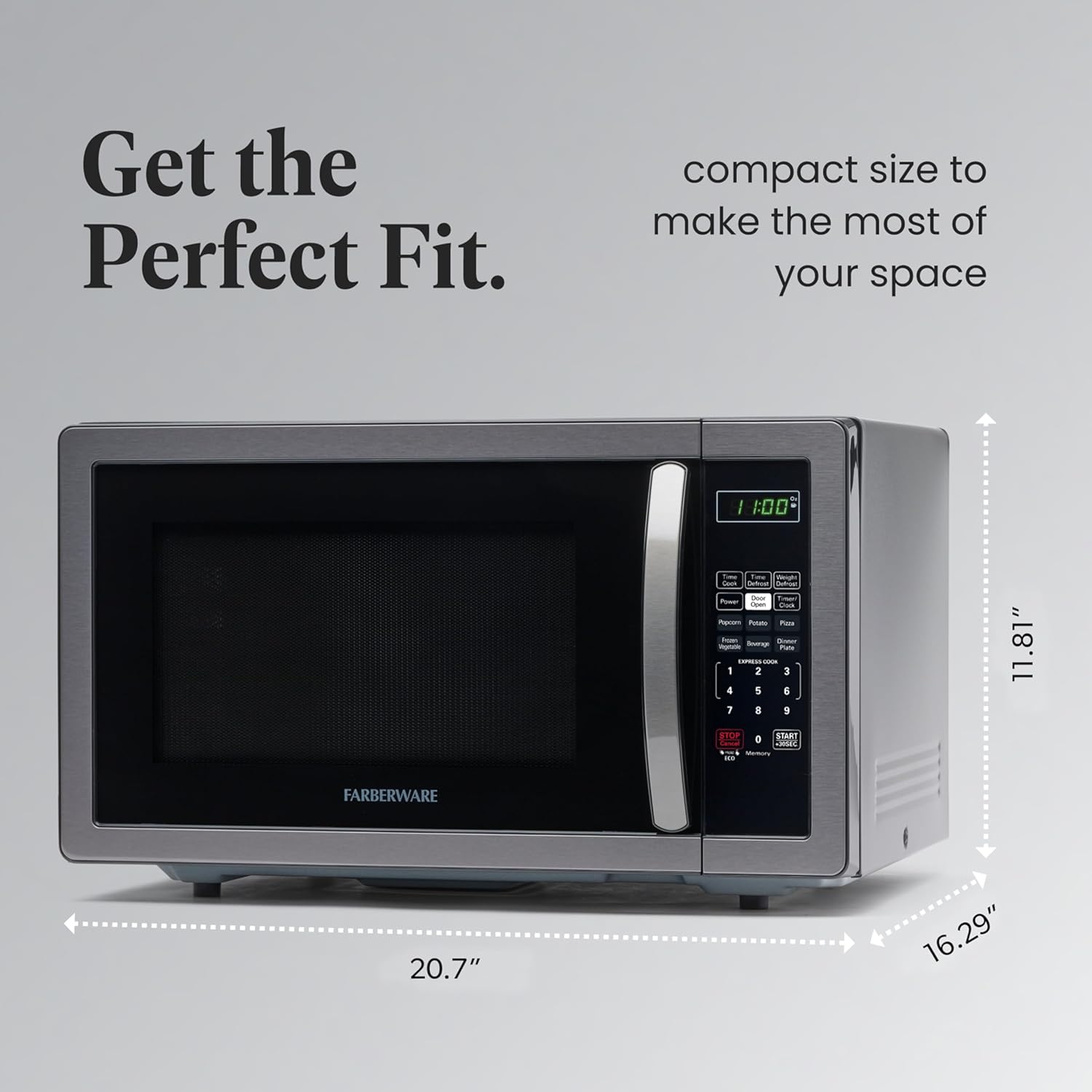
Figure 5: Exterior dimensions of the microwave oven.

Figure 6: Overview of the microwave's capacity, power levels, and wattage.
Warranty and Support
Your Farberware microwave oven comes with a manufacturer's warranty. Please refer to the included warranty card or visit the official Farberware website for detailed warranty information and registration.
For customer support, technical assistance, or to order replacement parts, please contact Farberware customer service through their official channels.


