
Introduction
This manual provides detailed instructions for the setup, operation, and maintenance of your Uniden BC365CRS Clock/FM Radio Scanner and Uniden BC355N Base/Mobile Scanner. Please read this manual thoroughly before using your devices to ensure proper functionality and safety.
What's in the Box
Upon unboxing your Uniden radio scanners, you should find the following components:
- Uniden BC365CRS Radio Scanner
- Uniden BC355N Base/Mobile Scanner
- Antenna (for each unit)
- AC Adapter
- DC Power Cable
- Automotive Power Outlet Plug
- Mounting Brackets
- User Manuals and Other Printed Materials

Figure 1: Uniden BC365CRS with included accessories including antenna, AC adapter, and printed materials.

Figure 2: Uniden BC355N with included accessories such as telescoping antenna, window-mount mobile antenna, AC adapter, vehicle power adapter, DC power cord, bracket, and installation hardware.
Product Overview
Uniden BC365CRS Clock/FM Radio Scanner
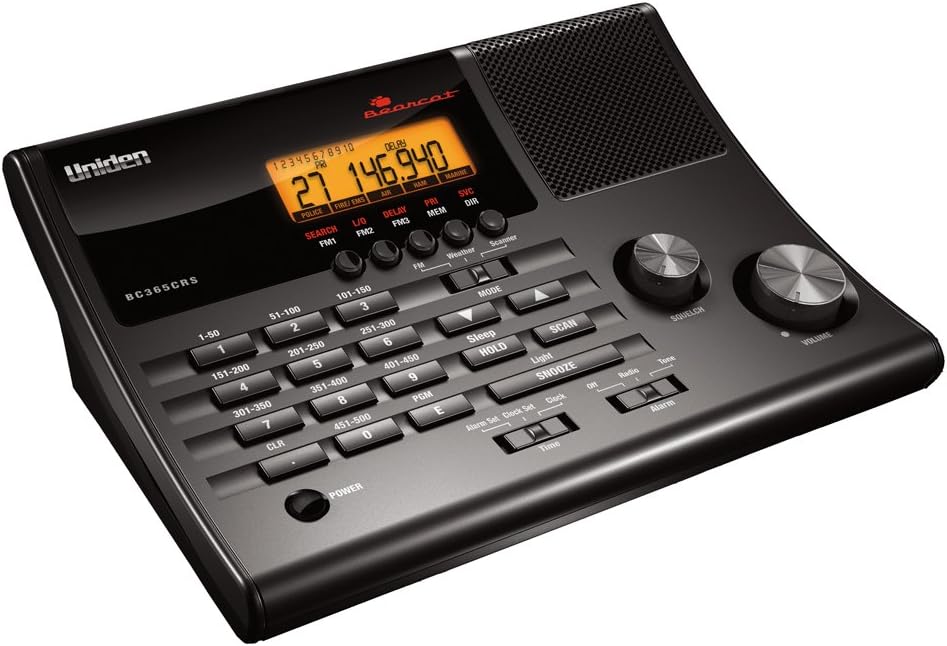
Figure 3: Front view of the Uniden BC365CRS Clock/FM Radio Scanner.

Figure 4: Labeled diagram of the Uniden BC365CRS, highlighting controls such as Power, Keyboard, Hold/Sleep, Snooze/Light, Scan, Volume, Squelch, Mode Switch, Decrease/Increase Switch, and various function buttons.
Uniden BC355N Base/Mobile Scanner

Figure 5: Labeled diagram of the Uniden BC355N, showing controls like Hold, Up/Down directional keys, LCD, Squelch, On/Off Volume, Private Bank Scan, Close Call, WX, CB, PD/FD/EMG Button, AIR/MRN Button, Search, L/O (Lock Out), Band, and PROG (Program).
Setup
General Setup
- Power Connection: Connect the supplied AC adapter to the scanner's power input and plug it into a standard wall outlet. For mobile use, utilize the DC power cable or automotive power outlet plug.
- Antenna Connection: Attach the provided antenna to the antenna jack on the rear of the scanner. Ensure a secure connection for optimal signal reception.
Initial Power On
Turn the Volume knob clockwise to power on the scanner. The display will illuminate, and the scanner will begin its initial startup sequence.
Operating Instructions
Basic Operation
- Volume Control: Adjust the Volume knob to increase or decrease the audio output.
- Squelch Control: Adjust the Squelch knob to eliminate static noise between transmissions. Turn it clockwise until the static disappears, but not so far that it cuts off weak signals.
Uniden BC365CRS Specific Operations
- Channel Scanning: The BC365CRS includes 500 channels organized into 10 banks. Use the numerical keypad and bank buttons (1-50, 51-100, etc.) to navigate and scan specific channel banks.
- FM Radio: Access the built-in FM radio function to listen to local radio stations. The unit supports 30 FM presets for quick access to your favorite stations.
- Alarm Clock: Utilize the integrated alarm clock feature to wake to your preferred FM station, a weather channel, or scanning. Snooze and Sleep functions are also available.
Uniden BC355N Specific Operations
- Service Banks: The BC355N includes 6 pre-programmed service banks for monitoring Police, Fire, Emergency Medical Services, Marine, Air, Weather, and CB frequencies. Use the dedicated buttons (PRIVATE, PD/FD/EMG, AIR/MRN, WX, CB) to select these banks.
- Close Call RF Capture Technology: This feature instantly tunes to signals from nearby transmitters, making it easier to find active frequencies in your area.
- Programmable Frequencies: Save up to 300 frequencies in addition to the preset frequencies. This allows for quick access to newly activated local frequencies.
- Scan Speed: The scanner offers a maximum scan speed of 100 channels per second.
Maintenance
To ensure the longevity and optimal performance of your Uniden radio scanners, follow these maintenance guidelines:
- Cleaning: Use a soft, dry cloth to clean the exterior of the scanners. Avoid using abrasive cleaners or solvents, which can damage the finish.
- Storage: When not in use for extended periods, store the scanners in a cool, dry place away from direct sunlight and extreme temperatures.
- Antenna Care: Handle the antenna with care to prevent bending or breaking. Ensure it is securely attached during operation.
Troubleshooting
If you encounter issues with your Uniden radio scanners, refer to the following common problems and solutions:
| Problem | Possible Cause | Solution |
|---|---|---|
| No Power | Power adapter not connected properly or power outlet issue. | Check power connections. Try a different power outlet. Ensure the AC adapter is functioning. |
| No Reception / Weak Signals | Antenna not connected, poor antenna placement, or out of range. | Ensure antenna is securely connected. Relocate the scanner to an area with better reception. Adjust squelch control. |
| Static or Noise | Squelch set too low, or interference. | Increase squelch level. Move scanner away from electronic devices that may cause interference. |
| Cannot find specific frequencies (BC355N) | Frequency is not programmed or is outside the scanner's range. | Verify the frequency is within the scanner's supported range. Ensure the frequency is correctly programmed into a bank. Use Close Call RF Capture for nearby transmissions. |
Specifications
| Feature | Uniden BC365CRS | Uniden BC355N |
|---|---|---|
| Number of Channels | 500 (in 10 banks) | 300 |
| Frequency Range (Aircraft) | 108.0000 MHz - 136.9916 MHz (AM mode 8.33 STEP kHz) | 108.0000 MHz - 136.9916 MHz (AM mode 8.33 STEP kHz) |
| Special Features | Built-in FM radio, Alarm Clock, Weather Alert | Close Call RF Capture Technology, 6 Service Banks, Backlit Display |
| Tuner Technology | N/A | UHF |
| Color | Black | Black |
Warranty and Support
For warranty information and technical support, please refer to the documentation included with your product or visit the official Uniden website. Specific warranty terms and support contact details may vary by region and purchase date.


