
1. Product Overview
The TORCHSTAR Solar Motion Sensor Lights are designed to provide efficient and reliable outdoor illumination. These IP65 waterproof lights are cordless and ideal for various outdoor applications, including driveways, patios, garages, and porches. They feature a 6500K pure white light output and are equipped with advanced motion sensing capabilities.
Key Features
- All Day Working: Stays off during the day for charging and automatically activates at night when motion is detected, turning off 15 seconds after no further motion.
- Wide Application: IP65 waterproof rating ensures durability against wind, rain, and snow, suitable for yards, garages, patios, driveways, and porches.
- Excellent Illumination: Features 178 high-quality LED chips with 240lm output. The sensor detects motion from 10-16ft away over a 270° detection angle.
- Quality Assurance: Offers three lighting modes and up to 8 hours of continuous operation on a full charge.
- Reliable Choice: High-quality craftsmanship for improved durability and extended lamp life.
Product Components
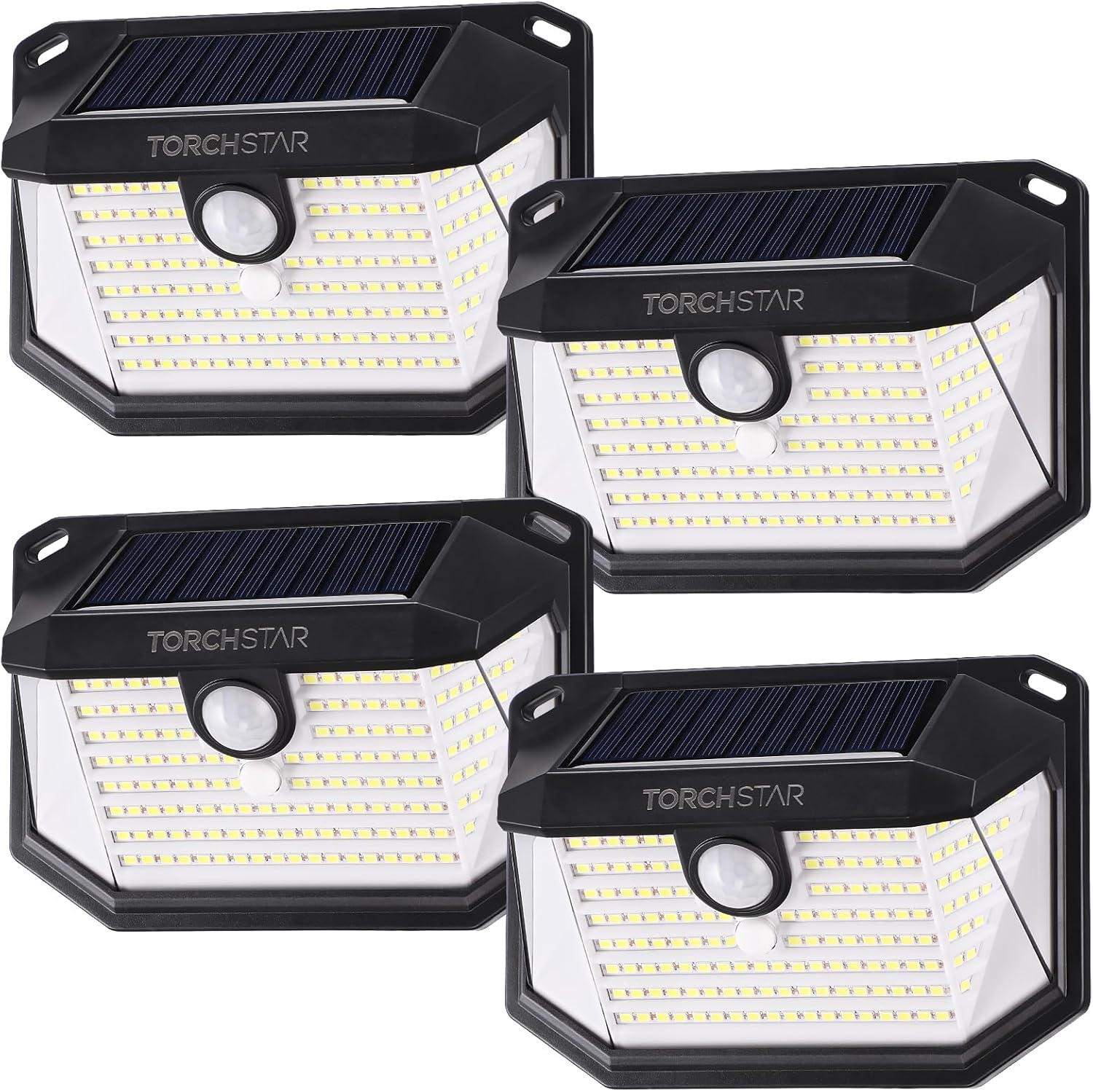
Figure 1.1: Overview of the TORCHSTAR Solar Motion Sensor Lights (Pack of 4).

Figure 1.2: Dimensions of a single TORCHSTAR Solar Motion Sensor Light.
- Solar Panel (integrated)
- LED Light Array (178 LED chips)
- Motion Sensor
- On/Off Button
- Mounting Holes
2. Setup and Installation
Before Installation
- Choose a location that receives direct sunlight for at least 6-8 hours daily to ensure optimal charging of the solar panel.
- Avoid installing near other light sources (e.g., streetlights) that might interfere with the light sensor and prevent the light from turning on at night.
- Ensure the mounting surface is stable and can support the weight of the light.
Installation Steps
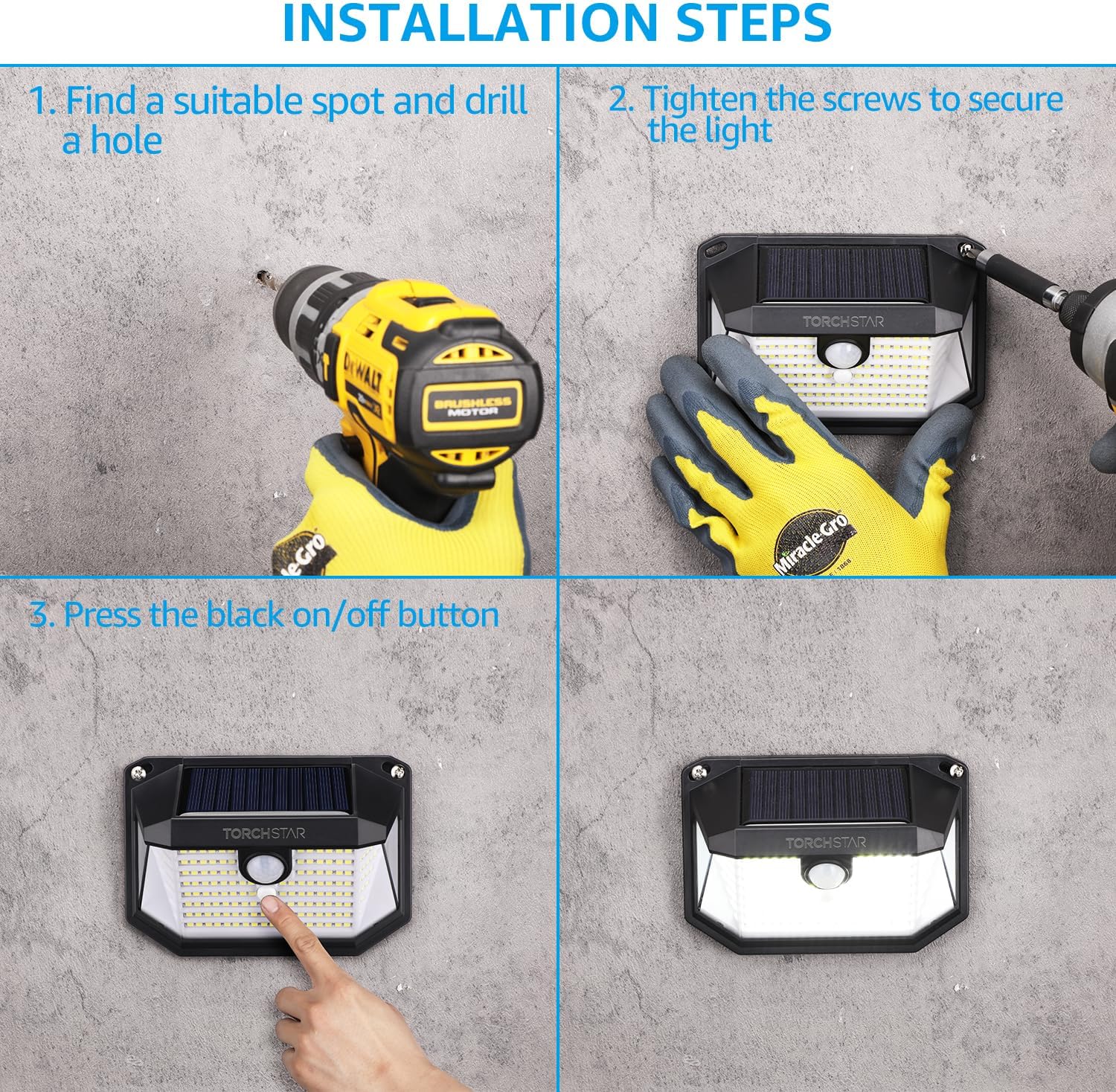
Figure 2.1: Visual guide for installing the solar motion sensor light.
- Find a suitable spot: Identify a location on a wall or fence where the light can receive maximum sunlight and provide desired illumination.
- Drill a hole: Use a drill to create a hole at the chosen spot. Ensure the hole size is appropriate for the provided screws.
- Tighten the screws: Secure the light to the wall using the provided screws. Make sure it is firmly attached.
- Press the On/Off button: Locate the black On/Off button on the light and press it to activate the device. The light is now ready for operation.
3. Operating Instructions
Charging and Automatic Operation
The TORCHSTAR Solar Motion Sensor Light is designed for automatic operation. During the day, the integrated solar panel charges the internal battery. At night, the light will automatically turn on when motion is detected within its sensing range.

Figure 3.1: Automatic day/night operation and charging.
The light features anti-overcharge protection, ensuring battery longevity. Once fully charged, it can provide illumination for up to 8 hours.
Lighting Modes
The light offers three distinct operating modes, which can be cycled by pressing the On/Off button after initial activation:
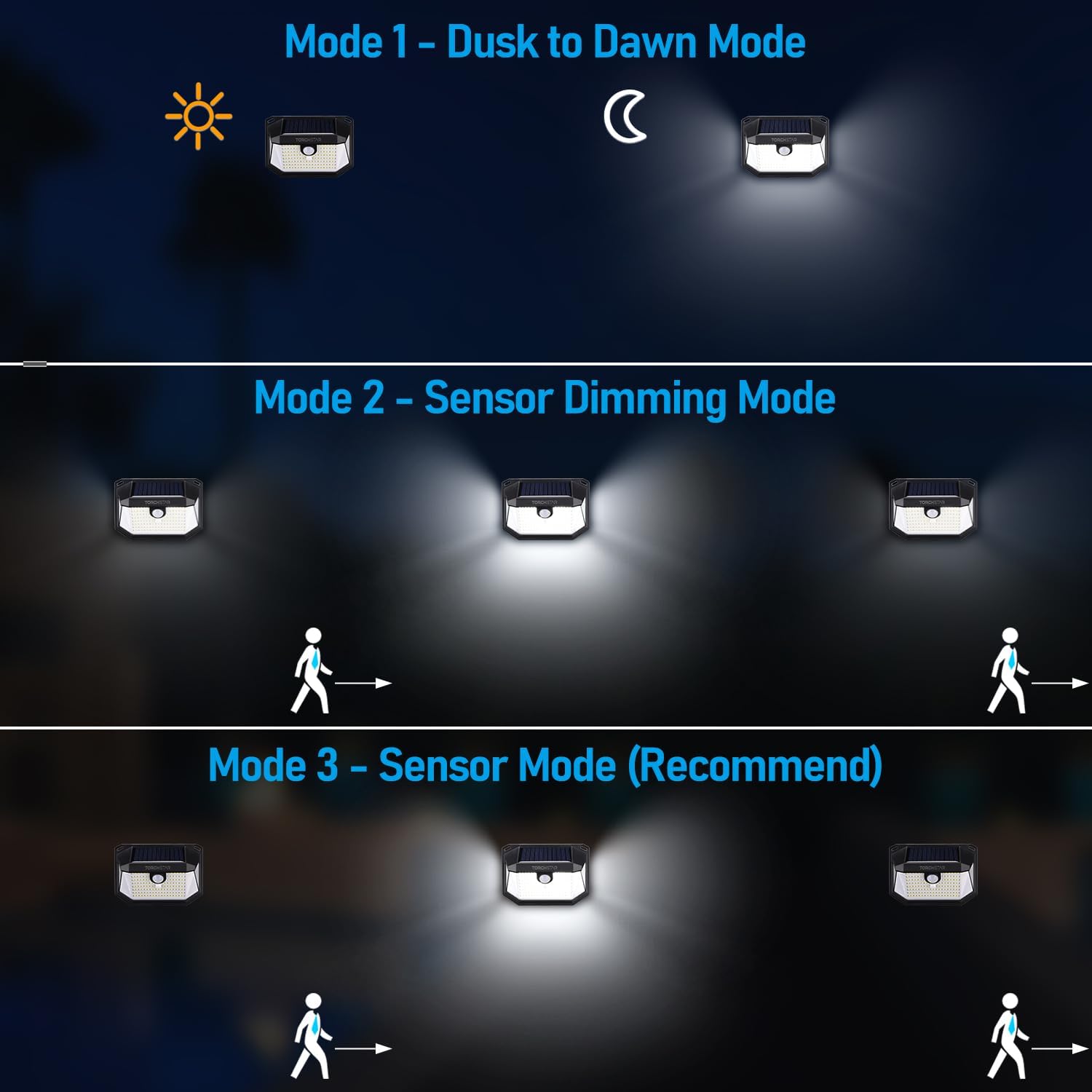
Figure 3.2: Explanation of the three lighting modes.
- Mode 1 - Dusk to Dawn Mode (Stay-On Mode): The light will automatically turn on at medium brightness when it gets dark and stay on continuously until dawn or until the battery is depleted.
- Mode 2 - Sensor Dimming Mode: At night, the light will stay on at a dim level. When motion is detected, it will brighten to 100% for 15 seconds, then return to the dim level if no further motion is detected.
- Mode 3 - Sensor Mode (Recommended): The light remains off at night. When motion is detected, it will turn on at 100% brightness for 15 seconds, then turn off completely if no further motion is detected. This mode conserves battery life most effectively.
Motion Sensor Functionality
The integrated motion sensor provides a broad detection area to ensure reliable activation when needed.

Figure 3.3: Motion detection range and angle.
- Detection Angle: 270 degrees
- Detection Distance: 10-16 feet (3-5 meters)
- The light will automatically turn off 15 seconds after no further motion is detected within its range.
Product Demonstration Video
Video 3.1: An official product video demonstrating the features and functionality of the TORCHSTAR Solar Motion Sensor Lights, including its solar charging, motion detection, and various lighting modes. This video is provided by the seller, Torchstar.
4. Maintenance
Regular maintenance ensures the longevity and optimal performance of your solar lights.
- Cleaning: Periodically wipe the solar panel and LED surface with a soft, damp cloth to remove dust, dirt, or debris. A clean solar panel ensures efficient charging.
- Obstruction Check: Ensure no trees, bushes, or other objects are blocking direct sunlight from reaching the solar panel, especially during winter months.
- Weather Resistance: The lights are IP65 waterproof, designed to withstand various weather conditions including rain and snow. No special weather-proofing is required beyond proper installation.

Figure 4.1: The light's weather-resistant design.
5. Troubleshooting
If you encounter issues with your solar lights, refer to the table below for common problems and solutions.
| Problem | Possible Cause | Solution |
|---|---|---|
| Light does not turn on at night. |
|
|
| Light stays on during the day. |
|
|
| Motion sensor not working effectively. |
|
|
| Light is dim or runs for a short period. |
|
|
6. Technical Specifications
| Attribute | Specification |
|---|---|
| Brand | TORCHSTAR |
| Model Number | R1-ZA1SP-2W60BLK-4P |
| Color | Black |
| Material | Acrylonitrile Butadiene Styrene |
| Product Dimensions (L x H x D) | 5.43" x 3.82" x 2.28" (138mm x 97mm x 58mm) |
| Item Weight | 1.9 pounds (for 4-pack) / 0.86 Kilograms |
| Power Source | Solar Powered |
| Light Source Type | LED (178 chips) |
| Light Color | 6500K Pure White |
| Brightness | 240 Lumen |
| Wattage | 2 watts |
| Voltage | 3.7 Volts |
| Water Resistance Level | IP65 Waterproof |
| Motion Detection Angle | 270° |
| Motion Detection Range | 10-16 ft |
| Battery Type | Lithium (1 AAA battery included per unit) |
| Charging Time | 6-8 hours under strong direct sunlight |
| Working Time | Up to 8 hours when fully charged |
7. Warranty and Support
Your TORCHSTAR Solar Motion Sensor Lights come with a 12-month warranty from the date of purchase, guaranteeing your rights and benefits against manufacturing defects.
For technical support, warranty claims, or any inquiries regarding your product, please contact TORCHSTAR customer service through their official channels. You can also visit the official TORCHSTAR store on Amazon for more information and products: