
1. Introduction
This manual provides detailed instructions for the installation, operation, and maintenance of your GATEMAN G-Swipe Fingerprint Biometric Vertibolt Rim Lock. This advanced security device offers multiple access methods, including fingerprint and passcode, along with an English voice guidance interface for ease of use. Ensure you read this manual thoroughly before installation and operation to guarantee optimal performance and security.
The GATEMAN G-Swipe lock is designed for doors with a thickness ranging from 30mm to 65mm.

Image 1.1: GATEMAN G-Swipe Fingerprint Biometric Vertibolt Rim Lock. This image displays the complete lock system, featuring the sleek exterior unit with a numeric keypad and integrated fingerprint scanner, alongside the robust interior mechanism.
2. Product Features
The GATEMAN G-Swipe lock incorporates several features designed for enhanced security and user convenience:
- Multiple Access Options: Supports fingerprint, passcode, and optional remote control for unlocking.
- EASY SCAN 2.0 Fingerprint Recognition: Advanced biometric technology for quick and accurate fingerprint authentication.
- Traceless Hairline Keypad: The keypad is only visible when activated, preventing fingerprint residue from revealing passcodes.
- Powerful Interlocking Hook Mechanism: Provides robust security, suitable for various door types, including sliding and double doors.
- UNI-BODY Construction: Engineered for ultimate robustness and durability.
- English Voice Guide Feature: Provides audio prompts for operation status and settings adjustments.
- Automatic Locking: The lock automatically secures the door after it is properly closed. Manual locking is also available.
- Alarm System: Features an 80dB alarm for break-in attempts, damage, or fire detection (when the internal temperature exceeds 60°C).
- Low Battery Alarm & Emergency Power: Alerts users to low battery status. In case of complete battery depletion, an external 9V battery can be used for emergency power.
- Silent Mode: Allows for quiet operation, ideal for late-night entry or exit.
- Forced Lock: Provides an additional layer of security by preventing unauthorized entry from either side.
- Volume Control: Adjustable volume for voice guidance and alarms.

Image 2.1: Overview of GATEMAN G-Swipe Features. This diagram highlights key functionalities such as multiple access methods, the invisible keypad, double action button, voice guidance, automatic locking, alarm systems, low battery alerts, and one-touch fingerprint verification.
3. Package Contents
Verify that all components are present in the package before proceeding with installation:
- Front Body (Exterior Unit)
- Main Body (Interior Unit)
- Main Bracket
- Striker Plate
- User Manual (this document)
- Installation Manual
- Installation Template
- Screws for mounting
Optional Accessories (Sold Separately):
- Remote Controller
- Remote Module

Image 3.1: GATEMAN G-Swipe Package Contents and Parts Diagram. This image illustrates the various components included in the package, such as the front body, main body, main bracket, and striker, along with a detailed breakdown of the internal and external parts of the lock.
4. Setup and Installation
Proper installation is crucial for the security and functionality of your GATEMAN G-Swipe lock. It is recommended to have the lock installed by a qualified professional. Refer to the dedicated Installation Manual and Installation Template provided in the package for detailed, step-by-step instructions.
4.1 Pre-Installation Checks
- Ensure your door thickness is between 30mm and 65mm.
- Verify that all package contents are present.
- Prepare necessary tools (e.g., drill, screwdriver, measuring tape).
4.2 Installation Overview
The installation process generally involves:
- Preparing the door by drilling necessary holes according to the template.
- Mounting the exterior Front Body.
- Installing the interior Main Body and connecting the wiring.
- Attaching the Main Bracket and Striker Plate to the door frame.
- Inserting batteries and performing initial setup.
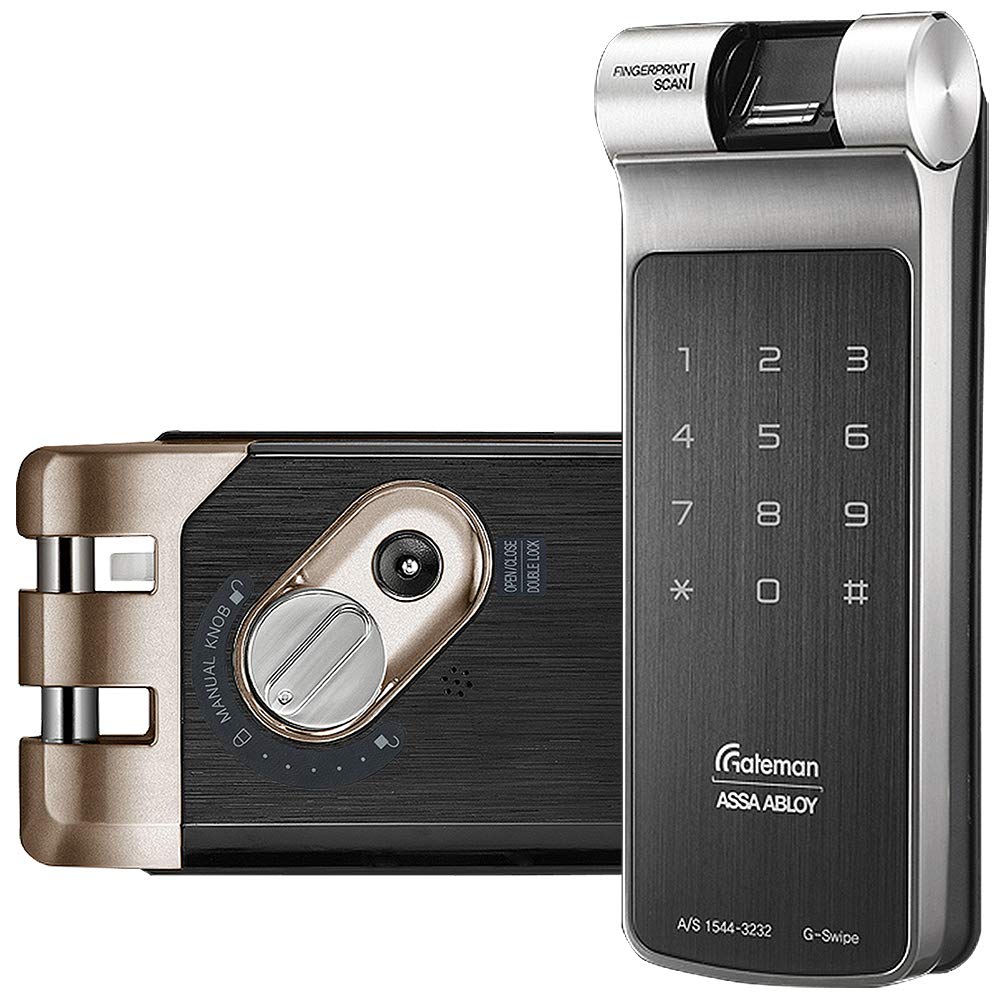
Image 4.1: GATEMAN G-Swipe Installation Diagram. This diagram provides a visual guide to the installation steps, showing how the lock components are assembled and secured onto the door and door frame.
5. Operating Instructions
This section details the primary functions and operations of your GATEMAN G-Swipe lock.
5.1 Master Mode and Registration
The Master Mode is used for registering and managing user fingerprints, passcodes, and other settings. Only one Master PIN can be registered.
- Entering Master Mode: Press the Registration button on the interior unit, then enter the Master PIN followed by the '#' button.
- Registering Master PIN: After installation, register your Master PIN (4-12 digits) by entering Master Mode and following the voice prompts.
- Registering User PINs: Up to 30 User PINs (4-12 digits) can be registered. Enter Master Mode, select the User PIN registration option, and follow the voice prompts.
- Registering Fingerprints: Up to 20 fingerprints can be registered. Enter Master Mode, select the fingerprint registration option, and follow the voice prompts to scan the finger multiple times.
- Registering One-time PIN: A single-use PIN for temporary access.
- Registering Visitor PIN: A temporary PIN with limited validity.
5.2 Unlocking the Door
- By Fingerprint: Place your registered finger on the fingerprint sensor. The lock will unlock after successful verification.
- By Passcode: Touch the keypad to activate it, enter your registered PIN, then press '#'.
- By Remote Control (Optional): Press the unlock button on the remote control.
5.3 Locking the Door
- Automatic Locking: The lock will automatically engage approximately 3 seconds after the door is closed.
- Manual Locking (Exterior): Touch the keypad with your palm or press the '*' button.
- Manual Locking (Interior): Use the thumb turn or press the 'OPEN/CLOSE' button.
5.4 Advanced Settings
- Silent Mode: To activate/deactivate, enter Master Mode and follow the voice prompts for silent mode settings. This mutes operation sounds.
- Volume Control: Adjust the voice guidance volume through Master Mode settings.
- Forced Lock (Double Lock): This feature prevents unlocking from the outside (exterior forced lock) or inside (interior forced lock). Activate via Master Mode or specific button combinations as per the detailed manual.
- Double Action Button: On the interior unit, this button provides an additional security measure, requiring two actions to unlock from the inside, preventing accidental opening or unauthorized exit.
6. Maintenance
Regular maintenance ensures the longevity and reliable operation of your GATEMAN G-Swipe lock.
6.1 Battery Replacement
The lock uses 4 AA 1.5V Alkaline batteries (sold separately).
- Low Battery Alarm: When batteries are low, the lock will emit an alarm sound and an LED indicator will flash. Replace all four batteries promptly.
- Replacing Batteries: Open the battery cover on the interior unit, remove old batteries, and insert new ones, ensuring correct polarity.
6.2 Emergency Power
If the batteries are completely depleted and the lock cannot be operated, you can use a standard 9V battery for emergency power.
- Locate the emergency power terminal on the exterior unit.
- Press a 9V battery firmly against the terminals.
- While holding the 9V battery, enter your passcode or use your fingerprint to unlock the door.
6.3 Cleaning
Clean the lock's exterior surfaces with a soft, dry cloth. Avoid using abrasive cleaners, solvents, or harsh chemicals, as these can damage the finish or electronic components. Keep the fingerprint sensor clean and free of debris for optimal performance.
7. Troubleshooting
This section addresses common issues you might encounter with your GATEMAN G-Swipe lock.
7.1 Alarms
- Break/Damage Alarm: If an attempt is made to force open the door or damage the lock, an 80dB alarm will sound. The alarm will cease once the disturbance stops or after a set period.
- Fire Alarm: If the internal temperature of the lock exceeds 60°C, a fire alarm will activate, and the lock will automatically unlock to facilitate evacuation.
- Low Battery Alarm: Refer to Section 6.1 for details on low battery alerts and replacement.
7.2 Operational Issues
- Lock Not Responding: Check if batteries are depleted. Use the 9V emergency power feature (Section 6.2). Ensure the door is properly closed.
- Fingerprint Recognition Failure: Ensure your finger is clean and dry. Try re-registering your fingerprint if issues persist. Ensure the sensor is clean.
- Keypad Not Visible: The keypad is designed to be traceless and only illuminates when touched with a palm or finger.
- Passcode Entry Issues: Ensure you are entering the correct PIN and pressing '#' afterwards.
- Automatic Locking Not Working: Check if the door sensor is aligned and the door closes completely. Verify that automatic locking is enabled in settings (if applicable).
8. Specifications
| Feature | Specification |
|---|---|
| Brand | GATEMAN |
| Model Number | G-Swipe |
| Lock Type | Biometric Rim Lock |
| Material | Metal |
| Front Body Dimensions (W x H x D) | 66mm x 176mm x 31.5mm |
| Back Body Dimensions (W x H x D) | 162.2mm x 87mm x 35mm |
| Applicable Door Thickness | 30mm - 65mm |
| Power Source | 4 x AA 1.5V Alkaline Batteries (Sold Separately) |
| Emergency Power | 9V Battery (GLF22) (Sold Separately) |
| Operating Temperature | -15°C to 55°C (5°F to 131°F) |
| Master PIN Memory | 1 |
| User PIN Memory | 30 |
| Fingerprint Memory | 20 |
| Visitor PIN Memory | 1 |
| One-time PIN Memory | 1 |
9. Warranty and Support
Specific warranty details for the GATEMAN G-Swipe Fingerprint Biometric Vertibolt Rim Lock are not provided in this document. For warranty information, technical support, or service inquiries, please refer to the warranty card included with your product or contact the authorized GATEMAN distributor or retailer from whom you purchased the lock. You may also visit the official GATEMAN website for further assistance.