
1. Introduction
This manual provides instructions for the FocalTop N2QAYB000953 replacement remote control. This remote is designed to function as a direct replacement for the original Panasonic Blu-ray Player remote control models N2QAYB000953, compatible with DMP-BDT360, DMP-BDT361, DMP-BDT460, and DMP-BDT460PS Blu-ray players.
No programming is required for this remote control. Simply insert batteries, and it is ready for use.
2. Setup
2.1 Battery Installation
- Locate the battery compartment on the back of the remote control.
- Slide the battery compartment cover downwards to open it.
- Insert two (2) AAA alkaline batteries (not included), ensuring the positive (+) and negative (-) terminals align correctly with the markings inside the compartment.
- Slide the battery compartment cover back into place until it clicks securely.

Figure 2.1: Battery compartment with cover removed, showing battery placement.
Note: Ensure batteries are inserted with correct polarity. Incorrect installation may prevent the remote from functioning.
3. Operating the Remote Control
The FocalTop N2QAYB000953 remote control is designed for intuitive operation of your compatible Panasonic Blu-ray Player. Point the remote directly at the Blu-ray player's infrared sensor for optimal performance.
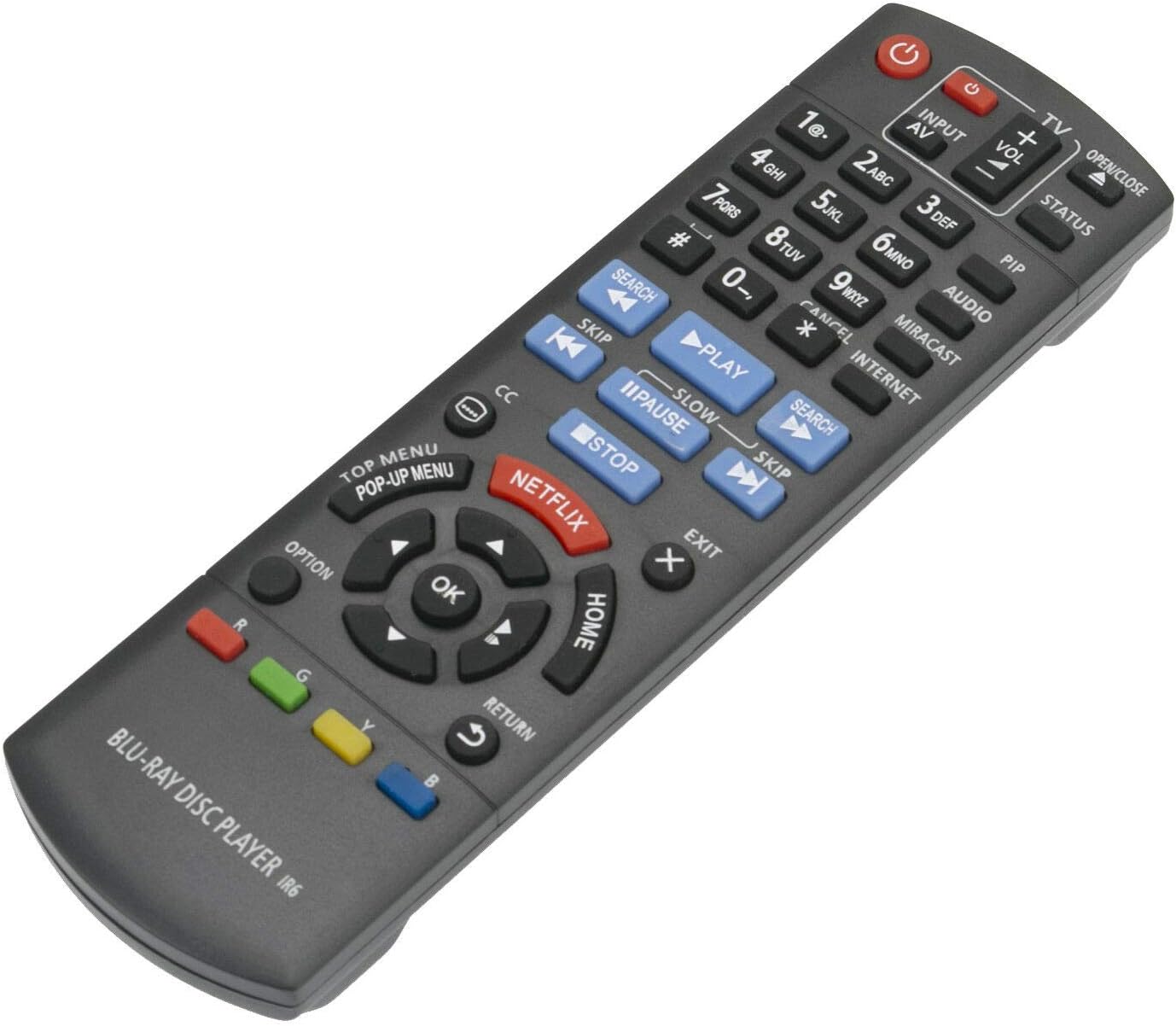
Figure 3.1: Front view of the remote control with button layout.
3.1 Key Functions
- Power (⏻): Turns the Blu-ray player on or off.
- Input/AV: Selects the input source on your television.
- Volume (+/-): Adjusts the volume of the connected audio system (if supported by the Blu-ray player's HDMI-CEC or similar function).
- Number Buttons (0-9): Used for direct track selection or entering numerical data.
- Play (▶), Pause (⏸), Stop (■): Standard media playback controls.
- Skip (⏭), Search (⏮): Navigate between tracks or fast-forward/rewind.
- Directional Pad (Up, Down, Left, Right) & OK: Navigates menus and confirms selections.
- HOME: Returns to the main menu of the Blu-ray player.
- TOP MENU/POP-UP MENU: Accesses the disc's top menu or pop-up menu.
- NETFLIX: Direct access button for the Netflix application.
- RETURN: Goes back to the previous screen or menu.
- OPTION: Displays options relevant to the current screen or playback.
- Color Buttons (Red, Green, Yellow, Blue): Used for specific functions within menus or applications, as indicated on-screen.
4. Maintenance
- Cleaning: Wipe the remote control with a soft, dry cloth. Do not use liquid cleaners or abrasive materials.
- Battery Replacement: Replace batteries when the remote's response becomes sluggish or stops working. Always replace both batteries at the same time with new ones of the same type (AAA alkaline).
- Storage: If the remote control will not be used for an extended period, remove the batteries to prevent leakage and potential damage.
- Environment: Avoid exposing the remote to extreme temperatures, direct sunlight, or high humidity.
5. Troubleshooting
| Problem | Possible Cause | Solution |
|---|---|---|
| Remote control does not work. |
|
|
| Some buttons do not respond. |
|
|
| Remote works intermittently. |
|
|
6. Specifications
- Model: N2QAYB000953
- Brand: FocalTop
- Compatibility: Panasonic Blu-ray Player models DMP-BDT360, DMP-BDT361, DMP-BDT460, DMP-BDT460PS
- Connectivity Technology: Infrared (IR)
- Controller Type: Button Control
- Power Source: 2 x AAA Alkaline Batteries (not included)
- Special Feature: Ergonomic design
7. Warranty and Support
This product is a replacement remote control. For specific warranty information or technical support, please refer to the documentation provided by the original seller or contact FocalTop directly. No explicit warranty information is provided within this manual.