
Edison Professional M20
Edison Professional iRocker M20 Portable Wireless Speaker User Manual
Model: M20
Introduction
This manual provides essential instructions for the safe and efficient operation of your Edison Professional iRocker M20 Portable Wireless Speaker. Please read this manual thoroughly before using the device and retain it for future reference.
The Edison Professional iRocker M20 is a portable Bluetooth speaker featuring dual 6.5-inch woofers, LED and RGB lighting, a rechargeable battery, and a wired microphone input. It is designed for versatile audio playback and entertainment.
Safety Information
- Do not expose the speaker to water or excessive moisture.
- Avoid placing the speaker near heat sources or in direct sunlight.
- Do not attempt to disassemble or modify the speaker. Refer all servicing to qualified personnel.
- Use only the specified charging adapter.
- Keep out of reach of children.
Package Contents
- Edison Professional iRocker M20 Portable Wireless Speaker
- Wired Microphone
- Charging Cable
- User Manual (this document)
Product Overview
Familiarize yourself with the main components and controls of your iRocker M20 speaker.

Figure 1: Front view of the Edison Professional iRocker M20 speaker, showcasing the dual 6.5-inch woofers with active blue LED lighting and the "iRocker" logo.
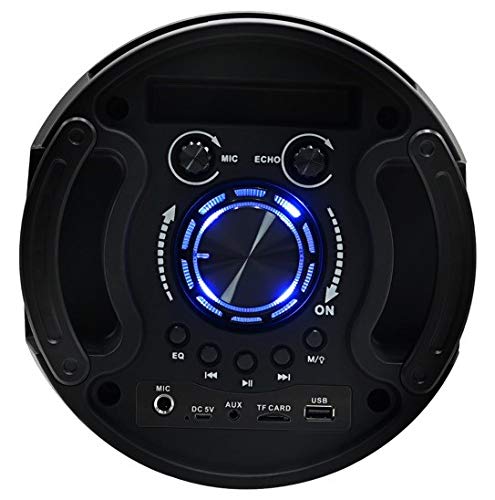
Figure 2: Top control panel of the iRocker M20, displaying the main volume knob, microphone and echo controls, media playback buttons, and input ports (MIC, DC 5V, AUX, TF CARD, USB).
Control Panel Features:
- MIC Input: For connecting the wired microphone.
- DC 5V: Power input for charging the speaker.
- AUX Input: 3.5mm audio input for external devices.
- TF CARD Slot: For playing audio from a TF (MicroSD) card.
- USB Port: For playing audio from a USB flash drive.
- EQ Button: To cycle through equalizer presets.
- Play/Pause Button: To control media playback.
- Previous/Next Buttons: To skip tracks.
- M/Q Button: Mode selection / Light control.
- MIC Volume Knob: Adjusts microphone volume.
- ECHO Knob: Adjusts microphone echo effect.
- Main Volume Knob: Controls overall speaker volume.
Setup
Charging the Speaker:
- Connect the provided charging cable to the DC 5V port on the speaker.
- Plug the other end of the charging cable into a compatible USB power adapter (not included) or a USB port.
- The charging indicator light will illuminate. The speaker is fully charged when the indicator light changes or turns off (refer to specific model behavior).
- A full charge typically takes approximately 3-4 hours.
Powering On/Off:
- To power on, locate the power switch (usually on the top panel) and slide it to the "ON" position.
- To power off, slide the power switch to the "OFF" position.
Operating Instructions
Bluetooth Mode:
- Power on the speaker. It will automatically enter Bluetooth pairing mode, indicated by a flashing "bt" on the display and an audible prompt.
- On your mobile device (smartphone, tablet, laptop), enable Bluetooth and search for available devices.
- Select "iRocker M20" from the list of devices.
- Once paired, the speaker will emit an audible confirmation, and the "bt" indicator will stop flashing.
- You can now play audio from your device through the speaker.
USB/TF Card Mode:
- Insert a USB flash drive or TF (MicroSD) card into the corresponding port on the control panel.
- The speaker will automatically detect the storage device and switch to USB or TF card mode, beginning playback of supported audio files.
- Use the Play/Pause and Previous/Next buttons to control playback.
AUX Mode:
- Connect one end of a 3.5mm audio cable (not included) to the AUX input port on the speaker.
- Connect the other end of the cable to the audio output jack of your external device (e.g., MP3 player, computer).
- Press the "M/Q" button repeatedly until "AUX" is displayed on the screen.
- Control audio playback from your connected device.
FM Radio Mode:
- Press the "M/Q" button repeatedly until "FM" is displayed on the screen.
- Press and hold the Play/Pause button to initiate an automatic scan for FM radio stations. The speaker will save all found stations.
- Use the Previous/Next buttons to navigate between saved stations.
Microphone Usage:
- Connect the wired microphone to the "MIC" input port.
- Adjust the "MIC" volume knob to control the microphone's output level.
- Adjust the "ECHO" knob to add an echo effect to your voice.
LED Lighting Control:
- The speaker features dynamic LED and RGB lighting.
- Press the "M/Q" button briefly to cycle through different lighting modes or to turn the lights off.
Maintenance
- Cleaning: Use a soft, dry cloth to clean the exterior of the speaker. Do not use liquid cleaners or abrasive materials.
- Storage: When not in use for extended periods, store the speaker in a cool, dry place, away from direct sunlight and extreme temperatures.
- Battery Care: To prolong battery life, avoid fully discharging the battery frequently. Charge the speaker regularly, even if not in use, to maintain battery health.
Troubleshooting
| Problem | Possible Cause | Solution |
|---|---|---|
| Speaker does not power on. | Battery is discharged. | Connect the speaker to a power source and charge it. |
| No sound from the speaker. | Volume is too low or muted. Incorrect input mode selected. Device not properly connected. | Increase the speaker's volume. Ensure the correct input mode (Bluetooth, AUX, USB, TF) is selected. Reconnect your device. |
| Bluetooth pairing fails. | Speaker is not in pairing mode. Device Bluetooth is off. Speaker is already connected to another device. | Ensure the speaker is in Bluetooth mode and "bt" is flashing. Turn your device's Bluetooth off and on again. Disconnect from other devices. |
| Microphone not working. | Microphone not properly connected. Microphone volume is too low. | Ensure the microphone is securely plugged into the MIC input. Adjust the "MIC" volume knob. |
| Distorted audio. | Volume too high. Source audio quality is poor. | Reduce the volume on both the speaker and the connected device. Try a different audio source. |
Specifications
| Model Number | M20 |
| Brand | Edison Professional |
| Speaker Type | Portable Wireless Speaker |
| Connectivity Technology | Bluetooth, USB, TF Card, AUX, FM Radio |
| Power Output | 250 Watts (Peak Music Power Output) |
| Woofers | Dual 6.5 inches |
| Power Source | DC 5V, Rechargeable Lithium Ion Battery (3600mAh) |
| Battery Life | Varies with usage and volume level |
| Charging Time | Approximately 3-4 hours |
| Dimensions (L x W x H) | 52.6 x 52.6 x 66.8 cm (20.7 x 20.7 x 26.3 inches) |
| Weight | 3.95 kg (8.7 lbs) |
| Color | Black |
| Compatible Devices | Smartphones, Tablets, Laptops, MP3 Players |
Warranty and Support
Edison Professional products are designed for reliability and performance. For warranty information and technical support, please refer to the warranty card included with your product or visit the official Edison Professional website.
For further assistance, please contact Edison Professional customer service.
Related documentsM20


Ask a question about this manual
Ask about setup, troubleshooting, compatibility, parts, safety, or missing instructions. Manuals+ will review the question and use this page’s manual context to help answer it.