
1. Product Overview
The Knowtek Engine Interface Module (EIM) Basic MK3, part number 258-9754, is a 12V controller designed for integration into generator control systems. This module facilitates essential engine monitoring and control functions, ensuring reliable operation and protection of the generator set.
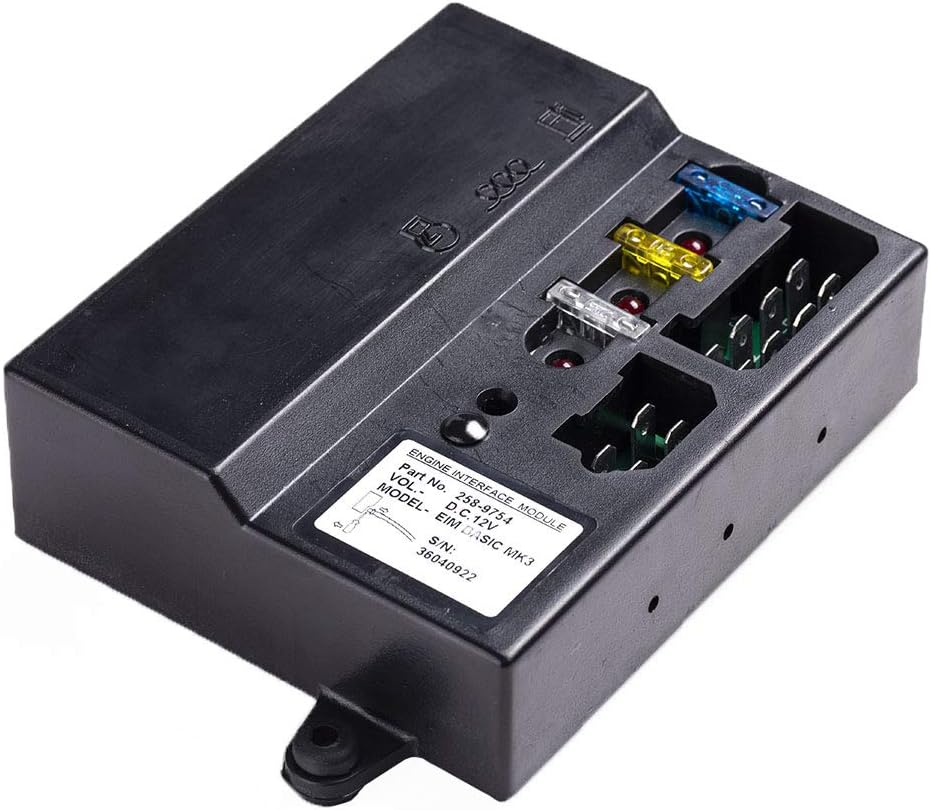
Figure 1.1: Front view of the Knowtek EIM Basic MK3 module, showing the label with part number and model, along with fuse slots and connection points.
This manual provides detailed instructions for the proper installation, operation, and maintenance of the EIM Basic MK3 module. Adherence to these guidelines is crucial for optimal performance and longevity of the unit.
2. Key Features
The EIM Basic MK3 module incorporates several features designed to enhance generator control and protection:
- Protection Function Data Display: Provides essential operational data for monitoring.
- Emergency Stop: Supports immediate shutdown in critical situations.
- Low Lubricating Oil Pressure Monitoring: Detects and signals low oil pressure to prevent engine damage.
- Speed Monitoring: Monitors engine speed for optimal performance.
- Manual Start/Stop Capability: Allows for direct control of engine operation.
- Charge Failure Detection: Alerts to issues with the battery charging system.
- Battery Voltage Monitoring: Displays the voltage of the battery.
- Distance Start/Stop: Enables remote control of engine start and stop functions.
- Preheat Control: Manages the engine preheating process for cold starts.
- High Cooling Water Temperature Monitoring: Warns of overheating conditions.
- Operation Time Tracking: Records the total operational hours of the engine.
3. Installation
Proper installation is critical for the safe and effective operation of the EIM Basic MK3 module. It is recommended that installation be performed by qualified personnel.
3.1 Mounting the Module
The module should be mounted in a secure location, protected from excessive vibration, moisture, and extreme temperatures. Ensure adequate ventilation around the unit.

Figure 3.1: Rear view of the EIM Basic MK3 module, highlighting the mounting tabs for secure installation.
- Select a flat, stable surface for mounting.
- Use appropriate fasteners (not included) through the designated mounting holes on the module.
- Ensure the module is firmly secured to prevent movement during generator operation.
3.2 Electrical Connections
Refer to the wiring diagram provided with your generator control system for specific connection details. The EIM Basic MK3 operates on a 12V DC supply.

Figure 3.2: Top-down view of the EIM Basic MK3, showing the various fuse types and terminal blocks for electrical connections.
- Power Supply: Connect the 12V DC power supply to the designated terminals. Observe correct polarity.
- Sensor Inputs: Connect engine sensors (oil pressure, water temperature, speed, etc.) to their respective input terminals.
- Control Outputs: Connect control lines for start/stop, preheat, and other functions to the appropriate output terminals.
- Fuses: The module includes various fuses for circuit protection. Ensure they are correctly rated and seated.
Warning: Disconnect all power sources before making any electrical connections to prevent electric shock or damage to the module and associated equipment.
4. Operation
The EIM Basic MK3 module functions as an interface between the engine and the generator control panel, interpreting sensor inputs and executing control commands.
4.1 Manual Start/Stop
To manually start or stop the engine, follow the procedures outlined in your generator's primary control panel manual. The EIM module processes these commands.
4.2 Remote Start/Stop
If configured for remote operation, the EIM module will respond to start/stop signals from a remote control unit or system. Ensure the remote system is properly connected and configured according to its own manual.
4.3 Monitoring Functions
The module continuously monitors various engine parameters. In the event of an abnormal condition (e.g., low oil pressure, high water temperature, charge failure), the EIM will trigger appropriate alarms or engine shutdowns as programmed by the main control panel.

Figure 4.1: An illustration showing a generator set with various control components, including where an EIM module would typically integrate.
5. Maintenance
The EIM Basic MK3 module is designed for reliability and requires minimal maintenance. However, periodic checks are recommended to ensure continued optimal performance.
- Visual Inspection: Periodically inspect the module for any signs of physical damage, loose connections, or corrosion.
- Cleaning: Keep the module clean and free from dust and debris. Use a soft, dry cloth for cleaning. Do not use solvents or abrasive cleaners.
- Fuse Check: If the module or connected components are not functioning, check the fuses within the EIM module. Replace blown fuses with ones of the correct rating.
- Connection Integrity: Ensure all electrical connections remain tight and secure.
Caution: Always disconnect power to the module before performing any maintenance or inspection.
6. Troubleshooting
This section provides guidance on common issues that may arise with the EIM Basic MK3 module. For complex problems, consult a qualified technician.
| Problem | Possible Cause | Solution |
|---|---|---|
| Module not powering on | No 12V DC supply; Blown fuse; Loose power connection | Check 12V supply; Inspect and replace fuses; Secure power connections. |
| Engine not starting via module | Incorrect wiring; Faulty start signal; Engine fault (e.g., low fuel) | Verify wiring against diagram; Check start signal source; Diagnose engine issues independently. |
| Incorrect sensor readings | Faulty sensor; Loose sensor connection; Incorrect sensor type | Test sensor functionality; Secure sensor connections; Ensure compatible sensors are used. |
| Module overheating | Poor ventilation; Overload on outputs | Ensure adequate airflow around the module; Check for short circuits or excessive current draw on outputs. |
7. Specifications
Detailed technical specifications for the Knowtek EIM Basic MK3 module:
- Part Number: 258-9754
- Model: EIM Basic MK3
- Voltage: 12V DC
- Package Dimensions: 6.42 x 6.3 x 2.6 inches
- Item Weight: 14.1 ounces
- Manufacturer: KNOWTEK
- ASIN: B0821G1RZF
8. Warranty and Support
For warranty information and technical support, please refer to the documentation provided at the time of purchase or contact Knowtek customer service directly. Keep your purchase receipt as proof of purchase.
Knowtek Customer Support: For assistance, please visit the Knowtek Store on Amazon or refer to the contact information provided with your product packaging.