
1. Introduction
The ANENG M1 is a portable 3 1/2 digit handheld digital multimeter designed for a wide range of electrical measurements. It accurately measures DC and AC voltage, DC and AC current, resistance, diode, transistor (hFE), and continuity. This device features a clear LCD backlight display for visibility in various lighting conditions and incorporates overload protection for safe and reliable operation. Its compact design makes it suitable for both professional and DIY use.

Figure 1: ANENG M1 Multimeter highlighting data keeping, backlit screen, and high precision features.
2. Safety Information
To ensure safe operation and service of the meter, follow these safety precautions:
- Always ensure the multimeter is set to the correct function and range before making any measurements.
- Do not exceed the maximum input limits specified for each range. Refer to the specifications section for details.
- Exercise extreme caution when working with live circuits. Avoid contact with bare wires or terminals.
- Never apply voltage to the meter when the rotary switch is set to current, resistance, diode, or continuity functions.
- Replace the battery immediately when the low battery indicator appears on the display to ensure accurate readings.
- Do not use the meter if it appears damaged or if the test leads are frayed or broken.
- Disconnect the test leads from the circuit before changing functions or ranges.
- Keep fingers behind the probe barriers during measurements.
3. Product Overview and Components
The ANENG M1 multimeter consists of the following main components:
- LCD Display: Shows measurement readings, units, and function indicators.
- Rotary Switch: Used to select the desired measurement function (Voltage, Current, Resistance, Diode, Transistor, Continuity).
- Input Jacks:
- VΩmA Jack: Positive input for voltage, resistance, diode, capacitance, and current measurements (up to 200mA).
- COM Jack: Common (negative) input for all measurements.
- 10A Jack: Positive input for high current measurements (up to 10A).
- HOLD Button: Freezes the current display reading.
- Backlight Button: Activates or deactivates the LCD backlight.
- Transistor (hFE) Socket: For testing NPN and PNP transistors.
- Back Support Stand: Allows the multimeter to stand upright on a flat surface.

Figure 2: Front view of the ANENG M1 Multimeter, showing the display, rotary switch, and input jacks.

Figure 3: The ANENG M1 Multimeter with its back support extended, allowing for hands-free operation.
4. Setup
4.1. Battery Installation
The ANENG M1 multimeter requires a 9V battery (NEDA 1604 or 6F22) for operation. To install or replace the battery:
- Ensure the multimeter is turned off and disconnect all test leads.
- Locate the battery compartment cover on the back of the unit.
- Unscrew the retaining screw(s) and remove the cover.
- Connect the 9V battery to the battery clip, observing correct polarity.
- Place the battery into the compartment and replace the cover, securing it with the screw(s).
4.2. Connecting Test Leads
For most measurements, connect the test leads as follows:
- Insert the black test lead into the COM (common) jack.
- Insert the red test lead into the VΩmA jack for voltage, resistance, diode, capacitance, and low current measurements.
- For high current measurements (up to 10A), move the red test lead to the 10A jack.
5. Operating Instructions
5.1. Power On/Off and Function Selection
To turn on the multimeter, rotate the central switch from the "OFF" position to the desired measurement function. To turn off, rotate the switch back to "OFF".
5.2. Measuring DC Voltage (V=)
- Connect the black lead to COM and the red lead to VΩmA.
- Set the rotary switch to the desired DC Voltage (V=) range. Start with the highest range if the voltage is unknown.
- Connect the test leads across the component or circuit to be measured, observing polarity.
- Read the voltage value on the LCD display.
Overload Protection: 250V rms for 200mV range, and 600V DC or rms AC for other ranges.
5.3. Measuring AC Voltage (V~)
- Connect the black lead to COM and the red lead to VΩmA.
- Set the rotary switch to the desired AC Voltage (V~) range. Start with the highest range if the voltage is unknown.
- Connect the test leads across the AC voltage source.
- Read the voltage value on the LCD display.
Overload Protection: 600V DC or AC rms.

Figure 4: Measuring common home AC voltage using the ANENG M1 Multimeter.
5.4. Measuring DC Current (A=)
- Important: Ensure the circuit is de-energized before connecting the multimeter in series.
- Connect the black lead to COM. For currents up to 200mA, connect the red lead to VΩmA. For currents up to 10A, connect the red lead to 10A.
- Set the rotary switch to the appropriate DC Current (A=) range.
- Open the circuit and connect the multimeter in series with the load.
- Apply power to the circuit and read the current value.
Overload Protection: 250V DC or AC rms for all ranges. F250Ma/250V fuse (10A range unfused).
5.5. Measuring AC Current (A~)
- Important: Ensure the circuit is de-energized before connecting the multimeter in series.
- Connect the black lead to COM. For currents up to 200mA, connect the red lead to VΩmA. For currents up to 10A, connect the red lead to 10A.
- Set the rotary switch to the appropriate AC Current (A~) range.
- Open the circuit and connect the multimeter in series with the load.
- Apply power to the circuit and read the current value.
Overload Protection: 250V DC or AC rms for all ranges. F250Ma/250V fuse (10A range unfused).
5.6. Measuring Resistance (Ω)
- Important: Ensure the circuit is de-energized and the component is isolated before measuring resistance.
- Connect the black lead to COM and the red lead to VΩmA.
- Set the rotary switch to the desired Resistance (Ω) range.
- Connect the test leads across the component to be measured.
- Read the resistance value on the LCD display.
Overload Protection: 250V DC or AC rms for all ranges.
5.7. Diode Test (→|)
- Connect the black lead to COM and the red lead to VΩmA.
- Set the rotary switch to the Diode Test (→|) position.
- Connect the red lead to the anode and the black lead to the cathode of the diode. A forward voltage drop will be displayed.
- Reverse the leads. An open circuit ("1" or "OL") indicates a good diode.
5.8. Transistor (hFE) Test
- Set the rotary switch to the hFE position.
- Identify if the transistor is NPN or PNP.
- Insert the transistor's emitter, base, and collector leads into the corresponding holes in the hFE socket.
- Read the hFE (DC current gain) value on the display.
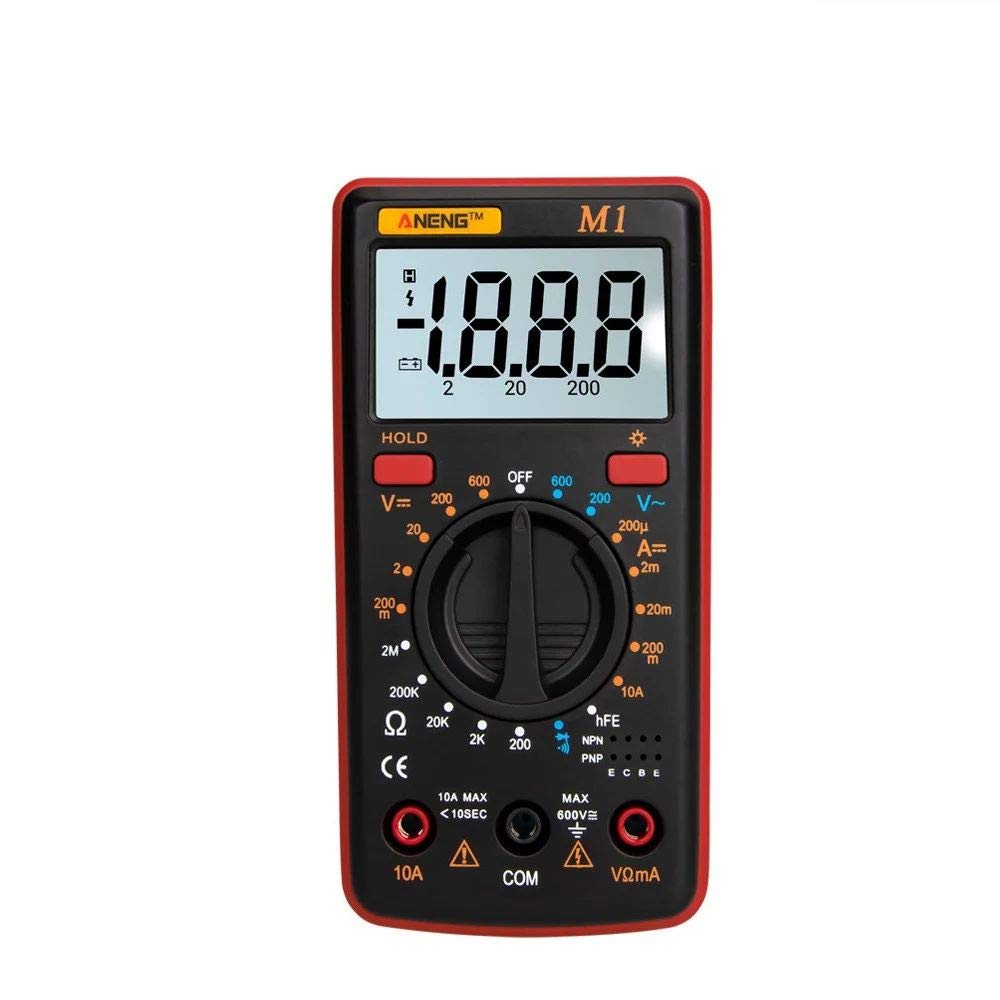
Figure 5: Performing a triode (transistor) measurement using the ANENG M1 Multimeter's dedicated socket.
5.9. Continuity Test (♫)
- Connect the black lead to COM and the red lead to VΩmA.
- Set the rotary switch to the Continuity Test (♫) position.
- Connect the test leads across the circuit or component.
- If the resistance is below approximately 50Ω, the buzzer will sound, indicating continuity.
5.10. Measuring Capacitance
- Important: Ensure the capacitor is fully discharged before measurement to prevent damage to the meter.
- Connect the black lead to COM and the red lead to VΩmA.
- Set the rotary switch to the Capacitance range (if available on your specific model).
- Connect the test leads across the capacitor terminals.
- Read the capacitance value on the LCD display.
Overload Protection: 250V DC or AC rms for all ranges. F250Ma/250V fuse.
5.11. Data Hold Function
Press the "HOLD" button to freeze the current reading on the display. Press it again to release the hold and resume live measurements.
5.12. Backlight Function
Press the backlight button (often indicated by a sun or light bulb icon) to turn on the LCD backlight. This improves visibility in dimly lit environments. Press it again to turn off the backlight.

Figure 6: The ANENG M1 Multimeter's HD backlit screen, demonstrating clear visibility in low light conditions.
6. Maintenance
6.1. Battery Replacement
When the low battery indicator ([BATTERY ICON]) appears on the display, the 9V battery needs to be replaced. Follow the steps outlined in Section 4.1. Battery Installation.
6.2. Fuse Replacement
The multimeter is protected by a F 250mA/250V self-restoring fuse for most ranges and a separate fuse for capacitance. The 10A current range is unfused. If the meter fails to measure current or capacitance, the fuse may need replacement. Contact qualified service personnel for fuse replacement.
6.3. Cleaning
To clean the meter, wipe the case with a damp cloth and a mild detergent. Do not use abrasives or solvents. Ensure the meter is completely dry before use.
7. Troubleshooting
| Problem | Possible Cause | Solution |
|---|---|---|
| No display or faint display | Low or dead battery | Replace the 9V battery. |
| "OL" or "1" displayed | Overload, out of range, or open circuit | Select a higher range, check for open circuit, or ensure input is within limits. |
| Incorrect readings | Incorrect function/range selected, poor test lead connection, or damaged leads | Verify function and range, ensure leads are securely connected, or replace damaged leads. |
| Cannot measure current | Blown fuse (for mA/uA ranges) or incorrect lead connection | Check fuse (contact service), ensure red lead is in the correct current jack (VΩmA or 10A). |
8. Specifications
| Parameter | Detail |
|---|---|
| Material | ABS |
| Color | Red (available in Red, Blue, Orange) |
| Maximum Voltage (Terminals to Earth Ground) | 600V DC or 600V AC |
| Fuse Protection | F 250mA/250V Self-restoring fuse (10A range unfused) |
| Power | 9V battery, NEDA 1604 or 6F22 |
| Display | LCD, 1999 counts, updates 2-3 times per second |
| Measuring Method | Dual-slope integration A/D converter |
| Over Range Indication | Only figure "1" on the display |
| Polarity Indication | "-" display for negative polarity |
| Operating Environment | 0°C to 40°C (32°F to 104°F) |
| Storage Temperature | -10°C to 50°C (14°F to 122°F) |
| Low Battery Indication | Battery icon appears on the display |
| DC Voltage Overload Protection | 250V rms for 200mV range, 600V DC or rms AC for other ranges |
| AC Voltage Overload Protection | 600V DC or AC rms |
| DC Current Overload Protection | 250V DC or AC rms for all ranges (F250Ma/250V fuse, 10A range unfused) |
| AC Current Overload Protection | 250V DC or AC rms for all ranges (F250Ma/250V fuse, 10A range unfused) |
| Resistance Overload Protection | 250V DC or AC rms for all ranges |
| Capacitance Overload Protection | 250V DC or AC rms for all ranges (F250Ma/250V fuse) |
| Item Size | 130.3mm x 67.6mm x 31.4mm (5.13" x 2.66" x 1.23") |
| Item Weight | 81g (2.86oz) |

Figure 7: Dimensions of the ANENG M1 Handheld Digital Multimeter.

Figure 8: Summary of key specifications for the ANENG M1 Multimeter.


