
1. Introduction
The EPEVER Tracer AN series solar charge controller, including the 100A Tracer 10415AN model, is designed for advanced solar power systems. It features a common negative design and an advanced Maximum Power Point Tracking (MPPT) control algorithm. An integrated LCD displays the operating status, providing real-time system information. This controller is engineered to maximize energy harvest from photovoltaic (PV) arrays by efficiently tracking the maximum power point under various conditions, potentially increasing energy utilization by 10%-30% compared to traditional PWM methods. It incorporates features such as charging power and current limitation, automatic charge reduction at high temperatures, and enhanced communication port protection for improved reliability. The three-stage adaptive charging mode extends battery life and enhances overall system performance, while comprehensive electronic protection functions safeguard system components against installation errors or failures, ensuring safe and reliable long-term operation.
2. Key Features
- Advanced MPPT Technology: Features ultra-fast tracking speed with a tracking efficiency of no less than 99.5%. The maximum DC/DC transfer efficiency reaches 98.6%, with full load efficiency up to 98%.
- Optimized MPP Tracking: The advanced MPPT control algorithm minimizes MPP loss rate and time, ensuring accurate recognition and tracking of multi-peak MPPs across a wider operating voltage range.
- Automatic System Voltage Identification: Automatically identifies 12V, 24V, 36V, or 48V system voltages. Includes an automatic control system to limit charging power and current if they exceed rated values.
- Versatile Battery Charging: Supports four charging options: sealed, gel, flooded, and user-defined battery types.
- System Expandability: Supports parallel connection of up to 6 units to expand system capacity. Features an external load switch signal control load relay for diversified load working modes.
- Protection Functions: Includes automatic over-temperature power reduction and battery temperature compensation functions. Ensures 100% full load operation within the specified working environment temperature range during charging and discharging.
3. Product Overview
3.1 Physical Appearance
The EPEVER Tracer 10415AN MPPT Solar Charge Controller features a robust design with a clear LCD display and control buttons on the front panel. Mounting brackets are integrated on the sides for secure installation.
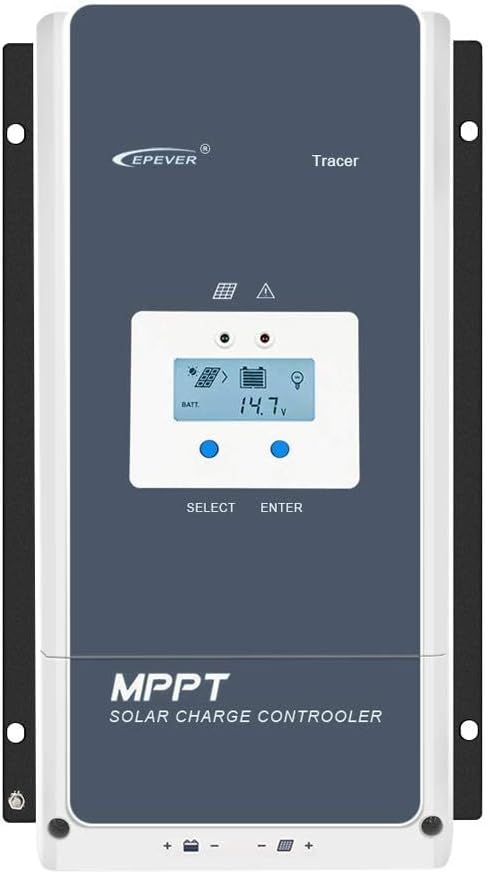
Figure 3.1: Front view of the EPEVER Tracer 10415AN MPPT Solar Charge Controller, showing the LCD screen and control buttons.
3.2 Dimensions
Understanding the physical dimensions is crucial for proper installation and space allocation. The controller measures approximately 394mm in length, 242mm in width, and 143mm in height.
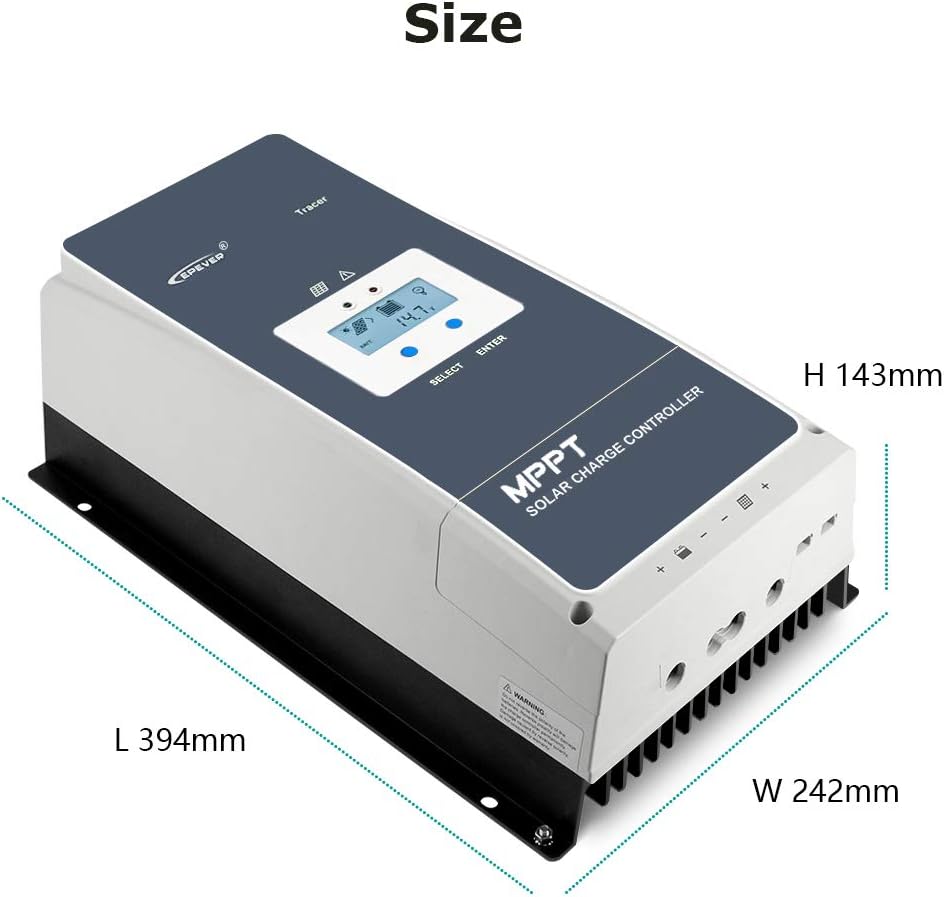
Figure 3.2: Diagram illustrating the length (L 394mm), width (W 242mm), and height (H 143mm) of the solar charge controller.
3.3 Component Identification
The rear and side panels of the controller house various terminals and ports for system connections and communication. Refer to the diagram and table below for detailed identification.

Figure 3.3: Detailed view of the controller's terminals and ports, with numbered labels for identification.
| No. | Component |
|---|---|
| 1 | Fuse |
| 2 | Battery Terminals |
| 3 | PV Terminals |
| 4 | Load Control Relay |
| 5 | RBVS Port |
| 6 | Utility/Generator Relay ON |
| 7 | Utility/Generator Relay OFF |
| 8 | RS485 Port (5VDC/200mA) |
| 9 | RTS Port (Remote Temperature Sensor) |
| 10 | Generator and Load Relay Enable |
| 11 | PV Reverse Polarity Alarm Indicator |
| 12 | Grounding Terminal |
4. Setup and Installation
4.1 Safety Precautions
- Ensure all connections are secure and correct before powering on the system.
- Always connect the battery first, then the solar panels, and finally the load. Disconnect in reverse order.
- Use appropriate wire gauges for all connections to prevent overheating and power loss.
- Install the controller in a well-ventilated area, away from direct sunlight, high temperatures, and moisture.
- Ensure proper grounding of the controller.
4.2 Connection Overview
The controller supports various external connections for enhanced functionality, including remote voltage sensing, temperature sensing, and relay control for generators or loads. The diagram below illustrates these conceptual connections.
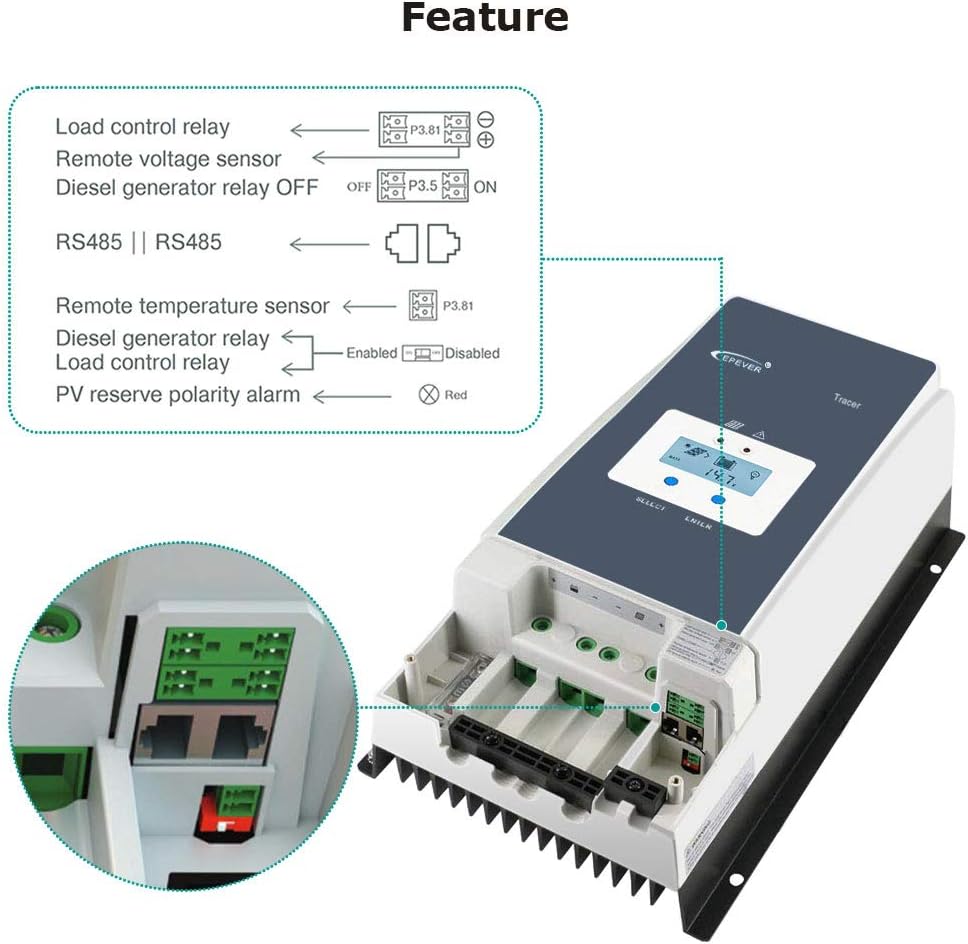
Figure 4.1: Diagram showing various connection features such as load control relay, remote voltage sensor, diesel generator relay, RS485, remote temperature sensor, and PV reverse polarity alarm.
4.3 Installation Steps
- Mount the Controller: Securely mount the controller to a vertical surface in a cool, dry, and well-ventilated location using the integrated mounting holes.
- Connect the Battery: Connect the battery cables to the battery terminals (2) on the controller. Ensure correct polarity (positive to positive, negative to negative).
- Connect the Solar Panels (PV Array): Connect the solar panel cables to the PV terminals (3) on the controller. Verify correct polarity.
- Connect the Load (Optional): If using a DC load directly from the controller, connect the load cables to the load terminals (not explicitly numbered in the provided image, but typically adjacent to battery terminals).
- Connect Grounding: Connect the grounding terminal (12) to an earth ground.
- Optional Connections: Connect any optional accessories such as the Remote Temperature Sensor (RTS Port 9), RS485 communication cable (Port 8), or relay control cables (Ports 4, 6, 7, 10) as required by your system design.
5. Operating Instructions
5.1 LCD Display and Navigation
The controller features an LCD display for monitoring system status and configuring settings. The display provides information on battery voltage, charging current, PV input, and more. Navigation is typically done using 'SELECT' and 'ENTER' buttons.

Figure 5.1: Close-up of the LCD display showing battery voltage and charging status, alongside the high-efficiency heat dissipation aluminum alloy fins.
5.2 Battery Type Settings
The Tracer 10415AN supports various battery types: Sealed, Gel, Flooded, and User-defined. It is critical to select the correct battery type in the controller's settings to ensure optimal charging and prolong battery life. Refer to the controller's detailed manual for specific steps on how to adjust these settings via the LCD or external communication tools.
5.3 Load Control
The controller can manage DC loads connected directly to its load terminals. It offers programmable load control modes, allowing users to set timers or activate/deactivate the load based on battery voltage or other parameters. This feature helps prevent over-discharge of the battery.
6. Maintenance
- Regular Inspection: Periodically inspect all wiring and connections for loose contacts, corrosion, or damage. Tighten any loose connections.
- Cleanliness: Keep the controller clean and free from dust and debris. Ensure the heat dissipation fins are not obstructed to maintain optimal cooling.
- Environmental Check: Verify that the installation environment remains within the specified temperature and humidity ranges.
- Battery Health: Monitor battery voltage and performance regularly. Ensure the battery type setting matches the installed battery.
- Firmware Updates: Check the manufacturer's website for any available firmware updates to ensure optimal performance and access to new features.
7. Troubleshooting
- No Charging:
- Check PV array connections and ensure solar panels are receiving adequate sunlight.
- Verify battery connections and voltage.
- Check for blown fuses (1).
- Low Charging Current:
- Ensure PV array voltage and current are within the controller's specifications.
- Check for shading on solar panels.
- Verify battery type settings are correct.
- Load Not Working:
- Check load connections and ensure the load is not exceeding the controller's rated capacity.
- Verify battery voltage is above the low voltage disconnect (LVD) setting.
- Check load control settings on the controller.
- Controller Display Off:
- Check battery connections and ensure battery voltage is present.
- Ensure the controller is receiving power.
- Error Codes: Refer to the comprehensive user manual for a list of specific error codes and their corresponding troubleshooting steps.
8. Technical Specifications
The EPEVER Tracer 10415AN offers robust performance for various solar applications. Key parameters are detailed below.
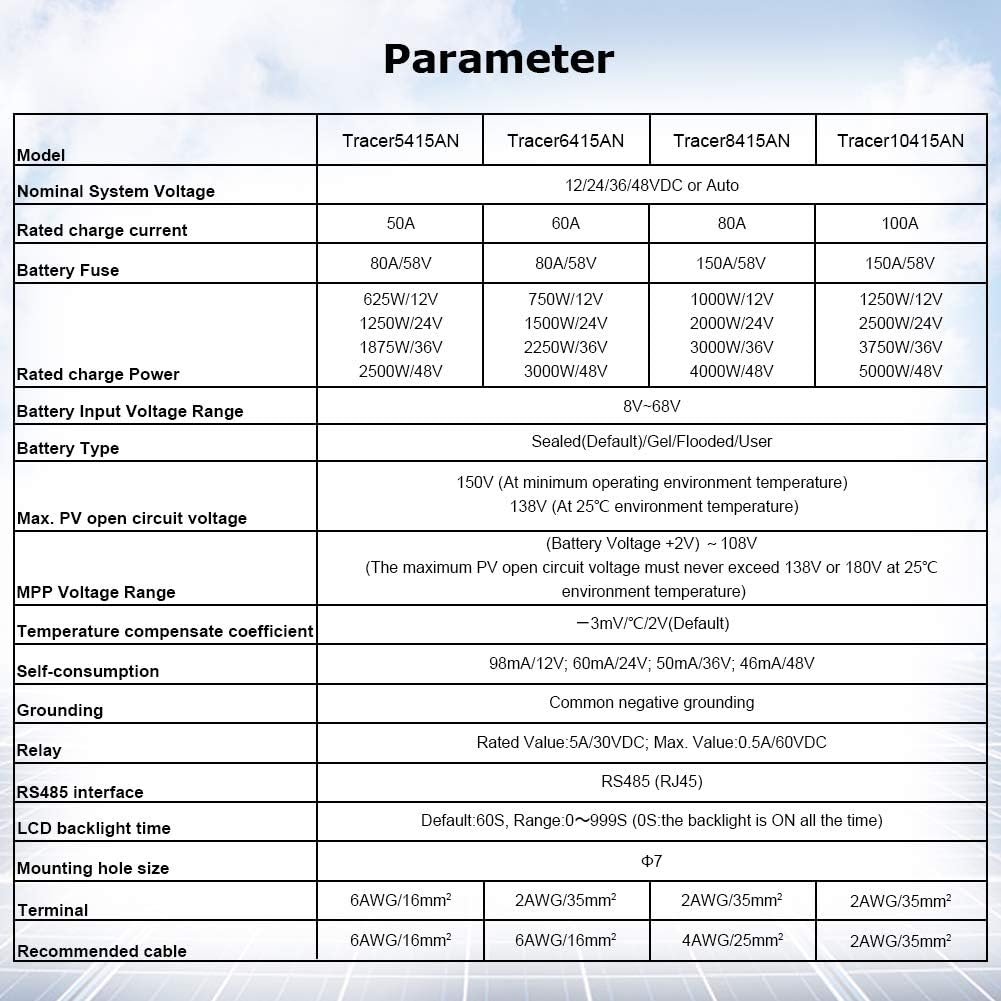
Figure 8.1: Table showing key technical parameters for Tracer AN series controllers, including the Tracer 10415AN.
| Parameter | Value |
|---|---|
| Nominal System Voltage | 12V/24V/36V/48V Auto |
| Rated Charge Current | 100A |
| Battery Fuse | 150A/58V |
| Rated Charge Power | 1250W/12V, 2500W/24V, 3750W/36V, 5000W/48V |
| Battery Input Voltage Range | 8V-68V |
| Battery Type Support | Sealed (Default), Gel, Flooded, User |
| Max. PV Open Circuit Voltage | 150V (at minimum operating environment temperature), 138V (at 25°C environment temperature) |
| MPP Voltage Range | (Battery Voltage +2V) ~ 108V |
| Temperature Compensate Coefficient | -3mV/°C/2V (Default) |
| Self-consumption | 98mA/12V, 60mA/24V, 50mA/36V, 46mA/48V |
| Grounding | Common Negative Grounding |
| Relay | Rated Value 5A/30VDC; Max. Value 0.5A/60VDC |
| RS485 Interface | RS485 (RJ45) |
| LCD Backlight Time | Default: 60S, Range 0~999S |
| Mounting Hole Size | Φ7 |
| Terminal | 2AWG/35mm² |
| Recommended Cable | 2AWG/35mm² |
| UPC | 797550115970 |
| Manufacturer | SolaMr |
| Package Dimensions | 49 x 31.5 x 22.5 cm; 8.46 kg |
| Batteries Required | No |
| ASIN | B081Z31QVL |
| Item Model Number | 100A (Tracer 10415AN) |
| Available from | November 26, 2019 |
| Display Type | LCD |
| Operating Temperature | 25 Degrees Celsius |
9. Warranty and Support
EPEVER products typically come with a manufacturer's warranty. Please refer to the warranty card included with your product or visit the official EPEVER website for detailed warranty terms and conditions. For technical support, troubleshooting assistance, or warranty claims, please contact the seller or authorized EPEVER service center. The seller for this product is SolaMr-EU.
For further assistance, you may visit the EPEVER Store on Amazon.


