
1. Product Overview
The HP F660G is a dual dash camera system designed to record both front and rear views of your vehicle. It features Full HD 1080P recording for the front camera and 720P for the rear, a 2-inch LCD display, built-in GPS, and G-Sensor for emergency recording. Its wide 150-degree angle lens captures multiple driving lanes, and advanced night vision technology ensures clear footage in low-light conditions.
Key Features
- Dual Camera Recording: Front 1080P Full HD and Rear 720P recording.
- Wide Angle Lens: 150° wide angle for extensive coverage.
- Built-in GPS: Records location and speed data.
- G-Sensor: Automatically detects collisions and locks footage.
- Super Night Vision: Enhanced low-light recording capability.
- Loop Recording: Overwrites oldest footage when the memory card is full.
- Supercapacitor Power: Designed for improved temperature resistance and longer lifespan compared to lithium-ion batteries.
- 2-inch LCD Display: For live view and playback.
Package Contents
Verify that all items are present in your package:
- 1 x HP Dash Camera f660g (Primary Camcorder)
- 1 x Rear Camcorder
- 1 x Car Power Supply (with Mini USB Connector)
- 1 x 32GB Micro SD Card
- 1 x User Manual
- 2 x Electrostatic Sticker
- 1 x Double-side Sticker
- 5 x Cord Clip
- 1 x Remover Tool

Image: The HP F660G dash cam with its primary camcorder, rear camcorder, car charger, electrostatic sticker, user manual, cord clips, remover tool, and micro SD card.
2. Setup Guide
Installation Steps
- Prepare the Windshield: Clean the area on your windshield where you intend to mount the dash cam. Ensure it is free from dust and grease.
- Apply Electrostatic Sticker: Place one of the electrostatic stickers on the cleaned area of the windshield. This allows for easier removal and repositioning of the dash cam without leaving residue.
- Mount the Front Camera: Attach the primary dash cam to the electrostatic sticker using the double-sided adhesive. Ensure the camera lens has an unobstructed view of the road. Adjust the angle as needed.
- Install the Rear Camera: Mount the rear camcorder on the rear windshield using the provided adhesive. Route the cable from the rear camera to the front camera, tucking it neatly along the headliner and A-pillars using the cord clips and remover tool.
- Connect Power: Plug the car power supply (with Mini USB Connector) into your vehicle's 12V power outlet and connect the Mini USB end to the primary dash cam.
- Insert Micro SD Card: Insert the provided 32GB Micro SD card into the designated slot on the primary dash cam. Ensure it is inserted correctly until it clicks into place.
- Format SD Card: Before first use, or if experiencing issues, format the SD card through the camera's menu settings. This ensures proper functionality and prepares the card for recording.

Image: Illustration of the dash cam mounting process, including the electrostatic film and angle adjustment.
Initial Power On and Settings
Once connected to power, the dash cam will automatically power on and begin recording when your vehicle starts. It will power off when the vehicle is shut off. Adjust date, time, and other preferences via the on-screen menu.
Video: This video demonstrates the dash cam's functionality in various driving scenarios, highlighting its ability to capture clear footage of your journey.
3. Operating Instructions
Basic Recording
The HP F660G dash cam automatically starts recording when the vehicle's ignition is turned on and stops when the ignition is turned off. Footage is saved in segments to the Micro SD card.
Loop Recording
The camera continuously records by overwriting the oldest footage with new content once the memory card is full. This ensures uninterrupted recording without manual intervention.
G-Sensor and Emergency Recording
The built-in G-Sensor detects sudden impacts or collisions. When triggered, it automatically saves and locks the current footage segment into a protected "EVENT" file, preventing it from being overwritten by loop recording. This preserves critical evidence of incidents.
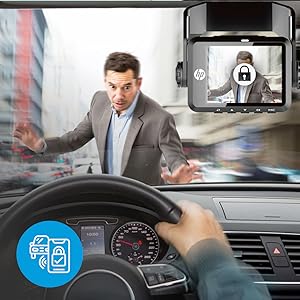
Image: The dash cam screen showing an emergency recording triggered by the G-Sensor, indicating collision detection.
Night Vision
The HP F660G features Super Night Vision technology, enhancing the sensor's light sensitivity to provide clear images even in low-light environments, such as during nighttime driving or in tunnels.

Image: The dash cam capturing high-definition footage in a low-light environment, demonstrating its night vision capabilities.
Parking Mode (Optional)
For 24/7 video recording even when your vehicle is off, the Parking Mode feature can be utilized. This requires a separate hardwire kit (e.g., c501 ACC cable) to provide continuous power. When activated, the camera will detect impacts or motion while parked and record footage.
Video: This video illustrates the dash cam's features, including its ability to record in various lighting conditions and its G-Sensor functionality.
4. Maintenance
SD Card Management
The provided 32GB Micro SD card has a specific partitioning: 50% for general video recording, 35% for emergency video recording, and the remaining space for photos and system reserved files. If you require longer retention of general video footage before it is overwritten, consider using a 64GB or larger SD card. Regularly format the SD card (at least once a month) through the camera's settings to maintain optimal performance and prevent data corruption.
Cleaning
Wipe the camera lens and screen with a soft, dry cloth to remove dust and smudges. Do not use harsh chemicals or abrasive materials, as this may damage the lens or display.
5. Troubleshooting
Common Issues and Solutions
- Camera not powering on:
- Ensure the car power supply is securely connected to both the dash cam and the vehicle's 12V outlet.
- Check if the vehicle's 12V outlet is functioning.
- Recording stops unexpectedly:
- Format the Micro SD card through the camera's settings.
- Ensure the SD card is a high-endurance type, suitable for continuous recording.
- The SD card might be full; loop recording should prevent this, but check for excessive locked files.
- Poor video quality:
- Clean the camera lenses of both front and rear cameras.
- Ensure the camera is securely mounted and not vibrating excessively.
- Check settings for video resolution and exposure.
- GPS not acquiring signal:
- Ensure the dash cam has a clear view of the sky and is not obstructed by metallic tints or other devices.
- Relocate the dash cam if necessary to improve GPS reception.
- Audio not recording:
- Check the audio recording setting in the camera's menu to ensure it is enabled.
6. Specifications
| Feature | Detail |
|---|---|
| Brand | HP |
| Model Name | F660G |
| Front Video Resolution | 1080p Full HD |
| Rear Video Resolution | 720p |
| Field Of View | 150 Degrees |
| Screen Size | 2 Inches |
| Display Type | LCD |
| Connectivity Technology | USB |
| Special Features | Built-in GPS, G-Sensor, Forward Collision Warning, Lane Departure Warning System, Super Night Vision |
| Power Source | Supercapacitor |
| Included Memory Card Size | 32 GB Micro SD |
| Item Dimensions (D x W x H) | 1.78"D x 2.28"W x 1.71"H |
| Item Weight | 82 Grams |
7. Warranty and Support
Warranty Information
For warranty information regarding your HP F660G Dual Dash Cam, please contact the seller directly. You may also find detailed warranty terms and conditions on the manufacturer’s official website.
Customer Support
If you encounter any issues or have questions not covered in this manual, please refer to the contact information provided by your retailer or visit the official HP support website for assistance.


