
1. Introduction
Thank you for choosing the HABOTEST HT106B Voltage Tester. This device is designed to quickly and accurately detect the wiring status of electrical sockets, including correct wiring, missing ground, live/neutral reverse, live/ground reverse, and open live/neutral circuits. It also features an RCD (Residual Current Device) test function to ensure the safety of your electrical installations. Please read this manual thoroughly before use to ensure safe and proper operation.
2. Safety Information
WARNING: Electrical shock hazard. Always exercise extreme caution when working with electricity.
- Do not use the device if it appears damaged or is not functioning correctly.
- Ensure your hands are dry before handling the device or any electrical outlets.
- Do not use the device in wet environments.
- This device is intended for testing standard AC outlets. Do not use it for other purposes.
- Always follow local electrical safety codes and regulations.
- The RCD test function should only be performed by qualified personnel or with extreme caution, as it will trip the RCD/GFCI.
3. Product Overview
The HABOTEST HT106B is a compact and easy-to-use socket tester. It features a clear LED indicator panel to display various wiring conditions and a button for RCD testing.
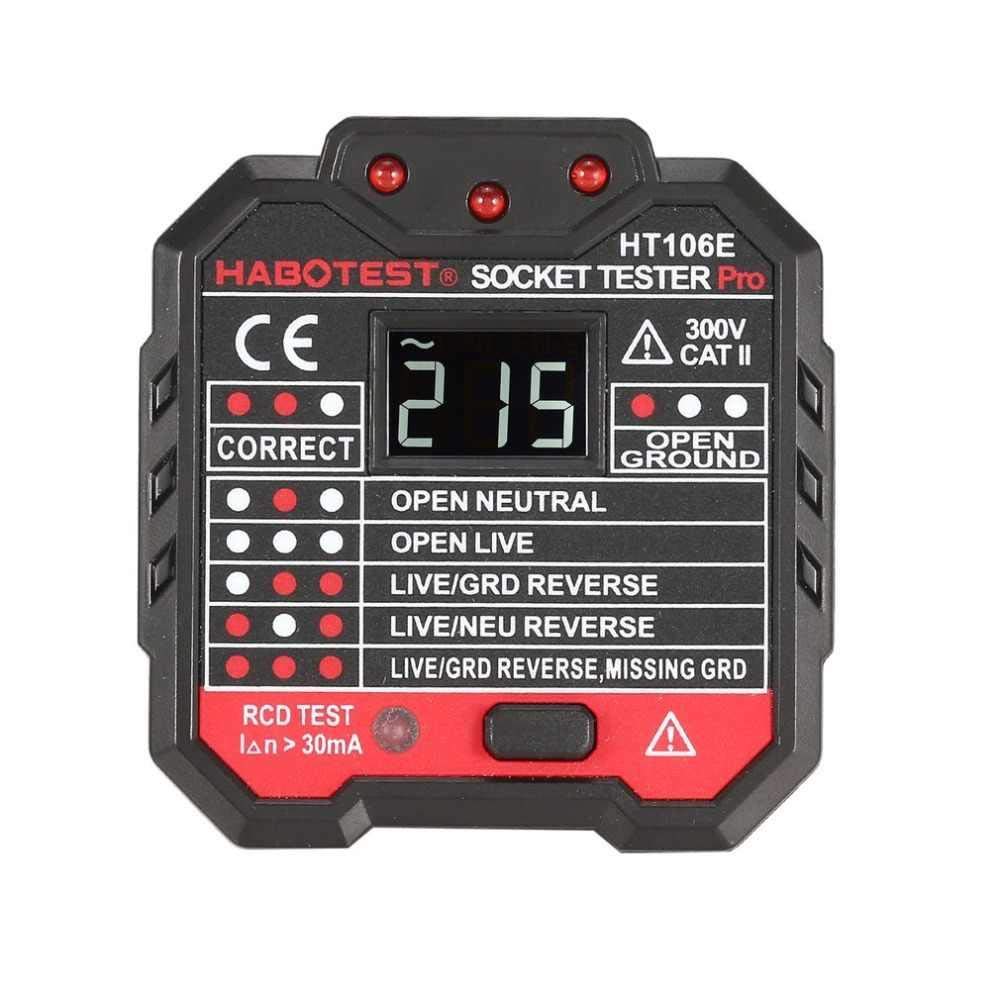
Image 1: The HABOTEST HT106B Voltage Tester and its accompanying manual. The device features a display panel with LED indicators for various wiring statuses and a prominent RCD test button.
The indicator panel typically includes labels such as:
- CORRECT: Indicates proper wiring.
- OPEN NEUTRAL: Indicates a break in the neutral wire.
- OPEN LIVE: Indicates a break in the live wire.
- LIVE/GRD REVERSE: Indicates live and ground wires are swapped.
- LIVE/NEU REVERSE: Indicates live and neutral wires are swapped.
- LIVE/GRD REVERSE, MISSING GRD: Indicates live and ground wires are swapped, and the ground connection is missing.
4. Setup
The HABOTEST HT106B is designed for immediate use. No battery installation is typically required as it draws power directly from the socket being tested.
- Ensure the device is clean and free from any visible damage.
- Verify that the plug type of the HT106B matches the socket you intend to test. If an adapter is needed for your region, ensure it is a certified and safe adapter.

Image 2: An example of a plug adapter, which may be required for compatibility with different regional socket types. Always use a certified adapter.
5. Operating Instructions
To test a socket for correct wiring:
- Plug the HABOTEST HT106B directly into the electrical socket you wish to test.
- Observe the LED indicators on the device's panel.
- Refer to the legend on the device or in the 'Product Overview' section of this manual to interpret the illuminated LEDs.
- A 'CORRECT' indication means the socket is wired properly. Any other indication points to a wiring fault that needs to be addressed by a qualified electrician.

Image 3: The HABOTEST HT106B Voltage Tester displaying its LED indicator panel, which illuminates to show the detected wiring status of the socket.
6. RCD Test Function
IMPORTANT: The RCD test will trip the RCD/GFCI circuit breaker. Ensure all connected devices are safely shut down or disconnected before performing this test to prevent data loss or damage.
To perform an RCD test:
- Plug the HABOTEST HT106B into a socket protected by an RCD/GFCI.
- Ensure the initial wiring test (as described in Section 5) indicates 'CORRECT' wiring. Do not proceed with the RCD test if there are wiring faults.
- Press the 'RCD TEST' button on the device.
- If the RCD/GFCI trips (power is cut off to the circuit), it indicates that the RCD is functioning correctly.
- If the RCD/GFCI does not trip, the RCD may be faulty and should be inspected by a qualified electrician.
- Reset the RCD/GFCI after the test.
7. Maintenance
Proper maintenance ensures the longevity and accuracy of your HABOTEST HT106B.
- Cleaning: Wipe the device with a dry, soft cloth. Do not use abrasive cleaners or solvents.
- Storage: Store the device in a cool, dry place, away from direct sunlight and extreme temperatures.
- Inspection: Periodically inspect the device for any signs of physical damage, such as cracks in the casing or bent pins. Do not use if damaged.
8. Troubleshooting
| Problem | Possible Cause | Solution |
|---|---|---|
| No LEDs illuminate when plugged in. | No power in the socket (dead outlet), or device malfunction. | Test the socket with another known working device. If still no power, check circuit breaker. If other devices work, the tester may be faulty. |
| RCD test button does not trip the RCD. | RCD is faulty, or the socket is not protected by an RCD. | Verify the socket is indeed RCD protected. If it is, have the RCD inspected by a qualified electrician. |
| Inconsistent readings. | Loose connection, faulty socket, or device malfunction. | Ensure the tester is firmly plugged in. Test multiple sockets. If issues persist, consult an electrician or consider device replacement. |
9. Specifications
- Model: HT106B
- Brand: HABOTEST
- Measurement Type: Voltage Meter / Socket Tester
- Power Source: Draws power from the tested socket (Battery Powered - no internal battery for user replacement)
- Color: Red
- Dimensions: 12.4 x 10.4 x 8.5 cm (Shipping Dimensions)
- Weight: 179.99 grams (Shipping Weight)
- Manufacturer: HABOTEST
10. Warranty and Support
For warranty information and technical support, please refer to the documentation provided with your purchase or contact your retailer. Keep your proof of purchase for any warranty claims.


