
Introduction
Thank you for purchasing the Muse M-1935 DJ Bluetooth Party Speaker. This powerful audio system is designed to deliver high-quality sound with dynamic light effects, perfect for any gathering. Featuring Bluetooth connectivity, USB playback, AUX input, and a microphone jack, it offers versatile entertainment options. Please read this manual carefully before using the device to ensure proper operation and to maximize its performance.
Important Safety Instructions
- Read these instructions.
- Keep these instructions.
- Heed all warnings.
- Follow all instructions.
- Do not use this apparatus near water.
- Clean only with a dry cloth.
- Do not block any ventilation openings. Install in accordance with the manufacturer’s instructions.
- Do not install near any heat sources such as radiators, heat registers, stoves, or other apparatus (including amplifiers) that produce heat.
- Protect the power cord from being walked on or pinched, particularly at plugs, convenience receptacles, and the point where they exit from the apparatus.
- Only use attachments/accessories specified by the manufacturer.
- Unplug this apparatus during lightning storms or when unused for long periods of time.
- Refer all servicing to qualified service personnel. Servicing is required when the apparatus has been damaged in any way, such as power-supply cord or plug is damaged, liquid has been spilled or objects have fallen into the apparatus, the apparatus has been exposed to rain or moisture, does not operate normally, or has been dropped.
Package Contents
Please check that all items listed below are included in your package:
- Muse M-1935 DJ Party Speaker
- Remote Control
- AUX IN Cable (3.5mm)
- Wired Microphone
- Power Cable
- User Manual

Image showing the Muse M-1935 DJ Party Speaker along with its standard accessories: a remote control, a 3.5mm AUX input cable, and a wired microphone. These components are essential for full functionality and versatile use of the speaker system.
Product Overview
The Muse M-1935 DJ is a tower-type party speaker featuring a robust design and multiple connectivity options. It includes an amber LED display for clear information, integrated color lights and flash effects for dynamic visuals, and various input ports for audio playback.
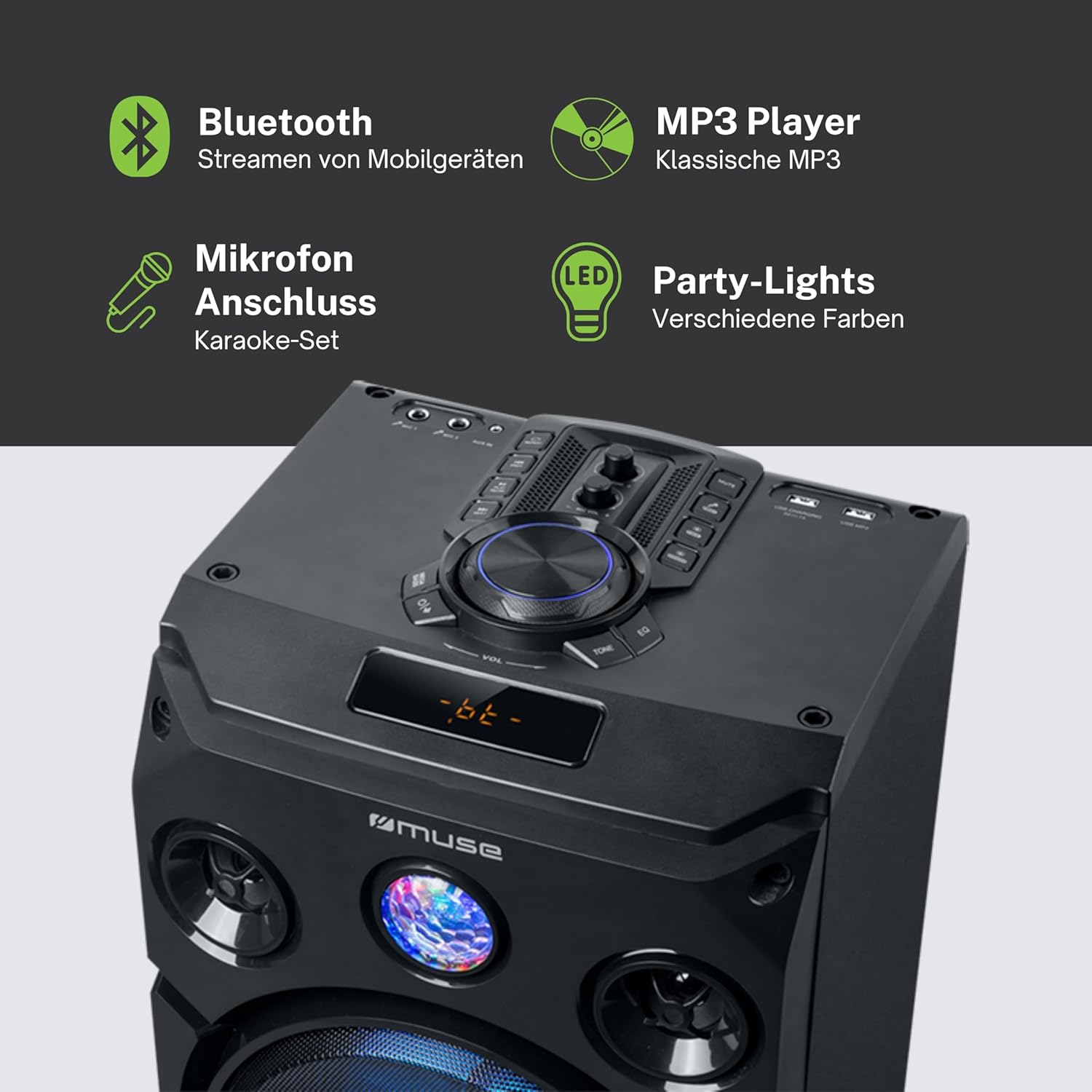
This image provides a detailed view of the speaker's key features, including the control panel at the top, the amber LED display, and the integrated party lights. Icons indicate support for Bluetooth streaming, MP3 playback via USB, microphone connection for karaoke, and dynamic party light effects.
Setup
1. Power Connection
- Ensure the speaker is placed on a stable, flat surface.
- Connect the power cable to the AC IN port on the back of the speaker.
- Plug the other end of the power cable into a standard wall outlet (AC 100-240V, 50/60Hz).
2. Audio Connections (Optional)
- AUX Input: For connecting external audio devices (e.g., smartphone, tablet, MP3 player) via a 3.5mm audio cable. Insert one end of the AUX cable into the AUX IN port on the speaker and the other end into your device's headphone jack.
- USB Playback: Insert a USB flash drive containing MP3 audio files into the USB port. The speaker will automatically detect and begin playing compatible files.
3. Microphone Connection (Optional)
- Connect the wired microphone to the MIC IN jack on the speaker. Adjust the microphone volume using the dedicated control on the speaker's panel.
Operating Instructions
1. Powering On/Off
- Press the POWER button on the control panel or remote control to turn the speaker on or off.
2. Bluetooth Pairing
- Turn on the speaker. The LED display will show the current mode.
- Press the MODE button to select Bluetooth mode. The display will show "BT" and an indicator will flash, signifying it's ready for pairing.
- On your Bluetooth-enabled device (smartphone, tablet, etc.), enable Bluetooth and search for available devices.
- Select "MUSE M-1935 DJ" from the list. Once paired, the speaker will emit a confirmation sound, and the Bluetooth indicator will stop flashing.
- You can now stream audio wirelessly from your device to the speaker.
3. USB Playback
- Insert a USB flash drive into the USB port. The speaker will automatically switch to USB mode and begin playing MP3 files.
- Use the PLAY/PAUSE, NEXT, and PREVIOUS buttons to control playback.
4. AUX Input
- Connect your external audio device to the AUX IN port using the provided 3.5mm cable.
- Press the MODE button to select AUX mode. Audio will now play through the speaker.
5. FM Radio Operation
- Press the MODE button to select FM Radio mode.
- Press and hold the PLAY/PAUSE button to initiate an automatic scan for FM stations. The speaker will save found stations as presets (up to 60 presets).
- Use the NEXT and PREVIOUS buttons to navigate through saved stations.
6. Microphone Usage
- Ensure the microphone is connected to the MIC IN jack.
- Adjust the microphone volume using the dedicated MIC VOL knob on the control panel.
7. Light Effects Control
- The speaker features integrated color lights and flash effects. Use the LIGHT button on the control panel or remote to cycle through different light modes or turn them off.
8. Volume and Tone Control
- Adjust the master volume using the large VOLUME knob.
- Use the BASS and TREBLE controls (if available) to fine-tune the audio output.

This diagram visually represents the diverse functionalities of the speaker, such as dynamic color and flash lighting, the clear amber LED display, USB connectivity for MP3 playback and charging, built-in FM radio with extensive preset memory, and a versatile AUX input for external devices.
Maintenance
- Cleaning: Disconnect the power before cleaning. Use a soft, dry cloth to wipe the exterior of the speaker. Do not use liquid cleaners or aerosol sprays.
- Storage: When not in use for extended periods, store the speaker in a cool, dry place, away from direct sunlight and extreme temperatures.
- Battery Care: The speaker contains a Lithium-ion battery. For optimal battery life, avoid fully discharging the battery frequently and store the unit with a partial charge if not used for long periods.
Troubleshooting
| Problem | Possible Cause | Solution |
|---|---|---|
| No power | Power cable not connected; Power outlet faulty; Speaker turned off. | Ensure power cable is securely connected. Try a different power outlet. Press the POWER button to turn on the speaker. |
| No sound | Volume too low; Incorrect input mode selected; Audio cable not connected properly (AUX); Bluetooth not paired. | Increase volume. Select the correct input mode (Bluetooth, AUX, USB, FM). Check audio cable connections. Re-pair Bluetooth device. |
| Bluetooth pairing fails | Speaker not in pairing mode; Device too far; Interference. | Ensure speaker is in Bluetooth pairing mode. Move device closer to speaker (within 10m). Avoid obstacles and other wireless devices. |
| USB playback not working | USB drive not formatted correctly; Incompatible file types; USB drive damaged. | Ensure USB drive is FAT32 formatted. Only MP3 files are supported. Try a different USB drive. |
| Microphone not working | Microphone not connected; MIC VOL too low. | Ensure microphone is securely plugged into MIC IN. Increase the MIC VOL knob. |
Specifications
| Feature | Specification |
|---|---|
| Model Number | M-1935 DJ |
| Output Power | 400 Watts |
| Speaker Type | Tower |
| Connectivity Technology | Bluetooth, USB, AUX |
| Audio Input | Microphone jacks, AUX IN (3.5mm) |
| Special Features | Bluetooth, Color Lights, Flash Effects, Amber LED Display, FM Radio (60 presets), USB Charging |
| Power Source | Electric Cable, Built-in Lithium-ion Battery |
| Material | Plastic |
| Color | Black |
| Product Dimensions (L x W x H) | 83.5 x 26.5 x 28.7 cm |
| Item Weight | 9.05 Kilograms |
| Manufacturer | MUSE |
| Country of Origin | Belgium |

This technical drawing provides precise measurements of the Muse M-1935 DJ speaker, indicating its height (835mm), width (287mm), and depth (265mm). These dimensions are crucial for planning placement and transportation.
Warranty and Support
Manufacturer Warranty
The Muse M-1935 DJ Party Speaker comes with a three-year warranty against manufacturing defects. Please retain your proof of purchase for warranty claims. This warranty covers defects in materials and workmanship under normal use. It does not cover damage caused by misuse, accidents, unauthorized modifications, or normal wear and tear.
Spare Parts Availability
Spare parts for this product are guaranteed to be available for 2 years from the date of purchase within the EU.
Customer Support
For technical assistance, warranty service, or general inquiries, please contact Muse customer support. Refer to the official Muse website or your purchase documentation for the most up-to-date contact information.


