
RAPOO H1030
Rapoo H1030 Bluetooth Stereo Headset User Manual
Model: H1030 | Brand: RAPOO
1. Introduction
Thank you for choosing the Rapoo H1030 Bluetooth Stereo Headset. This manual provides detailed instructions to help you set up, operate, and maintain your headset for optimal performance. Please read this manual thoroughly before using the product.
2. Product Overview
The Rapoo H1030 is a wireless over-ear stereo headset designed for comfortable audio listening and communication. It features Bluetooth connectivity, an integrated microphone, and volume controls.

Figure 2.1: Front view of the Rapoo H1030 Bluetooth Stereo Headset. This image shows the overall design of the headset, with both earcups and the headband visible from the front.

Figure 2.2: Side view of the Rapoo H1030 Bluetooth Stereo Headset, illustrating the adjustable headband and the design of the over-ear cushions.
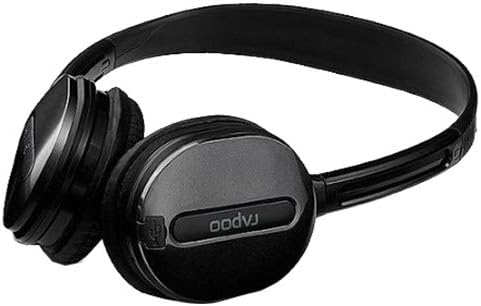
Figure 2.3: Close-up view of an earcup, highlighting the integrated controls and the "rapoo" branding. This image details the buttons for volume and playback control, and potentially the charging port or microphone location.
2.1 Key Features
- Wireless Bluetooth connectivity (2.4 GHz, up to 10 meters / 33 feet range)
- Over-ear design for comfort
- Built-in omni-directional microphone with noise cancelling
- Integrated volume control
- Rechargeable lithium battery (360mAh)
- Adjustable headband
3. Setup
3.1 Charging the Headset
Before initial use, fully charge the headset. The Rapoo H1030 features a built-in 360mAh rechargeable lithium battery.
- Locate the charging port on the headset (refer to Figure 2.3 for general control area).
- Connect the charging cable (typically Micro-USB) to the headset and the other end to a USB power source (e.g., computer USB port, USB wall adapter).
- The charging indicator light will illuminate (color may vary, refer to product packaging for specifics).
- A full charge takes approximately 2 hours. The indicator light will change or turn off once charging is complete.
A fully charged headset provides approximately 6 hours of usage time.
3.2 Bluetooth Pairing
The headset uses smart connection technology for easy pairing.
- Ensure the headset is charged and powered off.
- Press and hold the power button (or pairing button, if separate) on the headset until the indicator light begins to flash rapidly, indicating it is in pairing mode.
- On your device (smartphone, tablet, computer), enable Bluetooth and search for available devices.
- Select "RAPOO H1030" (or similar name) from the list of found devices.
- Once connected, the indicator light on the headset will typically stop flashing and remain solid, or turn off.
- The headset is now ready for use. It should automatically reconnect to the last paired device when powered on and within range.
4. Operating Instructions
4.1 Power On/Off
- Power On: Press and hold the power button for approximately 3 seconds until the indicator light illuminates.
- Power Off: Press and hold the power button for approximately 3-5 seconds until the indicator light turns off.
4.2 Volume Control
The headset features integrated volume controls.
- Increase Volume: Press the Volume Up button.
- Decrease Volume: Press the Volume Down button.
4.3 Call Management
When connected to a smartphone, the headset can manage phone calls.
- Answer/End Call: Press the Multi-function button (often the power button or a dedicated call button) once.
- Reject Call: Press and hold the Multi-function button for approximately 2 seconds.
- Redial Last Number: Double-press the Multi-function button.
4.4 Music Playback
When playing music from a connected device, use the headset controls.
- Play/Pause: Press the Multi-function button once.
- Next Track: Press and hold the Volume Up button (or a dedicated 'Next' button).
- Previous Track: Press and hold the Volume Down button (or a dedicated 'Previous' button).
5. Maintenance
- Cleaning: Use a soft, dry cloth to clean the headset. Do not use abrasive cleaners or solvents.
- Storage: Store the headset in a cool, dry place away from direct sunlight and extreme temperatures. When not in use, consider folding the headset (refer to Figure 5.1) to save space and protect it.
- Battery Care: To prolong battery life, avoid fully discharging the battery frequently. Charge the headset regularly, even if not in constant use.
- Water Exposure: The headset is not waterproof. Avoid exposure to water or excessive moisture.

Figure 5.1: The Rapoo H1030 headset in a folded position, demonstrating its portability and ease of storage. This compact form helps protect the earcups and headband when not in use.
6. Troubleshooting
| Problem | Possible Cause | Solution |
|---|---|---|
| Headset does not power on. | Low battery. | Charge the headset for at least 2 hours. |
| Cannot pair with device. | Headset not in pairing mode; Bluetooth disabled on device; device too far. | Ensure headset is in pairing mode (flashing light). Enable Bluetooth on your device. Move headset closer to the device (within 10 meters). Try restarting both devices. |
| No sound or low volume. | Volume too low on headset or device; headset not properly connected. | Increase volume on both headset and connected device. Re-pair the headset. |
| Poor sound quality or disconnections. | Interference; device out of range; low battery. | Move closer to the connected device. Avoid obstacles between headset and device. Charge the headset. Avoid environments with strong Wi-Fi or other 2.4 GHz signals. |
7. Specifications
| Model | H1030 |
| Brand | RAPOO |
| Connectivity | Wireless (Bluetooth, 2.4 GHz) |
| Transmission Range | Up to 10 meters (33 feet) |
| Headphone Type | Over-Ear |
| Microphone | Built-in, Omni-Directional, Noise Cancelling |
| Battery Type | Rechargeable Lithium Battery |
| Battery Capacity | 360mAh |
| Charging Time | Approximately 2 hours |
| Usage Time | Approximately 6 hours |
| Dimensions (L x W x H) | 6.85 x 5.43 x 2.17 inches |
| Weight | 80 g |
| Color | Black |
| Material | Metal, Rubber |
8. Warranty and Support
For warranty information and technical support, please refer to the warranty card included with your product or visit the official RAPOO website. Keep your purchase receipt as proof of purchase for warranty claims.
Manufacturer: Rapoo
Ask a question about this manual
Ask about setup, troubleshooting, compatibility, parts, safety, or missing instructions. Manuals+ will review the question and use this page’s manual context to help answer it.