
LASIKA W-H9001
LASIKA Sport Watch W-H9001 Digital Resin User Manual
Introduction
Welcome to the user manual for your new LASIKA W-H9001 Digital Sport Watch. This guide provides essential information to help you set up, operate, maintain, and troubleshoot your watch. Please read these instructions carefully to ensure proper use and to maximize the lifespan of your device.
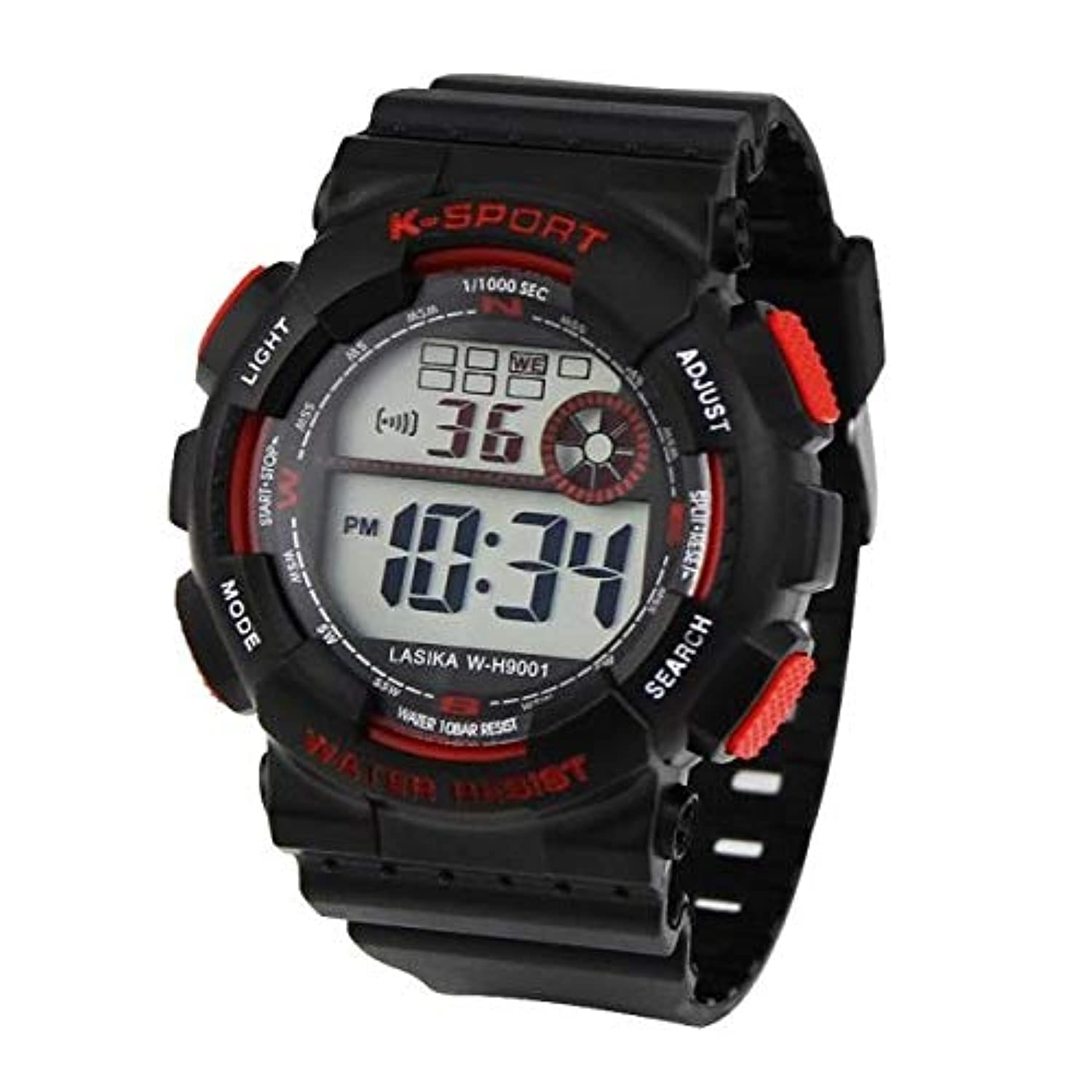
Image: Front view of the LASIKA W-H9001 Digital Sport Watch. The watch features a black resin case and strap with red accents on the buttons and some text on the bezel. The digital display shows '10:34 PM' and '36' (likely seconds or another function). Labels for buttons are visible: 'LIGHT' (top left), 'MODE' (bottom left), 'ADJUST' (top right), 'SEARCH' (bottom right), and 'START-STOP' (middle left). The watch face also indicates 'K-SPORT', '1/1000 SEC', and 'WATER 10BAR RESIST'.
Setup
Initial Power-On
Your LASIKA W-H9001 watch is typically ready for use upon purchase. If the display is blank, ensure any protective battery tabs have been removed. The watch requires one battery for operation.
Setting Time and Date
- From the Timekeeping Mode, press the MODE button repeatedly until the time digits begin to flash, indicating Time Setting Mode.
- Press the ADJUST button to cycle through the settings: seconds, hour, minute, month, date, and day of the week. The selected digit or segment will flash.
- Use the START-STOP button (or SEARCH button, depending on the specific function) to increase the flashing value. Hold the button to change values rapidly.
- Once all settings are correct, press the MODE button to exit the Time Setting Mode and return to normal timekeeping.
Operating the Watch
Button Functions
- LIGHT Button (Top Left): Activates the backlight for improved visibility in low-light conditions.
- MODE Button (Bottom Left): Cycles through the watch's various modes: Timekeeping, Stopwatch, and Alarm.
- ADJUST Button (Top Right): Used to select items for adjustment in setting modes and to confirm settings.
- START-STOP Button (Middle Left): Used to start and stop the stopwatch, and to increment values during time/date setting.
- SEARCH Button (Bottom Right): May serve as a reset function for the stopwatch or as an additional increment/decrement button in certain modes.
Timekeeping Mode
This is the default display mode, showing the current time (hours, minutes, seconds) and day of the week. You can switch between 12-hour and 24-hour formats during the time setting process by pressing the START-STOP button when the hour digits are flashing.
Alarm Mode
To set the alarm:
- Press the MODE button until you reach the Alarm Mode (indicated by 'AL' or a bell icon).
- Press ADJUST to select the hour or minute digits.
- Use START-STOP to set the desired alarm time.
- Press MODE to confirm and exit.
- To turn the alarm on/off, press START-STOP while in Alarm Mode.
Stopwatch Mode
The watch features a precise stopwatch with 1/1000 second accuracy.
- Press the MODE button until you reach the Stopwatch Mode (indicated by 'ST' or 'STOP').
- Press START-STOP to begin timing.
- Press START-STOP again to pause timing.
- Press SEARCH to reset the stopwatch to zero.
Water Resistance
Your LASIKA W-H9001 watch is marked with "WATER 10BAR RESIST", which means it is water resistant up to 100 meters (330 feet). This makes it suitable for showering, swimming, and snorkeling. However, it is not recommended for scuba diving or high-impact water sports. Avoid operating buttons while the watch is submerged to prevent water ingress.
Maintenance
Cleaning
To maintain the appearance and functionality of your watch, regularly wipe the case and strap with a soft, damp cloth. Avoid using harsh chemicals, solvents, or abrasive cleaners, as these can damage the resin material and seals.
Battery Replacement
When the display becomes dim or the watch stops functioning, the battery may need replacement. It is recommended to have the battery replaced by a qualified watch technician to ensure proper sealing and maintain water resistance.
Troubleshooting
- Display is blank or dim: The battery may be low or depleted. Replace the battery.
- Time is incorrect: Re-set the time and date following the instructions in the "Setting Time and Date" section. Ensure the correct 12/24-hour format is selected.
- Buttons are unresponsive: Ensure the watch is dry. If the issue persists, a soft reset (if available for this model, often by pressing all buttons simultaneously for a few seconds) might help, or consult a professional.
- Water inside the watch: Immediately take the watch to a professional for inspection and repair to prevent further damage.
Specifications
| Brand | LASIKA |
| Model Number | W-H9001 |
| Display Type | Digital |
| Watch Shape | Round |
| Band Material | Resin |
| Case Diameter Size | L (40 - 48 mm) |
| Water Resistance | 10 BAR (100 meters) |
| Power Source | 1 x Battery (type not specified) |
| Targeted Group | Men |
| Manufacturer | Lasika |
| Package Dimensions | 4.17 x 3.46 x 2.29 cm |
| Item Weight | 0.32 g |
Warranty and Support
For warranty information or technical support, please refer to the documentation provided at the time of purchase or contact your retailer or the manufacturer directly. Keep your purchase receipt as proof of purchase.
Ask a question about this manual
Ask about setup, troubleshooting, compatibility, parts, safety, or missing instructions. Manuals+ will review the question and use this page’s manual context to help answer it.