
1. Introduction
Thank you for choosing the Impex THUNDER T4 Stereo System. This 2.1 channel speaker system is designed to provide high-quality audio for your entertainment needs. It features multiple connectivity options including USB, MMC, FM radio, and Bluetooth, along with karaoke functionality. This manual provides essential information for the safe and efficient operation of your device.
2. Safety Instructions
- Read all instructions carefully before operating the system.
- Keep the manual for future reference.
- Do not expose the unit to rain or moisture to prevent fire or electric shock.
- Ensure proper ventilation; do not block any ventilation openings.
- Place the unit on a stable, flat surface.
- Do not open the casing. Refer all servicing to qualified personnel.
- Unplug the unit during lightning storms or when unused for long periods.
- Avoid placing the unit near heat sources such as radiators, heat registers, stoves, or other apparatus (including amplifiers) that produce heat.
3. Package Contents
Please check that the following items are included in your package:
- Impex THUNDER T4 Main Speaker Unit
- Satellite Speakers (2 units)
- Remote Control (if applicable, not explicitly mentioned but common for stereo systems)
- Audio Connection Cables
- User Manual (this document)
- Microphone Set (for Karaoke)
4. Product Overview
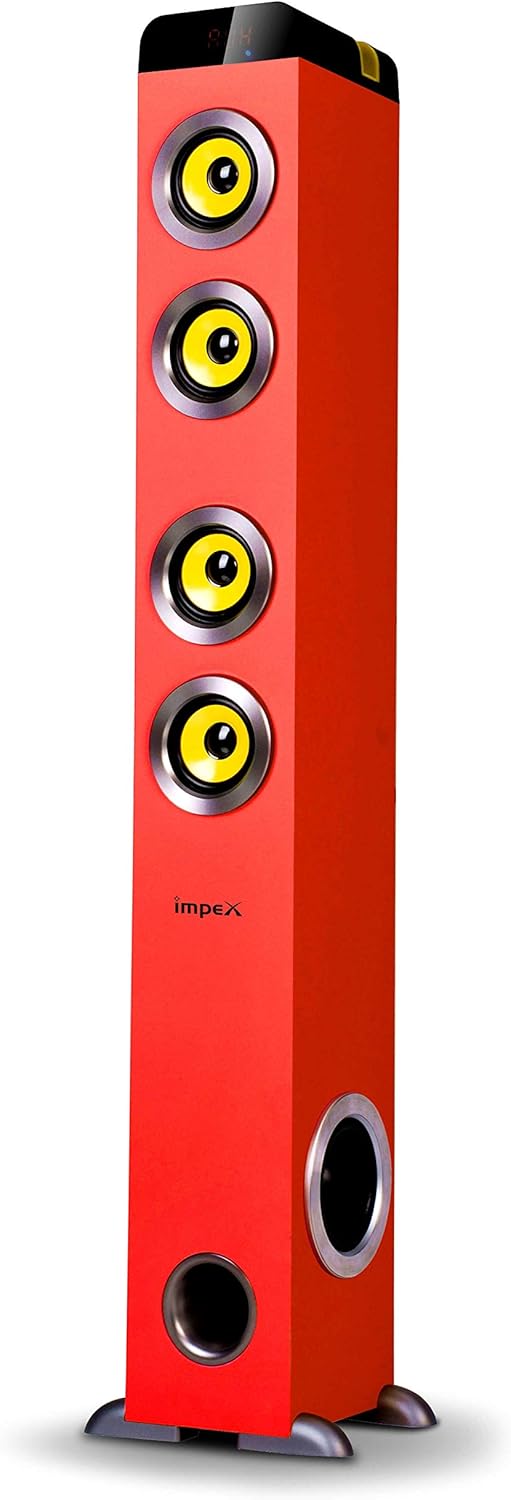
Figure 1: Impex THUNDER T4 Main Speaker Unit. This image displays the Impex THUNDER T4 stereo system, a tall, red tower speaker. It features four prominent yellow speaker cones arranged vertically on the front panel. Towards the bottom, there is a circular bass port. The 'Impex' logo is visible on the front. The speaker stands on a dark base with small feet.
The Impex THUNDER T4 is a 2.1 channel speaker system. The main unit (subwoofer and primary speakers) is a tower design, complemented by two satellite speakers (wooden satellite, speaker unit: 4"+3"*2+1"*2). The system integrates various input options and controls for a versatile audio experience.
5. Setup
- Placement: Position the main speaker unit and satellite speakers in your desired location. For optimal sound, ensure the main unit is on a stable surface.
- Connect Satellite Speakers: Connect the satellite speakers to the main unit using the provided audio cables. Ensure connections are secure.
- Power Connection: Plug the power cord into the main speaker unit and then into a suitable wall outlet.
- Initial Power On: Press the Power button on the main unit or remote control to turn on the system.
- Audio Source Connection: Connect your desired audio source (e.g., TV, smartphone, computer) using the appropriate input method (Bluetooth, USB, AUX).
6. Operating Instructions
6.1. Basic Operation
- Power On/Off: Use the Power button on the unit or remote.
- Volume Control: Adjust the master volume using the dedicated knob on the unit or volume buttons on the remote.
- Mode Selection: Press the "Mode" button to cycle through available input sources: Bluetooth, FM, USB, MMC, AUX.
6.2. Bluetooth Mode
- Switch the system to Bluetooth mode. The display will indicate "BT".
- Enable Bluetooth on your mobile device or computer.
- Search for "THUNDER T4" in your device's Bluetooth settings and pair.
- Once connected, you can play audio from your device through the stereo system.
6.3. FM Radio Mode
- Switch the system to FM mode.
- Press the "Scan" button (if available) to automatically search and save available radio stations.
- Use the "Previous" and "Next" buttons to navigate through saved stations.
6.4. USB/MMC Mode
- Insert a USB flash drive or MMC card into the respective slot.
- The system will automatically switch to USB/MMC mode and begin playing audio files.
- Use the play/pause, previous, and next buttons to control playback.
6.5. Karaoke Function
- Connect the microphone to the designated microphone input jack.
- Adjust the microphone volume and echo effects (if available) using the controls on the unit or remote.
- Play your desired karaoke track from any input source.
7. Maintenance
- Cleaning: Use a soft, dry cloth to clean the exterior of the unit. Do not use liquid cleaners or aerosols.
- Ventilation: Ensure that the ventilation openings are not blocked by dust or debris.
- Storage: If storing the unit for an extended period, unplug it from the power outlet and store it in a cool, dry place.
8. Troubleshooting
| Problem | Possible Cause | Solution |
|---|---|---|
| No power | Power cord not connected; Power outlet faulty | Check power cord connection; Try a different outlet |
| No sound | Volume too low; Incorrect input mode; Audio cables loose | Increase volume; Select correct input mode; Check audio cable connections |
| Bluetooth pairing failure | Device too far; Bluetooth not enabled on source; Incorrect pairing procedure | Move device closer; Enable Bluetooth; Refer to Bluetooth pairing instructions |
| USB/MMC not playing | Unsupported file format; USB/MMC card faulty; Card not inserted correctly | Ensure files are compatible; Try a different USB/MMC card; Reinsert card |
9. Specifications
| Brand | Impex |
| Model Number | THUNDER T4 |
| Type | Stereo System (2.1 Channel) |
| Output Power | 60 Watts |
| Frequency Response | 40-20,000 Hz (Assumed from 40-20Hz in description, typically 20kHz) |
| Speaker Unit Configuration | Main: 4" Woofer; Satellites: 3" x 2 + 1" x 2 |
| Connectivity Technology | USB, Bluetooth |
| Special Features | FM Tuner, MMC Card Slot, Karaoke Function (with Mic set) |
| Audio Output Mode | Stereo |
| Manufacturer | Impex |
| Item Model Number | THUNDER T4 Red |
| ASIN | B081TNH5SM |
| Package Dimensions | 6.97 x 5.33 x 3.01 cm; 1.1 g (Note: This dimension may refer to a component or packaging detail, not the full system.) |
Note: Specifications are subject to change without prior notice.
10. Warranty and Support
For warranty information and customer support, please refer to the warranty card included with your product or visit the official Impex website. Keep your purchase receipt as proof of purchase.