
Introduction
Thank you for purchasing the Edison Professional Armor Portable IPX7 Bluetooth Speaker. This manual provides essential information for the safe and efficient operation of your device. Please read it thoroughly before use and retain it for future reference.
Safety Information
To ensure safe operation and prevent damage, please observe the following precautions:
- Do not attempt to disassemble or modify the speaker. This may void the warranty and pose a safety risk.
- Keep the speaker away from extreme temperatures, direct sunlight, and open flames.
- Ensure all port covers are securely closed before exposing the speaker to water to maintain its IPX7 waterproof rating.
- Use only the provided or a certified charging cable.
- Avoid dropping or subjecting the speaker to severe impacts.
- Clean the speaker with a soft, damp cloth. Do not use abrasive cleaners or solvents.
Package Contents
Please check the package for the following items:
- Edison Professional Armor Portable IPX7 Bluetooth Speaker
- USB Charging Cable
- Auxiliary Audio Cable
- User Manual
Product Overview
The Edison Professional Armor speaker is designed for robust, portable audio. It features a durable, rubber-encased design, IPX7 waterproofing, and multiple connectivity options.
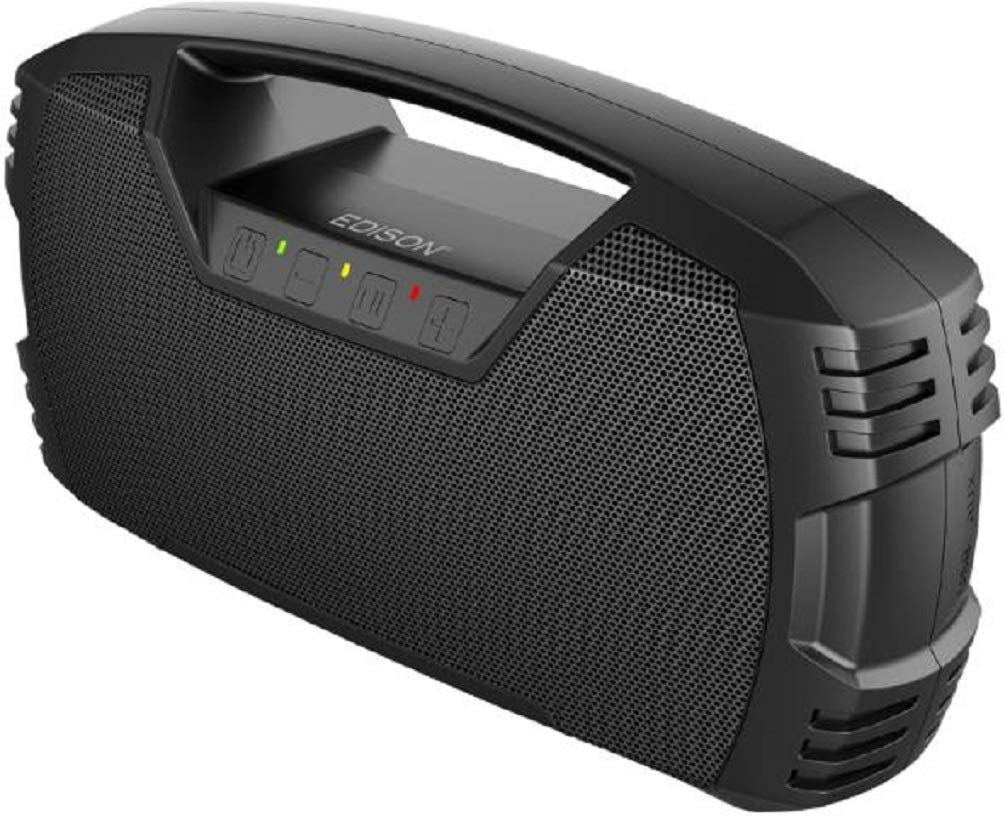
This image displays the overall design of the Edison Professional Armor speaker from a top-down perspective, highlighting the central control panel with buttons and the Edison branding. The rugged rubber casing and speaker grilles are also visible.

This image provides a clear front view of the Edison Professional Armor speaker, showcasing the large speaker grille that covers the audio drivers. The robust, protective design is evident, emphasizing its suitability for outdoor and rugged use.

This image presents a top view of the Edison Professional Armor speaker, focusing on the integrated carrying handle and the user control panel. The buttons for power, volume, and mode selection are clearly visible, along with the durable texture of the speaker's surface.
Control Panel Layout:
- Power Button: Turns the speaker on or off.
- Bluetooth Button: Initiates Bluetooth pairing mode.
- Volume Down / Previous Track Button: Decreases volume or skips to the previous track.
- Play/Pause Button: Plays or pauses audio.
- Volume Up / Next Track Button: Increases volume or skips to the next track.
- Mode Button: Switches between input modes (Bluetooth, Aux, USB).
- Charging Port: For connecting the USB charging cable.
- Aux-in Port: For connecting external audio devices via 3.5mm cable.
- USB Port: For USB playback or charging external devices (5V 1A power bank function).
- Microphone Input: For connecting an external microphone.
Setup
Initial Charging
Before first use, fully charge the speaker for approximately 4-6 hours.
- Open the protective cover on the back or side of the speaker to access the charging port.
- Connect the small end of the USB charging cable to the speaker's charging port.
- Connect the large end of the USB charging cable to a USB power adapter (not included) or a computer's USB port.
- The charging indicator light will illuminate. It will typically change color or turn off when charging is complete.
- Once fully charged, disconnect the charging cable and securely close the protective cover to maintain waterproofing.
Operating Instructions
Power On/Off
- To power on, press and hold the Power Button for 2-3 seconds. An indicator light will illuminate, and an audible prompt may sound.
- To power off, press and hold the Power Button for 2-3 seconds again. The indicator light will turn off.
Bluetooth Pairing
- Ensure the speaker is powered on and no other audio source is connected (e.g., Aux or USB). The speaker will automatically enter Bluetooth pairing mode, indicated by a flashing Bluetooth indicator light.
- On your mobile device (smartphone, tablet, etc.), enable Bluetooth and search for available devices.
- Select "Edison Armor" from the list of devices.
- Once paired, the Bluetooth indicator light will become solid, and an audible confirmation may sound.
- If pairing fails, turn off the speaker and your device's Bluetooth, then repeat the steps.
Audio Playback
- Play/Pause: Press the Play/Pause Button to play or pause audio.
- Volume Control: Press the Volume Up (+) or Volume Down (-) buttons to adjust the volume.
- Skip Tracks: Press and hold the Volume Up (+) button for the next track, or press and hold the Volume Down (-) button for the previous track.
Input Modes (Aux, USB, Microphone)
The speaker supports multiple audio input sources:
- Auxiliary Input: Connect an external audio device using a 3.5mm auxiliary cable to the Aux-in Port. The speaker will automatically switch to Aux mode or you may need to press the Mode Button.
- USB Playback: Insert a USB flash drive containing MP3 audio files into the USB Port. The speaker will automatically detect and play the files, or you may need to press the Mode Button.
- Microphone Input: Connect a microphone to the Microphone Input for vocal amplification.
Power Bank Function
The USB port can also function as a 5V 1A power bank to charge external devices.
- Connect your device's charging cable to the speaker's USB Port.
- The speaker will begin charging your device. Note that using the power bank function will consume the speaker's battery.
Waterproof Features (IPX7)
The Edison Professional Armor speaker is IPX7 rated, meaning it can be submerged in water up to 1 meter (3 feet) for up to 30 minutes. It also features floating capabilities.
- Ensure all port covers are completely sealed before exposing the speaker to water.
- After exposure to water, wipe the speaker dry with a soft cloth before charging or opening any ports.
- Do not submerge the speaker in saltwater or other liquids besides fresh water.
Maintenance
- Cleaning: Use a soft, slightly damp cloth to clean the speaker's surface. Do not use harsh chemicals or abrasive materials.
- Storage: Store the speaker in a cool, dry place away from direct sunlight and extreme temperatures when not in use for extended periods.
- Battery Care: To prolong battery life, avoid fully discharging the speaker frequently. Charge it regularly, even if not in use.
Troubleshooting
| Problem | Possible Solution |
|---|---|
| Speaker does not power on. | Ensure the battery is charged. Connect the speaker to a power source using the USB charging cable. |
| Cannot pair via Bluetooth. | Ensure the speaker is in pairing mode (flashing Bluetooth indicator). Turn off Bluetooth on your device and the speaker, then try again. Make sure no other devices are connected to the speaker. |
| No sound. | Check the volume level on both the speaker and your connected device. Ensure the correct input mode is selected (Bluetooth, Aux, USB). |
| Sound distortion. | Reduce the volume on both the speaker and your connected device. Ensure the speaker is not too far from the Bluetooth source. |
| Speaker not charging. | Verify the charging cable is securely connected to both the speaker and the power source. Try a different USB port or power adapter. |
Specifications
| Feature | Detail |
|---|---|
| Brand | Edison Professional |
| Model Name | Armor |
| Power Output | 30 Watts RMS / 90 Watts Peak |
| Water Resistance | IPX7 (Waterproof, floating capabilities) |
| Connectivity | Bluetooth, Auxiliary (3.5mm), USB |
| Audio Output Mode | Stereo |
| Battery | 12 Volt (long-lasting) |
| Material | Rubber (encased end caps) |
| Additional Features | Microphone Input, 5V 1A Power Bank Function |
Warranty Information
The Edison Professional Armor Portable IPX7 Bluetooth Speaker comes with a warranty period of 90 days for parts and 1-year for labor from the date of purchase. This warranty covers manufacturing defects under normal use. It does not cover damage caused by misuse, accidents, unauthorized modifications, or normal wear and tear. Please retain your proof of purchase for warranty claims.
Customer Support
If you encounter any issues not covered in this manual or require further assistance, please contact Edison Professional customer support. Refer to the product packaging or the official Edison Professional website for the most current contact information.
Please note: Specific contact details are not provided in this manual.
