
Verbatim 62865
Verbatim 62865 32GB Compact Flash CF Card User Manual
Model: 62865
Introduction
This manual provides comprehensive instructions for the proper use, setup, operation, and maintenance of your Verbatim 62865 32GB Compact Flash (CF) Card. Designed for reliable data storage, this card is compatible with various devices, including digital cameras and CNC machines. Please read this manual thoroughly before using the product to ensure optimal performance and longevity.
Product Overview
The Verbatim 62865 is a 32GB Compact Flash card, engineered for high-speed data transfer. It features a 233X speed rating, facilitating quick capture, smooth video recording, and efficient transfer of files. Its robust design ensures reliable performance in compatible devices.
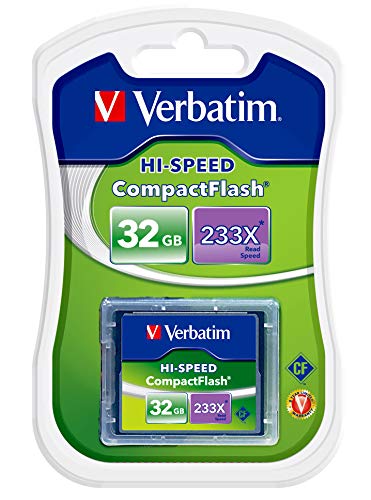
Image 1: Verbatim 32GB Compact Flash Card in its retail blister packaging, showing the card itself and its capacity and speed ratings.
Setup and Installation
Proper installation of the Compact Flash card is crucial for its functionality and to prevent damage to the card or your device.
- Identify the CF Card Slot: Locate the Compact Flash card slot on your digital camera, CNC machine, or other compatible device. This slot is typically labeled "CF" or has a Compact Flash icon.
- Orient the Card: Observe the orientation of the CF card. It has a specific way it must be inserted. The card typically has a beveled corner or an arrow indicating the correct insertion direction. Ensure the pins on the card align with the holes in the device's slot.
- Insert the Card: Gently slide the CF card into the slot. Do not force the card. If it does not slide in easily, recheck the orientation. Forcing it can bend or damage the pins.
- Secure the Card: Once fully inserted, the card should sit flush or nearly flush with the device's surface. Some devices may have a latch or cover to secure the card.
- Format the Card (Optional but Recommended): For first-time use or after significant data transfer, it is recommended to format the card using your device's internal formatting function. Refer to your device's manual for specific instructions on how to format a memory card. Formatting erases all data and prepares the card for optimal performance with that specific device.

Image 2: A close-up of the Verbatim Compact Flash card, highlighting its physical form factor and branding, ready for insertion into a device.
Operating Instructions
Once installed, the Verbatim CF card functions as your device's primary storage medium.
- Data Storage: The card will automatically store photos, videos, or program files generated by your device.
- Data Transfer: To transfer data to a computer, you can either connect your device directly to the computer (refer to your device's manual) or remove the CF card and insert it into a compatible CF card reader connected to your computer.
- Ejecting the Card: Always ensure your device is powered off or that the card is safely ejected through the device's menu system (if available) before physically removing the card. This prevents data corruption.
Maintenance and Care
To ensure the longevity and reliable performance of your Verbatim CF card, follow these maintenance guidelines:
- Handle with Care: Avoid dropping the card or subjecting it to strong impacts.
- Protect the Connectors: Do not touch the metal connector pins on the back of the card. Keep them clean and free from dust and debris.
- Storage: When not in use, store the CF card in its protective case or a suitable storage container to prevent physical damage and exposure to dust or moisture.
- Temperature and Humidity: Avoid exposing the card to extreme temperatures, direct sunlight, or high humidity.
- Cleaning: If necessary, gently wipe the exterior of the card with a soft, dry, lint-free cloth. Do not use liquid cleaners.
Troubleshooting
If you encounter issues with your Verbatim CF card, consider the following common solutions:
| Problem | Possible Cause | Solution |
|---|---|---|
| Card not recognized by device. | Incorrect insertion, dirty pins, incompatible device, card corruption. |
|
| Slow data transfer speeds. | Device limitation, fragmented data, card reader speed. |
|
| Error messages during use. | Card corruption, full card, device malfunction. |
|
Specifications
Key technical specifications for the Verbatim 62865 32GB Compact Flash Card:
- Model Number: 62865
- Brand: Verbatim
- Flash Memory Type: CompactFlash
- Memory Storage Capacity: 32 GB
- Speed Rating: 233X (up to 35MB/s read speed, actual write speeds may vary)
- Compatible Devices: Digital Cameras, CNC Machines, Personal Computers (with compatible card reader)
- Item Dimensions (LxWxH): 13.5 x 8.4 x 1 Centimeters
- Item Weight: 30 Grams
- Hardware Interface: CompactFlash
- Color: Green (packaging may vary)

Image 3: The Verbatim brand logo, emphasizing its commitment to reliable technology.
Warranty and Support
Your Verbatim 62865 32GB Compact Flash Card comes with a 3-year warranty from the date of purchase. This warranty covers manufacturing defects under normal use.
For warranty claims, technical support, or any product-related inquiries, please contact Verbatim customer support:
- Importer/Support Contact: Myswa Ventures Private Limited
- Address: UGF, 666, Street No -7, Govindpuri, Kalkaji, New Delhi 110019
- Email: sales@myswa.in
- Phone/WhatsApp Support: 9310093366
Please retain your proof of purchase for warranty validation.
Ask a question about this manual
Ask about setup, troubleshooting, compatibility, parts, safety, or missing instructions. Manuals+ will review the question and use this page’s manual context to help answer it.