
1. Introduction
Thank you for choosing the upHere U803 USB Fan. This 80mm silent USB fan is designed to provide efficient cooling for various electronic devices, including computers, laptops, PS4 consoles, TV boxes, receivers, AV cabinets, projectors, and routers. Its compact design and USB power source offer versatile placement options to help protect your equipment from heat-related damage.

Figure 1: upHere U803 USB Fan, general product view.
2. Product Features
- Strong Airflow: Equipped with 7 blades, the fan operates at approximately 1800 RPM, ensuring effective ventilation.
- Dual Ball Bearing: Features high-quality dual ball bearings for extended durability, offering a lifespan of up to 70,000 hours. This design allows for both horizontal and vertical fan operation.
- Versatile Application: Suitable for cooling a wide range of devices including PCs, laptops, TV boxes, receivers, AV cabinets, PS4 consoles, projectors, and routers.
- Enhanced Protection: Includes black metal grilles on both sides to protect fingers and cables from the fan blades. Cable protection adhesive is also integrated to prevent wear and breakage.
- USB Powered: Designed for convenience, the fan can be powered directly via USB ports found on various equipment, enabling flexible cooling solutions.
- Silent Operation: Engineered for low noise output, providing cooling without significant auditory disturbance.

Figure 2: Illustration of the dual ball bearing design, contributing to fan longevity.

Figure 3: Example of the upHere U803 fan providing cooling for an Xbox console.

Figure 4: Close-up of the protective metal grilles on the fan, designed to prevent accidental contact with blades.
3. What's in the Box
The upHere U803 USB Fan package typically includes the following components:
- upHere U803 USB Fan(s)
- USB Power Cable(s)
- Protective Metal Grilles
- Silicone Rubber Feet / Mounting Accessories

Figure 5: Contents of the upHere U803 USB Fan package, illustrating the fans and included accessories.
4. Setup Instructions
- Unpack Components: Carefully remove the fan and all accessories from the packaging.
- Attach Protective Grilles (if separate): If the metal grilles are not pre-installed, align them with the fan's screw holes and secure them using the provided screws or mounting hardware. Ensure they are firmly attached to prevent accidental contact with the fan blades.
- Install Silicone Rubber Feet: Attach the silicone rubber feet to the corners of the fan. These feet help absorb vibrations and reduce noise, while also providing stability.
- Position the Fan: Place the fan in the desired location to optimize airflow for your device. Consider the direction of airflow needed (intake or exhaust) to effectively cool your equipment. The fan can be used lying flat or standing upright.
- Connect Power: Plug the USB power cable into the fan's power input. Then, connect the other end of the USB cable to an available USB port on your computer, console, TV box, or a compatible USB power adapter (5V).

Figure 6: Detail of the silicone rubber feet, designed to minimize noise and vibration.
5. Operating Instructions
The upHere U803 USB Fan is designed for simple plug-and-play operation:
- Once the fan is properly set up and connected to a powered USB port, it will begin operating automatically.
- Ensure the fan blades are unobstructed to maintain optimal airflow and prevent damage.
- To turn off the fan, simply disconnect the USB power cable from the power source.
For continuous cooling, the fan can remain connected to a constantly powered USB port.
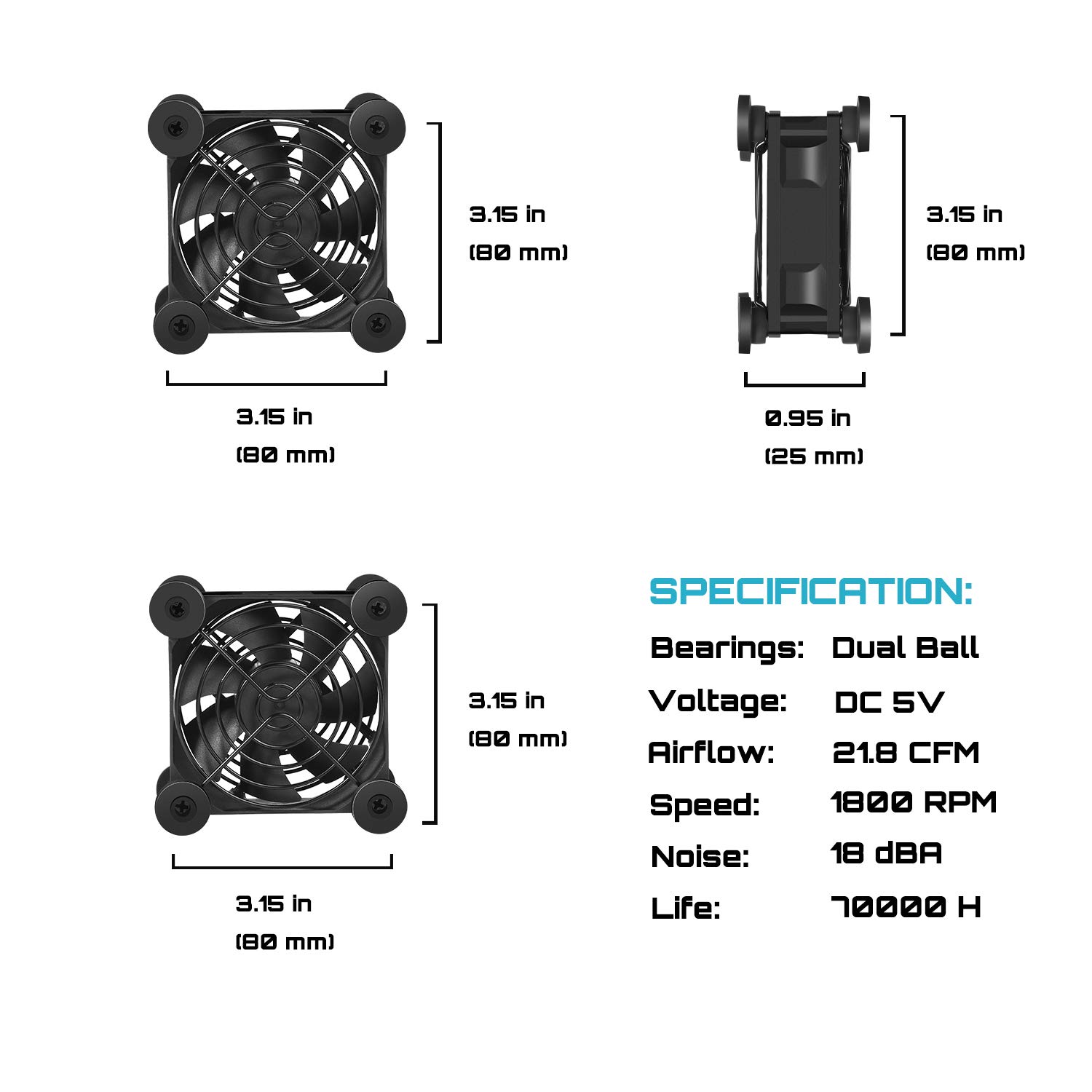
Figure 7: The upHere U803 fan providing cooling for a network router.
6. Maintenance
Regular maintenance helps ensure the longevity and optimal performance of your upHere U803 USB Fan:
- Cleaning: Periodically clean the fan blades and grilles to remove dust buildup. Use a soft, dry cloth or a can of compressed air. Always disconnect the fan from its power source before cleaning.
- Inspection: Check the USB cable for any signs of wear or damage. Ensure the protective grilles are securely in place.
- Storage: If storing the fan for an extended period, ensure it is clean and dry. Store it in a cool, dry place away from direct sunlight.
7. Troubleshooting
| Problem | Possible Cause | Solution |
|---|---|---|
| Fan does not turn on. | No power to the USB port. Faulty USB cable. Fan malfunction. | Try a different USB port or power adapter. Use a different USB cable if available. Contact customer support if the fan remains unresponsive. |
| Fan is noisy or vibrating excessively. | Dust buildup on blades. Loose silicone feet. Fan placed on an uneven surface. | Clean the fan blades and grilles. Ensure silicone feet are securely attached. Place the fan on a flat, stable surface. |
| Insufficient cooling. | Incorrect fan placement. Obstruction of airflow. Excessive heat source. | Adjust fan position to optimize airflow (e.g., direct air towards hot components or exhaust hot air). Ensure no objects are blocking the fan's intake or exhaust. Consider using multiple fans or a larger cooling solution if the heat source is too intense. |
8. Specifications
| Feature | Detail |
|---|---|
| Model Number | U803-US |
| Product Dimensions | 3.15"L x 0.98"W x 3.15"H (80mm x 25mm x 80mm) |
| Bearing Type | Dual Ball Bearing |
| Voltage | DC 5V |
| Power Connector Type | USB (2-Pin internal connection) |
| Wattage | 80 watts (Note: This value seems unusually high for a 5V USB fan. Typically, a 5V fan would draw much less power, e.g., 0.5A to 1A, resulting in 2.5W to 5W. Please refer to actual product labeling for precise wattage.) |
| Cooling Method | Forced Air |
| Compatible Devices | Desktop, Laptop, PS4, TV Box, AV Cabinet, Projector, Router |
| Noise Level | 20 Decibels (dBA) |
| Maximum Rotational Speed | 1800 RPM |
| Material | Metal, Polycarbonate |
| Lifespan | Up to 70,000 hours |

Figure 8: Detailed dimensions and key specifications of the upHere U803 USB Fan.
9. Warranty and Support
upHere products are manufactured to high-quality standards. For information regarding warranty coverage, technical support, or service inquiries, please refer to the warranty card included with your product or visit the official upHere website. Please retain your proof of purchase for warranty claims.
For further assistance, you may contact upHere customer support through their official channels.