1. Product Overview
The DENALI 2.0 D4 LED Light Pod is a high-performance auxiliary lighting solution designed for various applications, including motorcycles and off-road vehicles. This light pod features four powerful LEDs and incorporates DataDim™ Technology, allowing for seamless integration with vehicle high/low beam circuits for intelligent dimming control. Constructed with durable materials, it is engineered to withstand challenging environmental conditions.
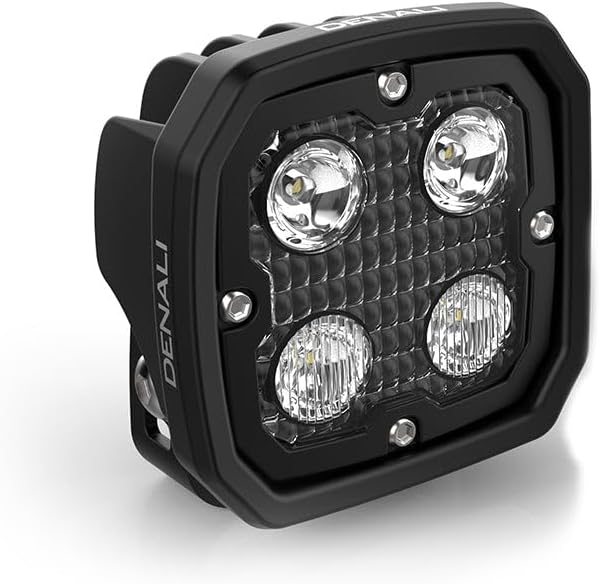
Image 1.1: Front view of the DENALI 2.0 D4 LED Light Pod, showcasing its four individual LED lenses and robust black housing.
2. What's in the Box
Verify that all components are present before beginning installation:
- DENALI 2.0 D4 LED Light Pod (Quantity: 1)
- Mounting hardware (specific components may vary based on kit)
- Wiring harness (may be sold separately or included in specific kits)
3. Setup and Installation
Proper installation is crucial for optimal performance and safety. If you are unsure about any step, consult a qualified technician.
3.1 Mounting the Light Pod
- Select Mounting Location: Choose a secure location on your vehicle that provides clear light projection and does not obstruct other vehicle functions. Ensure the mounting surface is strong enough to support the light pod's weight.
- Attach Mounting Bracket: Secure the provided mounting bracket to the chosen location using appropriate fasteners. Ensure the bracket is firmly attached and stable.
- Mount Light Pod: Attach the DENALI D4 LED Light Pod to the mounting bracket. Adjust the angle to achieve the desired beam pattern. Tighten all fasteners securely, but do not overtighten.

Image 3.1: The DENALI 2.0 D4 LED Light Pod mounted on the front of a motorcycle, demonstrating a typical installation scenario.
3.2 Wiring Instructions
The DENALI D4 LED Light Pod is designed to integrate with a vehicle's electrical system. Refer to your vehicle's service manual for specific wiring diagrams if necessary.
- Power Connection: Connect the positive (+) wire from the light pod to a switched 12V power source, typically through a relay and fuse for protection.
- Ground Connection: Connect the negative (-) wire from the light pod to a reliable chassis ground point on the vehicle.
- DataDim™ Technology: If utilizing DataDim™ Technology, connect the DataDim™ wire (usually a thin signal wire) to your vehicle's high beam circuit. This allows the light pod to automatically switch between full and dimmed output in conjunction with your vehicle's high beams. Consult the specific DataDim™ wiring harness instructions for detailed connections.
- Testing: After all connections are made, test the light pod's functionality before securing all wiring.
4. Operating Instructions
The DENALI D4 LED Light Pod operates in conjunction with your vehicle's electrical system and any connected switches or DataDim™ controller.
- Standard Operation: If connected to a simple on/off switch, activate the switch to turn the lights on and off.
- DataDim™ Operation: When connected via DataDim™ Technology, the light pod will operate as follows:
- When your vehicle's high beam is OFF, the D4 light pod will operate at a dimmed output (e.g., 50%).
- When your vehicle's high beam is ON, the D4 light pod will switch to full 100% output.
5. Maintenance
Regular maintenance ensures the longevity and optimal performance of your DENALI D4 LED Light Pod.
- Cleaning: Clean the lens and housing periodically with a soft cloth and mild soap and water. Avoid abrasive cleaners or solvents that could damage the lens or finish.
- Inspection: Regularly inspect all wiring connections for corrosion or damage. Check mounting hardware for tightness and ensure the light pod remains securely fastened.
- Lens Condition: Examine the lens for cracks or significant scratches. While durable, severe impacts can cause damage.
6. Troubleshooting
If you encounter issues with your DENALI D4 LED Light Pod, refer to the following troubleshooting steps:
- Light Does Not Turn On:
- Check all wiring connections for proper contact and ensure they are secure.
- Verify the power source is active (e.g., vehicle ignition is on).
- Inspect the fuse in the wiring harness (if applicable) and replace if blown.
- Ensure the ground connection is clean and secure.
- Light Output is Dim or Flickering:
- Check for loose or corroded wiring connections, especially at the power and ground points.
- If using DataDim™ Technology, ensure the DataDim™ signal wire is correctly connected to the high beam circuit and receiving a consistent signal.
- Verify the vehicle's battery voltage is adequate.
- Water or Condensation Inside Lens:
- While the unit is waterproof, extreme temperature changes can sometimes cause minor condensation. This usually dissipates.
- If significant water ingress is observed, inspect the housing for damage or improper sealing. Contact support if the issue persists.
7. Specifications
| Feature | Detail |
|---|---|
| Model | DNL.D4.050 |
| Brand | DENALI |
| Item Dimensions (L x W x H) | 3.5 x 5.5 x 5.75 inches |
| Item Weight | 1.84 pounds |
| Material | Stainless Steel (Housing components) |
| Water Resistance Level | Waterproof |
| Form Factor | Pod |
| Included Components | DENALI 2.0 D4 LED Light Pod with DataDim Technology |
| UPC | 810005870160 |

Image 7.1: A visual comparison of various DENALI LED light pod models and their dimensions, with the D4 model highlighted.
8. Warranty and Support
For warranty information, please refer to the official DENALI Electronics website or contact their customer support directly. Keep your proof of purchase for any warranty claims.
For technical assistance or further inquiries, please visit the DENALI Store on Amazon or the manufacturer's official support channels.


