
1. Introduction
This manual provides essential instructions for the installation, operation, and maintenance of your EPEVER 45A Solar Charge Controller. This device is designed to manage the power flow from your solar panels to your battery bank, ensuring efficient charging and protecting your batteries from overcharge and over-discharge. It features an LCD display for real-time monitoring and dual USB outputs for charging compatible devices.
2. Safety Instructions
Please read and understand all safety instructions before installation and operation to prevent injury and damage to the controller or system components.
- Always connect the battery to the charge controller first to allow the controller to recognize the system voltage.
- Ensure correct polarity when connecting components. Pay close attention to the "+" and "-" terminals. Incorrect wiring can cause damage.
- Do not insert fuses or turn on breakers during the initial installation process.
- Install the battery fuse as close to the battery as possible, ideally within 150mm.
- The VS AU series controller is a common positive ground device. Any positive connection of solar, load, or battery can be earth grounded if required.
- If an inverter or other load with a large starting current is necessary, connect it directly to the battery, not to the controller's load terminals.
- Ensure adequate ventilation around the controller to prevent overheating.
3. Product Overview
The EPEVER 45A Solar Charge Controller integrates advanced digital techniques for efficient solar energy management. It features a clear LCD display and user-friendly buttons for easy operation.
3.1 Key Features
- High-quality components from ST, IR, and Infineon for reliability and extended lifespan.
- LCD display for real-time monitoring of solar panel and battery performance, including energy statistics.
- Dual USB charging outputs (5V 2.4A total) for mobile devices.
- Supports three charging options: Sealed, Gel, and Flooded batteries.
- 3-Stage intelligent PWM charging: Bulk, Boost/Equalize, Float.
- Multiple load control modes: Light control, Light Time control, Dual Time control.
- Comprehensive protection features: PV Reverse Polarity, Battery Reverse Polarity, Battery Over Voltage, Battery Over Discharge, Battery Overheating, Load Short Circuit, Load Overload, Controller Overheating.
3.2 Controller Components
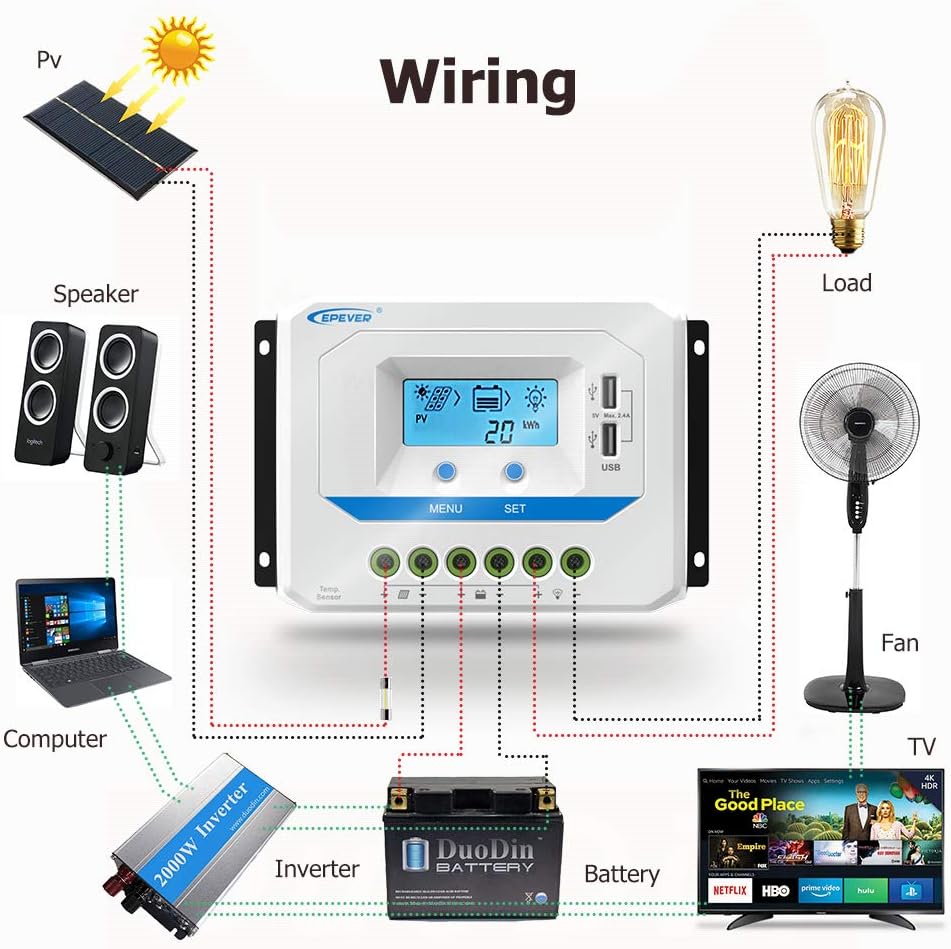
Figure 1: EPEVER 45A Solar Charge Controller Components. This diagram labels the various parts of the controller, including the LCD screen, control buttons (MENU, SET), dual USB charging ports, temperature sensor port (RTS), and the connection terminals for solar panels, battery, and load.

Figure 2: Dual USB Output Ports. The controller features two 5V 2.4A USB ports for convenient charging of external devices.
4. Setup and Installation
Follow these steps carefully to install your solar charge controller. Ensure all connections are secure and correct to prevent damage.
4.1 Wiring Sequence
- Connect the Battery: Connect the battery to the charge controller's battery terminals. Ensure correct polarity. The controller will automatically detect the system voltage (12V/24V/36V/48V).
- Connect the Solar Panel: Connect the solar panel to the charge controller's solar panel terminals. Ensure correct polarity.
- Connect the Load: Connect the DC load to the charge controller's load terminals. Ensure correct polarity.
When disconnecting the system, reverse the order: disconnect the load first, then the solar panel, and finally the battery.

Figure 3: System Wiring Diagram. This diagram shows the recommended connection order: battery first, then solar panel, then load. It also highlights the importance of correct positive and negative connections.
Figure 4: Example Wiring for a Solar System. This illustration provides a visual guide for connecting a solar panel, battery, and various DC loads (such as a fan, TV, and speakers) to the EPEVER solar charge controller.
5. Operating Instructions
The controller's LCD display provides real-time system information, and the buttons allow for configuration and navigation.
5.1 LCD Display and Buttons
The LCD screen shows various parameters such as PV voltage, charging current, battery voltage, load current, and energy statistics. Use the MENU and SET buttons to navigate through the display interfaces and adjust settings.

Figure 5: Browse Interface. This image illustrates the different screens accessible via the MENU and SET buttons, displaying parameters like PV voltage, current, generated energy, load status, battery voltage, and temperature.
5.2 Battery Type Selection
The controller supports Sealed, Gel, and Flooded battery types. Ensure the correct battery type is selected in the settings for optimal charging performance and battery longevity. Refer to the detailed manual for specific steps on how to change this setting.
5.3 Load Control Modes
The controller offers multiple load control modes:
- Light Control: The load turns on at dusk and off at dawn.
- Light Time Control: The load turns on at dusk and stays on for a set number of hours.
- Dual Time Control: Allows for two separate time periods for load operation.
These modes are configurable via the controller's interface. Consult the full product manual for detailed programming instructions.
6. Maintenance
Regular maintenance ensures the longevity and optimal performance of your solar charge controller and system.
- Inspect Connections: Periodically check all wiring connections for tightness and corrosion. Loose connections can cause resistance and heat buildup.
- Clean the Controller: Keep the controller clean and free from dust and debris. Ensure ventilation openings are not blocked.
- Check Battery Health: Monitor battery voltage and condition regularly. Ensure batteries are properly maintained according to their manufacturer's guidelines.
- Environmental Conditions: Ensure the controller is installed in a dry, well-ventilated area, away from direct sunlight and extreme temperatures.
7. Troubleshooting
This section addresses common issues you might encounter with your solar charge controller.
| Problem | Possible Cause | Solution |
|---|---|---|
| No display on LCD | Battery not connected or low voltage; reverse polarity. | Check battery connections and voltage. Ensure correct polarity. Charge battery if voltage is too low. |
| Battery not charging | Solar panel not connected; low solar input; reverse PV polarity; battery full. | Check solar panel connections and ensure adequate sunlight. Verify PV polarity. Controller stops charging when battery is full. |
| Load not working | Load disconnected; overload; short circuit; low battery voltage; load control mode settings. | Check load connections. Reduce load if overloaded. Check for short circuits. Ensure battery voltage is above cut-off. Verify load control mode settings. |
| Controller overheating | Poor ventilation; excessive load/charging current. | Ensure proper airflow around the controller. Reduce load or charging current if possible. |
8. Specifications
Detailed technical specifications for the EPEVER 45A Solar Charge Controller (Model 45A48V).

Figure 6: Technical Specifications for 48V Models. This table provides detailed specifications for the 48V compatible models, including the 45A48V, covering electrical parameters and environmental ratings.
| Specification | Value |
|---|---|
| Model | 45A48V |
| Rated Charge/Discharge Current | 45A |
| System Rated Voltage | 12V/24V/36V/48V Auto |
| Battery Input Voltage Range | 9V~64V |
| Max. PV Open Circuit Voltage | 96V |
| Battery Type | Sealed (Default) / Gel / Flooded |
| Grounding | Common Positive |
| USB Output | 5VDC/2.4A (Total) |
| Working Environment Temperature | -25°C to +55°C (Product can work continuously at full load) |
| Enclosure | IP30 |
| Dimensions (L x W x H) | 194mm x 118mm x 64mm (approx.) |
| Item Weight | 0.91 kg (2.01 pounds) |
| UPC | 732376582681, 732376583510 |
9. Warranty and Support
For warranty information and technical support, please refer to the official EPEVER website or contact your authorized dealer. Keep your purchase receipt as proof of purchase for warranty claims.
You can also visit the EPEVER Store on Amazon for additional resources and contact information.


