
1. Introduction
This manual provides essential information for the safe installation, operation, and maintenance of your Nutone 30" 210 Max CFM White Range Hood, Model NU230WW. Please read this manual thoroughly before installation and use, and retain it for future reference.
The Nutone range hood is designed to effectively remove smoke, steam, grease, and cooking odors from your kitchen, ensuring a cleaner and more comfortable cooking environment. It features a 2-speed rocker switch, an aluminum grease filter, and is compatible with both ducted and non-ducted installations (with an optional charcoal filter).
2. Safety Information
WARNING: To reduce the risk of fire, electric shock, or injury to persons, observe the following:
- Installation work and electrical wiring must be done by qualified person(s) in accordance with all applicable codes and standards, including fire-rated construction.
- Sufficient air is needed for proper combustion and exhausting of gases through the flue (chimney) of fuel burning equipment to prevent back-drafting. Follow the heating equipment manufacturer’s guideline and safety standards such as those published by the National Fire Protection Association (NFPA), and the American Society for Heating, Refrigeration and Air Conditioning Engineers (ASHRAE), and the local code authorities.
- When cutting or drilling into wall or ceiling, do not damage electrical wiring and other hidden utilities.
- Ducted fans must always be vented to the outdoors.
- Do not use this unit with any solid-state speed control device.
- This unit is intended for general ventilating use only. Do not use to exhaust hazardous or explosive materials and vapors.
- To reduce the risk of fire and to properly exhaust air, be sure to duct air outside – Do not vent exhaust air into spaces within walls or ceilings, attics, crawl spaces, or garages.
- Always disconnect power from the unit before servicing or cleaning.
CAUTION:
- For indoor use only.
- To reduce the risk of fire, use only metal ductwork.
- To reduce the risk of range top grease fire:
- Never leave surface units unattended at high settings. Boilovers cause smoking and greasy spillovers that may ignite. Heat oils slowly on low or medium settings.
- Always turn hood ON when cooking at high heat or when flambéing food.
- Clean ventilating fans frequently. Grease should not be allowed to accumulate on fan or filter.
- Use proper pan size. Always use cookware appropriate for the size of the surface element.
3. Setup and Installation
The Nutone Range Hood Model NU230WW is designed for wall-mount installation. Ensure you have all necessary components and tools before beginning installation.
3.1 Components Required (Not Included)
- 1-level 75-watt bulb (for lighting)
- Charcoal filter 41F (required for non-ducted installations)
- Appropriate electrical wiring and connectors
- Ductwork (for ducted installations)
3.2 Electrical Requirements
The unit requires an AC input of 120V, 60Hz, 2.5A. Ensure the electrical supply meets these specifications and is installed by a qualified electrician.
3.3 Dimensions and Placement
The range hood measures approximately 30" W x 17.5" D. Proper clearance above your cooking surface is crucial for optimal performance and safety. Refer to local building codes and the cooking appliance manufacturer's recommendations for minimum clearance.
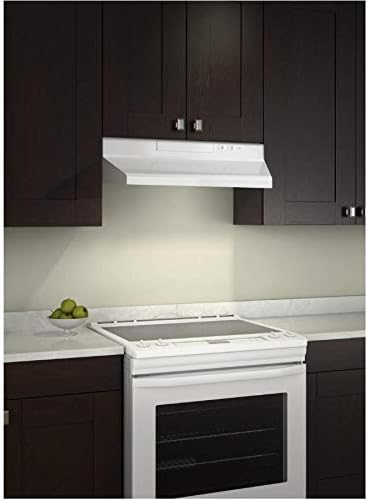
Figure 3.1: Nutone Range Hood Model NU230WW installed in a kitchen setting. This image illustrates the typical appearance of the range hood when mounted above a cooking range.
3.4 Installation Steps (General Overview)
- Prepare the Installation Area: Ensure the wall surface is clean, dry, and structurally sound to support the weight of the range hood. Mark the mounting points according to the installation template (if provided with the product packaging).
- Electrical Wiring: Route the electrical wiring to the installation point. Connect the wiring to the range hood's terminal block as per the wiring diagram provided in the full installation guide (not included in this general manual).
- Mount the Hood: Secure the range hood to the wall using appropriate fasteners. Ensure it is level and firmly attached.
- Ducting (if applicable): Connect the ductwork from the range hood to the exterior vent. Ensure all connections are sealed to prevent air leaks.
- Install Filters and Bulb: Insert the aluminum grease filter. If using a non-ducted setup, install the charcoal filter 41F. Install the 75-watt light bulb.
- Test Operation: Restore power and test the fan speeds and lighting to ensure proper functionality.
For detailed, step-by-step installation instructions, please refer to the complete installation guide included with your product packaging.
4. Operating Instructions
Your Nutone Range Hood is designed for simple and efficient operation.
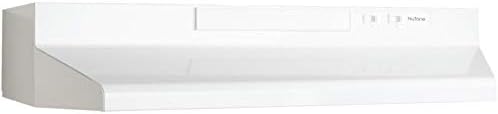
Figure 4.1: Front view of the Nutone Range Hood, highlighting the control panel area.
4.1 Fan Operation
- The range hood is equipped with a 2-speed rocker switch located on the front control panel.
- To turn the fan ON to the low speed setting, press the rocker switch to the first position.
- To increase the fan speed to high, press the rocker switch to the second position. At high speed, the fan provides up to 160 CFM (Cubic Feet Per Minute) of airflow, with a maximum CFM of 210.
- To turn the fan OFF, return the rocker switch to the neutral (center) position.
4.2 Lighting Operation
- The range hood features a light socket for a 75-watt bulb (not included).
- The light is controlled by a separate push button switch on the control panel.
- Press the button once to turn the light ON.
- Press the button again to turn the light OFF.
For best results, turn on the range hood a few minutes before cooking to establish an airflow pattern, and leave it on for a few minutes after cooking to clear any remaining smoke or odors.
5. Maintenance
Regular maintenance ensures the longevity and optimal performance of your Nutone Range Hood. Always disconnect power to the unit before performing any maintenance.
5.1 Cleaning the Exterior
- The exterior of the range hood is finished in white and is designed to be easy to clean.
- Wipe surfaces regularly with a soft cloth dampened with mild detergent and warm water.
- Do not use abrasive cleaners, steel wool, or scouring pads, as these can scratch the finish.
- Dry thoroughly after cleaning.
5.2 Cleaning the Aluminum Grease Filter
The aluminum grease filter should be cleaned regularly, depending on cooking frequency and type. A dirty filter can reduce airflow and increase fire risk.
- Remove the Filter: Locate the aluminum grease filter beneath the hood. It typically has a small latch or spring mechanism. Gently push or pull the latch to release the filter and slide it out.
- Clean the Filter: The filter can be washed by hand in hot water with a mild dish soap, or placed in a dishwasher. For stubborn grease, soak the filter in hot, soapy water before scrubbing with a non-abrasive brush.
- Dry and Reinstall: Ensure the filter is completely dry before reinstalling it. Slide the filter back into its slot until it clicks securely into place.
5.3 Replacing the Charcoal Filter (Non-Ducted Installations Only)
If your range hood is installed in a non-ducted configuration, it uses a charcoal filter (Nutone part 41F) to remove odors. This filter is not washable and must be replaced periodically, typically every 3-6 months depending on usage.
- Remove Old Filter: Disconnect power. Locate the charcoal filter, usually positioned above the grease filter or near the fan motor. Follow the instructions in your full installation guide for specific removal steps.
- Install New Filter: Place the new Nutone charcoal filter 41F into position, ensuring it is securely seated.
- Restore Power: Reconnect power and test the unit.
6. Troubleshooting
Before contacting customer support, please refer to the following common issues and their solutions:
| Problem | Possible Cause | Solution |
|---|---|---|
| Fan does not operate. | No power supply. Rocker switch is OFF. Motor malfunction. |
Check circuit breaker/fuse. Ensure rocker switch is in ON position. Contact qualified service personnel. |
| Light does not work. | Bulb is burnt out or loose. Light switch malfunction. |
Replace bulb (75-watt max). Ensure bulb is screwed in tightly. Contact qualified service personnel. |
| Poor airflow or excessive noise. | Clogged grease filter. Clogged charcoal filter (non-ducted). Obstruction in ductwork. Improper installation. |
Clean aluminum grease filter. Replace charcoal filter 41F. Check ductwork for blockages. Review installation steps or consult a professional. |
| Vibration. | Loose mounting screws. Fan blade imbalance. |
Check and tighten all mounting screws. Contact qualified service personnel. |
7. Specifications
| Model Number | NU230WW |
| Brand | Nutone |
| Color | White |
| Product Dimensions (W x D x H) | 30" x 17.5" x 30" (approximate installed height may vary) |
| Item Weight | 11.99 Pounds |
| Air Flow Capacity | 160 CFM (High Speed), 210 Max CFM |
| Number of Speeds | 2 |
| Controls Type | Push Button (Light), Rocker Switch (Fan) |
| Voltage | 120 Volts, 60Hz, 2.5A |
| Mounting Type | Wall Mount |
| Filter Type | Aluminum Grease Filter (included), Mesh; Charcoal Filter (optional, part 41F) |
| Special Feature | Easy To Clean |
| UPC | 026715253869 |
8. Warranty and Support
Nutone products are manufactured to high-quality standards. For specific warranty details, including coverage period and terms, please refer to the warranty card included with your product packaging or visit the official Nutone website.
For technical support, replacement parts, or service inquiries, please contact Nutone Customer Service. Have your model number (NU230WW) and purchase date ready when contacting support.
Contact information for Nutone can typically be found on their official website or on the product packaging.


