
TVON 1
TVON Universal Swivel TV Stand Base Instruction Manual
Model: 1
Product Overview
The TVON Universal Swivel TV Stand Base is designed to provide a stable and adjustable platform for 20-43 inch televisions and monitors. It features a tempered glass base, height adjustment, and a swivel function for optimal viewing angles. This stand supports TVs weighing up to 88 lbs with VESA mounting patterns up to 200x200mm.

Image: The TVON Universal Swivel TV Stand Base, featuring a black tempered glass base and a central support column with a VESA mounting plate.
Safety Information
- Ensure the stand is placed on a stable, level surface to prevent tipping.
- Do not exceed the maximum weight capacity of 88 lbs (40 kg).
- Verify your TV's VESA mounting pattern is compatible (75x75mm, 100x100mm, 150x150mm, 200x100mm, 200x200mm). Note: Not suitable for VESA 100x200mm or 43-inch Samsung TVs.
- Keep children and pets away from the TV and stand during assembly and operation.
- All components have been tested to UL standards for safety.
Setup and Assembly
Assembly of the TVON Universal Swivel TV Stand Base is designed to be straightforward and typically takes less than 10 minutes. All necessary tools and screws are included, and parts are numbered for easy identification.
Step-by-Step Guide:
- Unpack Components: Carefully remove all parts from the packaging and verify against the included parts list.
- Assemble Base: Attach the central support column to the tempered glass base using the provided screws. Ensure all connections are secure.
- Attach VESA Plate: Secure the VESA mounting plate to the central support column.
- Mount TV Brackets: Attach the TV brackets to the back of your television using the appropriate screws and spacers for your TV's VESA pattern. Refer to your TV's manual for specific VESA screw requirements.
- Hang TV: Carefully lift the television and hook the TV brackets onto the VESA mounting plate on the stand. Ensure the TV is securely seated and engage any safety locks.
- Adjust Height: Adjust the TV to your desired height level (see Operating Instructions for details).

Image: Diagram illustrating the simple assembly process, highlighting no drilling required and the inclusion of non-slip feet and a safety lock.
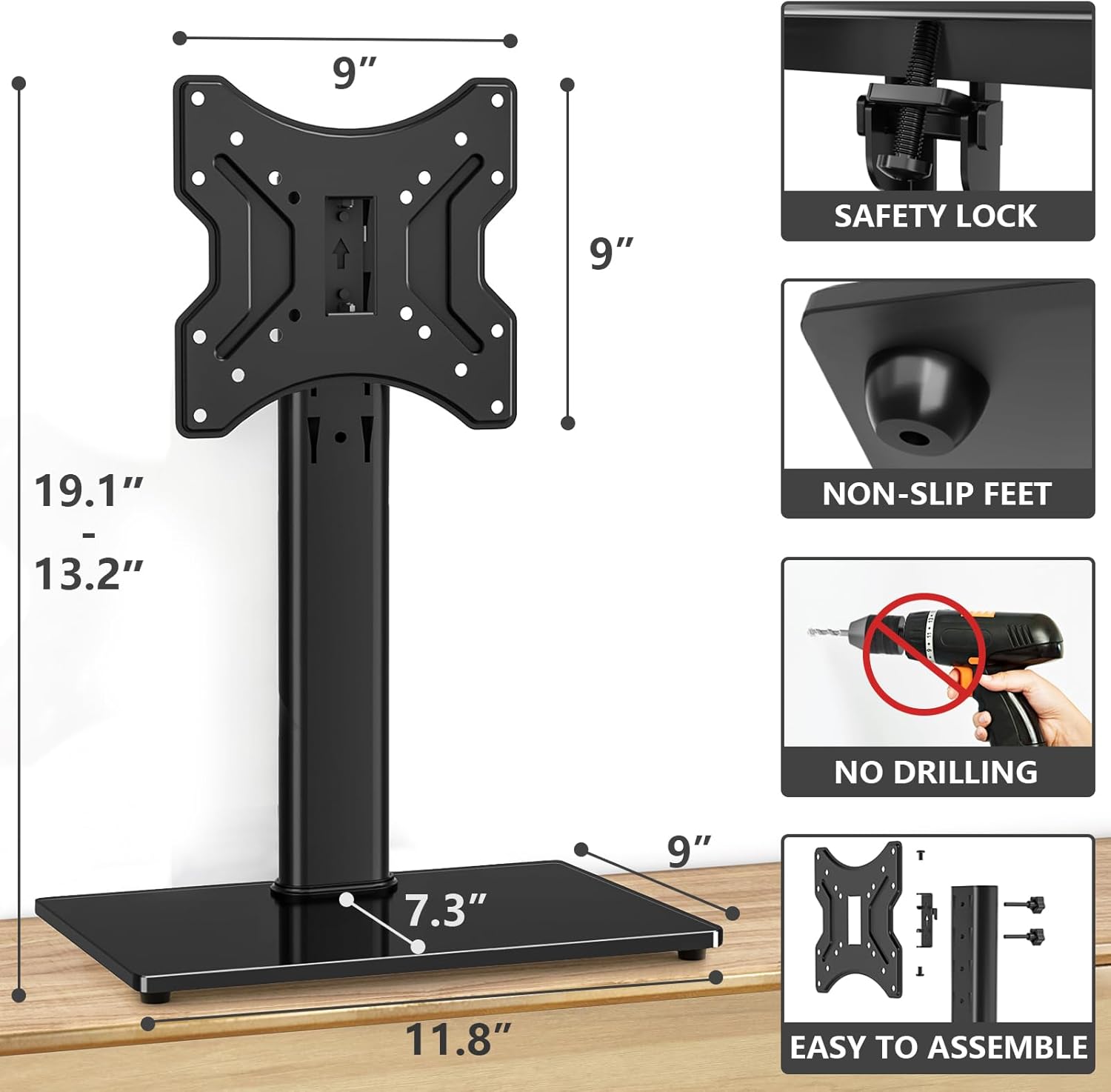
Image: Detailed dimensions of the stand and VESA plate, showing height range from 13.2" to 19.1", and base dimensions of 11.8" x 9".

Image: A chart detailing compatible VESA patterns (75x75mm, 100x100mm, 150x150mm, 200x100mm, 200x200mm) and explicitly stating incompatibility with VESA 100x200mm and 43-inch Samsung TVs.
Operating Instructions
Swivel Function:
The TVON stand allows for an 80-degree swivel range, providing 40 degrees of rotation to the left or right. This feature enables you to adjust the viewing angle without moving the entire stand or TV.

Image: Illustration showing a TV mounted on the stand swiveling 40 degrees left and right, demonstrating the 80-degree swivel range.
Height Adjustment:
The stand offers 4 levels of height adjustment, allowing you to set the TV's height from 13.2 inches to 19.1 inches. To adjust the height, carefully lift the TV off the mounting plate, reposition the mounting plate to the desired height setting on the central column, and then re-hang the TV, ensuring it is securely locked in place.
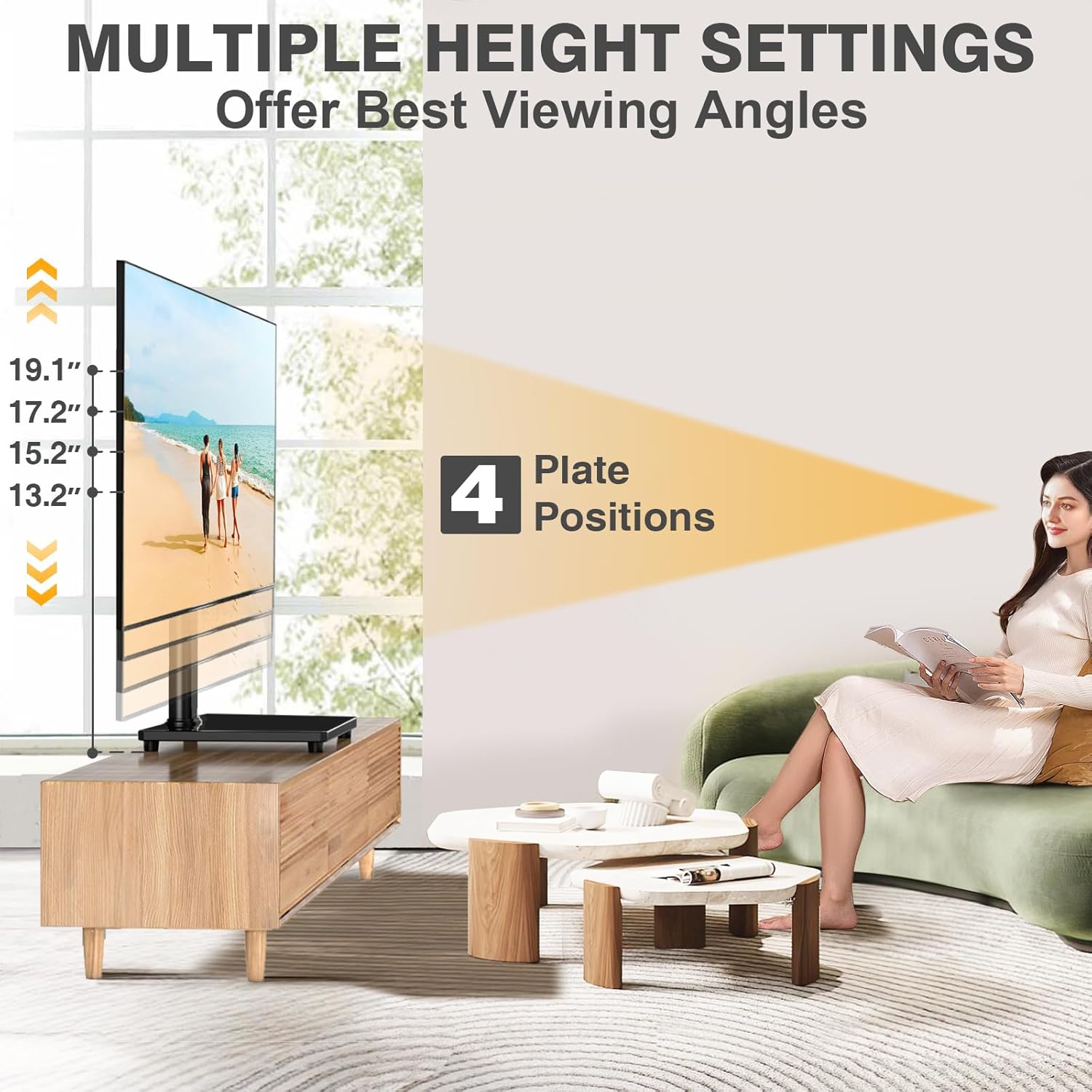
Image: Diagram showing the four adjustable height levels of the TV stand, ranging from 13.2 inches to 19.1 inches.

Image: Close-up view of the height adjustment mechanism on the central support column, showing how the VESA plate can be moved up or down.
Cable Management:
The stand includes integrated cable management features to help organize and conceal wires, contributing to a tidy setup.

Image: A close-up of the cable management clip attached to the central support column, showing cables neatly routed.
Maintenance
- Cleaning: Use a soft, dry cloth to clean the stand. For stubborn marks on the tempered glass, a mild glass cleaner can be used. Avoid abrasive cleaners.
- Stability Check: Periodically check all screws and connections to ensure they remain tight and secure.
- Non-Slip Feet: Ensure the non-slip feet on the base are intact and properly positioned to prevent movement and protect surfaces.

Image: Close-up of a non-slip foot on the underside of the tempered glass base.
Troubleshooting
- TV Not Fitting: Double-check your TV's VESA mounting pattern against the compatible patterns listed in the specifications. Ensure your TV is not a 43-inch Samsung model or has a VESA 100x200mm pattern, as these are not compatible.
- Missing or Incorrect Screws: The stand includes a variety of screws for different TV models. If you find that the provided screws do not fit your specific TV (e.g., some Samsung models), you may need to acquire the correct size screws from a hardware store.
- HDMI Cable Interference: If your TV's HDMI ports are located directly behind the VESA mount and a straight cable causes interference, a 90-degree HDMI adapter (not included) may be required.
- Stand Instability: Ensure all assembly screws are tightened securely and the stand is placed on a flat, stable surface. Verify the TV weight does not exceed 88 lbs.
- Non-Slip Feet Falling Off: The rubber feet are designed to protect surfaces and prevent slipping. If they become dislodged, reattach them securely. Consider using a small amount of adhesive if they repeatedly fall off.
If you encounter any issues not covered here, please refer to the Support section for assistance.
Specifications
| Brand | TVON |
| Model Number | 1 |
| Compatible TV/Monitor Sizes | 20-43 inches |
| Maximum Weight Capacity | 88 lbs (40 kg) |
| VESA Compatibility (W x H) | 75x75mm, 100x100mm, 150x150mm, 200x100mm, 200x200mm |
| Height Adjustment Range | 13.2 inches to 19.1 inches (4 levels) |
| Swivel Range | ±40 degrees (80 degrees total) |
| Base Material | Tempered Glass |
| Column Material | Alloy Steel |
| Product Dimensions (L x W x H) | 14.9 x 9.4 x 16.5 inches (overall, adjustable height) |
| Item Weight | 5.66 pounds |
Warranty Information
Specific warranty details are not provided in the product information. Please retain your proof of purchase for any warranty claims. For further information regarding warranty, contact TVON customer support.
Support
For any questions, concerns, or assistance with your TVON Universal Swivel TV Stand Base, please contact TVON customer service. They aim to respond to inquiries within 12 hours.
You can also visit the official TVON store on Amazon for more product information and support resources: TVON Store
Ask a question about this manual
Ask about setup, troubleshooting, compatibility, parts, safety, or missing instructions. Manuals+ will review the question and use this page’s manual context to help answer it.