
1. Introduction
The EPEVER TRIRON 3210N is an advanced Maximum Power Point Tracking (MPPT) solar charge controller designed for efficient and reliable solar power system management. This modular-designed controller integrates various display and interface modules to meet diverse functional requirements, automatically identifying and loading drivers for connected modules. It features an advanced MPPT control algorithm to maximize energy harvest from solar panels and supports a wide range of battery types with adaptive three-stage charging.
This manual provides essential information for the safe and effective installation, operation, and maintenance of your TRIRON 3210N solar charge controller.
2. Product Features
- Advanced MPPT Technology: Achieves tracking efficiency of no less than 99.5%, minimizing power loss and maximizing energy yield from solar modules.
- Modular Design: Allows for easy integration and replacement of different display and interface modules, enhancing versatility.
- Negative Ground Design: Suitable for various applications including communication base stations, household systems, street lighting, field monitoring, and RV solar systems.
- Battery Type Compatibility: Supports 7 battery types: Sealed (AGM), Gel, Flooded, Lead-acid User, LiFePO4 Lithium, Li(NiCoMn)O2 Lithium, and Lithium User (9~34V).
- Dual USB Output: Provides two 5V DC USB output interfaces for direct charging of electronic devices.
- Communication Modules: Master and slave RS485 communication modules enable reading load or inverter operating data.
- Relay Interface: Allows control of inverter switches.
- Intuitive Display & Control: Features three indicators with different colors for PV/Battery/Load status and five buttons for easy parameter adjustment and browsing.
3. Package Contents
The standard package for the EPEVER TRIRON 3210N MPPT Solar Charge Controller typically includes the main controller unit. Depending on the specific kit purchased, it may also include:
- MT50 Remote Meter
- RTS (Remote Temperature Sensor)
- RS485 Communication Cable

Image: EPEVER TRIRON 3210N MPPT Solar Charge Controller with included accessories (MT50, RS485, RTS).
4. Safety Information
Please read all instructions and warnings carefully before installation and operation. Keep this manual for future reference.
- Ensure all wiring is correctly polarized and securely connected to prevent damage to the controller or other components.
- Always disconnect the solar panel and battery power before installing or adjusting the controller.
- Install the controller in a well-ventilated area, away from direct sunlight, high temperatures, and moisture.
- Do not disassemble or attempt to repair the controller yourself. Contact qualified personnel for service.
- Use appropriate circuit breakers or fuses for all connections to protect against overcurrent.
5. Setup and Installation
Proper installation is crucial for the optimal performance and longevity of your solar charge controller. Follow these steps carefully:
5.1 Mounting the Controller
- Choose a vertical mounting location that is dry, cool, and well-ventilated.
- Ensure there is sufficient clearance around the controller for heat dissipation.
- Mount the controller using appropriate screws and anchors for the chosen surface.
5.2 Wiring Connections
Connect the components in the following order to ensure safety and proper operation:
- Connect the Battery: Connect the battery to the controller's battery terminals. Ensure correct polarity (positive to positive, negative to negative). The controller will automatically detect the system voltage (12V/24V).
- Connect the Solar Panels: Connect the solar panels to the controller's PV terminals. Ensure correct polarity. Do not exceed the maximum open circuit voltage or input power specified in the technical parameters.
- Connect the Load: Connect the DC load to the controller's load terminals. Ensure correct polarity.
- Connect Optional Accessories: If using, connect the MT50 remote meter, RTS temperature sensor, or RS485 communication cable to their respective ports.

Image: Product Function Diagram illustrating connections for solar panels, battery, load, and communication modules.
Important: Always connect the battery first, then the solar panels, and finally the load. Disconnect in the reverse order.
6. Operating Instructions
The TRIRON 3210N controller features an LCD display and five buttons for monitoring and configuration.
6.1 LCD Display Overview
The LCD displays various system parameters such as PV voltage/current, generated energy, battery voltage/current, temperature, and load status. Three indicator lights (PV, Battery, Load) provide quick visual status updates.
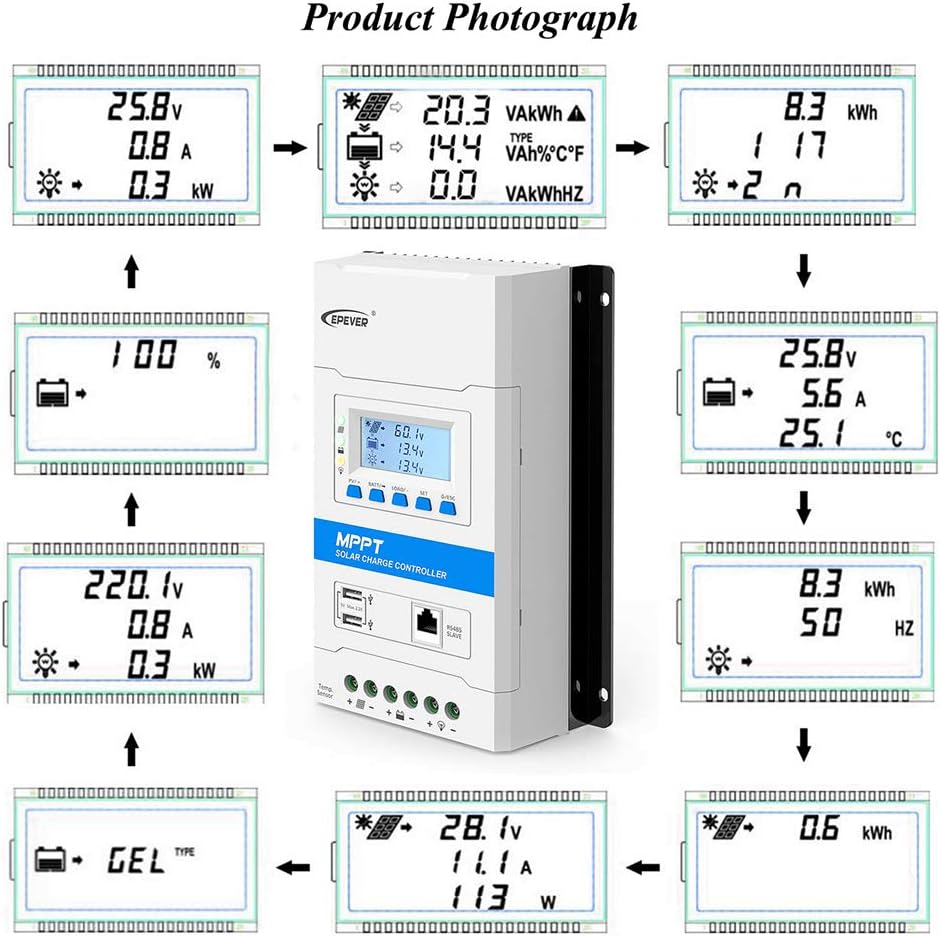
Image: Various LCD display screens showing system parameters.
6.2 Button Functions
The five buttons allow navigation through menus and adjustment of settings:
- UP/DOWN Buttons: Navigate through display screens or adjust parameter values.
- SET Button: Enter setting mode or confirm a selection.
- ESC Button: Exit setting mode or return to the previous screen.
- LOAD Button: Manually control the DC load output (on/off).
6.3 Battery Type Selection
It is essential to select the correct battery type for proper charging and battery longevity. Refer to the controller's menu to select from Sealed (AGM), Gel, Flooded, Lead-acid User, LiFePO4 Lithium, Li(NiCoMn)O2 Lithium, or Lithium User (9~34V).
6.4 Remote Monitoring (Optional)
With optional accessories like the MT50 remote meter or RS485 communication module, you can monitor system performance and adjust parameters remotely. Mobile APP connectivity is also available via specific communication modules.


Image: Optional accessories: MT50 Remote Meter, RS485 Communication Cable, and RTS Remote Temperature Sensor.
7. Maintenance
Regular maintenance ensures the longevity and efficient operation of your TRIRON 3210N solar charge controller.
- Check Connections: Periodically inspect all wiring connections for tightness and corrosion. Loose connections can cause overheating and power loss.
- Clean the Controller: Keep the controller clean and free from dust and debris. Use a dry cloth to wipe the exterior. Ensure ventilation openings are not blocked.
- Inspect for Damage: Check for any physical damage to the casing, cables, or terminals.
- Battery Inspection: For lead-acid batteries, check electrolyte levels and terminal corrosion as per battery manufacturer guidelines.
- Software Updates: If available, check the manufacturer's website for firmware updates to ensure optimal performance and access to new features.
8. Troubleshooting
This section provides solutions to common issues you might encounter with your solar charge controller.
| Problem | Possible Cause | Solution |
|---|---|---|
| No display or power | Battery not connected or low voltage; loose wiring. | Check battery connections and voltage. Ensure battery voltage is above the minimum operating voltage. |
| Battery not charging | Solar panels not connected; insufficient sunlight; incorrect PV polarity; PV voltage too low/high. | Verify solar panel connections and polarity. Check for shading. Ensure PV voltage is within the controller's operating range. |
| Load not working | Load output disabled; overload; short circuit; low battery voltage. | Check load settings on the controller. Reduce load. Inspect for short circuits. Ensure battery voltage is sufficient. |
| Inaccurate readings | Loose sensor connection; faulty sensor; incorrect battery type setting. | Check RTS connection. Verify battery type setting matches your battery. |
If the problem persists after attempting these solutions, please contact EPEVER customer support.
9. Specifications
Key technical specifications for the EPEVER TRIRON 3210N MPPT Solar Charge Controller.
| Parameter | Value (TRIRON 3210N) |
|---|---|
| Nominal System Voltage | 12V/24VDC Auto Work |
| Rated Charge Current | 30A |
| Rated Discharge Current | 30A |
| Battery Input Voltage Range | 8~32V |
| Max. PV Open Circuit Voltage | 92V (25°C), 72V (Min operating environment temp) |
| MPP Voltage Range | (Vbat+2V)~72V |
| Max. PV Input Power | 390W/12V, 780W/24V |
| Battery Type | Sealed / Gel / Flooded / LiFePO4 / Li-NiCoMn / User |
| Display Type | LCD |
| Material | Plastic |
For detailed electrical parameters including charging voltages for different battery types, please refer to the specific electrical parameter table provided by the manufacturer.

Image: Detailed Electrical Parameters Table for TRIRON series.
10. Warranty and Support
EPEVER products are designed for reliability and performance. For warranty information and technical support, please refer to the documentation included with your product or visit the official EPEVER website. Support is available for product inquiries and assistance with operation or troubleshooting.
Optional protection plans may be available for extended coverage. Please check with your retailer for details.