
Rigol DS1202Z-E
Rigol DS1202Z-E Digital Oscilloscope User Manual
Model: DS1202Z-E
1. Introduction
Thank you for choosing the Rigol DS1202Z-E Digital Oscilloscope. This instrument is a high-performance, economical digital oscilloscope designed for various applications in education, research, and industrial fields. It features a 200 MHz bandwidth, 2 analog channels, a 1 GSa/s real-time sample rate, and a 14 Mpts memory depth. This manual provides essential information for the safe and efficient operation of your device.
2. Safety Information
Please read the following safety precautions carefully to avoid personal injury and prevent damage to the instrument or any products connected to it. Rigol Technologies assumes no liability for any injury or damage caused by neglecting these safety precautions.
- Power Source: Ensure the instrument is connected to a power source with the correct voltage and frequency as specified on the product label.
- Grounding: The instrument must be properly grounded to prevent electric shock. Use only the provided power cord.
- Ventilation: Do not block the ventilation openings. Ensure adequate airflow around the instrument to prevent overheating.
- Environment: Operate the instrument in a dry, well-ventilated area, away from direct sunlight, high temperatures, humidity, and excessive dust.
- Probes: Use only probes specified for this instrument. Ensure probes are properly calibrated and rated for the voltages being measured.
- Servicing: Do not attempt to service the instrument yourself. Refer all servicing to qualified service personnel.
3. Package Contents
Verify that your package contains the following items:
- Rigol DS1202Z-E Digital Oscilloscope
- Two Passive Probes (1x/10x switchable)
- Power Cord
- USB Cable
- Quick Guide
- Resource CD (User Manual, Programming Manual, Software)
4. Product Overview
The Rigol DS1202Z-E features a user-friendly interface with a 7-inch color display and intuitive controls. Below are key components of the instrument.
4.1 Front Panel
The front panel includes the display, control buttons, and input connectors.
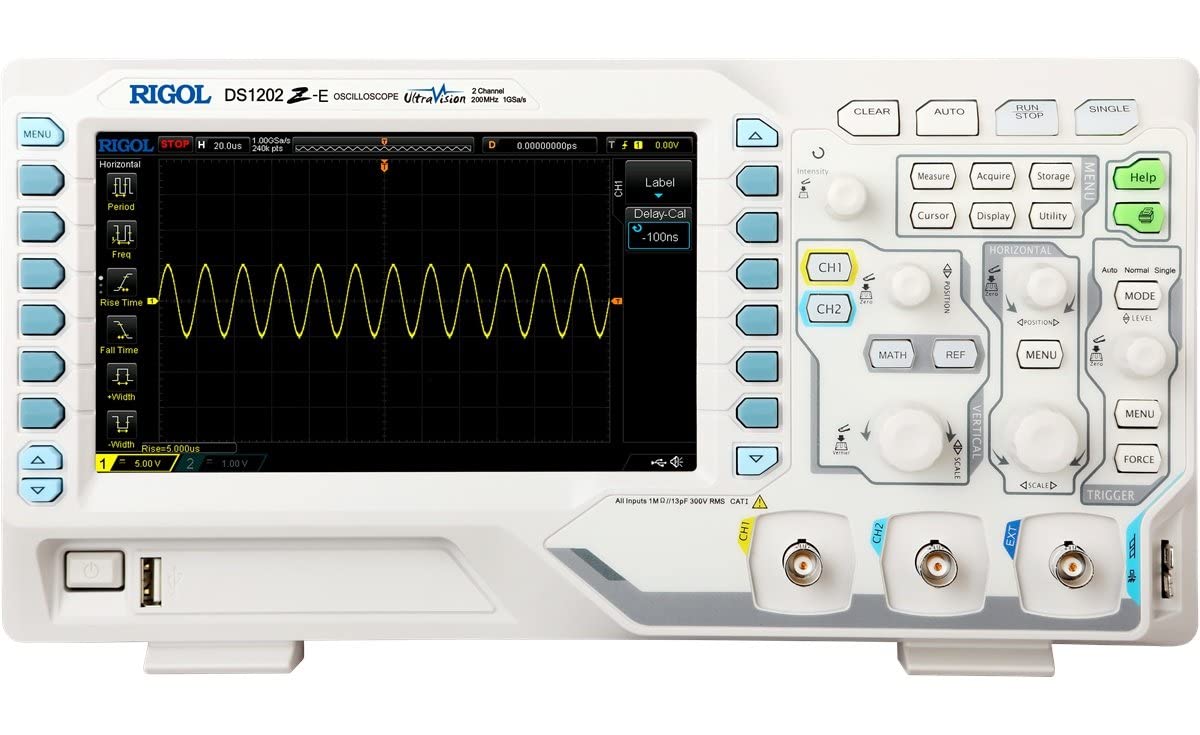
Figure 4.1: Front view of the Rigol DS1202Z-E Digital Oscilloscope, showing the main display, control knobs, and input channels.

Figure 4.2: Front-right view of the Rigol DS1202Z-E, highlighting the control panel with various function buttons and rotary encoders.
4.2 Side Panels
The side panels house ventilation and additional connectivity options.

Figure 4.3: Left side view of the Rigol DS1202Z-E, showing the instrument's profile and ventilation slots.

Figure 4.4: Right side view of the Rigol DS1202Z-E, illustrating the instrument's depth and design.
5. Setup
Follow these steps for initial setup of your oscilloscope.
- Connect Power: Connect the provided power cord to the AC input on the rear panel of the oscilloscope and then to a grounded power outlet.
- Power On: Press the power button located on the front panel to turn on the instrument. The Rigol logo will appear on the screen during startup.
- Connect Probes:
- Attach the BNC connector of a passive probe to one of the input channels (CH1 or CH2) on the front panel.
- Connect the probe ground clip to the ground terminal on the oscilloscope or to the ground of the circuit under test.
- Set the attenuation switch on the probe (e.g., 1x or 10x) to match the setting on the oscilloscope channel menu. For most measurements, 10x is recommended.
- Probe Compensation: For accurate measurements, compensate the probes. Connect the probe tip to the probe compensation signal output (usually a square wave) on the front panel and adjust the probe's compensation trimmer until a flat-top square wave is displayed.
6. Operating the Oscilloscope
This section covers basic operation for common measurement tasks.
6.1 Basic Measurements
- Vertical Scale (Volts/Div): Use the vertical scale knob for the selected channel (CH1 or CH2) to adjust the voltage per division.
- Vertical Position: Use the vertical position knob to move the waveform up or down on the screen.
- Horizontal Scale (Time/Div): Use the horizontal scale knob to adjust the time per division, controlling the time window displayed.
- Horizontal Position: Use the horizontal position knob to shift the waveform left or right.
6.2 Triggering
Triggering stabilizes repetitive waveforms and captures single-shot events.
- Trigger Level: Adjust the trigger level knob to set the voltage point at which the oscilloscope triggers.
- Trigger Mode: Press the MODE button in the Trigger section to select trigger modes like Auto, Normal, or Single.
- Trigger Source: Select the input channel (CH1, CH2, EXT, AC Line) that will be used as the trigger source.
6.3 Measurement Functions
The DS1202Z-E offers various automatic measurement functions.
- Press the MEASURE button to access the automatic measurement menu.
- Select desired measurements such as Vpp (Peak-to-Peak Voltage), Vrms (RMS Voltage), Frequency, Period, Rise Time, etc.
6.4 Saving Data
You can save waveforms, setups, or screen images to a USB flash drive.
- Insert a USB flash drive into the USB host port on the front panel.
- Press the STORAGE button to access the save menu.
- Select the desired save type (Waveform, Setup, Image) and follow the on-screen prompts to save the data.
7. Maintenance
Proper maintenance ensures the longevity and performance of your oscilloscope.
7.1 Cleaning
- Clean the exterior of the instrument with a soft cloth dampened with mild detergent and water. Do not use abrasive cleaners or solvents.
- Ensure the instrument is powered off and disconnected from the power source before cleaning.
- Avoid spraying liquids directly onto the instrument.
7.2 Storage
- When not in use for extended periods, store the oscilloscope in a clean, dry environment.
- Protect the screen from scratches and impacts.
8. Troubleshooting
This section lists common problems and their solutions.
| Problem | Possible Cause | Solution |
|---|---|---|
| No display after power on | Power cord not connected; Power switch off; Fuse blown | Check power cord connection; Ensure power switch is on; Contact service for fuse replacement. |
| No waveform displayed | Probe not connected; Incorrect vertical/horizontal settings; Trigger not set correctly | Connect probe to signal source; Adjust Volts/Div and Time/Div; Adjust trigger level and mode. |
| Waveform unstable | Incorrect trigger settings; Noisy signal | Adjust trigger level, mode, and source; Use averaging or filtering functions. |
| Probe compensation error | Probe not compensated | Perform probe compensation as described in Section 5.3. |
9. Specifications
Key technical specifications for the Rigol DS1202Z-E Digital Oscilloscope:
- Bandwidth: 200 MHz
- Analog Channels: 2
- Real-time Sample Rate: 1 GSa/s
- Memory Depth: 14 Mpts
- Display: 7-inch TFT LCD (800x480 resolution)
- Vertical Resolution: 8 bits
- Interfaces: USB Host, USB Device, LAN (LXI), AUX Out
- Dimensions (L x W x H): Approximately 31.3 cm x 12.2 cm x 16.1 cm (12.3 in x 4.8 in x 6.3 in)
- Weight: Approximately 2.9 kg (6.4 lbs)
- Operating Temperature: 0°C to 50°C
10. Support
For technical support, service, or warranty information, please contact your local Rigol distributor or visit the official Rigol website. Please have your model number (DS1202Z-E) and serial number ready when contacting support.
Related documentsDS1202Z-E


Ask a question about this manual
Ask about setup, troubleshooting, compatibility, parts, safety, or missing instructions. Manuals+ will review the question and use this page’s manual context to help answer it.