
1. Introduction
The Lorex LWB6801-W is a wireless receiver designed to capture radio frequency signals from compatible Lorex wire-free cameras. It processes these signals, typically video image data, and outputs them to a connected recording device or display. This receiver is an essential component for extending the range and functionality of your Lorex wire-free security camera system.
Key features include:
- Long Distance Wireless Range: Capable of receiving signals from wire-free cameras up to approximately 450 feet with a clear line-of-sight. This allows for flexible camera placement, even in detached structures.
- Weatherproof Design: The receiver is built to withstand various weather conditions, enabling outdoor installation for optimal signal reception.
- Signal Interference Reduction: Utilizes adaptive DSSS (Direct-Sequence Spread Spectrum) technology to minimize interference, reduce conflicts with other wireless signals, and enhance security against eavesdropping.
- Compatibility: Specifically designed to work with Lorex LHB926 Series HD Security DVRs for wire-free cameras. It is a replacement for LWB6800, LWB5800, LWB4900, and LWB4800 wire-free cameras.
2. Package Contents
Verify that all items are present in your package:
- Lorex LWB6801-W Wireless Receiver
- Two Antennas
- USB Cable (integrated or separate, for connection to DVR)
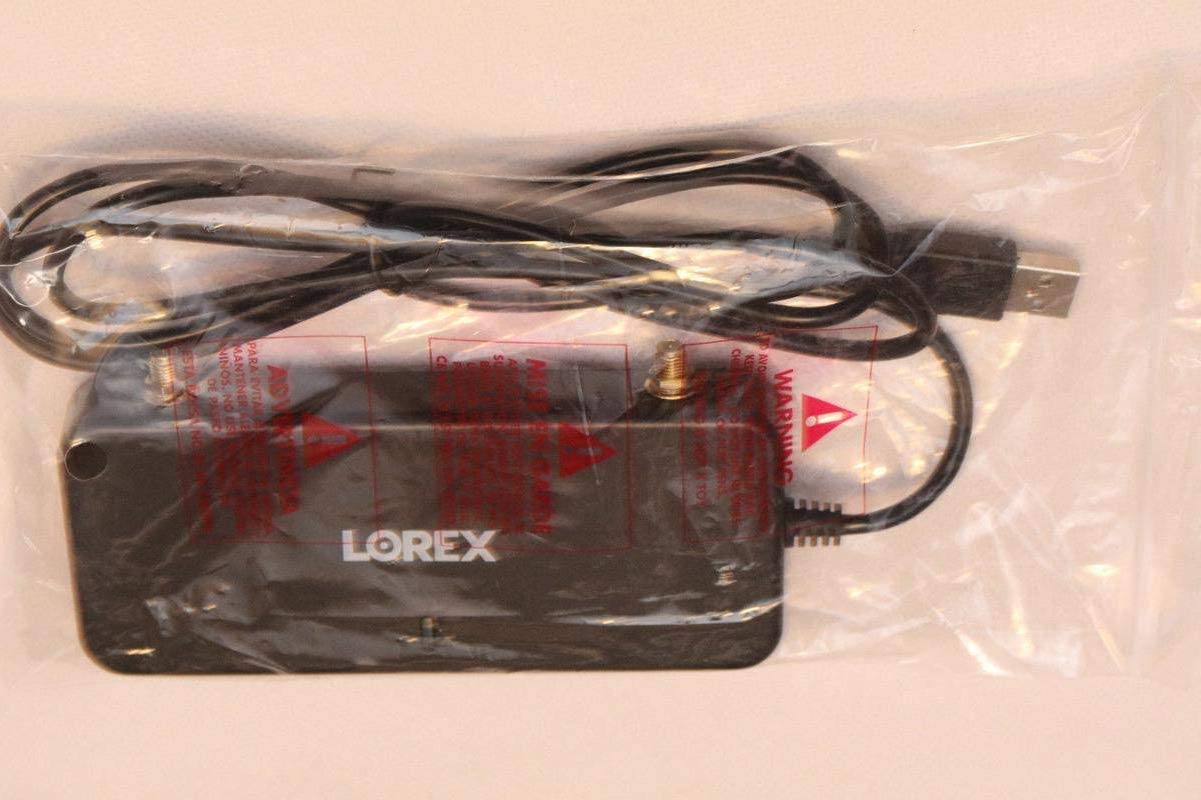
Image 1: The Lorex LWB6801-W Wireless Receiver, including its USB cable and two antennas, sealed in its original clear plastic packaging.

Image 2: A close-up view of the Lorex LWB6801-W Wireless Receiver, showing its top surface with the Lorex logo, model number, and regulatory markings. The USB cable is visible coiled around the device.
3. Setup Instructions
- Unpack the Receiver: Carefully remove the LWB6801-W wireless receiver and its components from the packaging.
- Attach Antennas: Screw the two provided antennas onto the designated ports on the receiver. Ensure they are securely fastened but do not overtighten.
- Connect to DVR: Connect the USB cable from the LWB6801-W receiver to an available USB port on your Lorex LHB926 Series HD Security DVR. This connection provides both power and data transfer for the receiver.
- Optimal Placement: For best wireless reception, consider installing the weatherproof receiver on the exterior of your house or in a location with a clear line-of-sight to your wire-free cameras. Ensure the USB cable length is sufficient for your chosen placement.
- Power On DVR: Ensure your Lorex LHB926 Series HD Security DVR is powered on. The receiver will typically power on automatically once connected.
- Pairing Cameras (if necessary): Refer to your Lorex LHB926 Series HD Security DVR manual for instructions on pairing your wire-free cameras with the newly connected receiver.
4. Operating the Receiver
The LWB6801-W wireless receiver operates by continuously scanning for and receiving wireless signals from compatible Lorex wire-free cameras. Once connected to your LHB926 Series HD Security DVR, it acts as a bridge, transmitting the video and audio data from your cameras to the DVR for recording and display.
- Automatic Operation: The receiver functions automatically once properly connected and powered. No manual intervention is typically required for its core operation.
- Signal Strength: The effectiveness of the wireless connection depends on factors such as distance, obstructions, and interference. Optimal placement of the receiver and cameras helps maintain strong signal integrity.
- Data Transmission: Video and audio data are transmitted digitally, utilizing DSSS technology for secure and reliable communication between cameras and the DVR via the receiver.
5. Maintenance
To ensure the longevity and optimal performance of your Lorex LWB6801-W wireless receiver, follow these maintenance guidelines:
- Cleaning: Periodically wipe the exterior of the receiver with a soft, dry cloth to remove dust and dirt. Avoid using harsh chemicals or abrasive cleaners.
- Weather Protection: While the receiver is weatherproof, ensure its connections (USB cable, antenna ports) are secure and protected from excessive moisture or extreme environmental conditions.
- Antenna Care: Ensure antennas remain upright and unobstructed for best signal reception. Avoid bending or damaging them.
- Cable Integrity: Regularly inspect the USB cable for any signs of wear, cuts, or damage. Replace if necessary to prevent connectivity issues.
6. Troubleshooting
If you encounter issues with your Lorex LWB6801-W wireless receiver, consider the following basic troubleshooting steps:
- No Signal/Poor Signal:
- Verify that the receiver is securely connected to the DVR's USB port.
- Ensure both antennas are properly attached and oriented.
- Check for obstructions between the receiver and the wire-free cameras. Try repositioning the receiver for a clearer line-of-sight.
- Confirm that the wire-free cameras are powered on and within range.
- Check for potential sources of wireless interference (e.g., Wi-Fi routers, microwaves, cordless phones) and try to minimize their proximity to the receiver.
- Receiver Not Powering On:
- Ensure the DVR is powered on and functioning correctly.
- Try connecting the receiver to a different USB port on the DVR, if available.
- Inspect the USB cable for damage.
- Compatibility Issues:
- Confirm that your DVR is a Lorex LHB926 Series HD Security DVR. This receiver is only compatible with this specific series.
If issues persist after performing these steps, please contact Lorex customer support for further assistance.
7. Specifications
| Feature | Detail |
|---|---|
| Model Number | LWB6801-W |
| Brand | Lorex |
| Connectivity Technology | USB (for DVR connection) |
| Compatible Devices | Lorex LHB926 Series HD Security DVR for Wire-Free Cameras |
| Wireless Range | Up to 450ft (137m) with clear line-of-site |
| Wireless Technology | Adaptive DSSS (Direct-Sequence Spread Spectrum) |
| Weather Resistance | Weatherproof |
| Color | Black |
| Output Power | 5 Watts |
| Wattage | 5 watts |
8. Warranty and Support
This product may be subject to a limited warranty. For specific warranty details, please refer to the documentation included with your original purchase or visit the official Lorex website. Typically, new products come with a manufacturer's warranty covering defects in materials and workmanship.
For technical support, product registration, or to access additional resources such as FAQs and software updates, please visit the official Lorex support website:
When contacting support, please have your product model number (LWB6801-W) and purchase information readily available.


