
Product Overview
The Rocketfish Full-Motion TV Wall Mount (Model RF-HTLF23) is designed to securely mount most 40-inch to 75-inch televisions, supporting weights up to 100 lbs. This mount offers versatile viewing options with its full-motion capabilities, including swivel, tilt, and an articulating arm, allowing you to adjust your TV for optimal viewing comfort from various positions in your room. It also features built-in wire management to help keep your entertainment area tidy.

Image: The Rocketfish Full-Motion TV Wall Mount, showcasing its robust articulating arm and wall plate design.
Setup and Installation
Proper installation is crucial for the safety and stability of your television. It is recommended to have two people for installation. Ensure you have the necessary tools before beginning.
Tools Required:
- Stud Finder
- Level
- Drill with appropriate bits
- Wrenches (various sizes)
- Pencil
- Measuring Tape
Installation Steps (General Guidelines):
- Locate Wall Studs: Use a stud finder to locate and mark the center of two adjacent wall studs where you intend to mount the TV. Ensure the studs are strong enough to support the weight of the mount and your TV.
- Mark Drill Holes: Hold the wall plate of the mount against the wall, aligning it with the marked studs. Use a level to ensure it is perfectly horizontal. Mark the pilot hole locations.
- Drill Pilot Holes: Drill pilot holes at the marked locations. Ensure the drill bit size matches the recommendations in the detailed installation guide provided with your product.
- Attach Wall Plate: Secure the wall plate to the wall using the provided lag bolts and washers. Tighten all bolts firmly.
- Attach TV Brackets: Attach the TV brackets to the back of your television using the appropriate screws and spacers from the hardware kit. Ensure the brackets are centered and securely fastened to the VESA mounting holes on your TV.
- Mount TV to Wall Plate: Carefully lift the TV with the attached brackets and hook them onto the wall plate. Secure the TV to the wall plate using the locking mechanisms or screws as per the detailed instructions.
- Adjust and Level: Once mounted, make any necessary leveling adjustments.

Image: Diagram illustrating the compatibility of the mount with TVs ranging from 40 to 75 inches and supporting up to 100 lbs.
Operating the Mount
The Rocketfish Full-Motion TV Wall Mount provides extensive flexibility to optimize your viewing experience.
Articulating Arm:
The mount features a robust articulating arm that allows you to extend your TV up to 25.2 inches from the wall. This extension provides ample space to angle your TV as needed.
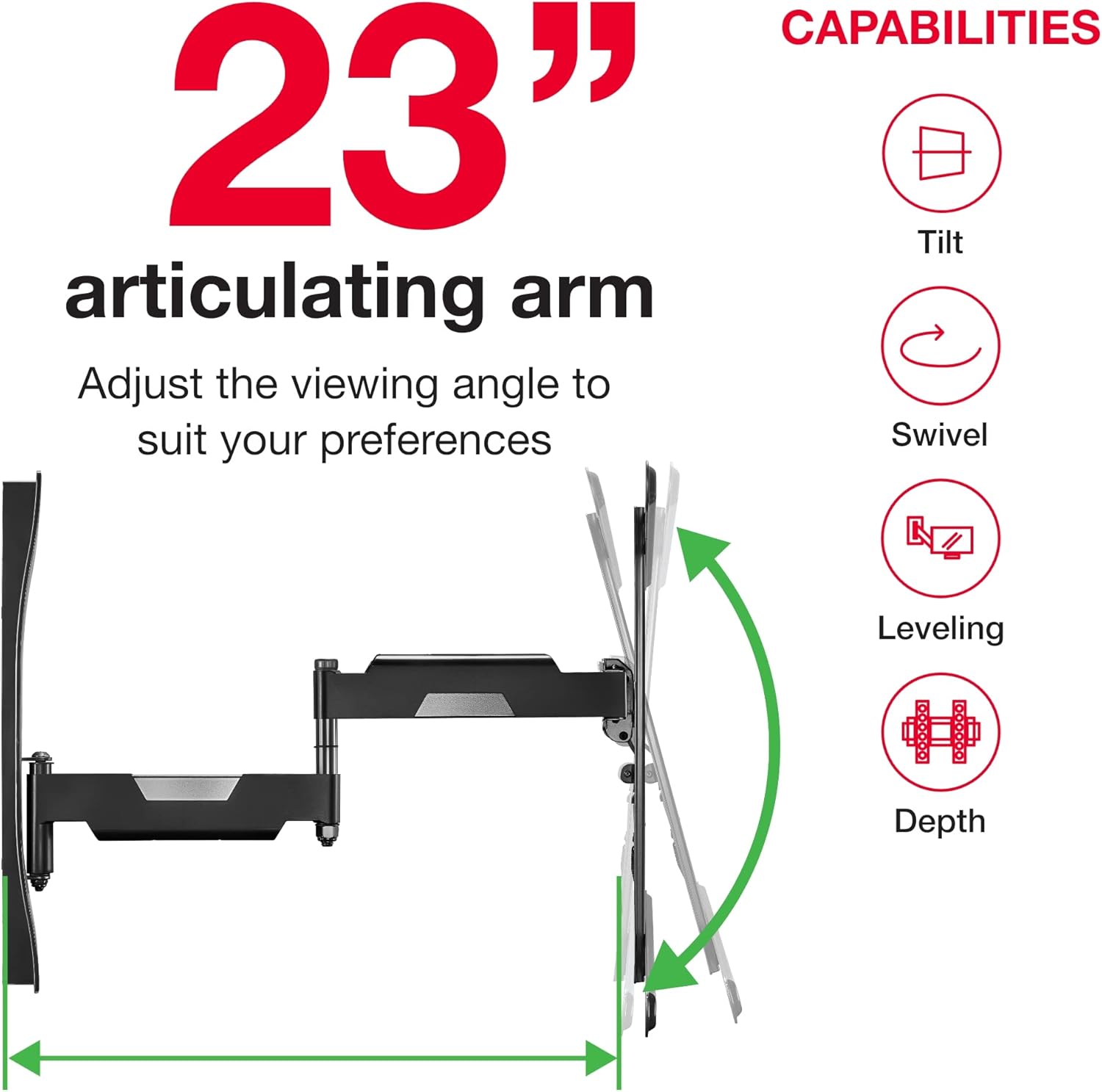
Image: Illustration of the 23-inch articulating arm, demonstrating its tilt, swivel, leveling, and depth adjustment capabilities.
Swivel Function:
You can swivel your TV up to 50 degrees left or right, depending on the TV size and wall clearance. This feature is ideal for viewing from different seating areas within a room.
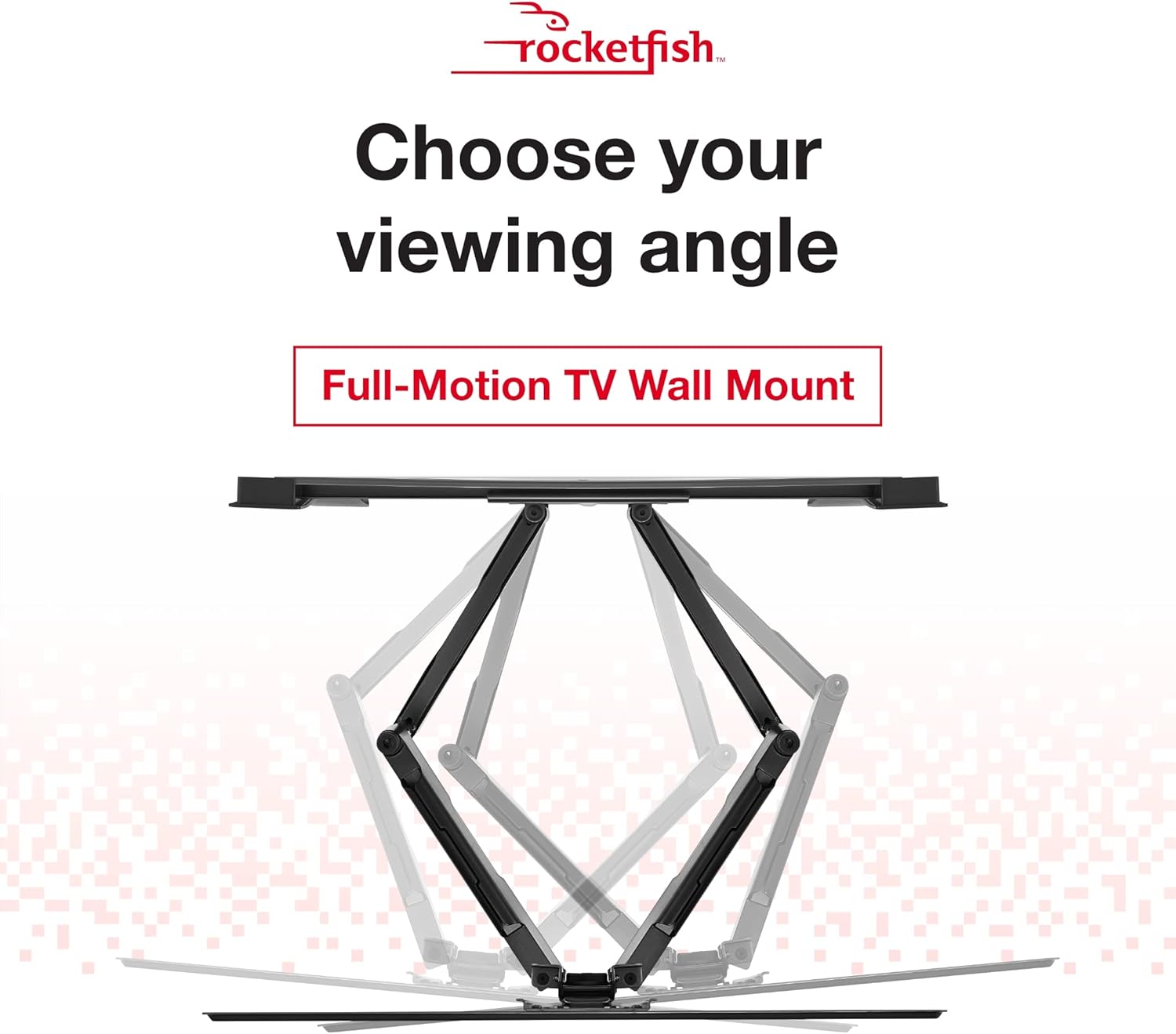
Image: Diagram showing the range of motion for the full-motion TV wall mount, illustrating how the TV can be angled for various viewing positions.
Tilt Function (Virtual Axis Technology):
Utilize the Virtual Axis tilt technology to adjust the vertical viewing angle from +5 to -15 degrees. This helps reduce glare and provides a comfortable viewing angle, especially when the TV is mounted higher on the wall.
Cable Management:
The mount includes built-in wire management channels. Route your cables through these channels to keep them organized and out of sight, contributing to a clean and professional appearance.

Image: Side view of the TV mount showing how cables can be concealed within the arm for a tidy setup.
Maintenance
To ensure the longevity and safe operation of your Rocketfish TV wall mount, follow these simple maintenance guidelines:
- Regular Inspection: Periodically check all mounting bolts and screws to ensure they remain tight. Over time, vibrations or adjustments can cause them to loosen.
- Cleaning: Dust the mount regularly with a soft, dry cloth. For stubborn marks, a slightly damp cloth can be used, but avoid harsh chemicals or abrasive cleaners that could damage the finish.
- Movement Check: Occasionally move the articulating arm, swivel, and tilt mechanisms through their full range of motion to ensure smooth operation. If any stiffness is noted, do not force it.
- Weight Limit: Always ensure that the total weight of your TV and any attached accessories does not exceed the mount's maximum weight capacity of 100 lbs.
Troubleshooting
If you encounter issues with your Rocketfish TV wall mount, consider the following common troubleshooting steps:
- TV Not Level: If your TV appears unlevel after installation, check the leveling adjustments on the mount. Ensure the wall plate was installed perfectly level. Some mounts offer post-installation leveling adjustments.
- Mount Feels Loose/Wobbly: Immediately re-check all wall mounting bolts and TV attachment screws. Ensure they are securely tightened. Verify that the wall studs are solid and capable of supporting the load. If mounted into drywall with anchors, ensure the anchors are rated for the weight and properly installed.
- Difficulty Moving Arm/Swivel/Tilt: Ensure no cables are snagged or obstructing the movement. Check for any debris in the joints. Do not apply excessive force. If the movement is consistently stiff, consult the manufacturer's support.
- Cables Not Concealing Properly: Ensure cables are routed correctly through the designated channels. Avoid overfilling the channels, which can prevent proper closure or movement.
- Mounting Surface Concerns: This mount is designed for wood stud or concrete wall installation. If you are attempting to install on a different surface (e.g., metal studs, plaster), ensure you are using appropriate anchors and techniques, or consult a professional installer.
Specifications
| Feature | Detail |
|---|---|
| Brand | Rocketfish |
| Model Number | RF-HTLF23 |
| Compatible TV Sizes | Most 40" - 75" TVs |
| Maximum Weight Capacity | 100 lbs (45.36 kg) |
| Movement Type | Swivel, Tilt, Articulating |
| Maximum Extension from Wall | 25.2 inches |
| Swivel Angle | Up to 50 degrees (left/right) |
| Tilt Angle | +5 to -15 degrees (Virtual Axis Technology) |
| Material | Metal |
| Product Dimensions (folded) | 27.76 x 16.34 x 2.95 inches |
| Item Weight | 22.5 pounds |
| UPC | 600603253249 |
Warranty and Support
For detailed warranty information, please refer to the warranty card included with your product or visit the official Rocketfish website. Keep your purchase receipt for warranty claims.
For technical support, product registration, or to view frequently asked questions, please visit the Rocketfish brand store or contact their customer service directly.
Rocketfish Brand Store: Visit Rocketfish Store on Amazon
Note on Videos: No official seller videos with relevant content and creator type "Seller" were available for embedding in this manual.


