
1. Product Overview
The EPEVER Tracer AN Series MPPT Solar Charge Controller is designed to manage power flow from solar panels to batteries, ensuring efficient charging and protecting the battery from overcharge and over-discharge. This 50A model supports 12V, 24V, 36V, and 48V automatic system voltage identification and features advanced Maximum Power Point Tracking (MPPT) technology for optimal solar energy harvesting. It is suitable for various off-grid solar applications.
Key Features:
- Advanced MPPT Technology: Ultra-fast tracking speed with efficiency no less than 99.5% for maximum power point utilization.
- Adaptive Three-Stage Charging: Extends battery life and improves system performance.
- Automatic System Voltage Identification: Supports 12V/24V/36V/48V systems.
- Multiple Battery Type Support: Compatible with Sealed, Gel, Flooded, and User-defined battery types.
- Communication Interfaces: Standard Modbus protocol with RS485 interface for monitoring and parameter setting via phone apps, MT50 remote meter, and PC software.
- Parallel Operation: Dual RS485 ports (RJ45) support up to 8 units in parallel for system expansion.
- Comprehensive Protection: Includes protection against overcharge, over-discharge, reverse polarity, and more.
2. Product Components
The package typically includes the following components:
- EPEVER Tracer AN Series MPPT Solar Charge Controller (Tracer5415AN)
- MT50 Remote Meter
- Remote Temperature Sensor (RTS)
- PC Communication Cable (RS485)
- Mounting accessories (screws, wall plugs)

3. Controller Features and Ports
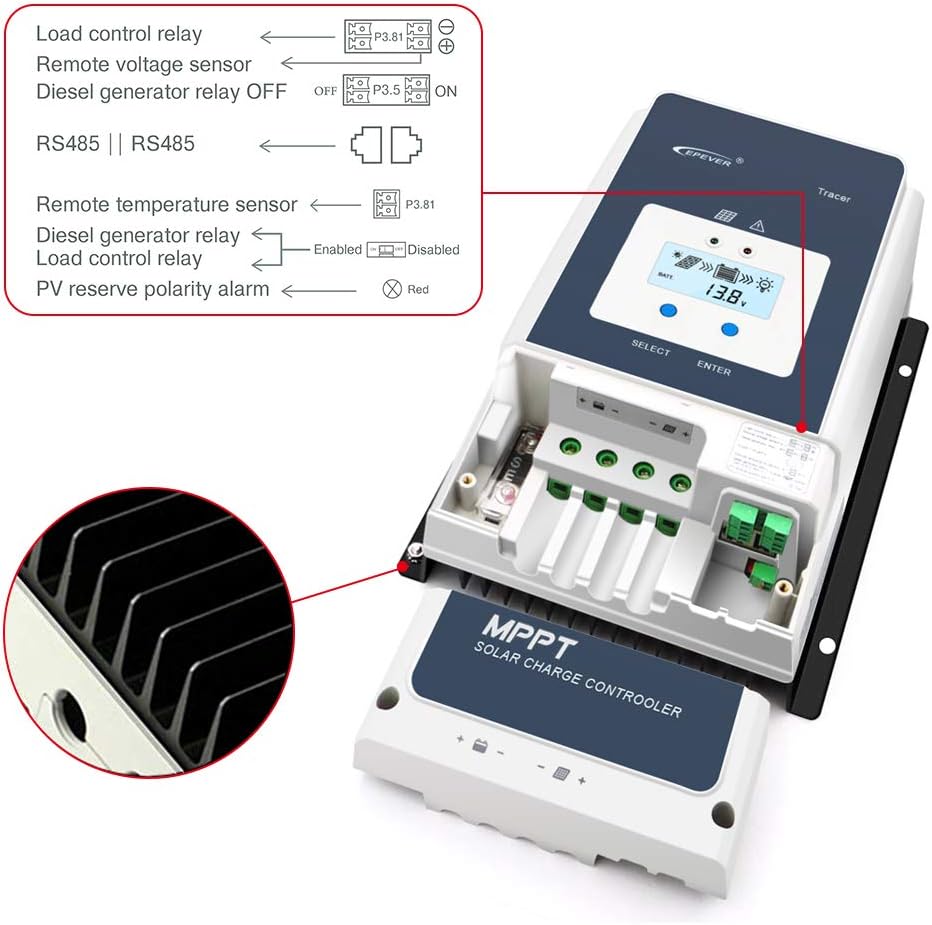
Familiarize yourself with the various components and connection points of the solar charge controller.

- Charging LED indicator: Indicates charging status.
- SELECT button: Used for menu navigation and selection.
- Fuse: Overcurrent protection for the battery circuit.
- Grounding Terminal: For system grounding.
- Fault LED indicator: Indicates system faults or errors.
- LCD: Displays system parameters and status.
- ENTER button: Used to confirm selections and enter menus.
- RBVS Port: Remote Battery Voltage Sensor port.
- Utility/Generator relay ON: Output for controlling external utility/generator.
- RS485 port (5VDC/200mA): Communication port for accessories.
- RTS Port: Remote Temperature Sensor port.
- Generator and load relay enable: Control for generator and load relays.
- PV reverse polarity alarm indicator: Alerts to incorrect PV connection.
- Load control relay: Output for controlling DC loads.
- Utility/Generator relay OFF: Output for controlling external utility/generator.
- PV Terminals: Connection points for solar panel input.
- Battery Terminals: Connection points for battery bank.
4. Installation Guide
4.1 Safety Precautions
- Ensure all connections are secure and correct to prevent damage or injury.
- Disconnect all power sources (solar panels and battery) before installation or maintenance.
- Install the controller in a well-ventilated area, away from direct sunlight and moisture.
- Maintain adequate clearance around the controller for heat dissipation.
4.2 Mounting the Controller
Mount the controller vertically on a non-flammable surface, ensuring the terminals are easily accessible. Use the provided mounting accessories.
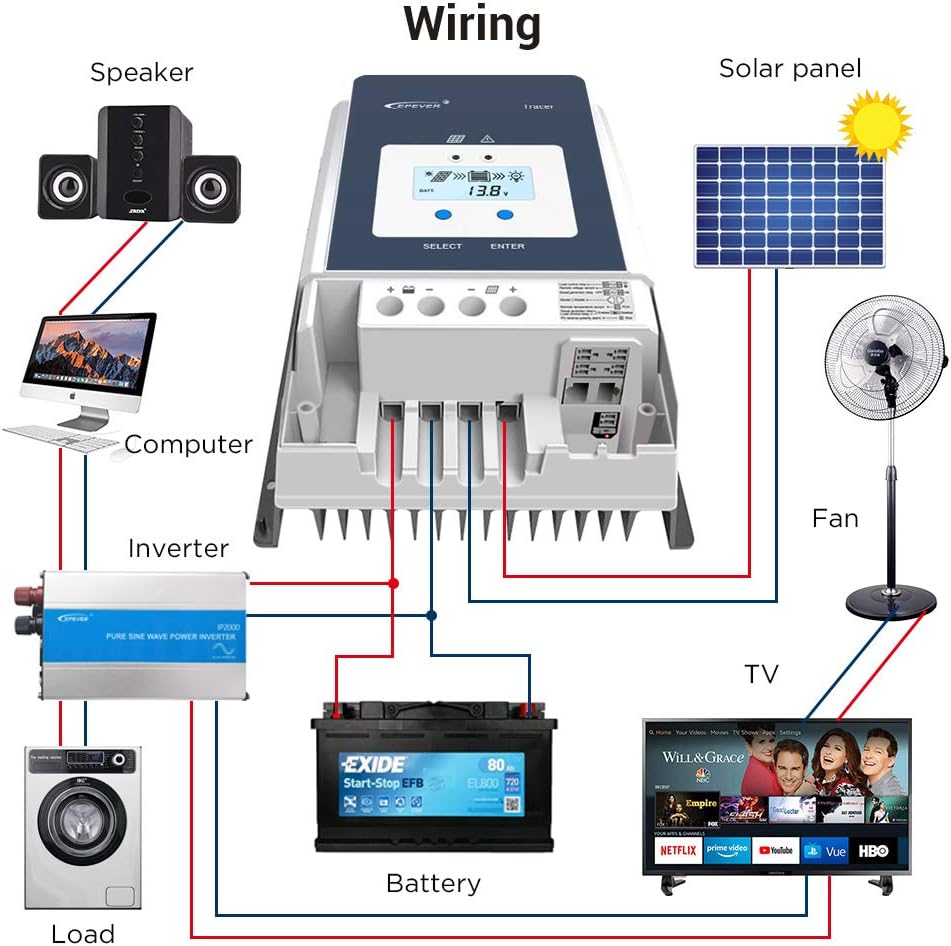
4.3 Wiring Connections
Follow the wiring sequence carefully to avoid damage. Connect the components in the order specified below:
- Connect the Battery: Connect the battery to the controller's battery terminals. Ensure correct polarity (+ to + and - to -). The controller will detect the system voltage.
- Connect the Solar Panel: Connect the solar panel to the controller's PV terminals. Ensure correct polarity.
- Connect the DC Load (Optional): Connect the DC load to the controller's load terminals.
- Connect Remote Accessories (Optional): Connect the MT50 remote meter, RTS, and RS485 communication cable as needed.

5. Operating Instructions
5.1 Initial Power-Up
After connecting the battery, the controller will power on and display system information on its LCD. The charging LED will indicate the charging status.
5.2 Using the MT50 Remote Meter
The MT50 remote meter provides a comprehensive interface for monitoring system data and configuring parameters. Connect the MT50 to the controller via the RS485 port. The MT50 will automatically identify the controller and display real-time data.

5.3 Parameter Settings
Use the SELECT and ENTER buttons on the controller or the MT50 remote meter to navigate menus and adjust parameters such as battery type, charging voltage limits, and load control settings. Refer to the detailed user manual for specific menu structures and parameter definitions.
5.4 Communication with PC Software
The controller supports communication with PC software via the RS485 port and the provided communication cable. This allows for advanced monitoring, data logging, and parameter configuration. Download the latest software from the EPEVER official website.
6. Maintenance
Regular maintenance ensures optimal performance and longevity of your solar charge controller.
- Check Connections: Periodically inspect all wiring connections for tightness and corrosion.
- Clean the Controller: Keep the controller clean and free from dust and debris. Use a dry cloth for cleaning.
- Inspect for Damage: Check for any physical damage to the controller, cables, or terminals.
- Monitor Performance: Regularly check system parameters via the LCD, MT50, or PC software to ensure normal operation.
7. Troubleshooting
This section provides basic troubleshooting steps for common issues. For more complex problems, consult the detailed product manual or contact technical support.
Common Issues and Solutions:
- Controller Not Powering On:
- Check battery connections and ensure correct polarity.
- Verify battery voltage is within the controller's operating range.
- Check the battery fuse.
- No Charging Indication:
- Ensure solar panels are connected correctly and receiving sufficient sunlight.
- Check PV input voltage and current.
- Verify battery voltage is below the charging setpoint.
- Load Not Working:
- Check load connections and ensure correct polarity.
- Verify load control settings on the controller or MT50.
- Ensure battery voltage is above the low voltage disconnect (LVD) threshold.
- Communication Errors:
- Check RS485 cable connections.
- Ensure the MT50 or PC software is correctly configured.
8. Technical Specifications
Detailed technical parameters for the EPEVER Tracer5415AN MPPT Solar Charge Controller.

| Parameter | Value (Tracer5415AN) |
|---|---|
| Nominal System Voltage | 12/24/36/48VDC Auto |
| Battery Input Voltage Range | 8V ~ 68V |
| Battery Type | Sealed(Default)/Gel/Flooded/User |
| Battery Fuse | 80A/58V |
| Rated Charge Current | 50A |
| Rated Charge Power | 625W/12V, 1250W/24V, 1875W/36V, 2500W/48V |
| Max. PV Open Circuit Voltage | 150V |
| MPP Voltage Range | (Battery Voltage +2V) ~ 108V |
| Tracking Efficiency | ≥99.5% |
| Max. Conversion Efficiency | 98.30% |
| Full Load Efficiency | 97.80% |
| Temperature Compensate Coefficient | -3mV/°C/2V (Default) |
| Self-Consumption | 98mA/12V; 60mA/24V; 50mA/36V; 46mA/48V |
| Grounding | Common negative grounding |
| RS485 Interface | RS485 (RJ45) |
| LCD Backlight Time | Default: 60S, Range: 0 ~ 999S |
| Ambient Temperature Range | -25°C ~ +60°C (Derate above 45°C) |
| Enclosure | IP20 |
| Dimensions (L x W x H) | 261 x 216 x 119 mm (approx.) |
| Item Weight | 4.46 kg (9.81 lbs) |
9. Product Dimensions
Physical dimensions of the solar charge controller and the MT50 remote meter.
9.1 Controller Dimensions

9.2 MT50 Remote Meter Dimensions
10. Application Examples
The EPEVER Tracer AN Series MPPT Solar Charge Controller is versatile and can be used in various solar power systems.

11. Warranty and Support
For warranty information, technical support, or service inquiries, please refer to the documentation included with your product or visit the official EPEVER website. You can also find support resources and contact information on the EPEVER Brand Store on Amazon.
12. Product Videos
No official product videos from the seller were found in the provided data for this model.


