
1. Introduction
This manual provides essential instructions for the safe and efficient operation of your EPEVER Tracer4210AN 40A MPPT Solar Charge Controller. This device is designed to manage power flow from your solar panels to your battery bank, ensuring optimal charging and system protection. Please read this manual thoroughly before installation and use.
1.1 What's in the Box
The package includes the EPEVER Tracer4210AN MPPT Solar Charge Controller, an MT50 Remote Meter, a Remote Temperature Sensor (RTS), and an RS485 PC Communication Cable. Mounting hardware is also provided.

Image 1.1: EPEVER Tracer4210AN 40A MPPT Solar Charge Controller with MT50 Remote Meter, Remote Temperature Sensor, and RS485 Communication Cable.
1.2 Product Overview
The Tracer4210AN controller features an LCD display for key parameters, SELECT and ENTER buttons for navigation, and terminals for connecting solar panels, batteries, and loads. It also includes dedicated ports for the Remote Temperature Sensor (RTS) and RS485 communication.

Image 1.2: Front view of the controller highlighting the LCD display, Select/Enter buttons, and connection terminals for solar panel, battery, and load.

Image 1.3: Side view of the controller indicating the Remote Temperature Sensor (RTS) interface and the RS485 communication port.
2. Product Features
- Advanced MPPT control algorithm for tracking efficiency over 99.5%.
- Built-in LCD screen displays key charging parameters.
- Compatibility with multiple battery types: Sealed lead acid, gel, flooded, lithium, and user-defined.
- Suitable for solar panels up to 520W (12V battery) or 1040W (24V system).
- Current limiting function (40A) allows for future solar panel expansion.
- RS-485 communication bus interface and Modbus protocol for various communication requirements.
- Full-load operation without capacity drop within the working environment temperature range.
- Aluminum alloy material for effective heat dissipation.
3. Installation
Proper installation is crucial for the safe and efficient operation of your solar charge controller. Ensure all connections are secure and follow the specified order.
3.1 Connection Order
The correct connection order is critical to prevent damage to the controller and other components. Always connect the battery first, then the solar panel, and finally the load.
- Connect the battery to the controller.
- Connect the solar panel to the controller.
- Connect the load to the controller.
For disassembly, reverse the order: Disconnect the load first, then the solar panel, and finally the battery.
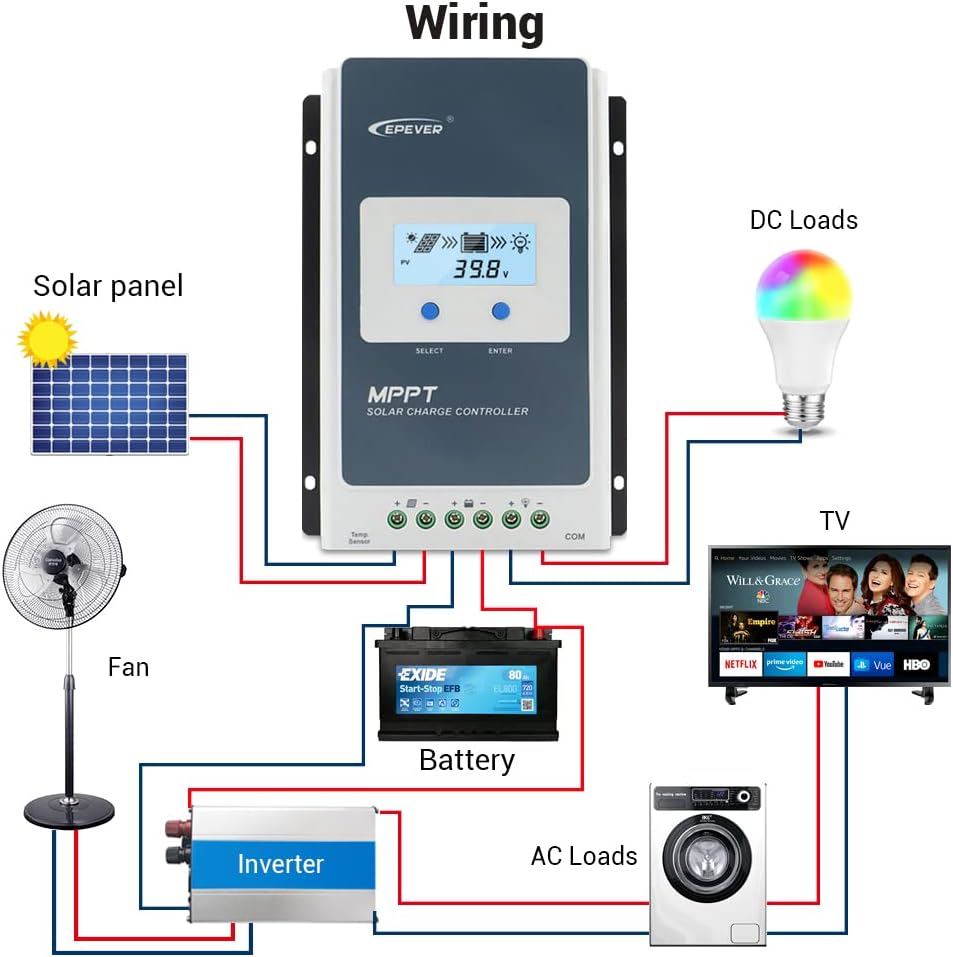
Image 3.1: General wiring diagram illustrating connections for solar panel, battery, and loads (DC and AC via inverter).
3.2 Connecting the Remote Temperature Sensor (RTS)
Connect the Remote Temperature Sensor (RTS) to the designated port on the controller. This sensor provides accurate battery temperature readings for temperature compensation during charging, optimizing battery life.
Video 3.1: This video demonstrates the unboxing, physical overview, and installation steps for the EPEVER Tracer-AN MPPT Solar Charge Controller, including connecting the temperature sensor. (Relevant segment: 0:08 - 1:29)
4. Operating Instructions
The EPEVER Tracer4210AN offers various settings to optimize your solar power system. These settings can be adjusted directly on the controller's LCD or via the MT50 Remote Meter.
4.1 Setting Battery Type
It is essential to set the correct battery type for proper charging and to prevent battery damage. The controller supports Sealed, Gel, Flooded, Lithium, and User-defined battery types.
- Press and hold the "ENTER" button for 5 seconds when the battery voltage interface is displayed.
- Press the "SELECT" button to cycle through battery types when the battery type interface is flashing.
- Press the "ENTER" button to confirm the selected battery type.
Video 4.1: This video demonstrates how to set the battery type on the EPEVER Tracer-AN MPPT Solar Charge Controller. (Relevant segment: 2:00 - 2:35)
4.2 Setting Load Working Mode
The load working mode determines how the connected load operates. Options include manual control, light ON/OFF, and various timer settings.
- Press and hold the "ENTER" button for 5 seconds when the load mode interface is displayed.
- Press the "SELECT" button to cycle through the available load modes.
- Press the "ENTER" button to confirm the desired load mode.
Manual Control Mode:
When in Manual Control Mode, pressing the "ENTER" button will toggle the load ON or OFF.
Video 4.2: This video demonstrates how to set the load working mode and use manual control on the EPEVER Tracer-AN MPPT Solar Charge Controller. (Relevant segment: 2:35 - 3:30)
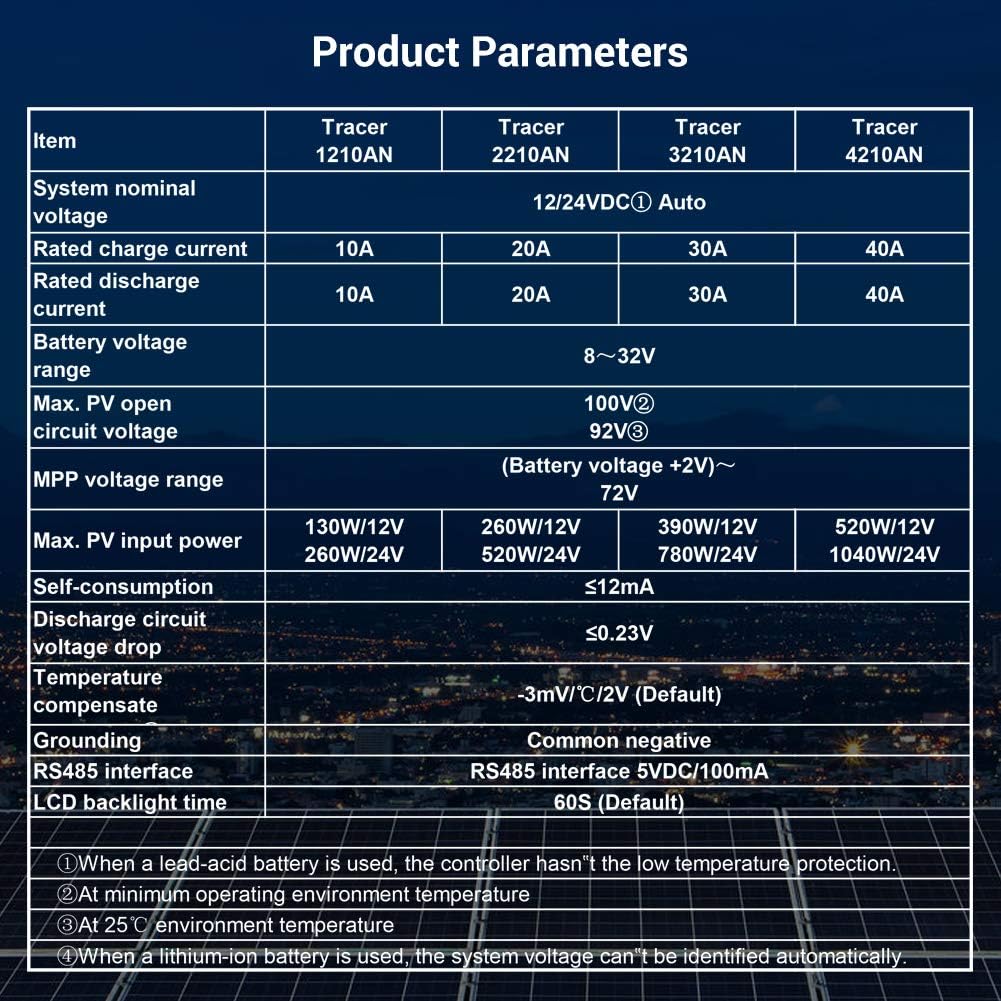
Image 4.1: Load Working Mode table, detailing various timer and control options.
4.3 MT50 Remote Meter Operation
The MT50 Remote Meter provides comprehensive monitoring and setting capabilities for the controller. It displays various operating data and system fault information. The buttons are easy to operate, and the numeric display is clear.
Video 4.3: This video demonstrates how to navigate and set parameters using the MT50 Remote Meter. (Relevant segment: 3:30 - 4:10)
5. Maintenance
Regular maintenance ensures the longevity and optimal performance of your solar charge controller.
- Check Connections: Periodically inspect all wiring connections for tightness and corrosion. Loose connections can cause overheating and damage.
- Clean the Controller: Keep the controller clean and free from dust and debris. Ensure the heat sink fins are not obstructed to maintain proper cooling.
- Inspect Wiring: Check all cables for signs of wear, fraying, or damage. Replace any damaged wiring immediately.
- Monitor Performance: Regularly check the LCD display or MT50 remote meter for normal operating parameters and any error codes.
6. Troubleshooting
If you encounter issues with your EPEVER Tracer4210AN, refer to the following basic troubleshooting steps:
- No Display/Power: Verify battery connections and ensure the battery has sufficient charge. Check for blown fuses in the battery circuit.
- No Charging: Ensure solar panels are connected correctly and receiving sunlight. Check solar panel voltage and current. Verify battery type setting.
- Load Not Working: Check load connections and ensure the load is not exceeding the controller's rated current. Verify the load working mode setting (e.g., not in manual OFF mode).
- Error Codes: Consult the full product manual (available on the manufacturer's website) for specific error code interpretations and solutions.
For persistent issues, contact EPEVER customer support.
7. Specifications
The following table outlines the key technical specifications for the Tracer series, including the Tracer4210AN model.
Image 7.1: Detailed technical parameters for EPEVER Tracer series MPPT solar charge controllers.
| Parameter | Value (Tracer4210AN) |
|---|---|
| System Nominal Voltage | 12/24VDC Auto |
| Rated Charge Current | 40A |
| Rated Discharge Current | 40A |
| Battery Voltage Range | 8~32V |
| Max. PV Open Circuit Voltage | 100V (92V at 25°C environment temperature) |
| MPP Voltage Range | Battery Voltage +2V ~ 72V |
| Max. PV Input Power | 520W/12V, 1040W/24V |
| Self-consumption | ≤12mA |
| Discharge Circuit Voltage Drop | ≤0.23V |
| Temperature Compensation | -3mV/°C/2V (Default) |
| Grounding | Common Negative |
| RS485 Interface | 5VDC/100mA |
| LCD Backlight Time | 60S (Default) |
| Package Dimensions | 11.61 x 7.99 x 6.97 inches |
| Item Weight | 5.47 pounds (2.49 Kilograms) |
| Display Type | LCD |
8. Warranty and Support
For warranty information, detailed technical support, or to download the latest software and firmware, please visit the official EPEVER website or refer to the documentation included with your product. You may also contact your retailer for assistance.


