
1. Introduction
The BENGOO G9000 Stereo Pro Gaming Headset is designed to provide an immersive audio experience for gamers across multiple platforms. Featuring high-precision sound, a noise-isolating microphone, and comfortable design, this headset is built for extended gaming sessions and clear communication.
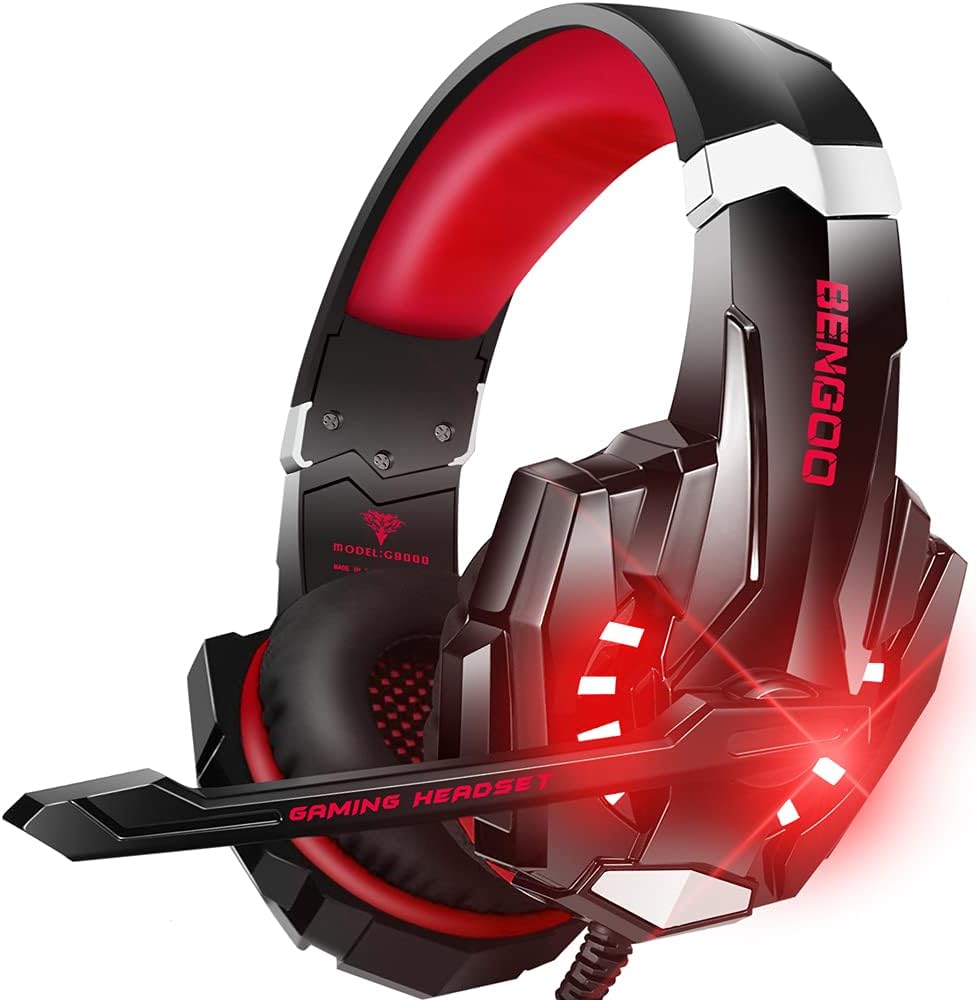
Figure 1: BENGOO G9000 Stereo Pro Gaming Headset (Red variant shown)
This image displays the BENGOO G9000 headset, highlighting its red and black color scheme, LED lighting on the earcups, and the adjustable microphone.
2. Product Features
2.1 Audio Quality
The G9000 headset is equipped with a 40mm magnetic neodymium driver, engineered for acoustic positioning precision. This enhances the sensitivity of the speaker unit, delivering a vivid sound field, clear audio, and impactful bass surround, crucial for an immersive gaming experience.

Figure 2: Superior Performance - Internal Components
This diagram illustrates the internal structure of the earcup, detailing components like the 40mm Neodymium Magnet Driver, Precision Magnet, Ring Transducer, Shockproof Protector, 20mm Plush Leatherette Ear Cushions, and High Precision Speaker Grill, all contributing to 3D stereo surround sound.
2.2 Noise-Isolating Microphone
The integrated omni-directional microphone features premium noise-cancelling technology. It is designed to pick up sounds with high sensitivity and effectively reduce ambient noise, ensuring clear communication with teammates. The long, flexible mic design allows for convenient angle adjustment.

Figure 3: Noise Isolating Microphone
This image highlights the adjustable 120° microphone and visually compares a waveform before and after noise reduction, demonstrating the microphone's noise-cancelling capability.
2.3 Comfort and Design
Crafted for extended wear, the headset features superior comfortable and breathable protein over-ear pads. The multi-points headbeam conforms to human body engineering specifications, reducing hearing impairment and heat accumulation. Skin-friendly leather material ensures comfort for prolonged use. Glaring LED lights on the earcups enhance the gaming atmosphere.

Figure 4: Soft Memory Earmuffs and Adjustable Headband
This image showcases the soft memory-protein earmuffs, the adjustable headband, and the flexible design that fits various head shapes, emphasizing comfort.

Figure 5: Designed for Long-Session Gaming
This image features a person wearing the headset, illustrating its optimized fit and superior comfort for long-time wearing.
2.4 Effortless Volume Control
The headset features a high tensile strength, anti-winding braided USB cable with an integrated rotary volume controller and a one-key microphone mute switch. This design effectively prevents cable tangling and allows for easy, on-the-fly audio adjustments.

Figure 6: Details Determine Quality - In-line Controls
This image details the gold-plated 3.5mm plug, the USB connector for LED light, the volume wheel, and the one-key mute button. It also shows the robust construction of the cable with strong braided, Keluodine Fiber, and OFC4N Copper Core for enhanced durability.
3. Setup & Connectivity
The BENGOO G9000 headset offers broad compatibility with various gaming platforms and devices.
3.1 Compatible Devices
- PlayStation 4 (PS4)
- New Xbox One (Note: An extra Microsoft Adapter is required for old version Xbox One controllers, not included.)
- PC
- Nintendo 3DS
- Laptop
- PSP
- Tablet
- iPad
- Computer
- Mobile Phone
3.2 Connection Guide
The headset connects via a 3.5mm audio jack for sound and a USB plug for the LED lighting feature.
- For Audio: Plug the 3.5mm jack into the corresponding audio port on your device (controller, laptop, mobile phone, etc.).
- For LED Lighting: Plug the USB connector into an available USB port on your device (console, PC, laptop, etc.). The LED lights will illuminate once connected.
- For Old Xbox One Controllers: If using an older Xbox One controller without a 3.5mm jack, a separate Microsoft Adapter (not included) is required to connect the headset.

Figure 7: Universal Compatibility Overview
This visual guide demonstrates how the headset connects to different devices such as PS4, Switch, iPad, Smartphone, PC, Xbox One (with adapter), and Laptop, illustrating the various connection methods.
4. Operating Instructions
4.1 Adjusting Volume
Locate the rotary volume controller on the braided cable. Rotate the wheel upwards to increase volume and downwards to decrease volume.
4.2 Muting the Microphone
Next to the volume controller, you will find a one-key microphone mute switch. Slide the switch to mute or unmute the microphone as needed during gameplay or communication.
4.3 Adjusting Headset Fit
The headband is adjustable to fit various head sizes. Gently slide the earcups up or down along the headband to achieve a comfortable and secure fit. The flexible mic can be positioned closer or further from your mouth by swiveling it.
5. Maintenance
5.1 Cleaning
- Ear Pads: Gently wipe the protein leather ear pads with a soft, damp cloth. Avoid using harsh chemicals or abrasive cleaners.
- Headset Body: Use a dry, soft cloth to wipe down the plastic and metal parts of the headset.
- Connectors: Keep the 3.5mm jack and USB plug clean and free of dust.
5.2 Storage
Store the headset in a cool, dry place away from direct sunlight and extreme temperatures. Avoid tangling the cable by coiling it neatly when not in use.
6. Troubleshooting
6.1 No Sound from Headset
- Ensure the 3.5mm audio jack is fully inserted into the device's audio port.
- Check the volume control wheel on the headset cable and ensure it is turned up.
- Verify the audio settings on your device (console, PC, mobile) to ensure the headset is selected as the output device and volume is not muted.
- Test the headset with another device to rule out a device-specific issue.
6.2 Microphone Not Working
- Ensure the microphone mute switch on the cable is in the


