
ANLAN ALDRY06
ANLAN 5-in-1 Multifunctional Facial Care Device User Manual
Model: ALDRY06
1. Introduction
Thank you for choosing the ANLAN 5-in-1 Multifunctional Facial Care Device. This advanced beauty tool combines multiple functions including cleaning, hot and cold therapy, EMS microcurrent, ion therapy, and high-frequency vibration to provide comprehensive skincare at home. Regular use can help improve skin texture, reduce wrinkles, enhance nutrient absorption, and promote a healthier, more radiant complexion.
Please read this manual thoroughly before first use to ensure proper operation, safety, and optimal results. Keep this manual for future reference.
2. Safety Information
To ensure safe operation and prevent damage to the device or injury, please observe the following precautions:
- Do not use the device while it is charging.
- Keep the device away from water or excessive moisture. Do not immerse in water.
- Do not use on broken, irritated, or infected skin. Consult a dermatologist if you have severe skin conditions.
- Avoid direct contact with eyes.
- If you experience any discomfort or adverse reactions, discontinue use immediately.
- Keep out of reach of children.
- Do not disassemble, repair, or modify the device yourself. Contact customer support for assistance.
- Use only the provided charging cable and adapter.
- Individuals with pacemakers, heart conditions, epilepsy, or pregnant women should consult a doctor before use.
3. Product Overview
The ANLAN Facial Care Device is designed for ease of use and effective skincare. Familiarize yourself with its components:

Figure 3.1: ANLAN 5-in-1 Multifunctional Facial Care Device. The image shows the white and black device with a metallic treatment head, a display screen, and three control buttons (MODE, LEVEL, LED). It is placed in its white charging base. The treatment head features red and blue light indicators.
Device Components:
- Treatment Head: The metallic surface that comes into contact with the skin, featuring hot/cold functions, EMS, ion therapy, and vibration.
- Display Screen: Shows current mode, intensity level, battery status, and treatment time.
- MODE Button: Press to cycle through different treatment modes.
- LEVEL Button: Adjusts the intensity level within each mode.
- LED Button: Activates and switches between red and blue LED light therapy.
- Charging Port: Located at the bottom of the device.
- Charging Base: For convenient charging and storage.
4. Setup
4.1 Initial Charging
Before first use, fully charge the device. A full charge typically takes 2-3 hours.
- Connect the charging cable to the charging base.
- Plug the adapter into a power outlet.
- Place the device onto the charging base. The battery indicator on the display screen will show charging progress.
- Once fully charged, the battery indicator will show full. Disconnect the device from the charger before use.
Note: Do not use the device while it is charging.
5. Operating Instructions
The ANLAN device features 5 main modes, each combining different functions for targeted skincare. You can also activate LED light therapy in conjunction with any mode.

Figure 5.1: Overview of the device's 5 modes and 8 functions. The diagram, originally in German, illustrates: REINIGUNG (CLEANING) with Warm Compress / Vibration / Ion+ Export; KÜHLUNG (COOLING) with Cold Compress / Vibration; EMS-LIFTING with EMS Microcurrent; FEUCHTIGKEIT (MOISTURIZING) with Warm Compress / Vibration / Ion- Import; FEUCHTIGKEITSSPEICHERUNG (MOISTURE RETENTION) with Cold Compress / Vibration / Ion- Import. It also highlights LED-LICHTTHERAPIE (LED LIGHT THERAPY) with Red Light and Blue Light, noting that all five modes can be combined with LED.
General Operation:
- Power On/Off: Press and hold the MODE button for 2 seconds to turn the device on or off.
- Select Mode: Short press the MODE button to cycle through the 5 available modes. The selected mode will be displayed on the screen.
- Adjust Level: Short press the LEVEL button to adjust the intensity or temperature level within the selected mode.
- LED Light Therapy: Short press the LED button to activate red or blue light. Press again to switch between colors or turn off.
- Automatic Shut-off: The device has a built-in timer for each mode (typically 5-10 minutes) and will automatically shut off after the cycle is complete.
5.1 Mode Descriptions:
1. CLEAN Mode (Deep Cleansing)
This mode combines warm compress, high-frequency vibration, and positive ion export to deeply cleanse pores, remove dirt, oil, and makeup residues.
- Functions: Warm compress (38-42°C), 10,000 vibrations/min, Positive Ion Export.
- Usage: Apply a cleansing lotion or makeup remover to your face. Gently move the device in circular motions across your face.

Figure 5.2: Deep Cleaning function. The image, originally in German, illustrates the device's head applying warmth (38-42°C, 3 temperature levels), positive ions (ION+ Export), and vibration to the skin, showing how it helps to remove impurities from pores. It also shows cotton pads for use with the device for makeup removal.
2. COOL Mode (Pore Refinement & Soothing)
Utilizes cold compress and vibration to shrink pores, lock in moisture and nutrients, soothe skin, and reduce puffiness.
- Functions: Cold compress (6-12°C), Vibration.
- Usage: After cleansing or applying serum, gently glide the device over your face. Ideal for calming skin and preparing it for makeup.

Figure 5.3: Immediate Cooling & Pore Refinement. The image, originally in German, shows the device's head applying cold temperatures (12°C, 8°C, 6°C, 3 temperature levels) to the skin, illustrating how it helps to cool, refine pores, and seal in nutrients.
3. EMS LIFTING Mode (Skin Firming & Anti-Aging)
Microcurrent (EMS) stimulates facial muscles, improving skin elasticity, reducing sagging, and diminishing the appearance of fine lines and wrinkles.
- Functions: EMS Microcurrent (3 levels).
- Usage: Apply a conductive gel or serum. Glide the device upwards along the contours of your face and neck.
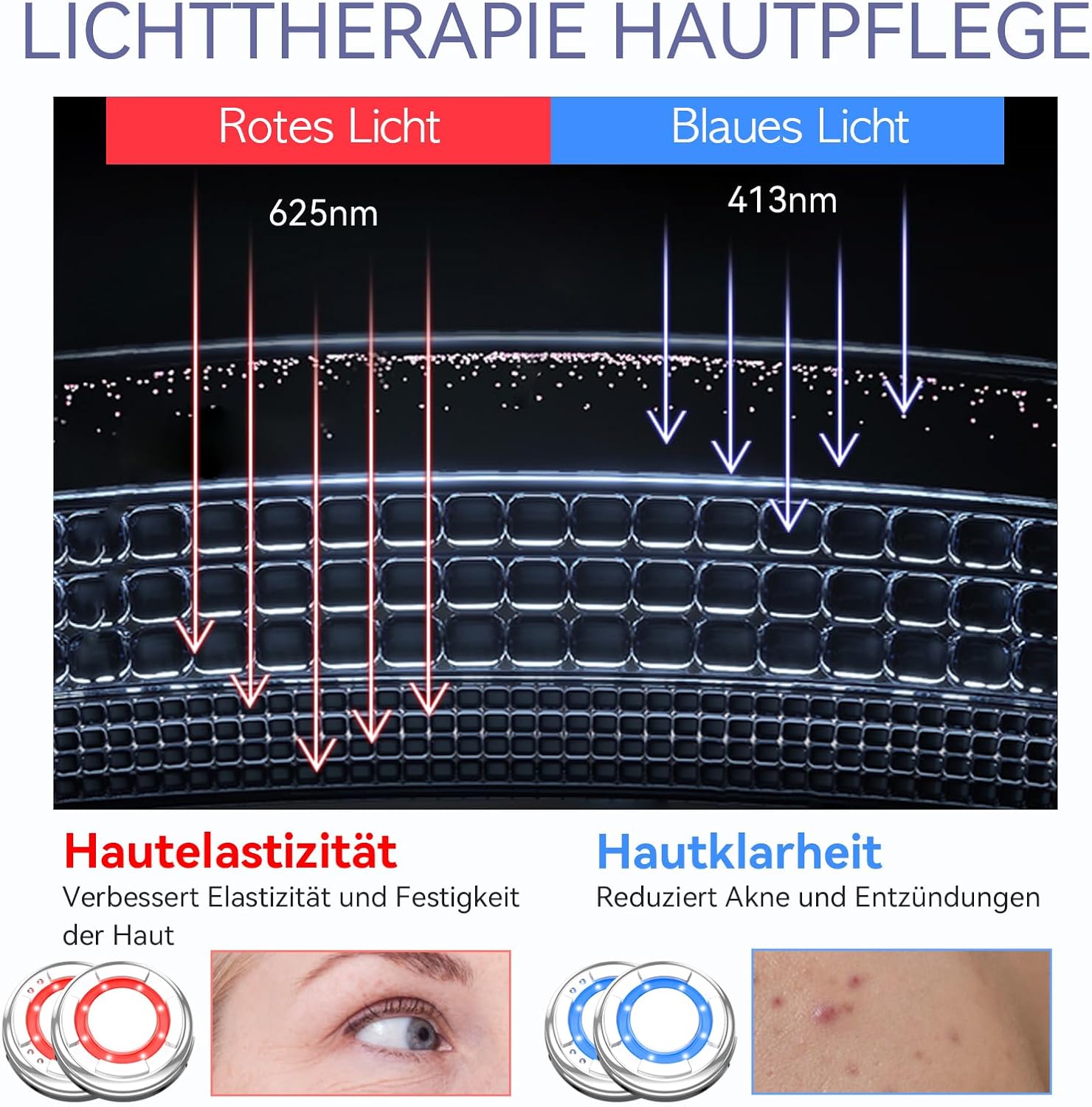
Figure 5.4: EMS Lifting Desired Results. The image, originally in German, shows a woman's face with dotted lines indicating areas for EMS treatment (forehead, under eyes, cheekbones, cheeks). It also includes "Before" and "After" images showing a reduction in fine lines around the mouth, demonstrating the tightening and firming effect on facial muscles and collagen production.
4. MOISTURIZING Mode (Nutrient Absorption)
Combines warm compress, EMS, and negative ion import to enhance the absorption of skincare products, allowing nutrients to penetrate deeper into the skin.
- Functions: Warm compress, EMS, Negative Ion Import.
- Usage: Apply your favorite serum, essence, or moisturizer. Gently massage the device over your face to aid absorption.

Figure 5.5: The Perfect Partner for Your Face Mask. The image, originally in German, shows a comparison chart indicating over 300% more effectiveness in ingredient absorption when using the ANLAN device compared to applying by hand. Below, it shows a woman using the ANLAN device over a sheet mask and another woman applying a mask by hand, visually demonstrating the enhanced absorption.
5. COL SYNTHESIS Mode (Collagen Production & Elasticity)
Combines cold compress and EMS to stimulate collagen production, improve skin elasticity, and firm the skin.
- Functions: Cold compress, EMS.
- Usage: Use after applying a collagen-boosting serum or cream. Glide the device over areas where you want to improve firmness and elasticity.
5.2 LED Light Therapy:
The device offers two LED light options that can be used independently or in conjunction with any of the 5 modes.
- Red Light (622nm ± 10nm): Promotes collagen production, improves fine lines, repairs damaged skin, and restores elasticity. Ideal for anti-aging and skin rejuvenation.
- Blue Light (470nm ± 10nm): Rapidly inhibits inflammation, beneficial for treating acne and enlarged pores. Helps reduce acne and balance skin moisture.

Figure 5.6: Light Therapy Skincare. The image, originally in German, shows red light (625nm) penetrating the skin to improve elasticity and firmness, and blue light (413nm) penetrating to reduce acne and inflammation. Visual examples of skin before and after treatment are shown for both light types.
6. Maintenance
6.1 Cleaning the Device
To maintain hygiene and prolong the lifespan of your device:
- After each use, wipe the treatment head with a soft, damp cloth or an alcohol wipe.
- Do not use abrasive cleaners, harsh chemicals, or immerse the device in water.
- Ensure the device is completely dry before storing or charging.
6.2 Storage
Store the device in a cool, dry place, away from direct sunlight and extreme temperatures. Keep it in its original packaging or charging base to protect it from dust and damage.
7. Troubleshooting
If you encounter any issues with your ANLAN Facial Care Device, please refer to the following common problems and solutions:
| Problem | Possible Cause | Solution |
|---|---|---|
| Device does not turn on. | Low battery or not charged. | Charge the device fully. Ensure the charging cable and adapter are properly connected. |
| No sensation from EMS/Vibration. | Intensity level too low; insufficient contact with skin; dry skin. | Increase the LEVEL. Ensure the treatment head is in full contact with your skin. Apply a conductive gel or serum to improve conductivity. |
| Device stops during use. | Automatic shut-off timer activated; low battery. | This is normal if the treatment cycle is complete. If not, check battery level and recharge if necessary. |
| LED light not working. | LED function not activated. | Press the LED button to cycle through red, blue, or off. |
If the problem persists after trying these solutions, please contact ANLAN customer support.
8. Specifications
| Feature | Detail |
|---|---|
| Model Number | ALDRY06 (DRYO6) |
| Brand | ANLAN |
| Dimensions (L x W x H) | 16.51 x 5.08 x 5.08 cm (6.5 x 2 x 2 inches) |
| Weight | 300 grams (13.4 Ounces) |
| Power Source | Battery Powered (1 Lithium-polymer battery required) |
| Material | Plastic, Metal |
| Color | White-black |
| Hot Compress Temperature | 38-42°C (100.4-107.6°F) |
| Cold Compress Temperature | 6-12°C (42.8-53.6°F) |
| Vibration Frequency | 10,000 times/minute |
| Red LED Wavelength | 622nm ± 10nm |
| Blue LED Wavelength | 470nm ± 10nm |
9. Warranty and Support
ANLAN provides a standard warranty for this product. Please refer to the warranty card included in your product packaging for specific terms and conditions. For any questions, technical support, or warranty claims, please contact ANLAN customer service:
- Customer Service: Refer to the contact information provided on the ANLAN official website or your purchase receipt.
- Online Resources: Visit the official ANLAN website for FAQs, product registration, and additional support.
Note: The warranty does not cover damage caused by improper use, unauthorized repairs, or failure to follow the instructions in this manual.
Related documentsALDRY06


Ask a question about this manual
Ask about setup, troubleshooting, compatibility, parts, safety, or missing instructions. Manuals+ will review the question and use this page’s manual context to help answer it.