
Introduction
Thank you for choosing the iBall Cinebar 200DD. This 2.1 channel soundbar system with a wired subwoofer is designed to enhance your audio experience with 120 Watts of power and Dolby Digital technology. This manual will guide you through the setup, operation, and maintenance of your device to ensure optimal performance.
What's in the Box
Please check the package contents carefully. If any items are missing or damaged, contact customer support.
- Bar Speaker – 1N
- Subwoofer Speaker – 1N
- Remote Control – 1N
- Audio Cable – 1N
- User Manual – 1N
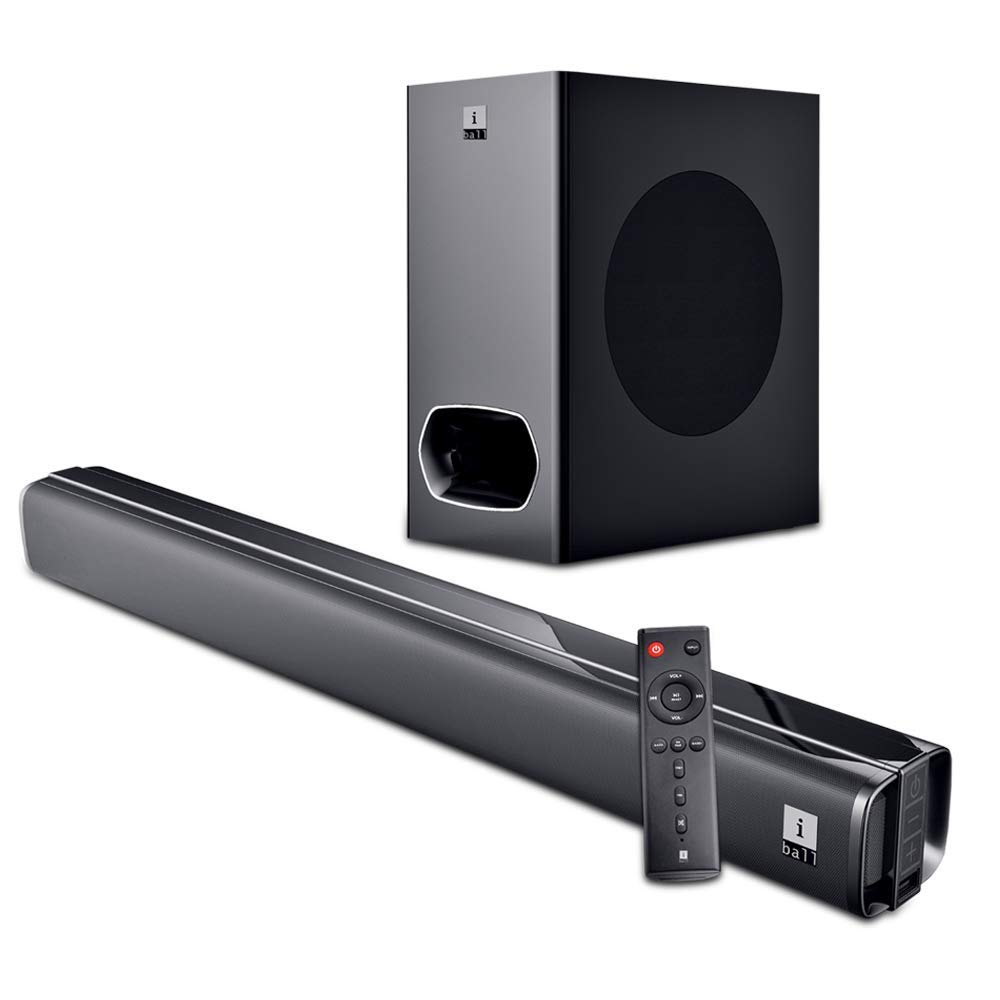
Image: The iBall Cinebar 200DD soundbar, its wired subwoofer, and the included remote control. This image illustrates the main components of the product.
Setup
1. Placement
Place the soundbar on a stable, flat surface in front of your television. Ensure there is adequate space around the soundbar for optimal sound dispersion. The subwoofer should be placed on the floor, ideally near the soundbar, to provide rich bass.

Image: A front view of the iBall Cinebar 200DD soundbar, highlighting its sleek design suitable for placement under a TV.
2. Connections
Connect the soundbar to your audio source using one of the available connection methods:
- HDMI (ARC): For high-quality digital audio and control via your TV remote (if supported). Connect an HDMI cable from the soundbar's HDMI ARC port to your TV's HDMI ARC port.
- OPTICAL: For digital audio connection. Connect an optical cable from the soundbar's optical input to your TV or other audio source's optical output.
- AUX: For analog audio connection. Use the provided audio cable to connect the soundbar's AUX input to the audio output of your device.
- USB: For playing audio files directly from a USB drive. Insert a USB drive into the USB port.
- Bluetooth (BT): For wireless audio streaming from compatible devices.
Connect the wired subwoofer to the soundbar using the integrated cable from the subwoofer.

Image: The wired subwoofer component of the iBall Cinebar 200DD system, showing its design and connection point.

Image: A top-down view of the iBall Cinebar 200DD soundbar, illustrating the locations for HDMI, Optical, and USB connections, along with power and volume buttons.
3. Power On
Connect the soundbar's power adapter to an electrical outlet. Press the Power button on the soundbar or the remote control to turn on the device.

Image: A close-up of the integrated controls on the side of the iBall Cinebar 200DD soundbar, showing the Power On/Off, Volume -, and Volume + buttons.
Operating Instructions
1. Basic Controls
Use the included remote control or the integrated controls on the soundbar to manage playback and settings.
- Power: Press the power button to turn the soundbar on or off.
- Volume: Use VOL+ and VOL- buttons to adjust the volume level.
- Input: Press the INPUT button to cycle through available input sources (BT, HDMI, OPTICAL, AUX, USB).
- EQ/PAIR: Press EQ to select sound modes (Music, Movie, News, 3D). Press and hold for Bluetooth pairing.
- BASS+/BASS-: Adjust the bass level.
- TRE+/TRE-: Adjust the treble level.

Image: The remote control for the iBall Cinebar 200DD, showing buttons for power, volume, input selection, EQ modes, and bass/treble adjustments.
2. Bluetooth Pairing
- Turn on the soundbar and select the Bluetooth input mode using the INPUT button on the remote or soundbar. The LED indicator will flash, indicating pairing mode.
- Enable Bluetooth on your mobile device (smartphone, tablet, etc.).
- Search for available devices and select "iBall Cinebar 200DD" from the list.
- Once paired, the LED indicator will stop flashing and remain solid. You can now stream audio wirelessly.
3. Sound Modes
The iBall Cinebar 200DD offers various sound modes to optimize your listening experience. Press the EQ button on the remote control to cycle through the following modes:
- Music: Optimized for music playback.
- Movie: Enhanced for cinematic audio with broader soundstage.
- News: Clearer vocal reproduction for spoken content.
- 3D: Creates a virtual surround sound effect.
Maintenance
To ensure the longevity and optimal performance of your soundbar, follow these maintenance guidelines:
- Cleaning: Use a soft, dry cloth to clean the surfaces of the soundbar and subwoofer. Do not use liquid cleaners, aerosols, or abrasive materials, as these can damage the finish or internal components.
- Ventilation: Ensure that the ventilation openings on the soundbar and subwoofer are not blocked. Proper airflow prevents overheating.
- Storage: If storing the device for an extended period, disconnect it from power and store it in a cool, dry place away from direct sunlight and extreme temperatures.
- Power Cord: Regularly inspect the power cord for any damage. If damaged, discontinue use and contact customer support for replacement.
Troubleshooting
If you encounter issues with your iBall Cinebar 200DD, refer to the following common problems and solutions:
| Problem | Possible Cause | Solution |
|---|---|---|
| No power | Power cord not connected; power outlet not active. | Ensure the power cord is securely connected to the soundbar and a working power outlet. |
| No sound | Incorrect input source selected; volume too low; cables not connected properly. | Select the correct input source. Increase the volume. Check all audio cables for secure connections. |
| Bluetooth not pairing | Soundbar not in pairing mode; device too far; interference. | Ensure the soundbar is in Bluetooth pairing mode. Move your device closer to the soundbar. Avoid sources of interference. |
| Distorted sound | Volume too high; poor audio source quality; incorrect EQ settings. | Reduce the volume. Try a different audio source. Adjust EQ settings. |
Specifications
| Feature | Detail |
|---|---|
| Model Name | iBall Cinebar |
| Model Number | CINEBAR-200DD |
| Speaker Type | Soundbar, Subwoofer |
| Channel Configuration | 2.1 |
| Total Output Power | 120 Watts |
| Connectivity Technology | Bluetooth, HDMI (ARC), Optical, AUX, USB |
| Wireless Communication | Bluetooth |
| Control Method | Remote, Touch |
| Color | Black |
| Product Dimensions (Soundbar) | 8.3 x 96 x 7.9 cm |
| Item Weight | 6.1 kg |
| Power Source | AC |
Warranty and Support
The iBall Cinebar 200DD comes with a 1 Year Warranty from the date of purchase. This warranty covers manufacturing defects under normal use. For warranty claims or technical support, please contact iBall customer service.
Manufacturer Contact: 87, Mistry Industrial Complex, MIDC Cross Road "A" Andheri (E), Mumbai 400 093. Maharashtra India. Toll free No. 18002666409.