
Udreamer UD001
Udreamer Vinyl Record Player
Instruction Manual
Model: UD001
Introduction
Welcome to the world of vinyl! This instruction manual provides detailed guidance on setting up, operating, and maintaining your new Udreamer Vinyl Record Player (Model: UD001). Designed for both entertainment and home decoration, this belt-driven vintage phonograph offers versatile playback options and built-in speakers. Please read this manual thoroughly to ensure proper use and longevity of your device.
What's in the Box
- 1 x Udreamer Turntable
- 1 x User Manual
- 1 x 5V, 1.5A Power Cord

Figure 1: Included components of the Udreamer Vinyl Record Player package.
Product Overview
Familiarize yourself with the main components and controls of your Udreamer record player.
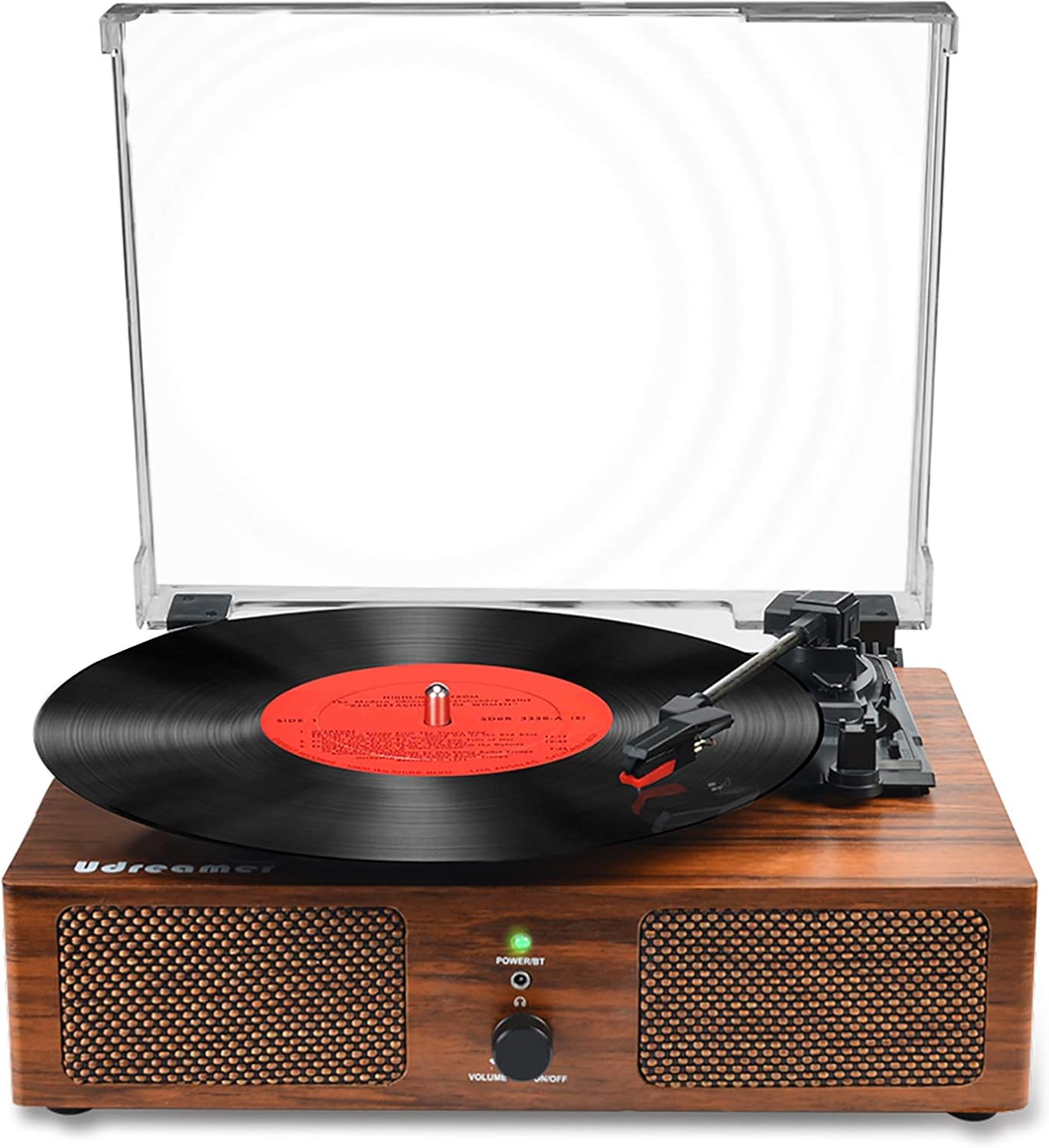
Figure 2: Front view of the Udreamer Vinyl Record Player.

Figure 3: Key components and control panel.
Control Panel & Ports:
- Power Button & Volume Control: Turn the unit on/off and adjust volume.
- Power/BT Indicator: Lights up when powered on, flashes for Bluetooth pairing.
- Headphone Jack: For private listening.
- AUX-IN: Connect external audio devices via 3.5mm cable.
- RCA (R&L) Output: Connect to external speakers for enhanced sound.
- USB Input: Play music directly from a USB drive.
- Power In (DC5V-1A): Connect the power adapter.
Turntable Components:
- Platter: Where the vinyl record rests.
- Tonearm: Holds the stylus and tracks the record grooves.
- Stylus (Needle): Reads the audio from the record.
- Arm Raise Lever: Gently raises and lowers the tonearm.
- Turntable Auto Stop Switch: Enables/disables automatic stopping of the platter at the end of a record.
- Turntable Speed Switch: Select playback speed (33 1/3, 45, 78 RPM).
- Detachable Dust Cover: Protects the platter and tonearm from dust.
Setup
- Unpack: Carefully remove all components from the packaging.
- Placement: Place the turntable on a stable, level surface away from direct sunlight, heat sources, and excessive vibration.
- Power Connection: Connect the provided 5V, 1.5A power cord to the 'Power In' port on the back of the turntable and plug the adapter into a wall outlet.
- Dust Cover: Attach the detachable dust cover by aligning its hinges with the slots on the back of the turntable.
- Initial Power On: Rotate the Power/Volume knob clockwise to turn on the unit. The Power/BT indicator light will illuminate.

Figure 4: Rear connection ports for power, USB, AUX, and RCA.
Operating Instructions
Playing Vinyl Records
- Place Record: Gently place a vinyl record on the turntable platter.
- Select Speed: Adjust the Turntable Speed Switch to match the RPM of your record (33 1/3, 45, or 78 RPM). Use the 45 RPM adapter for 7-inch records if needed.
- Auto Stop: Set the Turntable Auto Stop Switch to ON if you want the platter to stop spinning automatically at the end of the record. Set to OFF for continuous play.
- Position Tonearm: Gently move the tonearm over the desired starting groove of the record.
- Lower Tonearm: Use the Arm Raise Lever to slowly lower the tonearm onto the record. The music will begin to play.
- Adjust Volume: Rotate the Power/Volume knob to adjust the sound level.
- End Playback: At the end of the record, if Auto Stop is ON, the platter will stop. If OFF, manually lift the tonearm using the Arm Raise Lever and return it to its rest.

Figure 5: Stylus, belt-driven system, and supported record speeds.
Bluetooth Pairing
- Enable Bluetooth: Turn on the record player. The Power/BT indicator light will flash blue, indicating it's in Bluetooth pairing mode.
- Activate Device Bluetooth: On your smartphone or other Bluetooth-enabled device, enable Bluetooth and search for available devices.
- Connect: Select "Turntable" or "Udreamer" from the list of devices. Once connected, the Power/BT indicator light will stop flashing and remain solid blue.
- Play Music: You can now play music from your device through the record player's built-in speakers.
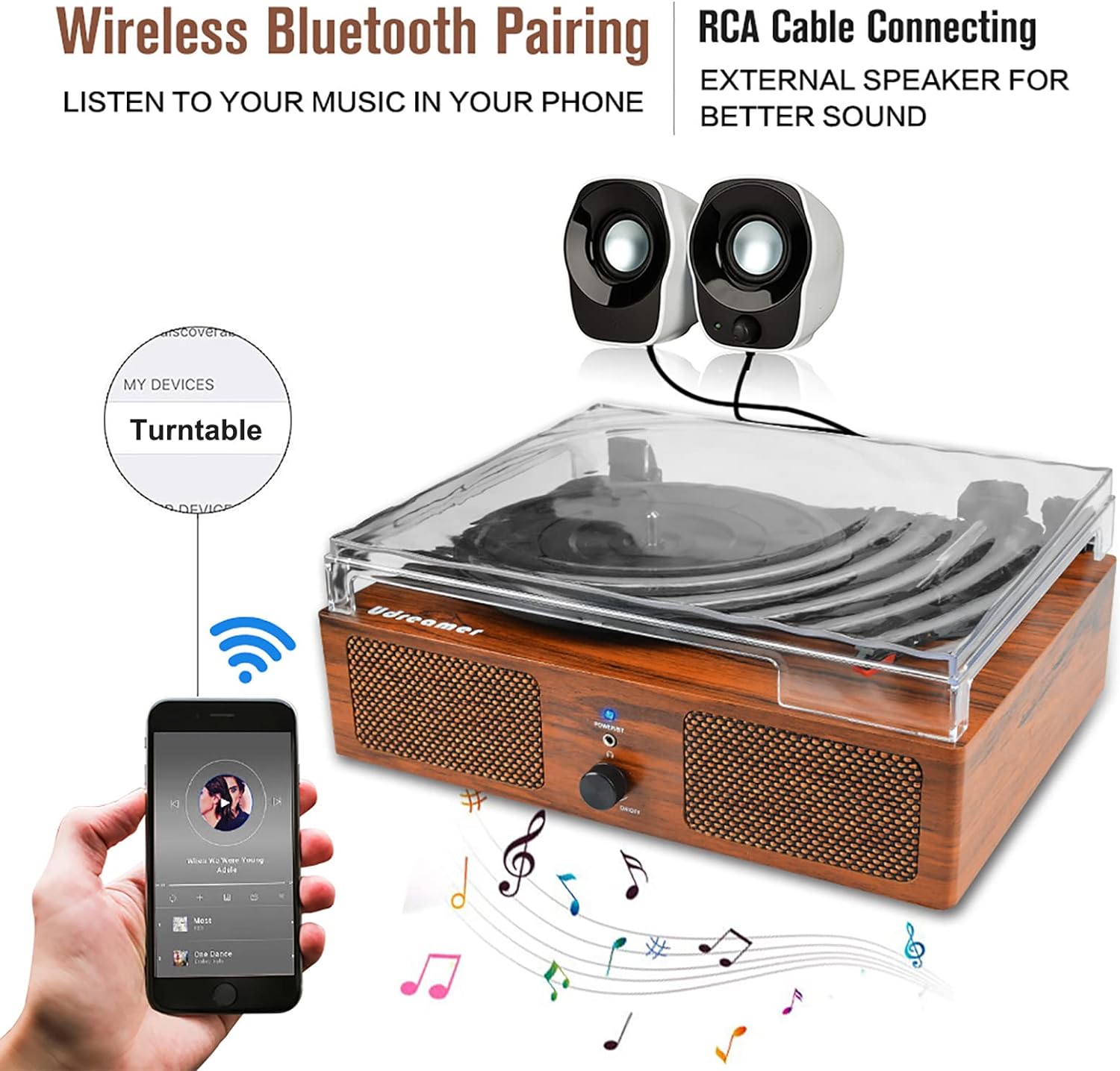
Figure 6: Bluetooth pairing and RCA output options.
USB Playback
- Insert USB: Insert a USB flash drive into the USB input port on the back of the record player.
- Automatic Playback: The unit will automatically switch to USB mode and begin playing audio files from the drive.
- Control Playback: Use the controls on your connected device (if applicable) or the record player's volume knob to manage playback.
AUX Input
- Connect Device: Use a 3.5mm audio cable (not included) to connect your external audio device (e.g., MP3 player, CD player) to the AUX-IN port on the back of the record player.
- Play Music: Play music from your external device. The audio will be routed through the record player's speakers.
- Adjust Volume: Control the volume using the record player's volume knob and/or your external device's volume control.
Connecting External Speakers (RCA Output)
- Connect RCA Cables: Use RCA cables (not included) to connect the RCA (R&L) Output ports on the back of the record player to the corresponding input ports on your external amplifier or powered speakers.
- Power On External System: Ensure your external audio system is powered on and set to the correct input.
- Adjust Volume: Adjust the volume primarily through your external audio system. The record player's volume knob will still affect the sound from its built-in speakers.
Maintenance
Cleaning the Turntable
- Always unplug the unit from the power outlet before cleaning.
- Use a soft, dry cloth to wipe the exterior surfaces.
- Do not use harsh chemicals, abrasive cleaners, or waxes.
- For the dust cover, use a soft cloth and a mild, non-abrasive cleaner.
Stylus Care
- Handle the stylus with extreme care. Avoid touching the stylus tip with your fingers.
- Clean the stylus regularly using a soft brush, brushing gently from back to front.
- If the stylus is damaged or worn, it should be replaced to prevent damage to your records.
Record Care
- Keep records clean and free of dust. Use a carbon fiber brush before each play.
- Store records vertically in their sleeves to prevent warping.
- Avoid touching the record grooves with your fingers.
Troubleshooting
| Problem | Possible Cause | Solution |
|---|---|---|
| No power | Power cord not connected; outlet not working. | Ensure power cord is securely connected; try a different outlet. |
| No sound from speakers | Volume too low; incorrect input mode; external speakers not connected properly. | Increase volume; ensure correct mode (Vinyl, Bluetooth, USB, AUX); check RCA connections if using external speakers. |
| Record skipping | Record is dirty or scratched; turntable not level; stylus is worn or dirty. | Clean record; ensure turntable is on a stable, level surface; clean or replace stylus. |
| Bluetooth not connecting | Device not in pairing mode; too far from turntable; interference. | Ensure turntable is in Bluetooth pairing mode (flashing blue light); move device closer; restart both devices. |
| Platter not spinning | Power off; belt dislodged; Auto Stop switch is ON and tonearm is at rest. | Check power; inspect drive belt; ensure tonearm is lifted or Auto Stop is OFF. |
Specifications
| Feature | Detail |
|---|---|
| Model Name | UD001 |
| Brand | Udreamer |
| Product Dimensions | 12.8 x 9.8 x 4.7 inches |
| Item Weight | 4.84 pounds |
| Connectivity Technology | Bluetooth |
| Maximum Rotational Speed | 78 RPM |
| Included Components | Turntable, User Manual, Power Cord |
| Special Features | AUTO stop switch, Detachable cover, Built-in 2 stereo speakers, RCA output, Bluetooth input, AUX input, Headphone jack, 3 Speeds (33 1/3, 45, 78 rpm), 3 Record Sizes (7", 10", 12") |
| Material | Wood, Plastic |
| Color | Brown |
| Manufacturer | Udreamer |
| Country of Origin | China |
Warranty and Support
Udreamer is committed to providing quality products and excellent customer service. For any questions or concerns regarding your Udreamer Vinyl Record Player, please feel free to contact our support team. We strive to provide 24-hour one-on-one service to assist you.
Please refer to your purchase documentation for specific warranty details and contact information.
Related documentsUD001


Ask a question about this manual
Ask about setup, troubleshooting, compatibility, parts, safety, or missing instructions. Manuals+ will review the question and use this page’s manual context to help answer it.