
1. Introduction
This manual provides essential information for the safe and efficient installation, operation, and maintenance of the ICMA 82002NC53 electrothermal actuator. This device is designed for controlling zone valves in heating and cooling systems, ensuring precise regulation of fluid flow. Please read these instructions carefully before proceeding with installation or use.
2. Safety Information
WARNING: Electrical installation should only be performed by qualified personnel in accordance with local electrical codes and regulations. Failure to follow these instructions may result in electric shock, fire, or property damage.
- Always disconnect power before installing, servicing, or removing the actuator.
- Ensure the supply voltage matches the actuator's rating (230V).
- Do not expose the actuator to water or excessive moisture.
- Do not attempt to open or repair the actuator; refer servicing to qualified personnel.
- Keep packaging materials away from children.
3. Product Overview
The ICMA 82002NC53 is an electrothermal actuator featuring an end-of-stroke microswitch. This microswitch provides a clean, normally closed signal, which is interrupted once the actuator reaches its fully open or closed position. This functionality allows for precise control and feedback within the system.
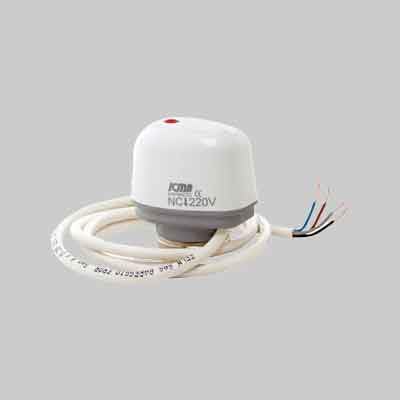
Figure 1: ICMA 82002NC53 Electrothermal Actuator. This image shows the compact design of the actuator, typically mounted on a zone valve.
4. Technical Specifications
| Model | 82002NC53 |
| Manufacturer | ICMA SPA |
| Supply Voltage | 230 V |
| Opening Time | Approx. 3 minutes |
| Operating Temperature | 5 - 50°C |
| Item Weight | 110 g |
| Batteries Required | No |
5. Installation
The ICMA 82002NC53 actuator is designed for use with specific ICMA zone valves, including models 05849, 05851, and 05853. Ensure compatibility before installation.
5.1 Mounting the Actuator
- Ensure the zone valve is in the correct position for actuator attachment.
- Carefully align the actuator with the valve body. The connection thread is 28x1.5.
- Screw the actuator onto the valve by hand until it is finger-tight. Do not overtighten.
- Verify that the actuator is securely seated on the valve.
5.2 Electrical Connections
Before making any electrical connections, ensure the main power supply to the system is OFF.
- Power Supply: Connect the Brown and Blue wires to the 230V power supply.
- Microswitch Output: Connect the Black and Grey wires to the control system for the microswitch signal. This signal indicates the end-of-stroke position.
After wiring, secure all connections and ensure no bare wires are exposed. Restore power only after all connections are verified and the installation is complete.
6. Operation
When power is applied to the Brown and Blue wires, the electrothermal element heats up, causing the actuator to gradually open the valve. The opening process takes approximately 3 minutes. Once fully open, the internal microswitch changes state, providing a signal via the Black and Grey wires. When power is removed, the actuator cools down, and the valve slowly returns to its normally closed position.
7. Maintenance
The ICMA 82002NC53 actuator is designed for long-term, maintenance-free operation. However, periodic checks are recommended:
- Visual Inspection: Periodically inspect the actuator and wiring for any signs of damage, wear, or loose connections.
- Cleaning: If necessary, gently wipe the exterior of the actuator with a dry, soft cloth. Do not use abrasive cleaners or solvents.
- Functionality Check: Occasionally verify that the actuator opens and closes the valve smoothly within the specified opening time.
8. Troubleshooting
| Problem | Possible Cause | Solution |
|---|---|---|
| Actuator does not open/close | No power supply; Faulty wiring; Actuator failure; Valve stuck. | Check 230V power to Brown/Blue wires; Verify wiring connections; Replace actuator if faulty; Inspect and service valve. |
| Microswitch signal not working | Faulty wiring to microswitch; Actuator not reaching full stroke; Internal microswitch failure. | Check Black/Grey wire connections; Ensure actuator fully opens/closes; Replace actuator. |
| Slow or incomplete operation | Low voltage; Valve resistance; Actuator nearing end of life. | Verify stable 230V supply; Check valve for obstructions; Consider actuator replacement. |
If troubleshooting steps do not resolve the issue, contact qualified service personnel.
9. Warranty and Support
ICMA products are manufactured to high-quality standards. For specific warranty terms and conditions, please refer to the documentation provided at the time of purchase or contact your local ICMA distributor. For technical support, please reach out to ICMA customer service or an authorized service center.