
GHodec GH-30
GHodec Grow Light User Manual
Model: GH-30 | Brand: GHodec
1. Introduction
Thank you for choosing the GHodec Grow Light. This 75W full-spectrum LED plant light is designed to provide optimal lighting for your indoor plants at all growth stages. Featuring 6000K sunlight white and red LEDs, 5 dimmable brightness levels, and a flexible gooseneck with a sturdy clip, it offers versatile placement and precise control. The integrated timer function allows for automatic on/off operation, simplifying your plant care routine. Please read this manual thoroughly before use to ensure proper operation and longevity of your grow light.
2. Safety Information
- Ensure the power source matches the specified voltage (5 Volts DC).
- Do not expose the light to water or high humidity environments, as it is not fully waterproof.
- Avoid looking directly into the LED lights for extended periods to prevent eye strain.
- Keep out of reach of children and pets.
- Do not attempt to disassemble or modify the product. Refer to qualified personnel for repairs.
- Unplug the light from the power source before cleaning or when not in use.
- Ensure proper ventilation around the light to prevent overheating.
3. Product Overview
The GHodec Grow Light consists of the following main components:
- LED Light Bars: Equipped with 5 Red + 37 Sunlight White LEDs per bar, providing full spectrum light.
- Flexible Goosenecks: 360-degree adjustable arms for directing light precisely.
- Sturdy Clamp: Anti-slip clamp for secure attachment to various surfaces.
- Control Panel: Integrated buttons for power, brightness adjustment, and timer settings.
- USB Power Cable: For connecting to a compatible USB power adapter (not always included, check packaging).
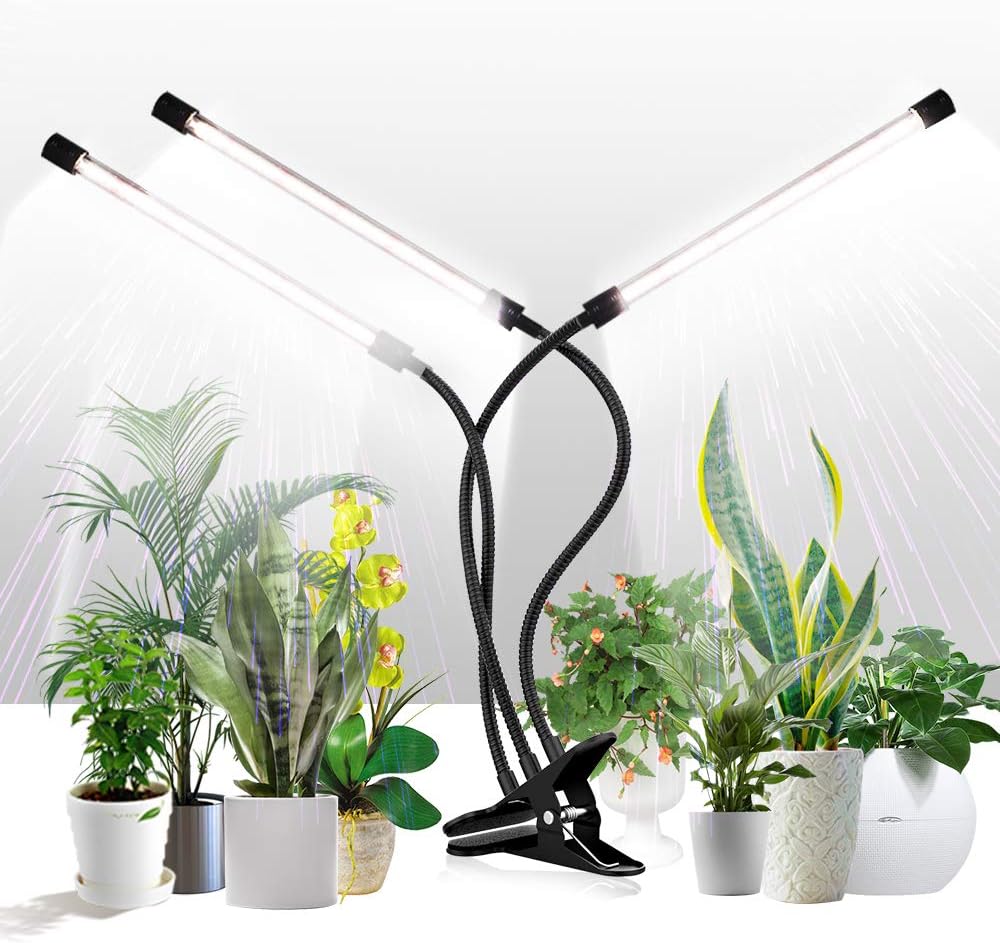
Figure 3.1: Overview of the GHodec Grow Light with its main components.
4. Setup
- Unpack: Carefully remove all components from the packaging.
- Attach: Secure the sturdy clamp to a stable surface such as a desk, shelf, or plant stand. Ensure the surface is thick enough for the clamp to grip firmly.
- Position: Adjust the flexible goosenecks to direct the LED light bars towards your plants. The 360-degree adjustability allows for optimal light coverage.
- Connect Power: Plug the USB power cable into a compatible USB power adapter (e.g., a 5V DC USB wall charger) and then into a power outlet.

Figure 4.1: Attaching the grow light using its sturdy clamp.
5. Operating Instructions
The control panel allows for easy management of the grow light's functions.

Figure 5.1: The integrated control panel.
5.1 Power On/Off
- Press the Power Button (usually marked with a circle and vertical line) to turn the light ON or OFF.
- Each LED bar can be controlled separately. Press the power button multiple times to cycle through: one light ON, two lights ON, three lights ON, or all lights OFF.
5.2 Brightness Adjustment
- Use the "+" button to increase brightness.
- Use the "-" button to decrease brightness.
- There are 5 dimmable levels to suit your plants' specific needs.
5.3 Timer Function
The grow light features an automatic timer for convenient operation.

Figure 5.2: Timer function details.
- Press the Timer Button (marked with a clock icon) to select the desired lighting duration:
- 4H: Light stays on for 4 hours, then automatically turns off. It will turn on again at the same time the next day.
- 8H: Light stays on for 8 hours, then automatically turns off. It will turn on again at the same time the next day.
- 12H: Light stays on for 12 hours, then automatically turns off. It will turn on again at the same time the next day.
- Once a timer setting is selected, the light will automatically cycle on and off daily at the set time. No manual operation is required.
- Note: There may be a daily error of approximately 15 minutes in the timer cycle.
6. Applications and Usage
The GHodec Grow Light is versatile and suitable for various applications:
- Indoor Plants: Provides essential light for all types of indoor plants, especially during periods of low natural light.
- Seedlings & Germination: Ideal for starting seeds and promoting healthy seedling growth.
- Succulents & Houseplants: Supports the growth and vitality of succulents and other common houseplants.
- Reading Light: The 6000K LED lights offer exceptional color-rendering (CRI 90) and flicker-free, soft light, making it suitable for use as a reading light.
- Versatile Environments: Suitable for balconies, greenhouses, darkrooms, offices, and other indoor spaces where plants need supplemental light.

Figure 6.1: Grow light in use with indoor plants.

Figure 6.2: Full Spectrum Light Output.
7. Specifications
| Feature | Detail |
|---|---|
| Model | GH-30 |
| Wattage | 75 Watts |
| Light Source Type | LED (126 LEDs total) |
| Color Temperature | 6000 Kelvin (Sunlight White + Red LEDs) |
| Color Rendering Index (CRI) | 90 |
| Brightness | 2800 Lumen |
| Dimmable Levels | 5 |
| Timer Settings | 4H / 8H / 12H (Auto On/Off) |
| Power Source | USB (5 Volts DC) |
| Product Dimensions | 4.33"D x 10.43"W x 15.75"H |
| Item Weight | 1.46 Pounds |
| Material | Iron, Plastic |
| Mounting Type | Tabletop (Spoke Clip) |
8. Maintenance
- Cleaning: Ensure the light is unplugged before cleaning. Use a soft, dry cloth to wipe down the LED bars and control panel. Do not use abrasive cleaners or immerse any part of the light in water.
- Storage: If storing the light for an extended period, ensure it is clean and dry. Store in a cool, dry place away from direct sunlight.
- Cable Care: Avoid bending or kinking the power cable excessively. Do not place heavy objects on the cable.
9. Troubleshooting
| Problem | Possible Cause | Solution |
|---|---|---|
| Light does not turn on. | No power, loose connection, faulty adapter. | Check if the USB cable is securely plugged into the light and the power adapter. Ensure the power adapter is plugged into a working outlet. Try a different USB power adapter. |
| Light flickers or turns off unexpectedly. | Unstable power supply, loose connection, internal issue. | Ensure the power connection is stable. Try a different power outlet or USB adapter. If the issue persists, contact customer support. |
| Timer function is inaccurate or not working. | Power interruption, internal timer malfunction. | Unplug the light for a few minutes and then plug it back in to reset the timer. Re-set the desired timer duration. Note the 15-minute daily error. If it continues to be significantly off, contact customer support. |
| One or more LED bars are not lighting up. | Individual bar control setting, faulty LED bar. | Press the power button repeatedly to ensure all individual light bars are selected to be ON. If a specific bar still doesn't light up, it may be faulty. |
10. Warranty and Support
GHodec products are designed for quality and reliability. While specific warranty terms are not detailed in this manual, GHodec typically offers customer support and warranty replacements for manufacturing defects or malfunctions within a reasonable period from the purchase date. Please retain your proof of purchase.
For technical assistance, troubleshooting beyond this guide, or warranty claims, please contact GHodec customer support through the retailer where you purchased the product or visit the official GHodec website for contact information.
Visit the GHodec Store on Amazon for more information and products.
Ask a question about this manual
Ask about setup, troubleshooting, compatibility, parts, safety, or missing instructions. Manuals+ will review the question and use this page’s manual context to help answer it.