
Introduction
This manual provides detailed instructions for the proper use and maintenance of your Bestol Remote Control FUTVRS1-BL. This remote is designed as an original replacement for Furrion Unismart Universal Remote Control systems, offering seamless control over various Furrion devices, including televisions, stereos, and fireplaces. Please read this manual thoroughly before operating the remote control to ensure optimal performance and longevity.
Product Overview
The Bestol FUTVRS1-BL remote control is a dedicated device for managing compatible Furrion entertainment and appliance systems. Its ergonomic design and clearly labeled buttons facilitate intuitive operation. It requires batteries for functionality, which are not included with the purchase.
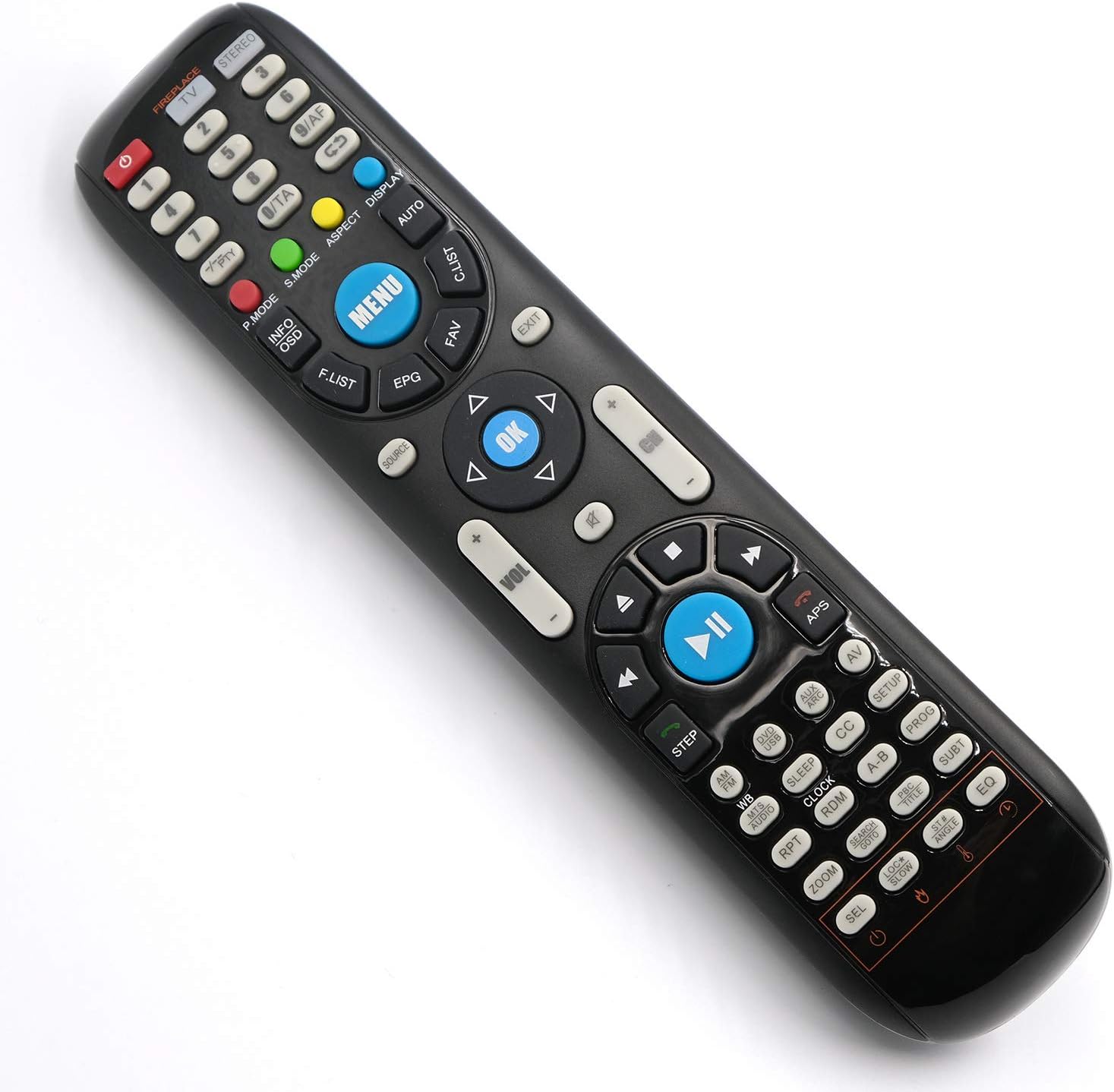
Image: Front view of the Bestol Remote Control FUTVRS1-BL, displaying its full array of buttons for various functions.
Setup
Battery Installation
The remote control requires two (2) AAA batteries (not included). Follow these steps to install them:
- Locate the battery compartment on the back of the remote control.
- Press down on the latch and slide the battery cover downwards to open it.
- Insert two AAA batteries, ensuring the positive (+) and negative (-) terminals align correctly with the markings inside the compartment.
- Slide the battery cover back into place until it clicks securely.

Image: Front and back views of the remote control. The back view clearly shows the battery compartment, indicating where batteries should be inserted.
Once batteries are installed, the remote is ready for use with compatible Furrion devices without additional programming.
Operating Instructions
This remote control is designed to operate various Furrion devices. Point the remote directly at the device you wish to control.
Device Selection Buttons
- FIREPLACE: Selects the fireplace mode for controlling compatible Furrion fireplaces.
- TV: Selects the television mode for controlling compatible Furrion TVs.
- STEREO: Selects the stereo mode for controlling compatible Furrion audio systems.
Basic Functions
- POWER (●): Turns the selected device on or off.
- Number Buttons (0-9): Used for direct channel input or menu navigation.
- VOL (+/-): Adjusts the volume level.
- CH (+/-): Changes channels.
- MUTE: Silences the audio.

Image: A close-up view of the upper part of the remote, highlighting the device selection buttons (Fireplace, TV, Stereo) and the numeric keypad.
Navigation and Menu Functions
- MENU: Accesses the main menu of the selected device.
- OK: Confirms selections within menus.
- Directional Arrows (▲ ◀ ▼ ▶): Navigates through menus and options.
- EXIT: Exits the current menu or function.
- SOURCE: Cycles through input sources (e.g., HDMI 1, AV).
- INFO/OSD: Displays on-screen information or the On-Screen Display.
- F.LIST: Accesses the favorite channel list.
- EPG: Displays the Electronic Program Guide.
- FAV: Accesses favorite functions or channels.
Media Playback and Advanced Functions
- Play/Pause (►▮▮): Controls media playback.
- Stop (■): Stops media playback.
- Rewind (◀◀): Rewinds media.
- Fast Forward (►►): Fast forwards media.
- Skip (◀▬ / ▬►): Skips tracks or chapters.
- STEP: Advances frame by frame during playback.
- APS: Auto Program Search.
- AV: Selects Audio/Video input.
- SETUP: Accesses device setup options.
- CC: Activates/deactivates Closed Captions.
- PROG: Program function.
- SUBT: Selects subtitle options.
- EQ: Adjusts equalizer settings.
- SLEEP: Sets a sleep timer.
- CLOCK: Displays or sets the clock.
- RDM: Random playback.
- RPT: Repeat playback.
- ZOOM: Zooms in on the screen.
- SEL: Select function.

Image: A close-up view of the lower part of the remote, detailing media control buttons and various advanced function keys.
Maintenance
- Cleaning: Wipe the remote control with a soft, dry cloth. Do not use liquid cleaners or abrasive materials.
- Battery Care: If the remote will not be used for an extended period, remove the batteries to prevent leakage and potential damage. Replace batteries when the remote's response becomes sluggish or inconsistent.
- Storage: Store the remote in a cool, dry place away from direct sunlight and extreme temperatures.
Troubleshooting
| Problem | Possible Cause | Solution |
|---|---|---|
| Remote is not working. | Dead or incorrectly installed batteries. | Replace batteries with new AAA batteries, ensuring correct polarity. |
| Remote has limited range or intermittent response. | Weak batteries; Obstruction between remote and device; Infrared sensor on device is blocked. | Replace batteries. Ensure a clear line of sight to the device's sensor. Remove any obstructions. |
| Remote controls the wrong device. | Incorrect device mode selected. | Press the correct device selection button (TV, STEREO, FIREPLACE) for the device you intend to control. |
| Certain buttons do not function. | Button malfunction; Device does not support the function. | Ensure the button corresponds to a function supported by your specific Furrion device model. If the issue persists, the remote may be faulty. |
Specifications
- Brand: Bestol
- Model Number: FUTVRS1-BL
- Compatible Devices: Furrion TV, Stereo, Fireplace (Unismart Universal Remote Control Systems)
- Power Source: 2 x AAA Batteries (not included)
- Item Weight: 4.6 ounces (approx. 130 grams)
- Package Dimensions: 9.13 x 2.64 x 1.26 inches (approx. 23.19 x 6.71 x 3.20 cm)
- Special Feature: Lightweight design

Image: The remote control shown with its approximate dimensions: 8.82 x 1.97 x 1.1 inches (22.4 x 5 x 3 cm).
Warranty and Support
For warranty information and customer support regarding your Bestol Remote Control FUTVRS1-BL, please refer to the documentation provided with your purchase or contact the seller directly. Specific warranty terms may vary.