
Introduction
This manual provides essential instructions for the setup, operation, and maintenance of your Bestol replacement remote control, designed for compatibility with the RCA RT2781BE Home Theater System DVD Player. Please read this manual thoroughly before using the remote control to ensure proper functionality and to maximize your user experience.
Product Overview
Key Features
- Designed for RCA RT2781BE Home Theater System DVD Player.
- Low power consumption for extended battery life.
- No programming or complex setup required; ready to use with compatible devices.
- Ergonomic design with delicate keys for comfortable and easy operation.
- Compact and lightweight for convenient handling.
Remote Control Layout

This image displays the front of the Bestol replacement remote control, highlighting its ergonomic design and the arrangement of all control buttons, including power, numerical keys, volume, channel, and input selection.
Setup
Battery Installation
The remote control requires two AAA batteries (not included) for operation. Follow these steps to install the batteries:
- Locate the battery compartment cover on the back of the remote control.
- Press down on the tab and slide the cover downwards to open the compartment.
- Insert two AAA batteries, ensuring the positive (+) and negative (-) terminals align correctly with the markings inside the compartment.
- Slide the battery compartment cover back into place until it clicks securely.

This image illustrates the open battery compartment of the remote control, showing the correct orientation for inserting two AAA batteries.
Battery Installation Video Guide
This video provides a visual guide to the Bestol remote control, showcasing its various buttons and demonstrating the correct procedure for installing batteries into the compartment.
Operating Instructions
The Bestol remote control is designed for immediate use with your RCA RT2781BE Home Theater System DVD Player without additional programming. Point the remote directly at your device and press the desired function button.
Basic Functions
- POWER: Turns the device on or off.
- VOL +/-: Adjusts the volume level.
- CHAN +/-: Changes the channel (if applicable to your system).
- MUTE: Silences the audio output.
- Number Buttons (0-9): For direct channel selection or inputting numerical values.
- SETUP: Accesses system setup menus.
- OK / Navigation Arrows: Navigates through menus and confirms selections.
- SOURCE / INPUT: Cycles through available input sources (e.g., DVD, AUX, Tuner).
- PLAY / PAUSE / STOP / REVERSE / FORWARD: Controls media playback functions.
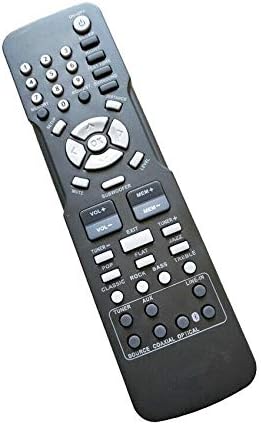
This image provides an angled view of the remote control, offering a perspective on its ergonomic shape and the arrangement of its various function buttons.
Maintenance
Cleaning and Care
- To clean the remote control, use a soft, dry cloth. Do not use abrasive cleaners or solvents.
- Avoid exposing the remote control to extreme temperatures, direct sunlight, or high humidity.
- If the remote control will not be used for an extended period, remove the batteries to prevent leakage and potential damage.
Troubleshooting
Common Issues and Solutions
| Problem | Solution |
|---|---|
| Remote control is not responding. | Check if the batteries are inserted correctly with the correct polarity. Replace old or depleted batteries with new ones. Ensure there are no obstructions between the remote and the device's infrared sensor. |
| Remote control only works intermittently. | Ensure the remote is pointed directly at the device. Replace batteries if they are low. Clean the remote's infrared emitter and the device's sensor. |
| Specific buttons are not working. | Check for any debris or stickiness around the buttons. If the issue persists after cleaning and battery replacement, the remote may require replacement. |
Specifications
| Feature | Detail |
|---|---|
| Brand | Bestol |
| Compatible Devices | RCA RT2781BE Home Theater System DVD Player |
| Connectivity Technology | Infrared |
| Max Number of Supported Devices | 1 |
| Special Feature | Ergonomic |
| Item Weight | 2.71 ounces |
| Package Dimensions | 7.2 x 2.32 x 1.1 inches |
Warranty and Support
For information regarding warranty coverage and customer support, please refer to the product packaging or contact the retailer from whom the product was purchased. Keep your purchase receipt as proof of purchase for any warranty claims.