
1. Introduction
This manual provides detailed instructions for the safe and proper installation, operation, and maintenance of the CJ TECH FM72902 Full Motion TV Wall Mount. This mount is designed to securely hold televisions ranging from 26 to 55 inches with a VESA pattern up to 400 x 400 mm. It offers full motion capabilities, including a 160-degree horizontal swivel and a +5 to 12-degree tilt, allowing for optimal viewing angles from various positions in a room.
2. Safety Information
WARNING: Failure to read and follow these instructions may result in serious personal injury, property damage, or voiding of warranty. Professional installation is highly recommended.
- Ensure the mounting surface can safely support the combined weight of the mount and the television.
- Do not exceed the maximum weight capacity of 35 kg (77 lbs).
- Verify the wall structure (wood studs, concrete, brick) before drilling. Use appropriate hardware for your wall type.
- Always use a stud finder to locate the center of wood studs.
- Do not install into drywall alone.
- Keep children and pets away during installation.
- Check all connections and fasteners periodically to ensure they remain secure.
- This product is intended for indoor use only.
3. Package Contents
Please verify that all components are present and undamaged before beginning installation. If any parts are missing or damaged, contact CJ TECH customer support.
- Wall Plate Assembly
- TV Bracket Arms (2x)
- Mounting Hardware Kit (various screws, washers, spacers for TV and wall)
- Bubble Level
- Installation Template
- Instruction Manual
4. Setup and Installation
Before installation, ensure your TV's VESA pattern (mounting hole distance) is compatible with this mount (up to 400x400mm) and that your TV's weight does not exceed 35 kg (77 lbs).
Tools Required (Not Included):
- Pencil
- Phillips Head Screwdriver
- Electric Drill
- Stud Finder (for wood stud installation)
- Measuring Tape
- Socket Wrench (for lag bolts)
Installation Steps:
- Prepare the TV: Lay your TV face down on a soft, clean surface. Attach the TV bracket arms to the back of your TV using the appropriate screws, washers, and spacers from the hardware kit. Ensure the brackets are centered and securely fastened.
- Determine Mounting Location: Decide on the desired height for your TV. Use a stud finder to locate the center of two adjacent wood studs in the wall. Mark these locations with a pencil. For concrete or brick walls, mark the desired drill points.
- Attach Wall Plate: Position the wall plate assembly against the wall, aligning the mounting holes with your marked stud centers or drill points. Use the included quick install template for precise placement. Use the bubble level to ensure the wall plate is perfectly horizontal. Mark the drill holes.
- Drill Pilot Holes: Drill pilot holes at the marked locations. For wood studs, use a 5.5mm (7/32") drill bit. For concrete/brick, use a 10mm (3/8") masonry drill bit and insert wall anchors (if provided and suitable for your wall type).
- Secure Wall Plate: Attach the wall plate assembly to the wall using the provided lag bolts and washers. Tighten them securely with a socket wrench, but do not overtighten.
- Mount TV to Wall Plate: Carefully lift the TV (with brackets attached) and hook the TV brackets onto the wall plate. Ensure both brackets are properly seated on the wall plate.
- Secure TV: Locate the safety screws or locking mechanisms on the TV brackets and tighten them to prevent the TV from accidentally disengaging from the wall plate.
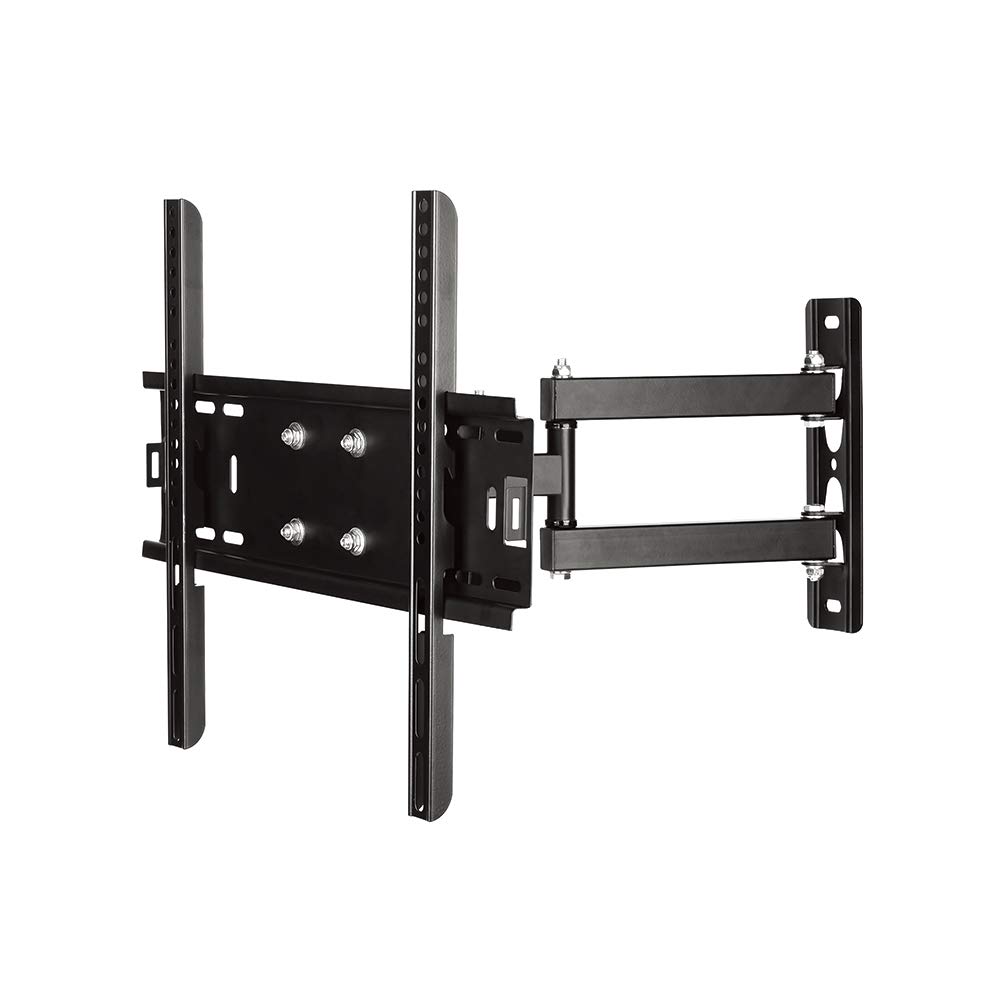
Image 1: The CJ TECH FM72902 Full Motion TV Wall Mount shown installed on a wall with a television, demonstrating its articulating capabilities in a modern living room setting.
5. Operating and Adjustments
The CJ TECH FM72902 mount offers flexible viewing options:
- Swivel Adjustment: Gently push or pull the TV to the desired left or right angle. The mount allows for a 160-degree horizontal swivel, providing flexibility to view your TV from various positions in the room.
- Tilt Adjustment: The mount supports a tilt range of +5 to 12 degrees. To adjust the tilt, loosen the tilt adjustment knobs or bolts on the TV brackets (if applicable), set the TV to the desired vertical angle, and then re-tighten the knobs/bolts to secure the position.
- Extension/Retraction: The articulating arm allows you to extend the TV away from the wall or push it back closer to the wall as needed.
6. Maintenance
Regular maintenance ensures the longevity and safe operation of your TV wall mount:
- Cleaning: Wipe the mount with a soft, dry cloth. Avoid abrasive cleaners or solvents that may damage the finish.
- Periodic Checks: Every few months, inspect all mounting hardware and connections. Ensure all screws and bolts are tight and that the mount is securely fastened to both the wall and the TV.
- Lubrication: The articulating joints are designed for smooth movement. If movement becomes stiff, a small amount of silicone-based lubricant can be applied to the pivot points, avoiding contact with electrical components.
7. Troubleshooting
If you encounter issues with your TV wall mount, refer to the following common problems and solutions:
- TV is not level:
- Check the wall plate installation. If the wall plate is not level, the TV will not be level. Re-adjust if necessary.
- Some TV brackets have fine-tuning level adjustments. Consult the specific bracket design for this feature.
- Difficulty moving the TV (swivel/tilt):
- Ensure no cables are snagged or obstructing movement.
- Check if any adjustment knobs or bolts are overtightened. Loosen slightly to allow movement, then re-tighten to secure.
- Apply a small amount of silicone lubricant to the articulating joints if they are stiff.
- TV feels unstable or loose:
- Immediately remove the TV from the mount if it feels unstable.
- Re-check all wall plate fasteners and TV bracket screws for tightness.
- Ensure the safety screws or locking mechanisms are engaged.
- Verify that the wall structure is sound and that the correct anchors/bolts were used.
8. Specifications
| Model Number | FM72902 |
| Brand | CJ Tech |
| Compatible TV Sizes | 26 - 55 Inches |
| VESA Compatibility | Up to 400 x 400 mm |
| Movement Type | Articulating / Full Motion |
| Horizontal Swivel | 160 Degrees |
| Tilt Angle | +5 to -12 Degrees |
| Maximum Weight Capacity | 35 kg (77 lbs) |
| Parcel Dimensions | 48.26 x 19.69 x 8.89 cm |
| UPC / GTIN | 695087729021 |
9. Warranty and Support
For warranty information or technical support, please contact CJ TECH customer service directly. Keep your purchase receipt as proof of purchase.
Manufacturer: CJ Tech