
1. Introduction
The artfone C1 is a mobile phone designed for ease of use, particularly for seniors. It features large buttons, a clear display, high volume, and an SOS function for emergencies. This manual provides detailed instructions on how to set up, operate, and maintain your device.
2. What's in the Box
Please check the package contents:
- artfone C1 Mobile Phone
- USB Cable
- Battery
- User Manual
Video: Unboxing the artfone C1 mobile phone, showing all included components.
3. Product Overview
The artfone C1 is designed with user-friendliness in mind. It features a compact and durable build, with clearly labeled buttons and an easy-to-read display.

Image: The artfone C1 phone held in a hand, highlighting its large buttons and clear display, designed for easy visibility and operation.
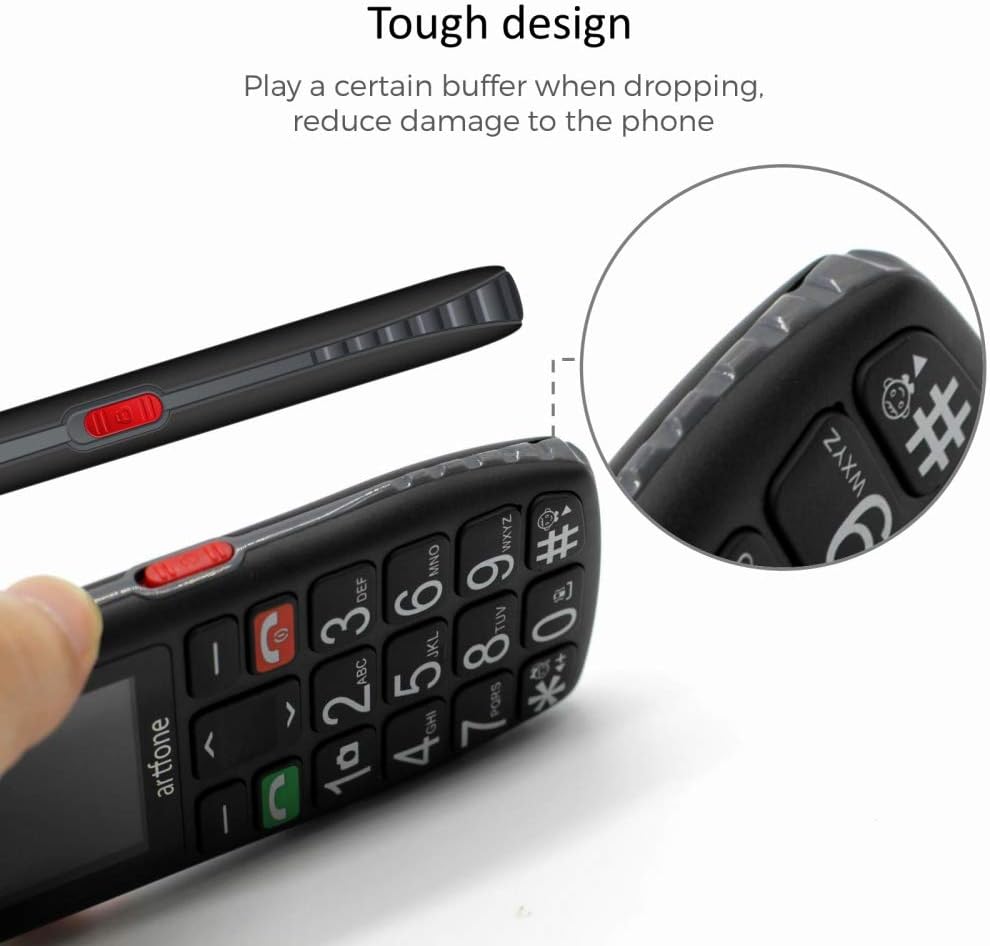
Image: A side view of the artfone C1, showcasing its durable construction and ergonomic shape, which helps reduce damage from accidental drops.

Image: Detailed close-ups of the artfone C1, showing the large, easy-to-press keys, the clear screen, the prominent SOS button on the back, and the side-mounted controls for volume and flashlight.
4. Setup
4.1. Inserting the SIM Card and Battery
- Remove the back cover of the phone.
- Carefully insert your SIM card(s) into the designated slot(s) as indicated by the diagram.
- Insert the battery into its compartment, ensuring the contacts align.
- Replace the back cover until it clicks securely into place.
4.2. Charging the Phone
Before first use, fully charge the phone. Connect the USB cable to the phone's charging port and plug the other end into a power adapter. You can also use a charging dock if provided.
Video: Demonstrates the charging process for the artfone C1+ (similar to C1) using a charging dock.
Video: Shows the artfone C1 phone in a charging dock and a hand interacting with the buttons.
5. Operating Instructions
5.1. Power On/Off
- To power on, press and hold the red hang-up key until the screen lights up.
- To power off, press and hold the red hang-up key until the phone shuts down.
5.2. Making Calls
- Enter the phone number using the large keypad.
- Press the green call key to initiate the call.
5.3. Receiving Calls
When a call comes in, press the green call key to answer. To end a call, press the red hang-up key.
5.4. SOS Function
The phone features a dedicated SOS button for emergencies. You can set up to 5 emergency contact numbers.
- To activate, press and hold the SOS button on the back of the phone for 3 seconds.
- The phone will trigger a loud alarm and automatically dial the emergency numbers one by one until a connection is made.
5.5. Speed Dial
The phone supports speed dial for frequently called numbers. Assign contacts to keys M1, M2, and number keys 2-9 for quick dialing.
5.6. Messaging
To send or receive text messages, navigate to the 'Messages' menu. The large font and clear display make typing and reading messages easier.
5.7. Flashlight
The phone is equipped with a powerful LED flashlight. Use the dedicated side button to turn it on or off.

Image: The artfone C1 phone demonstrating its powerful LED flashlight, capable of illuminating distances up to 10 meters.
5.8. Language Settings
The phone supports 8 languages: English, German, French, Italian, Spanish, Polish, Dutch, and Czech. To change the language, navigate to the settings menu and select 'Language'.
5.9. Volume Control
Adjust the call and media volume using the dedicated side buttons.
5.10. Time Report
The phone can announce the current time. Refer to the phone's settings for activating and configuring this feature.
Video: Overview of the artfone C1's features, including large buttons, flashlight, SOS function, and menu navigation.
6. Maintenance
- Keep the phone dry. Moisture can damage the electronic circuits.
- Do not expose the phone to extreme temperatures.
- Clean the phone with a soft, dry cloth. Avoid using harsh chemicals.
- Handle the battery with care. Do not puncture or expose it to high temperatures.
7. Troubleshooting
| Problem | Possible Solution |
|---|---|
| Phone does not turn on | Ensure the battery is correctly inserted and charged. Try charging the phone for at least 30 minutes. |
| Cannot make or receive calls | Check if the SIM card is properly inserted. Verify that you have network coverage. Contact your service provider if issues persist. |
| SOS function not working | Ensure emergency numbers are correctly programmed. Check if the SOS function is enabled in settings. |
| Low call volume | Adjust the volume using the side buttons during a call. Check volume settings in the menu. |
8. Specifications
| Feature | Detail |
|---|---|
| Brand | artfone |
| Model Number | C1 |
| Operating System | Nucleus OS |
| Screen Size | 1.8 Inches |
| Resolution | 240 x 320 |
| RAM Size | 128 MB |
| Memory Storage Capacity | 32 GB (expandable via Micro SD) |
| CPU Model | MT8317T |
| Cellular Technology | GSM |
| Battery Type | Lithium-ion |
| Special Features | Camera, Calculator, Flashlight, SOS Function |
| Connectivity | USB Type-C |
9. Warranty and Support
This product comes with a 2-year availability of spare parts. For further assistance, please refer to the contact information provided with your purchase or visit the official artfone website.


