
Justfog Compact 14 Kit
Justfog Compact 14 Kit Instruction Manual
Model: Compact 14 Kit
1. Introduction
Thank you for choosing the Justfog Compact 14 Kit. This instruction manual provides detailed information on how to properly use, maintain, and troubleshoot your device. Please read this manual carefully before use to ensure safe and optimal performance.
2. Product Overview
The Justfog Compact 14 Kit is a compact and portable e-cigarette starter set designed for ease of use and consistent performance. It features a 1500mAh built-in battery and a 1.8ml clearomizer.

Image: The Justfog Compact 14 Kit, showcasing its compact design and integrated clearomizer.
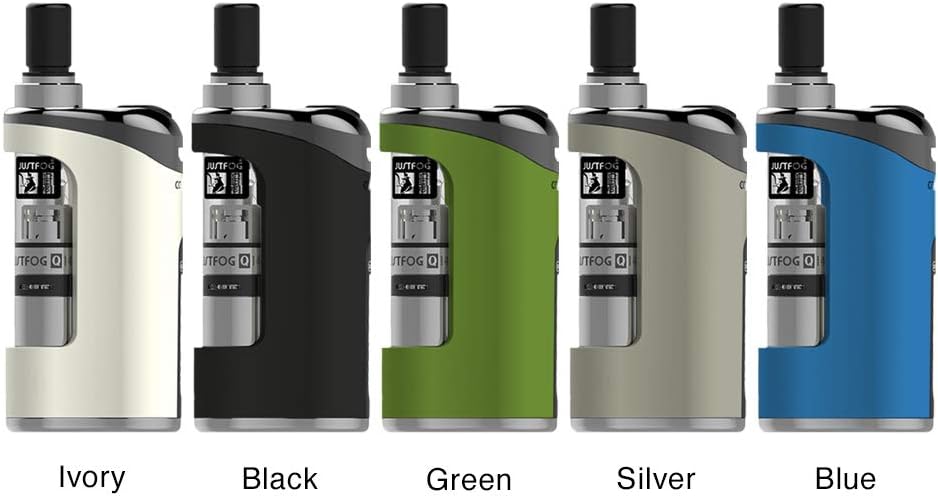
Image: The Justfog Compact 14 Kit is available in multiple color options including ivory, black, green, silver, and blue.
2.1 Components
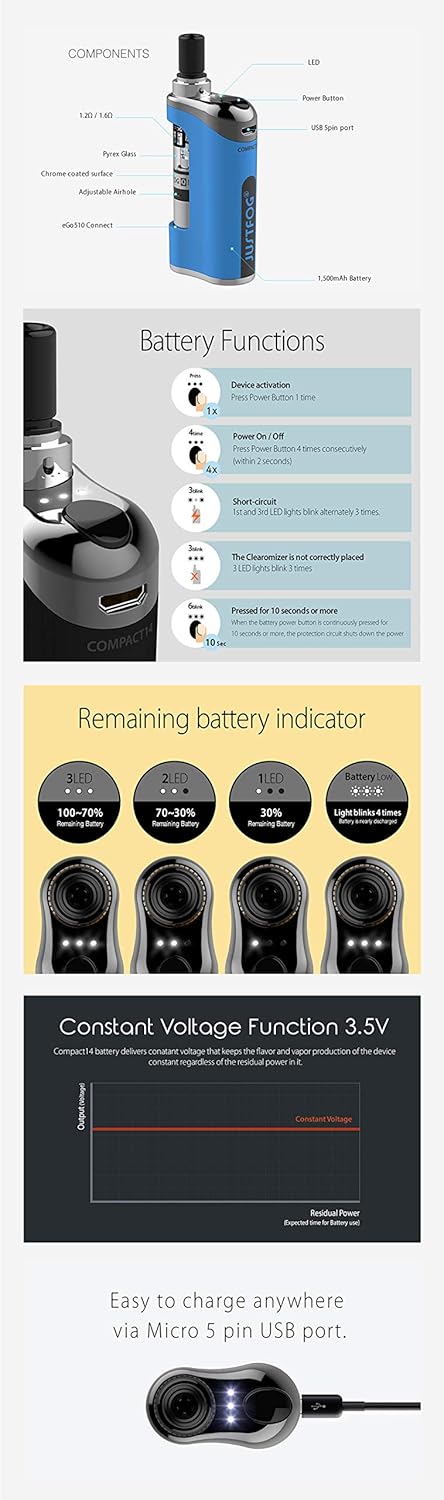
Image: Detailed diagram of the Justfog Compact 14 Kit components, including the L20/14Q clearomizer, Pyrex glass, adjustable airhole, eGo/510 connector, LED indicator, power button, USB 5-pin port, and the internal 1500mAh battery.
The kit typically includes:
- Justfog Compact 14 Device (with built-in 1500mAh battery)
- Justfog Q14 Clearomizer (1.8ml capacity)
- USB Charging Cable
- User Manual (this document)

Image: The complete contents of the Justfog Compact 14 Kit packaging, showing the device, USB charging cable, and accompanying documentation.
3. Setup and First Use
3.1 Charging the Device
Before first use, fully charge the device. Connect the provided USB cable to the Micro 5 pin USB port on the device and plug the other end into a suitable USB power source (e.g., computer USB port, wall adapter). The LED indicator will show charging status.
3.2 Filling the Clearomizer
- Unscrew the clearomizer from the device.
- Unscrew the base of the clearomizer.
- Carefully fill the tank with your e-liquid, avoiding the central airflow tube. Do not overfill.
- Screw the base back onto the clearomizer securely.
- Screw the filled clearomizer back onto the device.
For first-time filling or after changing a coil, let the clearomizer stand for 5-10 minutes to allow the coil to saturate with e-liquid before use.
4. Operating Instructions
4.1 Power On/Off
To turn the device on or off, press the power button 4 times consecutively within 2 seconds. The LED indicator will flash to confirm the action.
4.2 Vaping
To activate the device and vape, press and hold the power button. Inhale from the mouthpiece while holding the button. Release the button when you are finished inhaling.
4.3 Battery Functions and Indicators
Image: Visual guide to battery functions and LED indicators, including activation, power control, and error signals like short circuit or clearomizer detection.
The device features various battery functions and LED indicators:
- Device Activation: Press the power button 1 time to check battery level.
- Power On/Off: Press the power button 4 times consecutively.
- Short Circuit Protection: If a short circuit occurs, the 3 LEDs will blink 3 times.
- Clearomizer Not Correctly Placed: If the clearomizer is not detected or incorrectly placed, the 3 LEDs will blink 3 times.
- Over-Vaping Protection: If the power button is pressed for 10 seconds or more, the protection circuit will shut down the power.
4.4 Remaining Battery Indicator
Image: Visual representation of the battery level indicator using LEDs: 3 LEDs for 100-70% charge, 2 LEDs for 70-30%, 1 LED for 30-0%, and 4 blinks for low battery.
- 3 LEDs: 100% - 70% remaining battery
- 2 LEDs: 70% - 30% remaining battery
- 1 LED: 30% - 0% remaining battery
- Light blinks 4 times: Battery is low and needs charging.
4.5 Constant Voltage Function 3.5V
Image: Graph demonstrating the consistent 3.5V output of the Compact 14 Kit, ensuring stable vapor production regardless of the battery's remaining charge.
The Compact 14 Kit delivers a constant voltage of 3.5V, which helps maintain consistent vapor production and flavor intensity regardless of the battery's remaining charge level.
5. Maintenance
5.1 Cleaning
- Regularly clean the connection points between the clearomizer and the battery with a dry cloth or cotton swab to ensure good conductivity.
- Clean the mouthpiece with a damp cloth.
- If e-liquid leaks, clean the affected areas immediately to prevent damage.
5.2 Coil Replacement
The coil inside the clearomizer is a consumable part and needs to be replaced periodically (typically every 1-3 weeks, depending on usage). When you notice a burnt taste or reduced vapor production, it's time to replace the coil.
- Unscrew the clearomizer from the device.
- Unscrew the base of the clearomizer.
- Unscrew the old coil from the base.
- Screw in a new coil securely.
- Reassemble the clearomizer and fill with e-liquid. Allow it to sit for 5-10 minutes before use.
6. Troubleshooting
- Device not turning on: Ensure the device is charged. Press the power button 4 times quickly to turn it on.
- No vapor or weak vapor:
- Check if the clearomizer is correctly attached (LEDs blink 3 times if not).
- Ensure the coil is properly installed and not loose.
- Check e-liquid level.
- The coil might need replacement.
- Battery might be low.
- Burnt taste:
- E-liquid level is too low.
- Coil needs replacement.
- Did not allow coil to saturate after filling.
- Leaking:
- Ensure all parts of the clearomizer are screwed on tightly.
- Do not overfill the clearomizer.
- Check for damaged O-rings.
- LEDs blinking 3 times: Indicates a short circuit or the clearomizer is not correctly placed. Check the clearomizer connection and coil.
7. Specifications
| Brand | Justfog |
| Model | Compact 14 Kit |
| Battery Capacity | 1500mAh (Built-in) |
| Clearomizer Capacity | 1.8ml |
| Output Voltage | Constant 3.5V |
| Charging Port | Micro 5 pin USB |
| Dimensions (approx.) | 71.6mm (H) x 37.0mm (W) x 14.0mm (D) |
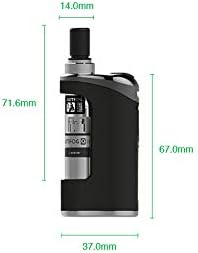
Image: Detailed dimensions of the Justfog Compact 14 Kit, showing its height, width, and depth.
8. Safety Information and Warnings
WARNING: This product contains nicotine, which is a highly addictive substance. Nicotine is an addictive chemical.
- Keep out of reach of children and pets.
- Not recommended for non-smokers, pregnant or breastfeeding women, or persons with heart conditions, high blood pressure, diabetes, or asthma.
- Do not use if you are allergic to nicotine or any other ingredients.
- Use only original Justfog components and chargers.
- Do not expose the device to extreme temperatures, direct sunlight, or water.
- Do not disassemble or modify the device.
- Dispose of the device and battery responsibly according to local regulations.
9. Warranty and Support
For warranty information and customer support, please refer to the official Justfog website or contact your local retailer. Keep your purchase receipt as proof of purchase.
Related documentsCompact 14 Kit

Ask a question about this manual
Ask about setup, troubleshooting, compatibility, parts, safety, or missing instructions. Manuals+ will review the question and use this page’s manual context to help answer it.