
mDesign 10632MDHS
mDesign Metal 3-Tier Rolling Utility Storage Cart Instruction Manual
Model: 10632MDHS
1. Introduction
This manual provides comprehensive instructions for the assembly, operation, maintenance, and troubleshooting of your mDesign Metal 3-Tier Rolling Utility Storage Cart. Please read this manual thoroughly before assembly and use to ensure safe and efficient operation.
The mDesign 3-Tier Rolling Utility Storage Cart is designed to provide versatile storage solutions for various spaces, including bathrooms, kitchens, laundry rooms, offices, and kids' rooms. Its durable metal construction and caster wheels offer portability and convenience.
2. Safety Information
Please observe the following safety guidelines to prevent injury or damage to the product:
- Do not use on wet or slippery surfaces.
- Always engage the wheel locks when the cart is not in use to prevent unwanted movement.
- Do not exceed the weight capacity of 4.51 pounds per shelf.
- Keep small parts away from children during assembly.
- Ensure all connections are secure before use.
3. Package Contents
Before beginning assembly, verify that all parts are present and undamaged. If any parts are missing or damaged, please contact mDesign customer support.
| Part | Description | Quantity |
|---|---|---|
| A | Side Frames | 2 |
| B | Basket Shelves | 3 |
| C | Caster Wheels (2 with locks, 2 without) | 4 |
| D | Screws/Fasteners | (As required for assembly) |
| E | Assembly Tool (e.g., Allen wrench) | 1 |
4. Setup and Assembly
Follow these steps to assemble your mDesign 3-Tier Rolling Utility Storage Cart. Assembly is typically straightforward and requires minimal tools.
- Step 1: Attach Caster Wheels.
Carefully insert the four caster wheels into the designated holes at the bottom of the side frames (Part A). Ensure two locking wheels are placed on one side for stability. Twist until secure. Note: The specific placement of locking wheels does not affect functionality, but placing them on the same side can be more convenient for locking.

Figure 4.1: Caster wheels with locking mechanism. This image shows the durable caster wheels, highlighting the locking feature that secures the cart in place when not in motion.
- Step 2: Connect Side Frames and Shelves.
Align the basket shelves (Part B) with the slots on the side frames (Part A). Secure each shelf to the side frames using the provided screws/fasteners (Part D) and assembly tool (Part E). Start with the bottom shelf, then the middle, and finally the top shelf. Ensure all connections are tightened for stability.
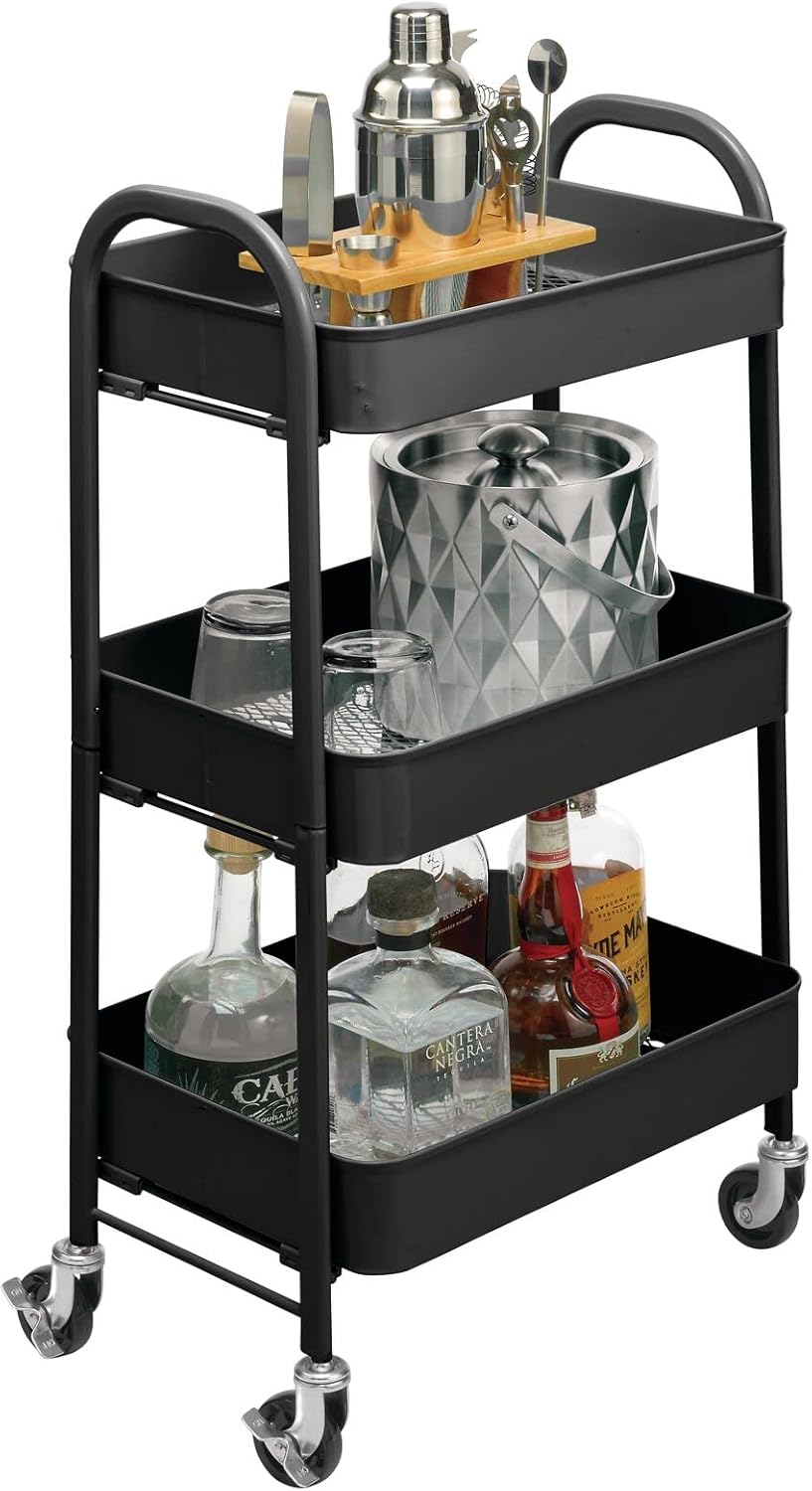
Figure 4.2: Fully assembled mDesign 3-Tier Rolling Utility Storage Cart. This image demonstrates the cart's capacity and design, suitable for organizing various household items.
- Step 3: Final Check.
Once all shelves are attached, gently shake the cart to ensure it is stable. Retighten any loose screws if necessary.
5. Operating Instructions
5.1 Moving the Cart
To move the cart, ensure all wheel locks are disengaged. Gently push or pull the cart using the top handles. The smooth-rolling caster wheels allow for easy maneuverability across various floor surfaces.
5.2 Securing the Cart
To secure the cart in a stationary position, press down on the locking levers located on two of the caster wheels until they click into place. This will prevent the cart from rolling unintentionally.
5.3 Loading the Cart
Distribute items evenly across the three shelves to maintain balance and stability. Avoid overloading any single shelf or the cart as a whole beyond the recommended weight capacity of 4.51 pounds per shelf.

Figure 5.1: Versatile uses of the mDesign 3-Tier Rolling Utility Cart. This composite image illustrates how the cart can be effectively used in various environments such as a bathroom for toiletries, a laundry room for supplies, an office for documents, and a craft room for art materials.

Figure 5.2: Cart in a bedroom setting. This image shows the cart's compact size and how it can fit into smaller spaces, providing additional storage next to furniture.

Figure 5.3: Cart used for kids' room storage. This image highlights the cart's suitability for organizing toys, books, and other items in a child's play area or bedroom.
6. Maintenance and Care
To ensure the longevity and appearance of your mDesign utility cart, follow these simple maintenance guidelines:
- Cleaning: Wipe with a damp cloth to remove dust and spills. For stubborn marks, use a mild soap solution and dry thoroughly immediately. Avoid abrasive cleaners or harsh chemicals, as they may damage the finish.
- Inspection: Periodically check all screws and fasteners to ensure they remain tight. Retighten if any looseness is detected.
- Storage: If storing the cart for an extended period, ensure it is clean and dry. Store in a cool, dry place away from direct sunlight or extreme temperatures.
7. Troubleshooting
| Problem | Possible Cause | Solution |
|---|---|---|
| Cart is wobbly or unstable. | Loose screws or uneven assembly. | Check and tighten all screws. Ensure shelves are properly seated in the side frames. Verify wheels are fully inserted. |
| Wheels do not roll smoothly. | Debris in wheels or wheel locks engaged. | Clear any debris from the wheels. Ensure wheel locks are disengaged. |
| Cart tips over easily. | Overloaded or unevenly distributed weight. | Reduce weight on shelves. Distribute items evenly across all three shelves. |
8. Product Specifications
- Model: 10632MDHS
- Dimensions: 12.1" (D) x 19.5" (W) x 30.3" (H) / 30.7cm (D) x 49.5cm (W) x 77cm (H)
- Material: Steel (Matte Black finish)
- Number of Tiers: 3
- Weight Capacity: Approximately 4.51 pounds per shelf
- Assembly Required: Yes
- Features: 4 Caster Wheels (2 locking), Tiered Shelves

Figure 8.1: Product Dimensions. This diagram provides a clear visual representation of the cart's height, width, and depth, including both imperial and metric measurements.
9. Warranty and Support
For warranty information, product support, or to purchase replacement parts, please visit the official mDesign website or contact their customer service department. Refer to your purchase documentation for specific warranty terms and conditions.
Manufacturer: MetroDecor
Brand Store: mDesign Amazon Store
10. Additional Resources
10.1 Product Overview Video
Video 10.1: Neutral Office Storage Organization for All Your Needs! This short video provides a quick overview of the mDesign utility cart's functionality and how it can help maximize study or office space with stylish storage solutions.
Ask a question about this manual
Ask about setup, troubleshooting, compatibility, parts, safety, or missing instructions. Manuals+ will review the question and use this page’s manual context to help answer it.