
Emerson 30-9530
EMERSON NETWORK POWER 30-9530 D-SUB Connector Adapter Instruction Manual
Model: 30-9530
Introduction
This manual provides essential information for the proper setup, operation, and maintenance of your Emerson Network Power 30-9530 D-SUB Connector Adapter. Please read this manual thoroughly before use to ensure safe and efficient operation.
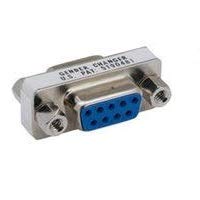
Figure 1: Emerson 30-9530 D-SUB Connector Adapter. This image shows the compact metal adapter with a blue 9-pin D-SUB receptacle on one side and a D-SUB connector on the other, designed for gender changing applications.
Setup and Installation
The Emerson 30-9530 D-SUB Connector Adapter is designed for straightforward installation. Follow these steps to connect the adapter:
- Identify Ports: Locate the D-SUB ports on the devices you intend to connect. Ensure they are compatible with a 9-position D-SUB connector.
- Align Connector: Carefully align the adapter's D-SUB connector with the corresponding port on your first device (e.g., a computer, monitor, or peripheral). The shape of the connector is trapezoidal, ensuring correct orientation.
- Secure Connection: Gently push the adapter into the port until it is fully seated. If available, tighten the thumbscrews on the adapter to secure it to the device's port, preventing accidental disconnection.
- Connect Second Device: Align the adapter's D-SUB receptacle (the female end) with the D-SUB cable or connector from your second device.
- Finalize Connection: Push the second connector into the adapter's receptacle. Again, if applicable, tighten any thumbscrews on the cable connector to ensure a firm and reliable connection.
Note: This adapter is primarily used for changing the gender of a D-SUB port or cable, allowing for compatibility between devices with differing connector types (male to female or vice-versa).
Operating Instructions
Once the Emerson 30-9530 D-SUB Connector Adapter is properly installed, its operation is passive and automatic. It functions as a direct pass-through for signals between the connected devices.
- Signal Transmission: The adapter facilitates the transmission of data or video signals between the two connected D-SUB devices without requiring any external power or configuration.
- Compatibility: Ensure that the devices connected via the adapter are designed to communicate using the D-SUB standard (e.g., RS-232 serial communication, VGA video).
- No Software Required: This is a hardware-only adapter and does not require any software drivers or installations.
The adapter's role is to physically bridge the connection, allowing the connected equipment to function as intended.
Maintenance and Care
The Emerson 30-9530 D-SUB Connector Adapter requires minimal maintenance to ensure its longevity and reliable performance.
- Cleaning:
Periodically wipe the exterior of the adapter with a soft, dry, lint-free cloth to remove dust and debris. Avoid using liquid cleaners, solvents, or abrasive materials, as these can damage the finish or internal components.
- Storage:
When not in use, store the adapter in a cool, dry place away from direct sunlight and extreme temperatures. Protect the connectors from dust and physical damage by using protective caps if available.
- Handling:
Handle the adapter by its body, not by the connectors or attached cables. Avoid bending or twisting the adapter excessively, which could stress the internal connections.
- Inspection:
Occasionally inspect the connectors for any signs of corrosion, bent pins, or physical damage. Do not attempt to use a damaged adapter.
Proper care will help maintain optimal signal integrity and extend the life of your adapter.
Troubleshooting
If you encounter issues while using the Emerson 30-9530 D-SUB Connector Adapter, consider the following troubleshooting steps:
| Problem | Possible Cause | Solution |
|---|---|---|
| No signal or intermittent connection | Loose connection Incompatible devices/cables Damaged adapter/cable | Ensure all connections are firm and secure, tightening thumbscrews if present. Verify that both connected devices and cables are compatible with 9-position D-SUB. Inspect the adapter and cables for bent pins or physical damage. Try a different cable or adapter if available. |
| Adapter does not fit into port | Incorrect port type Incorrect orientation Bent pins on adapter or device port | Confirm the port is a 9-position D-SUB. This adapter is not for other connector types (e.g., USB, HDMI). Ensure the adapter is oriented correctly (trapezoidal shape). Do not force it. Carefully inspect pins on both the adapter and the device port. If pins are bent, attempt to straighten them gently with fine-nose pliers, or replace the damaged component. |
| Poor signal quality (e.g., blurry video, data errors) | Long cable runs Electromagnetic interference (EMI) Damaged internal wiring | For long cable runs, consider using a signal booster or active cable. Ensure cables are routed away from power lines or other sources of EMI. If the adapter is physically damaged or has been subjected to stress, it may need replacement. |
If these steps do not resolve the issue, contact customer support for further assistance.
Specifications
| Feature | Detail |
|---|---|
| Product Name | D SUB Connector Adapter |
| Model Number | 30-9530 |
| Brand | Emerson Network Power |
| Connector Type | D-SUB (DB9) |
| Positions | 9 Positions |
| Gender | Gender Changer (Male to Female or Female to Male, depending on specific variant) |
| Manufacturer | VERTIV |
| ASIN | B0816W3B6X |
Warranty and Support
Specific warranty information for the Emerson 30-9530 D-SUB Connector Adapter is typically provided at the point of purchase or on the product packaging. Please refer to your purchase documentation for details regarding warranty coverage and duration.
For technical support or inquiries, please contact Emerson Network Power (now Vertiv) customer service. Contact information can usually be found on the manufacturer's official website or through your product vendor.
Disclaimer: This manual is for informational purposes only. Emerson Network Power (Vertiv) reserves the right to make changes to product specifications without prior notice.
Ask a question about this manual
Ask about setup, troubleshooting, compatibility, parts, safety, or missing instructions. Manuals+ will review the question and use this page’s manual context to help answer it.