
1. Introduction
This manual provides essential instructions for setting up, operating, maintaining, and troubleshooting your OPPO Reno2 CPH1907 smartphone. Please read this guide thoroughly to ensure proper use and to maximize the device's capabilities.
2. Package Contents
Verify that all items are present in your product package:
- OPPO Reno2 CPH1907 Smartphone
- SIM Tray Ejector
- Charging Adapter (may vary by region)
- USB Type-C Cable (may vary by region)
- Headphones (may vary by region)
- Protective Case (may vary by region)
3. Device Overview
Familiarize yourself with the physical components of your OPPO Reno2 CPH1907.

Figure 3.1: Front view of the OPPO Reno2 CPH1907 with the motorized pop-up camera visible at the top. The display is large and occupies most of the front surface.
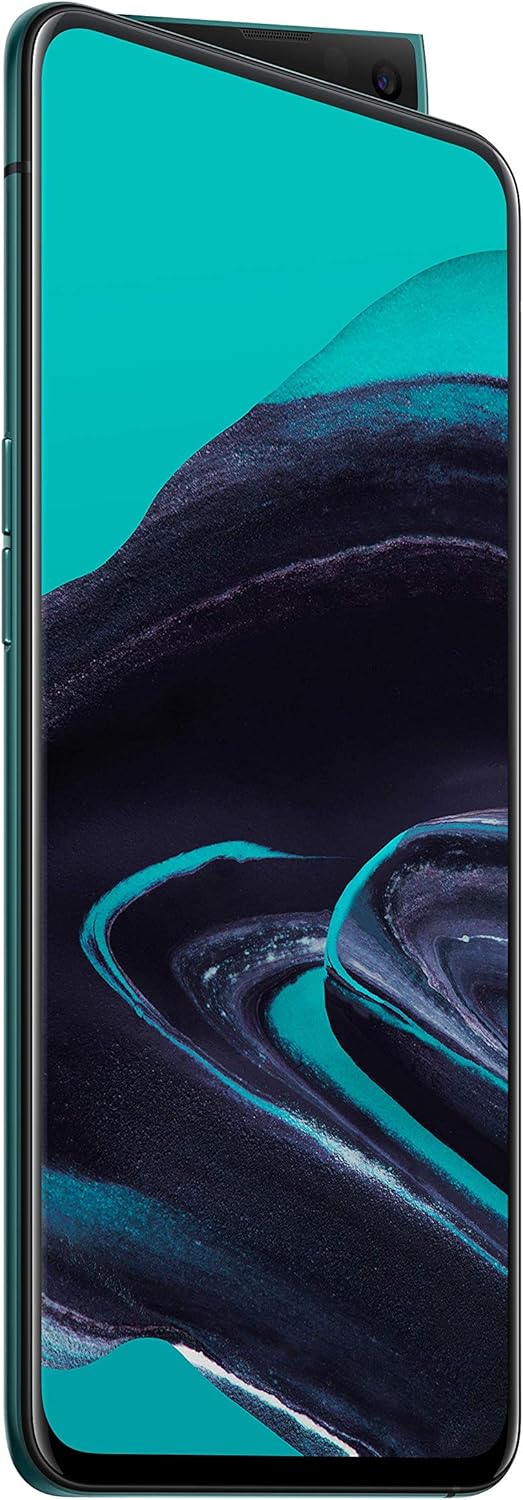
Figure 3.2: Side profile of the OPPO Reno2 CPH1907, highlighting the slim design and the mechanism of the pop-up front camera.

Figure 3.3: Rear view of the OPPO Reno2 CPH1907, featuring the vertically aligned quad-camera system and the OPPO logo. The device has a gradient blue finish.

Figure 3.4: Detailed rear view of the OPPO Reno2 CPH1907, showing the camera lenses and flash. The 'DESIGNED FOR RENO' text is visible below the camera module.
Key Components:
- Display: 6.5-inch AMOLED capacitive touchscreen with 1080 x 2400 pixels resolution, protected by Corning Gorilla Glass 6.
- Front Camera: Motorized pop-up 16 MP camera.
- Rear Camera: Quad camera system including 48 MP, 13 MP, 8 MP, and 2 MP B/W lenses with Dual-LED flash.
- Power Button: Typically located on the right side.
- Volume Buttons: Typically located on the left side.
- USB Type-C Port: For charging and data transfer, located at the bottom.
- 3.5mm Headphone Jack: Located at the bottom.
- SIM/microSD Card Tray: Located on the side.
4. Setup
4.1. SIM Card and microSD Card Installation
- Locate the SIM card tray on the side of your device.
- Insert the provided SIM tray ejector tool into the small hole next to the tray and press gently until the tray pops out.
- Place your Nano-SIM card(s) and/or microSD card into the designated slots on the tray. The OPPO Reno2 supports Dual-SIM functionality and a shared slot for microSD.
- Carefully reinsert the tray into the phone until it is flush with the device's side.
4.2. Initial Power On and Setup
- Press and hold the Power button until the OPPO logo appears.
- Follow the on-screen instructions to complete the initial setup, including language selection, Wi-Fi connection, Google account setup, and security settings (fingerprint, face unlock, PIN/pattern).
4.3. Network Compatibility Note
Important for USA Buyers:
This smartphone is designed to work with specific GSM networks only. It is crucial to verify 2G GSM, 3G, and 4G/LTE compatibility with your network provider before purchase. This phone is NOT compatible with CDMA networks such as Verizon, Sprint, or US Cellular.
5. Operating Instructions
5.1. Basic Navigation
The OPPO Reno2 operates on Android 9.0 (Pie) with ColorOS 6.1, utilizing a touch-based interface. Common gestures include:
- Tap: Select an item or open an application.
- Swipe: Scroll through screens or lists.
- Pinch: Zoom in or out on images and web pages.
- Long Press: Access contextual menus or move icons.
5.2. Camera Usage
The device features a versatile camera system:
- Rear Quad Camera: Includes a 48 MP main sensor, 13 MP telephoto, 8 MP ultrawide, and 2 MP monochrome sensor. Supports various modes like Ultra Dark Mode, Ultra Steady Video, and 5x Hybrid Zoom.
- Motorized Pop-up Front Camera: A 16 MP sensor that automatically extends when activated for selfies or video calls.
To access the camera, tap the Camera icon on your home screen. Select desired modes and settings within the camera application.
5.3. Battery Management
The OPPO Reno2 is equipped with a 4000mAh battery. To optimize battery life:
- Adjust screen brightness.
- Close unused applications running in the background.
- Utilize power-saving modes available in settings.
- Charge the device using the provided charger and cable for optimal charging speed.
5.4. Software and Updates
Your device runs on Android 9.0 (Pie) with OPPO's custom ColorOS 6.1 interface. Regularly check for software updates in the device settings to ensure optimal performance, security, and access to new features.
6. Maintenance
6.1. Cleaning
To clean your device:
- Use a soft, lint-free cloth.
- Avoid abrasive materials, solvents, or aerosol sprays.
- Do not expose the device to excessive moisture.
6.2. Software Updates
Keep your device's software up to date. Navigate to Settings > Software Update to check for and install available updates. Updates often include performance enhancements, security patches, and new features.
7. Troubleshooting
If you encounter issues with your OPPO Reno2 CPH1907, consider the following common solutions:
- Device not powering on: Ensure the battery is charged. Connect to a charger for at least 15 minutes before attempting to power on again.
- Poor network signal: Check SIM card insertion. Ensure you are within network coverage. Restart the device.
- Applications crashing: Clear the app's cache and data in Settings > Apps. If the issue persists, reinstall the app.
- Slow performance: Close unnecessary background applications. Clear device storage. Restart the phone.
- Touchscreen unresponsive: Restart the device. If the issue continues, contact support.
For more complex issues, refer to the official OPPO support website or contact customer service.
8. Specifications
| Model Name | OPPO Reno2 CPH1907 |
| Operating System | Android 9.0 (Pie); ColorOS 6.1 |
| Processor | Qualcomm SDM730 Snapdragon 730G (8 nm) |
| Display | 6.5 inches AMOLED, 1080 x 2400 pixels, Corning Gorilla Glass 6 |
| RAM | 8 GB |
| Internal Storage | 256 GB |
| Expandable Storage | microSDXC (uses shared SIM slot) up to 256GB |
| Rear Camera | 48 MP (wide), 13 MP (telephoto), 8 MP (ultrawide), 2 MP (B/W) |
| Front Camera | Motorized pop-up 16 MP |
| Battery | 4000 mAh, non-removable |
| Dimensions | 159.9 x 74.7 x 9.3 mm (6.30 x 2.94 x 0.37 inches) |
| Weight | 189 g (6.67 oz) |
| Connectivity | Wi-Fi, Bluetooth 5.0, GPS, NFC, USB Type-C |
| SIM | Dual SIM (Nano-SIM, dual stand-by) |
9. Safety Information
Please observe the following safety guidelines:
- Do not disassemble, repair, or modify the device.
- Use only approved chargers and accessories.
- Avoid exposing the device to extreme temperatures, direct sunlight, or liquids.
- Keep the device away from medical devices.
- Dispose of the device and its battery responsibly according to local regulations.
10. Warranty and Support
Your OPPO Reno2 CPH1907 is covered by a limited warranty. For detailed warranty terms and conditions, please refer to the warranty card included in your package or visit the official OPPO website. For technical support, software updates, or service inquiries, please contact OPPO customer service or visit an authorized service center.


